Functions
Functions are similar to methods but are not adjoined to a given base object. They offer the ability for programmers to group together many lines of code, or code blocks, to perform specific tasks so that they can be used repeatedly throughout the program. JavaScript already has some built-in functions, such as eval() , parseInt() , and parseFloat() , that you may already be familiar with. In many cases, however, programmers need to also define their own functions to supplement the built-in JavaScript functions. JavaScript offers this capability and flexibility.
Defining Functions
A function is declared by name and is invoked by calling its name in code. It is used in a block statement by using the reserved word function :
function

functionname

(parameter, arguments) {
command block
}
Function-naming conventions follow the same rules as variables :
- Are case sensitive
- Can include underscores
- Must begin with a letter
The list of arguments passed to a function is separated by a comma and is always enclosed in parentheses. To execute a function, it must be called. Just defining it does not mean that it will be executed.
Parameters
Parameters are used to pass data into a function and are used to return data from a function. Some functions return a value, whereas others just perform a task. In the following example, the statusbar() function uses the message parameter to pass data into the function:
function statusbar(message) {
 window.status = message;
 return true;
}
function statusbaroff() {
 window.status = "";
 return true;
}
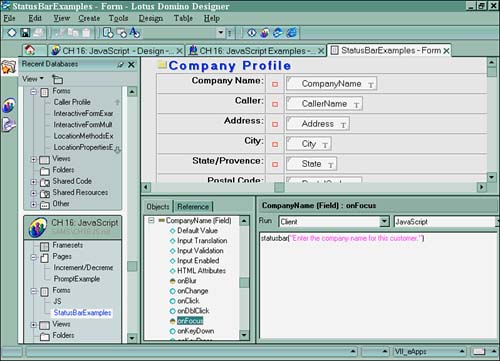
The function is then called in the onFocus event of a field on a form:
statusbar("Enter the company name for this customer.");
When a user places the cursor in a field, the message is passed as the argument and is then displayed on the user 's status bar. Figure 16.15 shows how the code looks from inside the JS Header :
Figure 16.15. The statusbar function inside the JS Header event.
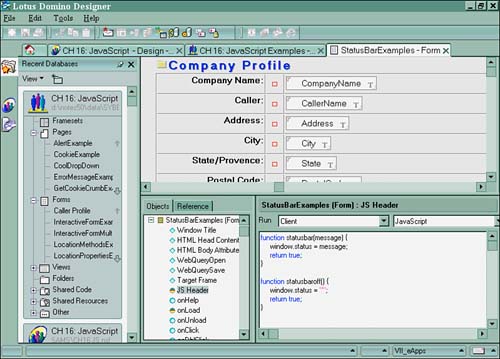
Figure 16.16 shows the JavaScript calling the function in the onFocus event of a field.
Figure 16.16. The statusbar function inside a field's onFocus event.
Another way to pass arguments to a function is to set a global variable:
var favcolor = prompt("What is your favorite color?", "Blue");
function printcolor(favcolor) {
document.write("
Your favorite color is "); document.write(favcolor); document.write("/B>
"); }
Here's how to call the function in an event:
printcolor(favcolor)
Using Multiple Parameters
Functions can pass multiple arguments as well. The only stipulation is that you must call or use them in the same order as they are defined in the function. For example:
Function winelist(selection, year) {
If (selection == "Chardonnay" && year=="1985"){
 return true;
}Else{
 return false;
}
}
You can call a multiparameter function in several ways. Here are some examples:
//declaring a variable
var wines = winelist("Red", "1996");
//Using the if... statement
if ( winelist("Red", "1996") ){
 ... other code here
}
//Using the onLoad event
onLoad = "winelist(selection, year)";
When more than one function parameter is being used, be careful of the order in which the parameters are defined. When one parameter is a string and the other is a number, and they are called in the reverse order, the result is an error when the code is compiled. This example shows the incorrect way to call a multiparameter function:
var selection = prompt("What type of wine would you like with dinner?", "Chardonnay");
var numbottles = 1;
winelist(numbottles, selection);

function winelist(selection, numbottles){
 If (selection == "Chardonnay"){
 return true;
 }else{
 Prompt("Sorry we only have Chardonnay in stock!");
 return false;
 }
}
This calls the function incorrectly:
winelist(numbottles,selection)
This results in an error at runtime.
Returning the Results
To return a value of a function's result, a return statement must be used in the code block:
function winelist(selection) {
 If (selection == "Chardonnay"){
 return true;
 }else{
 return false;
 }
}
In this case, if the wine list selection equals "Chardonnay" , true is returned by the function.
Built-In Functions
Sometimes using the built-in functions make more sense than creating your own functions. Why reinvent the wheel? Eval() is a good example of a JavaScript built-in function that you should not have to re-create.
Eval()
Eval() evaluates a string to a numeric value. This expression might be any string, variable, property of an existing object, or statement. Here's an example:
var gBeans = 0;
function countJellyBeans(jar1, jar2, jar3){
 gBeans = eval("jar1+jar2+jar3");
}
In this example, eval() is used to sum the total of jellybeans in each jar.
ParseInt()
ParseInt() evaluates a string argument and returns an integer. The integer returned depends on its base (decimal, octal, or hexadecimal). Here's an example:
var jar1 = "326.25";
gBeans = 0;
Function countJellyBeans(jar1){
 gBeans = parseInt(jar1);
}
In this example, the integer 326 would be returned as the total number of jellybeans in jar1 .
ParseFloat()
ParseFloat() evaluates a string argument and returns a floating-point number. Here's an example:
var jar1 = "+326.25987098+2";
gBeans = 0;
Function countJellyBeans(jar1){
 gBeans = parseInt(jar1);
}
In this example, the number 326.25987098 would be returned as the total number of jellybeans in jar1 .
Part I. Introduction to Release 6
Whats New in Release 6?
- Whats New in Release 6?
- A Brief History of Lotus Notes
- Major Features of Lotus Notes
- Types of Applications
- Whats New in Domino Designer?
- New Design Element Features
- New Language Features
The Release 6 Object Store
- The Release 6 Object Store
- Defining a Domino Database
- Understanding the Database Structure
- Creating a Database
- Working with Database Properties
- Understanding Design Templates
- Creating Your Own Templates
- Inheriting Designs from Templates
- Using Templates to Replicate Design Changes
- Using Templates as Design Libraries
- Archiving Versions with Templates
The Integrated Development Environment
- The Integrated Development Environment
- Working in the Application Design Environment
- Working with the Properties Box
- Understanding the Work Pane
- Using the Programmers Pane
- Understanding the Info List
- Understanding the Action Pane
- Customizing the Tools Menu
- Printing Source Code
- Using the HTML Editor
- Locking Design Elements
Part II. Foundations of Application Design
Forms Design
- Forms Design
- Designing Forms
- Setting Form Properties
- Working with Text Properties
- Working with Fields
- Writing Formulas in Fields
Advanced Form Design
- Advanced Form Design
- Working with Tables
- Using Graphic Objects on Forms
- Working with Form-Level Events
- Using Form Actions
- Working with Hotspots
- Understanding Sections and Section Properties
- Using Layout Regions
- Working with Special Forms
- Creating Reusable Design Objects
- Using Embedded Elements
- Using the Form Design Document
Designing Views
- Designing Views
- Defining the Elements of a View
- Creating a View
- Setting View Properties
- Creating Advanced View Selections
- Adding and Editing View Columns
- Using View Column Properties
- Adding Actions to a View
- Creating Calendar Views
- Understanding Folders
Using Shared Resources in Domino Applications
- Shared Resources
- Sharing Images Within a Database
- Creating Shared Files
- Creating Shared Applets
- Shared Code
- Creating Subforms
- Creating Shared Fields
- Creating Shared Actions
- Script Libraries
- Database Resources
Using the Page Designer
- Using the Page Designer
- Understanding Pages
- Working with the Page Properties Box
- Using the Page Designer
- Adding Layers to Your Pages
Creating Outlines
- Creating Outlines
- Creating an Outline
- Working with Outline Entries
- Embedding Outlines
- Adding an Outline to a Frameset
Adding Framesets to Domino Applications
- Adding Framesets to Domino Applications
- Creating a Frameset
- Using the Frameset Designer
- Working with Frames
- Viewing the HTML Source of Your Frameset
- Launching the Frameset
Automating Your Application with Agents
- Automating Your Application with Agents
- Working with Agents
- Creating an Agent
- Working in the Agent Builder Design Window
- Using @Commands in Agents
- Putting Your Agent to Work
- Creating a Complex Agent
- Using LotusScript in Agents
- Creating Web Agents Using Formulas and LotusScript
- Using Java in Agents
- Testing and Debugging Agents, the Agent Log, and Agent Properties
- Agent Properties via the Agent InfoBox
Part III. Programming Domino Applications
Using the Formula Language
- Using the Formula Language
- Overview of the Formula Language
- Knowing Where to Use @Functions and @Commands
- Formula Syntax
- Limitations of the Formula Language
- Working with Statements
- Using Logical @Functions
- Working with Date and Time @Functions
- Working with Strings
- Getting Session and User Information
- Working with Documents
- Retrieving Data with @DbColumn and @DbLookup
- Working with Lists
- Getting User Input
- Controlling the Flow of a Formula
- Error Handling
Real-World Examples Using the Formula Language
- Real-World Examples Using the Formula Language
- Programming Practices
- Using Formulas in Forms and Subforms
- Writing Field Formulas
- Writing View Formulas
- Using Hide When Formulas
- Working with Forms, Views, and Shared Actions
Writing LotusScript for Domino Applications
- Writing LotusScript for Domino Applications
- Software Construction
- Fundamental Elements of LotusScript
- New Technologies and LotusScript
Real-World LotusScript Examples
- Real-World LotusScript Examples
- Real-World Example 1: Importing a Delimited Text File
- Real-World Example 2: Delete a Parent Document and All Its Children: DeleteParentAndChildren
- Real-World Example 3: Schedule an Agent Robot to Refresh All the Documents in a View: Robot-DailyRefreshAllDocs
- Real-World Example 4: Return a Web User to the Place Where He Started After a Document Is Submitted: WebQuerySave-DocSubmit
Writing JavaScript for Domino Applications
- Writing JavaScript for Domino Applications
- What Is JavaScript?
- JavaScript Is Not Java
- JavaScript and the Domino IDE
- The Document Object Model
- JavaScript Support in Domino 6
- When to Use JavaScript
- A Look at JavaScript in Domino
- JavaScript Libraries in Domino
- JavaScript Principles 101
- Syntax and Command Blocks
- Statements
- Output
- Functions
- Objects
- Input Validation
- Validating Check Boxes
- Validating Radio Buttons
- Validating Selection Lists
- Calculations
- JavaScript Application
Real-World JavaScript Examples
- Real-World JavaScript Examples
- Real-World Example 1: Dynamic Drop-Down Lists on the Web
- Real-World Example 2: Dialog Boxes and window. opener on the Web
- Real-World Example 3: Dynamic Tables
- Real-World Example 4: Useful JavaScript Utilities
Writing Java for Domino Applications
- Writing Java for Domino Applications
- Introduction to Java
- Choosing a Java Solution in Domino
- Understanding the Notes Object Interface
- Writing Java Agents
- Using Other Java IDEs
- Other Uses for Java
Real-World Java Examples
Enhancing Domino Applications for the Web
- Enhancing Domino Applications for the Web
- Whats New in Designer 6
- Understanding the Domino Web Application Server
- Understanding the Basics of HTML
- Using HTML in Domino Designer
- Adding Power with Domino URLs
- Views and Forms Working Together on the Web
- Incorporating Flash into Your Web Pages
- What Its All About: XML Exposed
- How Does Domino Use XML?
Part IV. Advanced Design Topics
Accessing Data with XML
Accessing Data with DECS and DCRs
- Accessing Data with DECS and DCRs
- What Is DECS?
- The External Data Source
- DECS Administrator
- Creating the Activity
- Accessing the Application
- DECS Summary
- Data Connection Resources
- DCR Example
- Tips on External Data Access
Security and Domino Applications
- Security and Domino Applications
- How Does Domino Security Work?
- Enabling Physical Security
- Setting Server Access
- Database Access Control Lists
- The Role of the Domino Directory in Application Security
- ACL Privileges
- Enabling Database Encryption
- Using Roles
- Implementing View-Level Security
- Implementing Form-Level Security
- Implementing Document-Level Security
- Applying Field-Level Security
- Hiding the Design of Your Application
Creating Workflow Applications
- Creating Workflow Applications
- The Evolution of Groupware
- Introducing Workflow
- Creating Mail-Enabled Applications
- Using Triggers to Send Email
- Sending Mail with LotusScript
Analyzing Domino Applications
Part V. Appendices
Appendix A. HTML Reference
Appendix B. Domino URL Reference

EAN: 2147483647
Pages: 288
