Searching the Web
These shortcuts apply to the Search Box at the right end of the Navigation Toolbar as shown in Figure B-2.
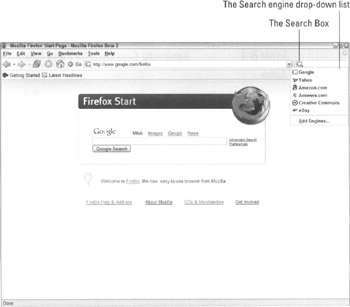
Figure B-2: The Search Box offers a handful of search engines that you can cycle through by using the keyboard.
The Search Box on the Navigation Toolbar is completely accessible from the keyboard. Press Ctrl+K (or  +K on a Mac) to focus it, type your phrase, and then press Enter.
As I discuss in Chapter 4, the Search Box supports a wide selection of search engines. You can click the icon to open a drop-down list and switch between them, but you can also press Ctrl+↓ and Ctrl+↑ (or  +↓ and
  +↑ on a Mac) to cycle through them downward or upward, one by one.
Table B-5 lists the shortcuts for searching the Web.
| Action | Windows | Mac |
|---|---|---|
| Select the Search Box | Ctrl+K or Ctrl+E | |
| Select the next search engine (see Figure B-2) | Ctrl+↓ | |
| Select the previous search engine | Ctrl+↑ | |
| Open a list of previous searches | ↓ or ↑ | ↓ or ↑ |
| Search for the phrase and load the results in the current tab or window | Enter | Return |
| Search for the phrase and load the results in a new tab | Alt+Enter | Option+Return |


