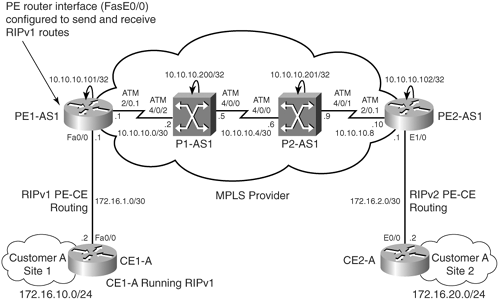
RIP PE-CE Routing Command ReferenceTable 4-2 provides the RIP PE-CE routing configuration command summary. Table 4-2. RIP PE-CE Routing Command Reference
|
Chapter 5. PE-CE Routing Protocol—OSPF and EIGRPChapter 4, "PE-CE Routing Protocol—Static and RIP," provided you with an overview and steps to configure static and RIP PE-CE routing protocol in an MPLS VPN environment. This chapter introduces you to OSPF and EIGRP PE-CE routing protocol concepts and includes the following:
|
OSPF PE-CE Routing Protocol Overview, Configuration and Verification
Open Shortest
Traditional OSPF Routing Model
The traditional OSPF domain is divided into backbone (Area 0) and non-backbone areas where non-backbone areas are connected to Area 0. Figure 5-1 shows Customer A implementing the traditional OSPF model in which non-backbone areas, Area 1 and Area 2
Figure 5-1. Traditional OSPF and MPLS VPN Routing Model
In an MPLS VPN environment, customer networks are connected to an MPLS VPN-enabled provider backbone. As shown in Figure 5-1, Customer A areas, Areas 1 and 2, are now connected to an MPLS VPN-enabled provider network. Area 1 and Area 2 have routers CE1-A and CE2-A running OSPF routing protocol. MP-iBGP is used between PE1 and PE2 to propagate routes between Site 1 (Area 1) and Site 2 (Area 2). Traditional OSPF-BGP redistribution is performed at PE routers, PE1 and PE2. Figure 5-1 depicts the following sequence that takes place in traditional OSPF-BGP redistribution:
Therefore, the OSPF route type, or LSA type, is not preserved when the OSPF route for 172.16.10.0 is redistributed into BGP when traditional OSPF routing rules are used in an MPLS VPN environment. Moreover, the following characteristics of OSPF external routes do not allow a smooth transition for a customer trying to migrate from traditional OSPF routing to the MPLS VPN routing model:
Another issue
Figure 5-2. OSPF Hierarchy Issue
MPLS VPN or OSPF Superbackbone ConceptTo circumvent the issues posed by the traditional OSPF routing model, the MPLS VPN architecture for OSPF PE-CE routing was expanded to allow transparent customer migration from traditional OSPF routing to the MPLS VPN routing model by introducing another backbone above the OSPF Area 0. This backbone is called the OSPF or MPLS VPN superbackbone. As shown in Figure 5-3 Figure 5-3. MPLS VPN or OSPF Superbackbone
BGP Extended Communities for OSPF PE-CE RoutingIn the MPLS VPN superbackbone, the following BGP extended attributes are carried:
Figure 5-4. OSPF Route Type, Router ID, and Domain ID
Figure 5-5. OSPF Route Type, Router ID, and Domain ID Detail for 172.16.20.0, 192.168.99.0, and 192.168.199.0
OSPF Route-Propagation Using MPLS VPN Superbackbone ConceptOSPF route propagation in an MPLS VPN environment is not as traditional as the OSPF routing model and depends on the OSPF domain ID. By default, the OSPF domain ID is equal to the process ID configured on the PE router. The domain ID is set in the VPNv4 update when the OSPF route is redistributed into MP-iBGP. OSPF Domain ID Is Same on All PE RoutersFigure 5-6 shows an MPLS network providing MPLS VPN services to Customer A. CE routers CE1-A and CE2-A at site networks 172.16.10.0/24 and 172.16.20.0/24 are in Area 1 and Area 2, respectively, while PE-CE links at both sites are in Area 0. OSPF process ID on both PE routers is 101. In addition, CE2-A functions as a traditional ASBR between the OSPF domain and external routing domains RIPv2 and EIGRP (AS101). Figure 5-6. Route Propagation When OSPF Domain (Process) ID Is Same
The following sequence takes place when CE2-A is sending 172.16.20.0/24, 209.165.127.0/27, and 209.165.202.128/27 to CE1-A:
OSPF Domain ID Is Different on All PE RoutersAs previously mentioned, OSPF domain ID by default is equal to the OSPF process ID configured on PE routers unless modified manually. If the process IDs are different on PE routers for sites belonging to same VPN, OSPF routes are seen as OSPF external routes (Type 5 OSPF LSA). As shown in Figure 5-7, when the PE1-AS1 router in OSPF Area 1 uses OSPF process ID 201 for Site 1 belonging to VPN VPN-A, and the PE2 router in OSPF Area 2 uses OSPF process ID 202 for Site 2 belonging to VPN VPN-A, external routes are seen at Site 1 for Site 2 networks and vice versa. Figure 5-7. Route Propagation When OSPF Domain (Process) ID Is Different
The following sequence of events takes place when CE2-A is sending 192.168.20.0, 192.168.99.0, and 192.168.199.0 to CE1-A:
Impact of Configuring OSPF Domain ID on PE RoutersManually configuring the OSPF domain ID changes the behavior of routes for Layer 3 VPNs connecting multiple OSPF domains. Configuring domain IDs helps control LSA translation (for Type 3 and Type 5 LSAs) between the OSPF domains and backdoor paths. The default domain ID is 0.0.0.0. Each VPN routing table on a PE router associated with an OSPF routing instance is configured with the same OSPF domain ID. Domain IDs are, hence, used to identify whether the routes originated from the OSPF domain or from external routing protocols. The OSPF domain ID helps identify which OSPF domain a route originated from, which allows classification of routes as Type 3 LSAs or Type 5 LSAs. In Figure 5-7, it is difficult to identify which routes received on CE1-A originated within OSPF or from external routing domains. As shown in Figure 5-8, by manually configuring the domain ID to be the same on PE1-AS1 and PE2-AS1, we can correctly identify which routes are external and which are internal. Figure 5-8. Route Propagation When OSPF Domain (Process) ID Is Manually Configured to Be the Same
OSPF Down Bit and Domain Tag
Routing
Figure 5-9. Route Propagation (OSPF Down Bit Not Set)
As shown in Figure 5-9, the following sequence takes place, which can lead to a potential routing loop:
OSPF Down BitThe routing loop shown in Figure 5-9 can be prevented by the use of the OSPF down bit, which is part of the options field in the OSPF header. The LSA header with the option field is shown in Figure 5-10. Figure 5-10. LSA Header and OSPF Down Bit
Figure 5-11 shows how the OSPF down bit is used to prevent the routing loop shown in Figure 5-10. Figure 5-11. Route Propagation When OSPF Down Bit Is Set
The following is the route propagation when the OSPF down bit is set:
OSPF Route Tag or VPN Route TagThe down bit helps prevent routing loops between MP-BGP and OSPF, but not when external routes are announced, such as when redistribution between multiple OSPF domains or when external routes are injected in an area that is dual-homed to the provider network. The PE router redistributes an OSPF route from a different OSPF domain into an OSPF domain as an external route. The down bit is not set because LSA Type 5 does not support the down bit. The redistributed route is propagated across the OSPF domain. A non-MPLS router can then redistribute the OSPF route into another OSPF domain. The OSPF route is propagated through the other OSPF domain, again without the down bit. A PE router receives the OSPF route. When the down bit is missing, the route is redistributed back into the MP-BGP backbone, resulting in a routing loop. This is shown in Figure 5-12 when external routes are propagated into the VPN sites. Figure 5-12. External Route Propagation in Dual-Homed CE
The following sequence of steps takes place:
The routing loops introduced by route redistribution between OSPF domains can be
Configuring and Verifying OSPF PE-CE RoutingThe configuration flowchart for implementing OSPF PE-CE routing is shown in Figure 5-13. Figure 5-13. Configuration Flowchart for OSPF PE-CE Routing
Note Cisco IOS versions prior to 12.3(4)T, 12.0(27)S, and 12.2(25)S have the limitation of 32 processes in which a separate OSPF process has to be created for each VRF so that the PE router can identify the OSPF routes belonging to the correct process. In an MPLS VPN environment, one process is used by MP-iBGP, one by an IGP routing protocol (OSPF, for example), one process for connected routes, and another for static routes. Therefore, out of 32, only 28 processes could be created for VRFs using OSPF PE-CE routing until the above mentioned versions. Configuration Scenario 1—OSPF Process ID Is Same for Customer A and Different for Customer B VPNsThe objective of this setup is to understand how the OSPF process ID plays a part in deciding the type of route seen on customer edge routers running OSPF. Figure 5-14 shows MPLS VPN services being provided to Customer A and Customer B sites:
Figure 5-14. MPLS VPN Network Implementing OSPF PE-CE Routing
Before configuring, ensure that the provider network is provisioned to deliver MPLS VPN services to Customer A and B sites. Ensure that IP addresses are preconfigured and VRFs defined on PE routers. Example 5-1 provides the configuration for defining VRF and its attributes on PE routers for OSPF PE-CE routing for VRF Cust_A (Customer A). Example 5-1. Define VRF Cust_A on PE Routers PE1-AS1 and PE2-AS1PE1-AS1(config)# ip vrf Cust_A PE1-AS1(config-vrf)# rd 1:100 PE1-AS1(config-vrf)# route-target both 1:100 PE1-AS1(config)# interface Serial1/0 PE1-AS1(config-if)# description connected to CE1-A PE1-AS1(config-if)# ip vrf forwarding Cust_A PE1-AS1(config-if)# ip address 172.16.1.1 255.255.255.252 _________________________________________________________________________ PE2-AS1(config)#ip vrf Cust_A PE2-AS1(config-vrf)# rd 1:100 PE2-AS1(config-vrf)# route-target both 1:100 PE2-AS1(config)# interface Serial1/0 PE2-AS1(config-if)# description connected to CE2-A PE2-AS1(config-if)# ip vrf forwarding Cust_A PE2-AS1(config-if)# ip address 172.16.2.1 255.255.255.252 The steps to configure OSPF PE-CE routing on the PE routers are
Final Configuration for Provider and Edge RoutersExample 5-5 shows the configuration for PE1-AS1, PE2-AS1, and P1-AS1. Example 5-5. PE1-AS1, PE2-AS1, and P1-AS1 Configurationhostname PE1-AS1 ! ip cef ! ip vrf Cust_A rd 1:100 route-target export 1:100 route-target import 1:100 ! ip vrf Cust_B rd 1:200 route-target export 1:200 route-target import 1:200 ! interface Loopback0 ip address 10.10.10.101 255.255.255.255 ! interface Loopback101 description OSPF Router ID for VRF Cust_A ip vrf forwarding Cust_A ip address 172.16.101.1 255.255.255.255 ! interface Loopback201 description OSPF Router ID for VRF Cust_B ip vrf forwarding Cust_B ip address 192.168.201.1 255.255.255.255 ! interface Serial0/0 description connected to P1-AS1 ip address 10.10.10.1 255.255.255.252 mpls ip ! interface Serial1/0 description connected to CE1-A ip vrf forwarding Cust_A ip address 172.16.1.1 255.255.255.252 ! interface Serial2/0 description connected to CE1-B ip vrf forwarding Cust_B ip address 192.168.1.1 255.255.255.252 ! router ospf 101 vrf Cust_A router-id 172.16.101.1 redistribute bgp 1 subnets network 172.16.0.0 0.0.255.255 area 0 ! router ospf 201 vrf Cust_B router-id 192.168.201.1 redistribute bgp 1 subnets network 192.168.0.0 0.0.255.255 area 1 ! router ospf 1 router-id 10.10.10.101 network 10.0.0.0 0.255.255.255 area 0 ! router bgp 1 no synchronization neighbor 10.10.10.102 remote-as 1 neighbor 10.10.10.102 update-source Loopback0 no auto-summary ! address-family vpnv4 neighbor 10.10.10.102 activate neighbor 10.10.10.102 send-community extended exit-address-family ! address-family ipv4 vrf Cust_B redistribute ospf 201 vrf Cust_B match internal external 1 external 2 no auto-summary no synchronization exit-address-family ! address-family ipv4 vrf Cust_A redistribute ospf 101 vrf Cust_A match internal external 1 external 2 no auto-summary no synchronization exit-address-family __________________________________________________________________________ hostname PE2-AS1 ! ip cef ! ip vrf Cust_A rd 1:100 route-target export 1:100 route-target import 1:100 ! ip vrf Cust_B rd 1:200 route-target export 1:200 route-target import 1:200 ! interface Loopback0 ip address 10.10.10.102 255.255.255.255 ! interface Loopback101 description OSPF Router ID for VRF Cust_A ip vrf forwarding Cust_A ip address 172.16.102.1 255.255.255.255 ! interface Loopback202 description OSPF Router ID for VRF Cust_B ip vrf forwarding Cust_B ip address 192.168.202.1 255.255.255.255 ! interface Serial0/0 description connected to P1-AS1 ip address 10.10.10.5 255.255.255.252 mpls ip ! interface Serial1/0 description connected to CE2-A ip vrf forwarding Cust_A ip address 172.16.2.1 255.255.255.252 ! interface Serial2/0 description connected to CE2-B ip vrf forwarding Cust_B ip address 192.168.2.1 255.255.255.252 ! router ospf 101 vrf Cust_A router-id 172.16.102.1 redistribute bgp 1 subnets network 172.16.0.0 0.0.255.255 area 0 ! router ospf 202 vrf Cust_B router-id 192.168.202.1 redistribute bgp 1 subnets network 192.168.0.0 0.0.255.255 area 2 ! router ospf 1 router-id 10.10.10.102 network 10.0.0.0 0.255.255.255 area 0! router bgp 1 no synchronization neighbor 10.10.10.101 remote-as 1 neighbor 10.10.10.101 update-source Loopback0 no auto-summary ! address-family vpnv4 neighbor 10.10.10.101 activate neighbor 10.10.10.101 send-community extended exit-address-family ! address-family ipv4 vrf Cust_B redistribute ospf 202 vrf Cust_B match internal external 1 external 2 no auto-summary no synchronization exit-address-family ! address-family ipv4 vrf Cust_A redistribute ospf 101 vrf Cust_A match internal external 1 external 2 no auto-summary no synchronization exit-address-family ___________________________________________________________________________ hostname P1-AS1 ! interface Loopback0 ip address 10.10.10.200 255.255.255.255 ! interface Serial0/0 description connected to PE1-AS1 ip address 10.10.10.2 255.255.255.252 mpls ip ! interface Serial1/0 description connected to PE2-AS1 ip address 10.10.10.6 255.255.255.252 mpls ip ! router ospf 1 log-adjacency-changes network 10.0.0.0 0.255.255.255 area 0 Example 5-6 shows the configuration for CE1-A, CE2-A, CE1-B, and CE2-B. Example 5-6. CE1-A, CE2-A, CE1-B, and CE2-B Configurationhostname CE1-A ! interface Ethernet0/0 description VPN-A Site 1 network ip address 172.16.10.1 255.255.255.0 ! interface Serial1/0 description connected to PE1-AS1 ip address 172.16.1.2 255.255.255.252 ! router ospf 101 network 172.16.1.0 0.0.0.255 area 0 network 172.16.10.0 0.0.0.255 area 1 __________________________________________________________________________ hostname CE2-A ! interface Loopback0 description RIPv2 network ip address 209.165.201.1 255.255.255.224 ! interface Loopback1 description EIGRP network ip address 209.165.202.129 255.255.255.224 ! interface Ethernet0/0 description VPN-A Site 2 network ip address 172.16.20.1 255.255.255.0 ! interface Serial1/0 description connected to PE2-AS1 ip address 172.16.2.2 255.255.255.252 ! router eigrp 1 network 209.165.202.0 no auto-summary ! router ospf 101 redistribute eigrp 1 subnets redistribute rip metric-type 1 subnets network 172.16.2.0 0.0.0.255 area 0 network 172.16.20.0 0.0.0.255 area 2 ! router rip version 2 redistribute ospf 101 match internal external 1 external 2 network 209.165.201.0 no auto-summary __________________________________________________________________________ hostname CE1-B ! interface Ethernet0/0 description VPN-B Site1 network ip address 192.168.10.1 255.255.255.0 ! interface Serial1/0 description connected to PE1-AS1 ip address 192.168.1.2 255.255.255.252 ! router ospf 201 network 192.168.1.0 0.0.0.255 area 1 network 192.168.10.0 0.0.0.255 area 1 __________________________________________________________________________ hostname CE2-B ! interface Loopback0 ip address 192.168.99.1 255.255.255.0 ! interface Loopback1 ip address 192.168.199.1 255.255.255.0 ! interface Ethernet0/0 description VPN-B Site 2 network ip address 192.168.20.1 255.255.255.0 ! interface Serial1/0 description connected to PE2-AS1 ip address 192.168.2.2 255.255.255.252 ! router eigrp 1 redistribute ospf 202 metric 1500 1 255 1 1500 match internal external 1 external 2 network 192.168.199.0 no auto-summary ! router ospf 202 redistribute eigrp 1 subnets redistribute rip metric-type 1 subnets network 192.168.2.0 0.0.0.255 area 2 network 192.168.20.0 0.0.0.255 area 2 ! router rip version 2 redistribute ospf 202 metric 1 match internal external 1 external 2 network 192.168.99.0 no auto-summary Verify OSPF PE-CE Routing
The steps to verify OSPF PE-CE routing are as
Configuration Scenario 2—Using OSPF Domain ID Support for LSA Type 5/Type 3 TranslationFigure 5-15 shows an MPLS VPN network for Customer B in which CE1-B and CE2-B belong to the same VPN but have different process IDs. Configuring domain IDs helps control LSA translation (for Type 3 and Type 5 LSAs) between the OSPF domains and backdoor paths. Each VPN routing table in a PE router associated with an OSPF routing instance is configured with the same OSPF domain ID. Figure 5-15. MPLS VPN Network Using Domain ID Support
Configuration for this section remains the same as shown in configuration Scenario 1. Configuring domain ID ip-address under the OSPF routing process for VRF Cust_B is the only addition in this section. The configuration step is outlined here:
Example 5-18. Configuring OSPF Domain IDPE1-AS1(config)# router ospf 201 vrf Cust_B PE1-AS1(config-router)# domain ID 192.168.202.1 __________________________________________________________________________ PE2-AS1(config)# router ospf 202 vrf Cust_B PE2-AS1(config-router)# domain ID 192.168.202.1 Verify Route Propagation When Using OSPF Domain IDExample 5-19 shows that when the OSPF domain ID is not configured, the CE1-B routing table shows all the routes being external. Example 5-19. Routing Table on CE1-B When OSPF Domain ID Is Not ConfiguredCE1-B# show ip route ospf O E2 192.168.199.0/24 [110/20] via 192.168.1.1, 00:00:08, Serial1/0 192.168.201.0/32 is subnetted, 1 subnets O 192.168.201.1 [110/65] via 192.168.1.1, 00:00:14, Serial1/0 O E2 192.168.99.0/24 [110/84] via 192.168.1.1, 00:00:08, Serial1/0 O E2 192.168.20.0/24 [110/74] via 192.168.1.1, 00:00:08, Serial1/0 192.168.202.0/32 is subnetted, 1 subnets O E2 192.168.202.1 [110/1] via 192.168.1.1, 00:00:14, Serial1/0 192.168.2.0/30 is subnetted, 1 subnets O E2 192.168.2.0 [110/1] via 192.168.1.1, 00:00:14, Serial1/0 Example 5-20 shows that when the OSPF domain ID is configured, the CE1-B routing table shows 192.168.20.0 as inter-area and 192.168.99.0 as external Type 1. Example 5-20. Routing Table on CE1-B When OSPF Domain ID Is ConfiguredCE1-B# show ip route ospf O E2 192.168.199.0/24 [110/20] via 192.168.1.1, 00:44:09, Serial1/0 192.168.201.0/32 is subnetted, 1 subnets O 192.168.201.1 [110/65] via 192.168.1.1, 00:45:15, Serial1/0 O E1 192.168.99.0/24 [110/148] via 192.168.1.1, 00:44:09, Serial1/0 O IA 192.168.20.0/24 [110/138] via 192.168.1.1, 00:44:14, Serial1/0 192.168.202.0/32 is subnetted, 1 subnets O E2 192.168.202.1 [110/1] via 192.168.1.1, 00:44:09, Serial1/0 192.168.2.0/30 is subnetted, 1 subnets O E2 192.168.2.0 [110/1] via 192.168.1.1, 00:44:09, Serial1/0 OSPF Sham-LinksFigure 5-16 shows an MPLS-enabled service provider network providing MPLS VPN services to Customer A sites belonging to the same VPN, VPN-A. Figure 5-16. MPLS VPN Network Using Backdoor Link
Customer A has four sites in VPN-A. All sites are in the OSPF area, Area 0. Site 3 and Site 4 in OSPF Area 0 are connected by a low bandwidth backdoor link (512 kbps). The backdoor link provides connectivity between Site 3 and Site 4 when the link to the provider backbone is down or disconnected. The sites are also connected to the high bandwidth BGP-based MPLS VPN backbone. This type of situation can result in suboptimal routing, as shown in Figure 5-17. Figure 5-17. Suboptimal Routing in MPLS VPN Network Using Backdoor Link
The following sequence takes place when 172.16.40.0/24 is propagated by CE4-A to CE3-A:
This sequence of events also occurs with 172.16.20.0/24, which is propagated by CE2-A. Therefore, data packets originating from the 172.16.30.0 network (Site 3) to 172.16.40.0 (Site 4) will take the backdoor link. This also applies to traffic originating from 172.16.10.0 (Site 1) to 172.16.20.0 (Site 2) because any alternative routes from the MPLS VPN backbone would be inter-area routes, and intra-area routes are preferred. The traffic forwarding is, therefore,
Figure 5-18. Data Forwarding Path in MPLS VPN Network Using Backdoor Link
This situation can be avoided by using a sham-link. A sham-link is a logical link that belongs to the area (intra-area) but is carried by the BGP-based superbackbone. The two PE routers will be the endpoints of the sham-link. They will form an OSPF adjacency across it and flood intra-area LSAs via this link. The two sites that belong to Area 0 can have a sham-link between them and then receive intra-area OSPF routes via the backdoor link or the sham-link. When the sham-link is up, it is regarded as an unnumbered point-to-point OSPF link in the area belonging to the VPN sites. The sham-link is treated as a demand circuit (DC) by the OSPF in order to reduce the traffic flow over the sham-link. This implies that the regular LSA will flood over the sham-link but the periodic refresh traffic is avoided. Figure 5-19 shows a sham-link. Figure 5-19. Sham-Link
CE4-A sends 172.16.40.0/24 as LSA Type 1 to CE3-A, which then propagates the LSA to the PE1-AS1 router. The PE1-AS1 router has now received the OSPF-LSA Type 1 route from two directions from CE4-A via CE3-A and from PE2-AS1 via the OSPF sham-link. OSPF sham-link serves as an intra-area link between PE1-AS1 and PE2-AS1. The OSPF cost of the sham-link can be configured so that it will be lower than the cost of the backup link between CE3-A and CE4-A. The PE2-AS1 router therefore redistributes the OSPF route 172.16.40.0/24 into MP-BGP because the OSPF route was not received via a sham-link from PE1-AS1. The PE1-AS1 router also does not redistribute the route in MP-iBGP because the route was received from PE2-AS1 via the OSPF sham-link between PE1-AS1 and PE2-AS1. PE1-AS1 therefore
Configuration Flowchart for OSPF Sham-LinksFigure 5-20 shows the configuration flowchart to configure OSPF sham-links. Figure 5-20. Configuration Flowchart to Configure OSPF Sham-Links
Configuration Scenario 3—OSPF Sham-LinksIn this section, you use the MPLS VPN setup shown in Figure 5-17. Before configuring, ensure that the provider network is provisioned to deliver MPLS VPN services to Customer A sites. Ensure that IP addresses are preconfigured and VRFs are defined on PE routers. To configure OSPF sham-links, follow these steps:
Final Configuration for PE1-AS1 and PE2-AS1Example 5-24 shows the configuration on PE1-AS1 and PE2-AS1. Example 5-24. Configuration on PE1-AS1 and PE2-AS1hostname PE1-AS1 ! ip cef ! ip vrf Cust_A rd 1:100 route-target export 1:100 route-target import 1:100 ! interface Loopback0 ip address 10.10.10.101 255.255.255.255 ! interface Loopback101 description sham-link Endpoint on PE1-AS1 ip vrf forwarding Cust_A ip address 172.16.101.1 255.255.255.255 ! interface Serial0/0 description connected to P1-AS1 ip address 10.10.10.1 255.255.255.252 mpls ip ! interface Serial1/0 description connected to CE1-A ip vrf forwarding Cust_A ip address 172.16.1.1 255.255.255.252 ! interface Serial2/0 description connected to CE1-B ip vrf forwarding Cust_A ip address 172.16.3.1 255.255.255.252 ! router ospf 101 vrf Cust_A router-id 172.16.101.1 area 0 sham-link 172.16.101.1 172.16.102.1 redistribute bgp 1 subnets network 172.16.1.0 0.0.0.255 area 0 network 172.16.3.0 0.0.0.255 area 0 ! router ospf 1 router-id 10.10.10.101 network 10.0.0.0 0.255.255.255 area 0 ! router bgp 1 no synchronization redistribute eigrp 101 neighbor 10.10.10.102 remote-as 1 neighbor 10.10.10.102 update-source Loopback0 no auto-summary ! address-family vpnv4 neighbor 10.10.10.102 activate neighbor 10.10.10.102 send-community both exit-address-family ! address-family ipv4 vrf Cust_A redistribute connected redistribute ospf 101 vrf Cust_A match internal external 1 external 2 no auto-summary no synchronization exit-address-family __________________________________________________________________________ hostname PE2-AS1 ! ip cef ! ip vrf Cust_A rd 1:100 route-target export 1:100 route-target import 1:100 ! interface Loopback0 ip address 10.10.10.102 255.255.255.255 ! interface Loopback101 description sham-link Endpoint on PE2-AS1 ip vrf forwarding Cust_A ip address 172.16.102.1 255.255.255.255 ! interface Serial0/0 description connected to P1-AS1 ip address 10.10.10.5 255.255.255.252 mpls ip ! interface Serial1/0 description connected to CE2-A ip vrf forwarding Cust_A ip address 172.16.2.1 255.255.255.252 ! interface Serial2/0 description connected to CE2-B ip vrf forwarding Cust_A ip address 172.16.4.1 255.255.255.252 ! router ospf 101 vrf Cust_A router-id 172.16.102.1 area 0 sham-link 172.16.102.1 172.16.101.1 redistribute bgp 1 subnets network 172.16.2.0 0.0.0.255 area 0 network 172.16.4.0 0.0.0.255 area 0 ! router ospf 1 router-id 10.10.10.102 network 10.0.0.0 0.255.255.255 area 0 ! router bgp 1 no synchronization neighbor 10.10.10.101 remote-as 1 neighbor 10.10.10.101 update-source Loopback0 no auto-summary ! address-family vpnv4 neighbor 10.10.10.101 activate neighbor 10.10.10.101 send-community both exit-address-family ! address-family ipv4 vrf Cust_A redistribute connected redistribute ospf 101 vrf Cust_A match internal external 1 external 2 no auto-summary no synchronization exit-address-family Final Configuration for CE1-A, CE2-A, CE3-A, and CE4-AExample 5-25 shows the configurations on CE1-A, CE2-A, CE3-A, and CE4-A. Example 5-25. Configurations on CE1-A, CE2-A, CE3-A, and CE4-Ahostname CE1-A ! interface Ethernet0/0 description VPN-A Site 1 network ip address 172.16.10.1 255.255.255.0 ! interface Serial1/0 description connected to PE1-AS1 ip address 172.16.1.2 255.255.255.252 ! router ospf 101 network 172.16.0.0 0.0.255.255 area 0 _________________________________________________________________________ hostname CE2-A ! interface Ethernet0/0 ip address 172.16.20.1 255.255.255.0 ! interface Serial1/0 description connected to PE2-AS1 ip address 172.16.2.2 255.255.255.252 ! router ospf 101 network 172.16.0.0 0.0.255.255 area 0 _________________________________________________________________________ hostname CE3-A ! interface Ethernet0/0 ip address 172.16.30.1 255.255.255.0 ! interface Serial1/0 bandwidth 512 ip address 172.16.5.1 255.255.255.252 ! interface Serial2/0 ip address 172.16.3.2 255.255.255.252 ! router ospf 101 network 172.16.0.0 0.0.255.255 area 0 _________________________________________________________________________ hostname CE4-A ! interface Ethernet0/0 ip address 172.16.40.1 255.255.255.0 ! interface Serial1/0 bandwidth 512 ip address 172.16.5.2 255.255.255.252 ! interface Serial2/0 ip address 172.16.4.2 255.255.255.252 ! router ospf 101 network 172.16.0.0 0.0.255.255 area 0 Verify Sham-Link Operation
For route propagation without sham-link configuration, Example 5-26 shows that without sham-link 172.16.40.0, 172.16.20.0 is
Example 5-26. show ip route vrf Cust_A on PE1-AS1PE1-AS1# show ip route vrf Cust_A 172.16.0.0/16 is variably subnetted, 11 subnets, 3 masks O 172.16.40.0/24 [110/269] via 172.16.3.2, 05:54:31, Serial2/0 O 172.16.30.0/24 [110/74] via 172.16.3.2, 05:54:31, Serial2/0 O 172.16.20.0/24 [110/397] via 172.16.3.2, 05:54:31, Serial2/0 O 172.16.10.0/24 [110/74] via 172.16.1.2, 05:54:31, Serial1/0 O 172.16.4.0/30 [110/323] via 172.16.3.2, 05:54:31, Serial2/0 O 172.16.5.0/30 [110/259] via 172.16.3.2, 05:54:31, Serial2/0 O 172.16.2.0/30 [110/387] via 172.16.3.2, 05:54:31, Serial2/0 Example 5-27 shows that without sham-link 172.16.30.0, 172.16.10.0 is reachable via CE4-A. Example 5-27. show ip route vrf Cust_A on PE2-AS1PE2-AS1# show ip route vrf Cust_A ospf 101 172.16.0.0/16 is variably subnetted, 11 subnets, 3 masks O 172.16.40.0/24 [110/74] via 172.16.4.2, 05:55:48, Serial2/0 O 172.16.30.0/24 [110/269] via 172.16.4.2, 05:55:48, Serial2/0 O 172.16.20.0/24 [110/74] via 172.16.2.2, 05:55:48, Serial1/0 O 172.16.10.0/24 [110/397] via 172.16.4.2, 05:55:48, Serial2/0 O 172.16.5.0/30 [110/259] via 172.16.4.2, 05:55:48, Serial2/0 O 172.16.1.0/30 [110/387] via 172.16.4.2, 05:55:48, Serial2/0 O 172.16.3.0/30 [110/323] via 172.16.4.2, 05:55:48, Serial2/0 Example 5-28 shows the routing tables on CE3-A and CE4-A without sham-link. Example 5-28. Routing Tables on CE3-A and CE4-A Without Sham-LinkCE3-A# show ip route ospf 172.16.0.0/16 is variably subnetted, 11 subnets, 3 masks O 172.16.40.0/24 [110/205] via 172.16.5.2, 05:56:25, Serial1/0 O 172.16.20.0/24 [110/333] via 172.16.5.2, 05:56:25, Serial1/0 O 172.16.10.0/24 [110/138] via 172.16.3.1, 05:56:25, Serial2/0 O 172.16.4.0/30 [110/259] via 172.16.5.2, 05:56:25, Serial1/0 O 172.16.1.0/30 [110/128] via 172.16.3.1, 05:56:25, Serial2/0 O 172.16.2.0/30 [110/323] via 172.16.5.2, 05:56:25, Serial1/0 O E2 172.16.101.1/32 [110/1] via 172.16.5.2, 05:55:49, Serial1/0 O E2 172.16.102.1/32 [110/1] via 172.16.3.1, 05:55:50, Serial2/0 _________________________________________________________________________ CE4-A# show ip route ospf 172.16.0.0/16 is variably subnetted, 11 subnets, 3 masks O 172.16.30.0/24 [110/205] via 172.16.5.1, 05:56:40, Serial1/0 O 172.16.20.0/24 [110/138] via 172.16.4.1, 05:56:40, Serial2/0 O 172.16.10.0/24 [110/333] via 172.16.5.1, 05:56:40, Serial1/0 O 172.16.1.0/30 [110/323] via 172.16.5.1, 05:56:40, Serial1/0 O 172.16.2.0/30 [110/128] via 172.16.4.1, 05:56:40, Serial2/0 O 172.16.3.0/30 [110/259] via 172.16.5.1, 05:56:40, Serial1/0 O E2 172.16.101.1/32 [110/1] via 172.16.4.1, 05:56:05, Serial2/0 O E2 172.16.102.1/32 [110/1] via 172.16.5.1, 05:56:06, Serial1/0 Example 5-29 shows the traceroute output when there is no sham-link. Example 5-29. Traceroutes Without Sham-LinksCE3-A# traceroute 172.16.40.1 Type escape sequence to abort. Tracing the route to 172.16.40.1 1 172.16.5.2 20 msec 24 msec * _________________________________________________________________________ CE1-A# traceroute 172.16.20.1 Type escape sequence to abort. Tracing the route to 172.16.20.1 1 172.16.1.1 20 msec 24 msec 20 msec 2 172.16.3.2 40 msec 40 msec 40 msec 3 172.16.5.2 60 msec 60 msec 60 msec 4 172.16.4.1 80 msec 80 msec 80 msec 5 172.16.2.2 100 msec 100 msec * _________________________________________________________________________ CE1-A# traceroute 172.16.40.1 Type escape sequence to abort. Tracing the route to 172.16.40.1 1 172.16.1.1 20 msec 20 msec 20 msec 2 172.16.3.2 48 msec 40 msec 40 msec 3 172.16.5.2 60 msec 60 msec * Example 5-30 shows that with the OSPF commands to verify sham links. Example 5-30. Sham-Links 172.16.40.0 and 172.16.20.0 Are Reachable via MP-iBGP BackbonePE1-AS1# show ip ospf sham-links Sham Link OSPF_SL0 to address 172.16.102.1 is up Area 0 source address 172.16.101.1 Run as demand circuit DoNotAge LSA allowed. Cost of using 1 State POINT_TO_POINT, Timer intervals configured, Hello 10, Dead 40, Wait 40, Hello due in 00:00:03 Adjacency State FULL (Hello suppressed) Index 3/3, retransmission queue length 0, number of retransmission 0 First 0x0(0)/0x0(0) Next 0x0(0)/0x0(0) Last retransmission scan length is 0, maximum is 0 Last retransmission scan time is 0 msec, maximum is 0 msec _________________________________________________________________________ PE1-AS1# show ip ospf neighbor Neighbor ID Pri State Dead Time Address Interface 10.10.10.200 0 FULL/ - 00:00:34 10.10.10.2 Serial0/0 172.16.102.1 0 FULL/ - - 172.16.102.1 OSPF_SL0 172.16.30.1 0 FULL/ - 00:00:34 172.16.3.2 Serial2/0 172.16.10.1 0 FULL/ - 00:00:33 172.16.1.2 Serial1/0 Example 5-31 shows sham-links 172.16.40.0, 172.16.20.0, and 172.16.30.0 are reachable via MP-iBGP backbone. Example 5-31. Sham-Links 172.16.40.0, 172.16.20.0, and 172.16.30.0 Are Reachable via MP-iBGP BackbonePE1-AS1# show ip route vrf Cust_A ospf 101 172.16.40.0 O 172.16.40.0/24 [110/75] via 10.10.10.102, 00:19:23 _________________________________________________________________________ PE1-AS1# show ip route vrf Cust_A ospf 101 172.16.20.0 O 172.16.20.0/24 [110/75] via 10.10.10.102, 00:19:23 _________________________________________________________________________ PE2-AS1# show ip route vrf Cust_A ospf 101 172.16.30.0 O 172.16.30.0/24 [110/75] via 10.10.10.101, 00:19:58 Example 5-32 shows the routing table on CE3-A and CE4-A when the sham-link is configured depicting all routes now reachable via MP-BGP backbone. Example 5-32. show ip route ospf on CE3-A and CE4-ACE3-A# show ip route ospf 172.16.0.0/16 is variably subnetted, 11 subnets, 3 masks O 172.16.40.0/24 [110/139] via 172.16.3.1, 00:20:20, Serial2/0 O 172.16.20.0/24 [110/139] via 172.16.3.1, 00:20:20, Serial2/0 O 172.16.10.0/24 [110/138] via 172.16.3.1, 00:20:20, Serial2/0 O 172.16.4.0/30 [110/129] via 172.16.3.1, 00:20:20, Serial2/0 O 172.16.1.0/30 [110/128] via 172.16.3.1, 00:20:20, Serial2/0 O 172.16.2.0/30 [110/129] via 172.16.3.1, 00:20:20, Serial2/0 O E2 172.16.101.1/32 [110/1] via 172.16.3.1, 00:20:20, Serial2/0 O E2 172.16.102.1/32 [110/1] via 172.16.3.1, 00:20:20, Serial2/0 _________________________________________________________________________ CE4-A# show ip route ospf 172.16.0.0/16 is variably subnetted, 11 subnets, 3 masks O 172.16.30.0/24 [110/139] via 172.16.4.1, 00:20:39, Serial2/0 O 172.16.20.0/24 [110/138] via 172.16.4.1, 00:20:39, Serial2/0 O 172.16.10.0/24 [110/139] via 172.16.4.1, 00:20:39, Serial2/0 O 172.16.1.0/30 [110/129] via 172.16.4.1, 00:20:39, Serial2/0 O 172.16.2.0/30 [110/128] via 172.16.4.1, 00:20:39, Serial2/0 O 172.16.3.0/30 [110/129] via 172.16.4.1, 00:20:39, Serial2/0 O E2 172.16.101.1/32 [110/1] via 172.16.4.1, 00:20:39, Serial2/0 O E2 172.16.102.1/32 [110/1] via 172.16.4.1, 00:20:39, Serial2/0 OSPF PE-CE Routing Command SummaryTable 5-1 shows the relevant OSPF PE-CE routing commands used in this chapter. Table 5-1. OSPF PE-CE Routing Command Summary
|