13.4. Thread Synchronization
| < Day Day Up > |
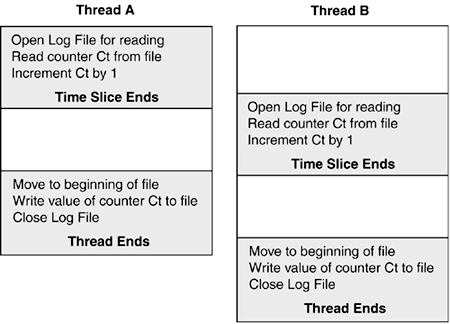
| Thread synchronization refers to the techniques employed to share resources among concurrent threads in an efficient and orderly manner. The specific objective of these techniques is to ensure thread safety. A class (or its members) is thread-safe when it can be accessed by multiple threads without having its state corrupted. The potential corruption arises from the nature of thread scheduling. Recall from the previous section that a thread executes in time slices. If it does not finish its task, its state is preserved and later restored when the thread resumes execution. However, while suspended, another thread may have executed the same method and altered some global variables or database values that invalidate the results of the original thread. As an example, consider the pseudo-code in Figure 13-7 that describes how concurrent threads execute the same code segment. Figure 13-7. Execution path that requires synchronization
Because the first thread is suspended before it updates the log file, both threads update the file with the same value. Because server applications may have hundreds of active threads, there is clear need for a mechanism to control access to shared resources. The implementation of the pseudo-code is presented in Listing 13-8. Executing this code multiple times produces inconsistent results, which is the pitfall of using code that is not thread-safe. About half the time, the counter is incremented correctly by 2; other times, the first thread is preempted and the second thread gets in before the first finishes updating. In this case, the counter is incorrectly incremented by 1. Listing 13-8. Example of Class That Requires Synchronization using System; using System.Threading; using System.IO; public class MyApp { public static void Main() { CallerClass cc = new CallerClass(); Thread worker1 = new Thread(new ThreadStart(cc.CallUpdate)); Thread worker2 = new Thread(new ThreadStart(cc.CallUpdate)); worker1.Start(); worker2.Start(); } } public class CallerClass { WorkClass wc; public CallerClass() { wc= new WorkClass(); // create object to update log } public void CallUpdate() { wc.UpdateLog(); } } public class WorkClass { public void UpdateLog() { // Open stream for reading and writing try { FileStream fs = new FileStream(@"c:\log.txt",FileMode.OpenOrCreate, FileAccess.ReadWrite, FileShare.ReadWrite); StreamReader sr = new StreamReader(fs); // Read current counter string ctr = sr.ReadLine(); if(ctr==null) ctr="0"; int oldCt = int.Parse(ctr) + 1; // If the thread's time slice ends here, the counter // is not updated. fs.Seek(0,SeekOrigin.Begin); StreamWriter sw= new StreamWriter(fs); sw.WriteLine(oldCt.ToString()); Console.WriteLine(oldCt); sw.Close(); sr.Close(); } catch(Exception ex) { Console.WriteLine(ex.Message); } } } // WorkClass A solution is to ensure that after a thread invokes UpdateLog, no other thread can access it until the method completes execution. That is essentially how synchronization works: permitting only one thread to have ownership of a resource at a given time. Only when the owner voluntarily relinquishes ownership of the code or resource is it made available to another thread. Let's examine the different synchronization techniques available to implement this strategy. The Synchronization AttributeThe developers of .NET recognized that the overhead required to make all classes thread-safe by default would result in unacceptable performance. Their solution was to create a .NET architecture that naturally supports the ability to lock code segments, but leaves the choice and technique up to the developer. An example of this is the optional Synchronization attribute. When attached to a class, it instructs .NET to give a thread exclusive access to an object's code until the thread completes execution. Here is the code that implements this type of synchronization in the log update example: [Synchronization] public class WorkClass: ContextBoundObject The class to which the [Synchronization] attribute is applied should derive from the ContextBoundObject class. When .NET sees this is a base class, it places the object in a context and applies the synchronization to the context. This is referred to as context-bound synchronization. For this to make sense, let's look at the .NET architecture to understand what a context is. When an application starts, the operating system runs it inside a process. The .NET runtime is then loaded and creates one or more application domains (AppDomains) inside the process. As we will see in the next chapter, these are essentially logical processes that provide the managed environment demanded by .NET applications. Just as a process may contain multiple AppDomains, an AppDomain may contain multiple contexts. A context can be defined as a logical grouping of components (objects) that share the same .NET component services. Think of a context as a layer that .NET wraps around an object so that it can apply a service to it. When a call is made to this object, it is intercepted by .NET and the requested service is applied before the call is routed to the object. Synchronization is one type of component service. In our example, .NET intercepts the call to UpdateLog and blocks the calling thread if another thread has ownership of the context containing this method. Another component service of interest call authorization enables .NET to check the calling thread to ensure it has the proper credentials to access the object. The [Synchronization] attribute is the easiest way to control thread access to a class only two statements are changed in our preceding example. The drawback to this approach is that it must be applied to the entire class even if only a small section of the class contains critical code that requires thread synchronization. The manual synchronization approaches we look at next permit a more granular implementation. The Monitor ClassThe Monitor class allows a single thread to place a lock on an object. Its methods are used to control thread access to an entire object or selected sections of code in an object. Enter and Exit are its most commonly used methods. Enter assigns ownership of the lock to the calling thread and prevents any other thread from acquiring it as long as the thread owns it. Exit releases the lock. Let's look at these methods in action. Using Monitor to Lock an ObjectMonitor.Enter takes an object as a parameter and attempts to grant the current thread exclusive access to the object. If another thread owns the object, the requesting thread is blocked until the object is free. The object is freed by executing the complementary Monitor.Exit. To illustrate the use of a monitor, let's return to the example in Listing 13-8 in which two threads compete to read and update a log file. The read and write operations are performed by calling the UpdateLog method on a WorkClass object. To ensure these operations are not interrupted, we can use a monitor to lock the object until the method completes executing. As shown here, it requires adding only two statements: public void CallUpdate() { Monitor.Enter(wc); // wc is WorkClass object wc.UpdateLog(); Monitor.Exit(wc); In addition to Monitor.Enter, there is a Monitor.TryEnter method that attempts to acquire an exclusive lock and return a TRue or false value indicating whether it succeeds. Its overloads include one that accepts a parameter specifying the number of millseconds to wait for the lock: if (!Monitor.TryEnter(obj) return; // Return if lock unavailable if (!Monitor.TryEnter(obj, 500) return; // Wait 500 ms for lock Encapsulating a MonitorA problem with the preceding approach is that it relies on clients to use the monitor for locking; however, there is nothing to prevent them from executing UpdateLog without first applying the lock. To avoid this, a better design approach is to encapsulate the lock(s) in the code that accesses the shared resource(s). As shown here, by placing Monitor.Enter inside UpdateLog, the thread that gains access to this lock has exclusive control of the code within the scope of the monitor (to the point where Monitor.Exit is executed). public void UpdateLog() { Monitor.Enter(this); // Acquire a lock try { // Code to be synchronized } finally // Always executed { Monitor.Exit(this); // Relinquish lock } Note the use of finally to ensure that Monitor.Exit executes. This is critical, because if it does not execute, other threads calling this code are indefinitely blocked. To make it easier to construct the monitor code, C# includes the lock statement as a shortcut to the TRy/finally block. For example, the previous statements can be replaced with the following: lock(this) { // Code to be synchronized } Monitor and lock can also be used with static methods and properties. To do so, pass the type of object as a command parameter rather than the object itself: Monitor.Enter(typeof(WorkClass)); // Synchronized code ... Monitor.Exit(typeof(WorkClass)); Core Recommendation
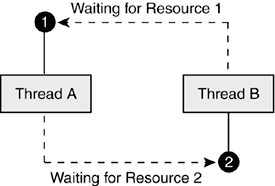
The MutexTo understand the Mutex class, it is first necessary to have some familiarity with the WaitHandle class from which it is derived. This abstract class defines "wait" methods that are used by a thread to gain ownership of a WaitHandle object, such as a mutex. We saw earlier in the chapter (refer to Table 13-1) how asynchronous calls use the WaitOne method to block a thread until the asynchronous operation is completed. There is also a WaitAll method that can be used to block a thread until a set of WaitHandle objects or the resources they protect are available. An application can create an instance of the Mutex class using one of several constructors. The most useful are public Mutex(); public Mutex(bool initiallyOwned); public Mutex(bool initiallyOwned, string name); The two optional parameters are important. The initallyOwned parameter indicates whether the thread creating the object wants to have immediate ownership of it. This is usually set to false when the mutex is created within a class whose resources it is protecting. The name parameter permits a name or identifier to be assigned to the mutex. This permits a specific mutex to be referenced across AppDomains and even processes. Because thread safety usually relies on encapsulating the locking techniques within an object, exposing them by name to outside methods is not recommended. Using a mutex to provide thread-safe code is a straightforward process. A mutex object is created, and calls to its wait methods are placed strategically in the code where single thread access is necessary. The wait method serves as a request for ownership of the mutex. If another thread owns it, the requesting thread is blocked and placed on a wait queue. The thread remains blocked until the mutex receives a signal from its owner that it has been released. An owner thread releases a mutex in two ways: by calling the object's ReleaseMutex method or when the thread is terminated. Here is an example of how the log update application is altered to use a mutex to provide thread safety: public class WorkClass { Mutex logMutex; public WorkClass() { logMutex = new Mutex(false); } public void UpdateLog() { logMutex.WaitOne(); // Wait for mutex to become available // Code to be synchronized logMutex.ReleaseMutex(); } } As part of creating an instance of WorkClass, the constructor creates an instance of the Mutex class. The Boolean false parameter passed to its constructor indicates that it is not owned (the parameterless constructor also sets ownership to false). The first thread that executes UpdateLog then gains access to the mutex through the WaitOne call; when the second thread executes this statement, it is blocked until the first thread releases the mutex. The SemaphoreThe Semaphore class is another WaitHandle derived class. It functions as a shared counter and like a mutex uses a wait call to control thread access to a code section or resource. Unlike a mutex, it permits multiple threads to concurrently access a resource. The number of threads is limited only by the specified maximum value of the semaphore. When a thread issues a semaphore wait call, the thread is not blocked if the semaphore value is greater than 0. It is given access to the code and the semaphore value is decremented by 1. The semaphore value is incremented when the thread calls the semaphore's Release method. These characteristics make the semaphore a useful tool for managing a limited number of resources such as connections or windows that can be opened in an application. The Semaphore class has several overloaded constructor formats, but all require the two parameters shown in this version: public Semaphore(int initialCount, int maximumCount ); The maximumCount parameter specifies the maximum number of concurrent thread requests the semaphore can handle; initialCount is the initial number of requests the semaphore can handle. Here is an example: Semaphore s = new Semaphore(5,10); This semaphore permits a maximum of 10 concurrent threads to access a resource. When it is first created, only 5 are permitted. To increase this number, execute the Semaphore.Release(n) command where n is the number used to increment the count permitted. The intended purpose of this command is to free resources when a thread completes executing and wants to exit a semaphore. However, the command can be issued even if the thread has never requested the semaphore. Now let's see how the Semaphore class can be used to provide synchronization for the log update example. As a WaitHandle derived class, its implementation is almost identical to the mutex. In this example, the semaphore is created with its initial and maximum values set to 1 thus restricting access to one thread at a time. public class WorkClass { private Semaphore s; public WorkClass() { // Permit one thread to have access to the semaphore s = new Semaphore(1, 1); } public void UpdateLog(object obj) { try { s.WaitOne(); // Blocks current thread // code to update log ... } finally { s.Release(); } } } Avoiding DeadlockWhen concurrent threads compete for resources, there is always the possibility that a thread may be blocked from accessing a resource (starvation) or that a set of threads may be blocked while waiting for a condition that cannot be resolved. This deadlock situation most often arises when thread A, which owns a resource, also needs a resource owned by thread B; meanwhile, thread B needs the resource owned by thread A. When thread A makes its request, it is put in suspended mode until the resource owned by B is available. This, of course, prevents thread B from accessing A's resource. Figure 13-8 depicts this situation. Figure 13-8. Deadlock situation
Most deadlocks can be traced to code that allows resources to be locked in an inconsistent manner. As an example, consider an application that transfers money from one bank account to another using the method shown here: public void Transfer(Account acctFrom, Account acctTo, decimal amt) { Monitor.Enter(acctFrom); // Acquire lock on from account Monitor.Enter(acctTo); // Acquire lock on to account // Perform transfer ... Monitor.Exit(acctFrom); // Release lock Monitor.Exit(acctTo); // Release lock } As you would expect, the method locks both account objects so that it has exclusive control before performing the transaction. Now, suppose two threads are running and simultaneously call this method to perform a funds transfer: Thread A: Transfer(Acct1000, Acct1500, 500.00); Thread B: Transfer(Acct1500, Acct1000, 300.00); The problem is that the two threads are attempting to acquire the same resources (accounts) in a different order and run the risk of creating a deadlock if one is preempted before acquiring both locks. There are a couple of solutions. First, we could lock the code segment being executed to prevent a thread from being preempted until both resources are acquired: lock(this) { ... Monitor statements } Unfortunately, this can produce a performance bottleneck. Suppose another method is working with one of the account objects required for the current transaction. The thread executing the method is blocked as well as all other threads waiting to perform a funds transfer. A second solution recommended for multithreading in general is to impose some order on the condition variables that determine how locking can occur. In this example, we can impose a lock sequence based on the objects' account numbers. Specifically, a lock must be acquired on the account with the lower account number before the second lock can be obtained. If(acctFrom < acctTo) { Monitor.Enter(acctFrom); Monitor.Enter(acctTo); }else { Monitor.Enter(acctTo); Monitor.Enter(acctFrom); } As this example should demonstrate, a deadlock is not caused by thread synchronization per se, but by poorly designed thread synchronization. To avoid this, code should be designed to guarantee that threads acquire resource locks in a consistent order. Summary of Synchronization TechniquesTable 13-2 provides an overview of the synchronization techniques discussed in this chapter and provides general advice on selecting the one to best suit your application's needs.
In addition to these, .NET offers specialized synchronization classes that are designed for narrowly defined tasks. These include Interlocked, which is used to increment and exchange values, and ReaderWriterLock, which locks the writing operation on a file but leaves reading open to all threads. Refer to online documentation (such as MSDN) for details on using these. |

| < Day Day Up > |
