Sams Teach Yourself OpenOffice.org All In One
Authors: Perry G. Brown K.
Published year: 2003
Pages: 170-172/205
Buy this book on amazon.com >>
 <  Day Day Up  >  

133 Upgrade OpenOffice.org to a New Version

Keep OpenOffice.org up to date, and OpenOffice.org will always perform as well as possible. The authors of OpenOffice.org continually update the programs to add features, correct bugs , and update the help documentation. You should routinely go to the OpenOffice.org Web site to check for updates and add-on programs for OpenOffice.org.

Before You Begin

131 About Sharing OpenOffice.org Files with Other Applications

132 Associating OpenOffice.org and Microsoft Office Files


Upgrading OpenOffice.org typically requires that you check your current version and see if a newer one is available on the Web site. If so, you'll download the new version and install it.

  1. Check Your Version

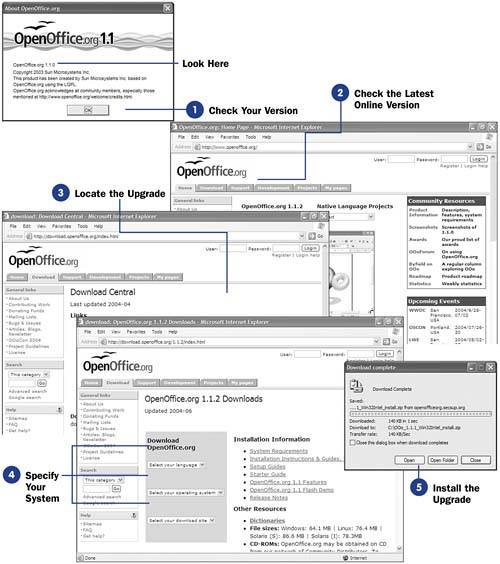
    From any OpenOffice.org program, select Help, About OpenOffice.org to see the current version number. Don't go by the graphic logo; check the exact version number you have installed by reading the first line of text in the About OpenOffice.org dialog box. Click OK to close the About dialog box.

    NOTE

    graphics/notebw_icon.gif

    Any and all data files you've created in previous versions of OpenOffice.org remain on your disk unchanged when you upgrade.

  2. Check the Latest Online Version

    Start your Web browser and traverse to http://OpenOffice.org/ and look for the latest version number. The latest version is usually the very first number on the Web page's main display area. If the version number is greater than the one you've installed, you should upgrade your system to the newer version.

    TIP

    graphics/tipbw_icon.gif

    With the About dialog box still open , you can press Ctrl+S+D+T to view a scrolling list of the names of the developers who created OpenOffice.org.

  3. Locate the Upgrade

    Click the OpenOffice.org Web page's Download tab to display the Download Central page. The new version to which you'll upgrade will most likely be the first item in the list.

  4. Specify Your System

    Select your language, operating system, and your closest download site location to begin the download. The File Download dialog box will appear. Specify a location and click Save to start the transfer of the upgraded version from OpenOffice.org's servers to your computer.

    graphics/17inf07.jpg

  5. Install the Upgrade

    Click Open to start the upgrade of your OpenOffice.org installation. The upgrade will act like a new installation, but your current option settings will be retained when possible. You may have to restart your computer when the upgrade finishes to reset everything properly and to start your new version of OpenOffice.org.

 <  Day Day Up  >  
 <  Day Day Up  >  

CD-ROM

License Agreement

What's on the CD-ROM

Windows Installation Instructions

Mac OS X Installation Instructions

Linux and Unix Installation Instructions

 <  Day Day Up  >  
 <  Day Day Up  >  

License Agreement

By opening this package, you are also agreeing to be bound by the following agreement:

You may not copy or redistribute the entire CD-ROM as a whole. Copying and redistribution of individual software programs on the CD-ROM is governed by terms set by individual copyright holders.

The installer and code from the author(s) are copyrighted by the publisher and the author(s). Individual programs and other items on the CD-ROM are copyrighted or are under an Open Source license by their various authors or other copyright holders.

This software is sold as-is without warranty of any kind, either expressed or implied, including but not limited to the implied warranties of merchantability and fitness for a particular purpose. Neither the publisher nor its dealers or distributors assumes any liability for any alleged or actual damages arising from the use of this program. (Some states do not allow for the exclusion of implied warranties, so the exclusion may not apply to you.)

 <  Day Day Up  >  
Sams Teach Yourself OpenOffice.org All In One
Authors: Perry G. Brown K.
Published year: 2003
Pages: 170-172/205
Buy this book on amazon.com >>

Similar books on Amazon