Memory Modules
| Two main types of industry-standard memory modules are used in laptops and portable computers today: SO-DIMM (small outline dual inline memory module) and Micro-DIMM (micro dual inline memory module). There are four main types of SO-DIMMs and two main types of Micro-DIMMs, with different sizes, speeds, and configurations available in each type (see Table 6.6). The SO-DIMM and Micro-DIMM form factors and pinouts are JEDEC standards, which means that they are industry standards, thus ensuring conformity , compatibility, and interchangeability among different systems and manufacturers. Table 6.6. Laptop/Portable Memory Module Types
SO-DIMMs are mainly used by laptop or notebook computers, whereas the smaller Micro-DIMMs are used mainly by subnotebooks, PDAs, and palmtop computers. SO-DIMMsMost laptop and notebook computers use SO-DIMMs (small outline dual inline memory modules), which are basically smaller and more compact modules than the standard DIMMs used in desktop systems. Although they differ in form factor and pinout, as compared to standard DIMMs, SO-DIMMs perform the same function. They allow for easy, modular memory installations and upgrades. The modules are inserted into sockets in the system and can easily be installed or removed. As the name implies, SO-DIMMs have different pins on each side of the module, with the odd-numbered pins on the front and the even-numbered pins on the back. Special keying notches on either side allow the module to be inserted into the connector only in the proper orientation. The notches are normally offset in their space for voltage keying as well. A variety of SO-DIMMs are available for different system requirements. Because they are not all interchangeable, it is necessary to ensure you match the correct type for a given system. 72-pin SO-DIMMThe 72-pin SO-DIMM is an older type used primarily in older 486 class portables. The 72-pin SO-DIMM reads and writes data 32 bits (4 bytes) at a time, which is a perfect match for 32-bit 486 processors. These modules are largely obsolete and are not used in any new system designs. They are still available for upgrading older systems, but because the supply is dwindling, the prices are higher than for newer , more modern modules. The 72-pin SO-DIMMs have the industry-standard form factor shown in the Figure 6.1. The 72-pin SO-DIMMs are available in several versions, with capacities of up to 64MB. Most utilize FPM/EDO memory chips, which are rated 60ns for speed and run on 3.3 volts . The most common sizes, including the depths and widths of the modules, are shown in Table 6.7. Table 6.7. 72-pin SO-DIMM Module Capacities
The 72-pin modules have a 32-bit-wide data bus, which is equal to 4 bytes. For example, a 64MB 72-pin SO-DIMM is arranged internally as 16 million rows, with 32 bits (4 bytes) in each row, for a total of 64 million (16 million x 4) bytes. The JEDEC standard pinout for 72-pin SO-DIMMs is listed in Tables 6.8 and 6.9. Table 6.8. 72-pin SO-DIMM Pinout (Front)
Table 6.9. 72-pin SO-DIMM Pinout (Back)
All SO-DIMM contacts are normally gold plated and should match the plating on the mating connector for reliable operation. You should avoid modules with tin-plated contacts because tin will react with the gold plating on the connector contacts, causing corrosion and eventual memory failures. 144-pin SO-DIMMThe 144-pin SO-DIMMs are very popular in Pentium or Athlon class and newer laptop and notebook computers. They can read or write data 64 bits at a time, which makes them a perfect match for 64-bit processors such as the Pentium and newer chips. The 144-pin SO-DIMMs are available in several different memory chip types, including EDO, 66MHz SDRAM, PC100 SDRAM, and PC133 SDRAM versions. The 144-pin SO-DIMMs are not available in versions supporting ECC (error-correction code). When installing these modules, you must ensure that the type you are using matches the requirements of the system. In most cases, you can put a faster module in place of a slower one, but only if it is the same basic memory type. For example, you can usually install PC133 memory even if the system only requires PC100 or even 66MHz SDRAM, but you cannot use SDRAM modules in systems that require EDO, or vice versa. Also, you should not install modules that are slower than the system requires, even if they are the correct memory type. The speeds of 144-pin SO-DIMMs are rated as shown in Table 6.10. Table 6.10. 144-pin SDRAM SO-DIMM Speeds
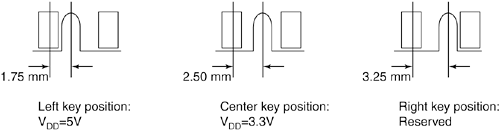
The throughput or bandwidth is simply the frequency multiplied by the width, which gives the rate at which data can be read from or written to the module. Another specification to consider that is related to speed is the CAS (column address strobe) Latency , often abbreviated as CL . This is also sometimes called read latency , and it's the number of clock cycles occurring between the registration of the CAS signal and the resultant output data, with lower numbers of cycles indicating faster (better) performance. Typically you find SDRAM modules rated CL 2 or CL 3. If possible, choose modules with a lower CL figure, because the motherboard chipset will read that specification out of the SPD (serial presence detect) ROM on the module and switch to slightly faster cycling rates. The 144-pin SO-DIMMs have the industry-standard form factor shown in the Figure 6.2. All 144-pin SO-DIMMs have the odd-numbered pins (1 “143) on the front and even-numbered pins (2 “144) on the back and are 2.66'' (67.6mm) long. The number of actual chips on the modules can vary, as can the physical height of the module. The modules are normally either 1'' (25.4mm) or 1.25'' (31.75mm) high, although the heights may vary slightly. The 144-pin SO-DIMMs use a SPD ROM (read-only memory) onboard, which the motherboard reads to determine the exact specifications of the modules installed. The ROM is normally a small chip on the module and can be seen as component "U1" in the preceding figure. The modules are keyed via a small notch in the connector area on the bottom (seen between pins 59 and 61 on the front), which prevents them from being installed backward and provides voltage keying as well. The voltage keying is shown Figure 6.3. Figure 6.3. 144-pin SO-DIMM voltage keying. Although the standard allowed for 5V modules, currently all 144-pin SO-DIMMs have the notch in the center position, indicating 3.3V operation. All the systems I am aware of will only accept 3.3V 144-pin modules, which draw less power and generate less heat. The 144-pin SO-DIMMs are available in several versions, with capacities of up to 512MB. They can utilize either EDO (extended data out) memory chips or SDRAM (synchronous dynamic RAM) at several different rated speeds. The most common sizes are shown in Table 6.11. Table 6.11. 144-pin SO-DIMM Module Capacities
The capacity can be determined by multiplying the depth by the width. The 144-pin modules have a 64-bit-wide data bus, which is equal to 8 bytes. For example, a 512MB 144-pin SO-DIMM is arranged internally as 64 million rows, with 64 bits (8 bytes) in each row, for a total of 512 million (64 million x 8) bytes. The JEDEC standard pinout for 144-pin SO-DIMMs using FPM or EDO RAM are listed in Tables 6.12 and 6.13. Table 6.12. 144-pin EDO/FPM SO-DIMM Pinout (Front)
Table 6.13. 144-pin EDO/FPM SO-DIMM Pinout (Back)
The JEDEC standard pinout for 144-pin SO-DIMMs using SDRAM are listed in Tables 6.14 and 6.15. Table 6.14. 144-pin SDRAM SO-DIMM Pinout (Front)
Table 6.15. 144-pin SDRAM SO-DIMM Pinout (Back)
All DIMM contacts are normally gold plated and should match the plating on the mating connector for reliable operation. 200-pin SO-DIMMThe 200-pin SO-DIMMs are used to provide DDR (double data rate) SDRAM (synchronous dynamic RAM) memory for laptop computers. DDR SDRAM is the type of memory used by most of the recent high-performance laptops. They normally run on only 2.5 volts, making them very efficient for longer battery life. Each 200-pin SO-DIMM incorporates a 64-bit data path , which is ideal because they can be installed individually in 64-bit (Pentium and newer) systems. The 200-pin SO-DIMMs are available in PC1600 (200MHz), PC2100 (266MHz), and PC2700 (333MHz) DDR SDRAM versions. They are also available in versions supporting ECC (error-correction code), which offers 1-bit error detection and correction for greater integrity. ECC requires support from the chipset and motherboard. When installing these modules you must ensure the type you are using matches the requirements of the system. In most cases, you can put a faster module in place of a slower one, but only if it is the same basic memory type. For example, you can usually install PC2700 memory, even if the system only requires PC2100 or even PC1600, but you cannot use modules that are slower than the system requires. The speeds of 200-pin SO-DIMMs are rated as shown in Table 6.16. Table 6.16. 200-pin DDR SDRAM SO-DIMM Speeds
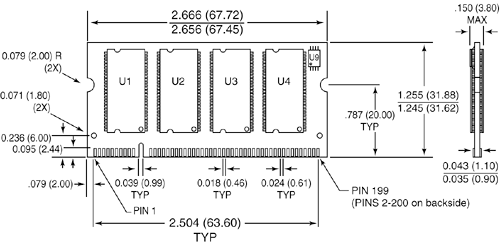
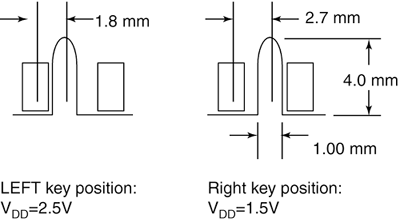
The cycle time in nanoseconds (billionths of a second) matches the single data rate (SDR) clock speed, but double data rate (DDR) modules transfer twice per cycle, so the DDR frequency is always equal to double the SDR frequency. The throughput or bandwidth is simply the DDR frequency times the width, which gives the rate at which data can be read from or written to the module. Another specification to consider that is related to speed is the CAS (column address strobe) Latency , often abbreviated as CL . This is also sometimes called read latency , and it's the number of clock cycles occurring between the registration of the CAS signal and the resultant output data, with lower numbers of cycles indicating faster (better) performance. Typically you can find DDR SDRAM modules rated CL 2 or CL 2.5. If possible, choose modules with a lower CL figure, because the motherboard chipset will read that specification out of the SPD (serial presence detect) ROM on the module and switch to slightly faster cycling rates. The 200-pin SO-DIMMs have the JEDEC industry-standard form factor shown in Figure 6.4. Figure 6.4. 200-pin DDR SDRAM SO-DIMM. All 200-pin SO-DIMMs have the odd-numbered pins (1 “199) on the front and even-numbered pins (2 “200) on the back and are 2.66'' (67.6mm) long. The number of actual chips on the module can vary, as can the physical height of the module. The modules are normally either 1'' (25.4mm) or 1.25'' (31.75mm) high, although some versions can be up to 1.5'' (38.1mm) high (the heights may vary slightly). The taller modules may not fit in all systems, so be sure to check before ordering. Although the 200-pin modules are the same physical size as 144-pin modules, the pin spacing is tighter and the notch is offset much farther to the left, preventing the installation of 200-pin modules in 144-pin sockets, and vice versa. The 200-pin SO-DIMMs use a SPD ROM (read-only memory) onboard, which the motherboard reads to determine the exact specifications of the modules installed. The ROM is normally a small chip on the module, much smaller than the memory chips, and may be mounted on the front or back side. The SPD chip can be seen as component "U9" in Figure 6.4. The modules are keyed via a small notch in the connector area on the bottom (seen between pins 39 and 41 on the front), which prevents them from being installed backward and provides voltage keying as well. The voltage keying is shown in Figure 6.5. Figure 6.5. 200-pin SO-DIMM voltage keying. Although the standard allows for 1.5V modules, currently most systems use 200-pin SO-DIMMs with the notch in the left position, indicating 2.5V operation. Regardless of the voltage used, the notch prevents plugging in modules of the improper voltage into a given system. The 200-pin SO-DIMMs are available in several versions, with capacities of up to 1GB. They utilize DDR SDRAM at several different rated speeds. The most common capacities are shown in Table 6.17. Table 6.17. 200-pin SO-DIMM Module Capacities
The capacity can be determined by multiplying the depth by the width. The 200-pin modules have a 64-bit-wide data bus, which is equal to 8 bytes. For example, a 1GB 200-pin SO-DIMM is arranged internally as 128 million rows, with 64 bits (8 bytes) in each row. If you multiply 128 million by 8, you get 1,024 million bytes, or 1GB. The JEDEC standard pinout and pin descriptions for 200-pin SO-DIMMs are listed in Tables 6.18 and 6.19. Table 6.18. 200-pin DDR SDRAM SO-DIMM Pinout (Front)
Table 6.19. 200-pin DDR SDRAM SO-DIMM Pinout (Back)
All DIMM contacts are normally gold plated and should match the plating on the mating connector for reliable operation. Table 6.20 describes the pin functions. Table 6.20. 200-pin DDR SDRAM SO-DIMM Pin Descriptions
Micro-DIMMsMicro-DIMMs (micro dual inline memory modules) are a newer and smaller type of memory module used mainly in subnotebooks, PDAs, and palmtop computers. As with all DIMMs, they have pins on both sides that perform different functions. The two main types of Micro-DIMMs are 144-pin and 172-pin. The 144-pin versions contain SDRAM (synchronous dynamic RAM) and are similar to 144-pin SO-DIMMs, whereas the 172-pin versions contain DDR (double data rate) SDRAM and are similar to 200-pin SO-DIMMs. The Micro-DIMMs are about half the size of the SO-DIMMs and yet offer similar capacities and performance. 144-pin SDRAM Micro-DIMMThe 144-pin SDRAM Micro-DIMMs are similar to the 144-pin SDRAM SO-DIMMs, but they're made to about half the physical size so as to fit the very tight form factors of smaller systems. Other than size, they have the same specifications as the 144-pin SDRAM SO-DIMMs, including the following features:
The 144-pin SDRAM Micro-DIMMs are only 1.5'' (38mm) long and 1.18'' (30mm) high, which is about half the size of an equivalent SO-DIMM. Unlike SO-DIMMs, Micro-DIMMs do not have any notches in the connector pin area; however, a notch is used on the left side to ensure proper insertion. They also have a unique size that is not interchangeable with other modules. The 144-pin SDRAM Micro-DIMMs are available in PC100 and PC133 speeds. You can generally use PC133 modules in place of PC100 modules, but not the other way around. The speeds of 144-pin Micro-DIMMs are rated as shown in Table 6.21. Table 6.21. 144-pin SDRAM Micro-DIMM Speeds
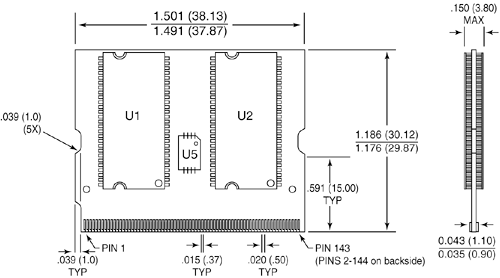
The throughput or bandwidth is simply the frequency times the width, which gives the rate at which data can be read from or written to the module. As with SDRAM SO-DIMMs, another performance specification to consider that is related to speed is the CAS (column address strobe) Latency , often abbreviated as CL . Typically you find SDRAM modules rated CL 2 or CL 3. If possible, choose modules with a lower CL figure, because the motherboard chipset will read that specification out of the SPD ROM on the module and switch to slightly faster cycling rates. The 144-pin SDRAM Micro-DIMMs have the industry-standard form factor shown in Figure 6.6. Figure 6.6. 144-pin SDRAM Micro-DIMM. All 144-pin Micro-DIMMs have the odd-numbered pins (1 “143) on the front and even-numbered pins (2 “144) on the back and are 1.5'' (38mm) long and 1.18'' (30mm) high. The number of actual chips on the modules can vary. The 144-pin Micro-DIMMs use an SPD ROM onboard, which the motherboard reads to determine the exact specifications of the modules installed. The ROM is normally a small chip on the module and can be seen as the smaller component "U5" in the preceding figure. The modules are keyed via a small notch on the left side of the connector area, which prevents them from being installed backward. The 144-pin Micro-DIMMs are available in several versions, with capacities of up to 256MB. The most common sizes are shown Table 6.22. Table 6.22. 144-pin SDRAM Micro-DIMM Module Capacities
The capacity can be determined by multiplying the depth by the width. The 144-pin modules have a 64-bit-wide data bus, which is equal to 8 bytes. For example, a 256MB Micro-DIMM is arranged internally as 32 million rows, with 64 bits (8 bytes) in each row, for a total of 256 million (32 million x 8) bytes. The JEDEC standard pinout for 144-pin SDRAM Micro-DIMMs is listed in Tables 6.23 and 6.24. Table 6.23. 144-pin SDRAM Micro-DIMM Pinout (Front)
Table 6.24. 144-pin SDRAM Micro-DIMM Pinout (Back)
All DIMM contacts are normally gold plated and should match the plating on the mating connector for reliable operation. 172-pin DDR SDRAM Micro-DIMMThe 172-pin DDR SDRAM Micro-DIMMs are similar to the 200-pin DDR SDRAM SO-DIMMs, but they're about half the physical size so as to fit the very tight form factors of smaller systems. Other than that, they have the same specifications as the 200-pin DDR SDRAM SO-DIMMs, including the following features:
The 172-pin DDR SDRAM Micro-DIMMs are only 1.8'' (45.5mm) long and 1.18'' (30mm) high, which is about half the size of an equivalent SO-DIMM. Unlike SO-DIMMs, Micro-DIMMs do not have any notches in the connector pin area; however, a notch is used on the left side to ensure proper insertion. They also have a unique size that is not interchangeable with other modules. Unlike the DDR SO-DIMMs, DDR Micro-DIMMs do not support ECC (error-correcting code) functions. The 144-pin SDRAM Micro-DIMMs are available in PC1600, PC2100, and PC2700 speeds. You can generally use faster modules in place of slower modules, but not the other way around. The speeds of 172-pin DDR SDRAM Micro-DIMMs are rated as shown in Table 6.25. Table 6.25. 172-pin DDR SDRAM Micro-DIMM Speeds
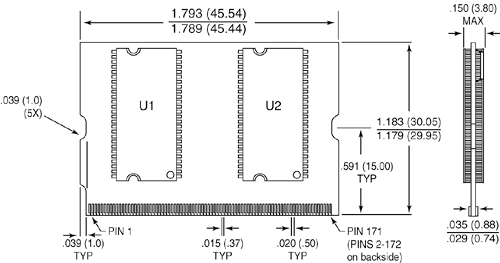
The cycle time in nanoseconds (billionths of a second) matches the single data rate (SDR) clock speed, but double data rate (DDR) modules transfer twice per cycle, so the DDR frequency is always double the SDR frequency. The throughput or bandwidth is simply the DDR frequency times the width, which gives the rate at which data can be read from or written to the module. As with DDR SDRAM SO-DIMMs, another performance specification to consider that is related to speed is the CAS (column address strobe) Latency , often abbreviated as CL . Typically you find SDRAM modules rated CL 2 or CL 2.5. If possible, choose modules with a lower CL figure, because the motherboard chipset will read that specification out of the SPD ROM on the module and switch to slightly faster cycling rates. The 172-pin SDRAM Micro-DIMMs have the industry-standard form factor shown in Figure 6.7. Figure 6.7. 172-pin DDR SDRAM Micro-DIMM. All 172-pin DDR SDRAM Micro-DIMMs have the odd-numbered pins (1 “171) on the front and even numbered pins (2 “172) on the back and are 1.8'' (45.5mm) long and 1.18'' (30mm) high. The number of actual chips on the modules can vary. The 172-pin DDR SDRAM Micro-DIMMs use an SPD ROM onboard, which the motherboard reads to determine the exact specifications of the modules installed. The ROM is normally a small chip on the module. The modules are keyed via a small notch on the left side of the connector area, which prevents them from being installed backward. The 172-pin DDR SDRAM Micro-DIMMs are available in several versions, with capacities of up to 256MB. The most common sizes are shown in Table 6.26. Table 6.26. 172-pin DDR SDRAM Micro-DIMM Module Capacities
The capacity can be determined by multiplying the depth by the width. The 172-pin modules have a 64-bit-wide data bus, which is equal to 8 bytes. For example, a 256MB Micro-DIMM is arranged internally as 32 million rows, with 64 bits (8 bytes) in each row, for a total of 256 million (32 million x 8) bytes. The JEDEC standard pinouts for 172-pin SDRAM Micro-DIMMs are listed in Tables 6.27 and 6.28. Table 6.27. 172-pin DDR SDRAM Micro-DIMM Pinout (Front)
Table 6.28. 172-pin DDR SDRAM Micro-DIMM Pinout (Back)
All DIMM contacts are normally gold plated and should match the plating on the mating connector for reliable operation. | |||||||||||||||||||||||||||||||||||||||||||||||||||||||||||||||||||||||||||||||||||||||||||||||||||||||||||||||||||||||||||||||||||||||||||||||||||||||||||||||||||||||||||||||||||||||||||||||||||||||||||||||||||||||||||||||||||||||||||||||||||||||||||||||||||||||||||||||||||||||||||||||||||||||||||||||||||||||||||||||||||||||||||||||||||||||||||||||||||||||||||||||||||||||||||||||||||||||||||||||||||||||||||||||||||||||||||||||||||||||||||||||||||||||||||||||||||||||||||||||||||||||||||||||||||||||||||||||||||||||||||||||||||||||||||||||||||||||||||||||||||||||||||||||||||||||||||||||||||||||||||||||||||||||||||||||||||||||||||||||||||||||||||||||||||||||||||||||||||||||||||||||||||||||||||||||||||||||||||||||||||||||||||||||||||||||||||||||||||||||||||||||||||||||||||||||||||||||||||||||||||||||||||||||||||||||||||||||||||||||||||||||||||||||||||||||||||||||||||||||||||||||||||||||||||||||||||||||||||||||||||||||||||||||||||||||||||||||||||||||||||||||||||||||||||||||||||||||||||||||

EAN: 2147483647
Pages: 182