Memory Upgrades
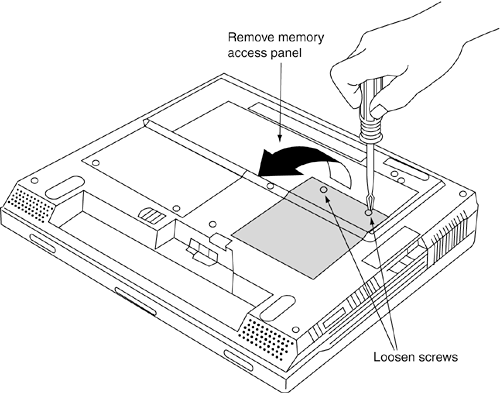
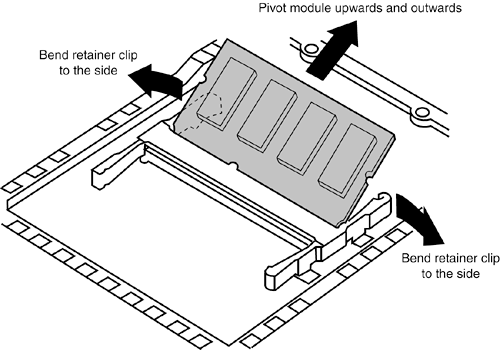
| Adding more memory is one of the most common upgrades performed on computers, and portables are no exception. Perhaps the biggest problem with laptop system upgrades is that most have only one or two sockets for additional modules, and often one or both are filled when the system is new. If both are filled, you will have to remove one of the modules when adding another. For example, many of the higher- powered laptop systems today will accept 1GB of RAM and can be ordered with 512MB when new. These same systems normally have only two 200-pin DDR SDRAM SO-DIMM sockets on the motherboard. Unfortunately, because it costs less to purchase two 256MB modules than a single 512MB module, most of the time the system will be delivered with two 256MB modules to make up the 512MB, leaving no other sockets available for expansion. If you wanted to upgrade that system to 1GB, you would have to literally remove and discard both 256MB modules currently in the system and replace them with two 512MB modules, for a total of 1GB. Obviously, throwing all your existing memory away and starting over is not a cheap way to upgrade. If you are ordering a new system with 256MB or 512MB, try to ensure that the initial amount of memory you order is supplied on a single module, leaving one free socket open for future expansion. Some manufacturers allow you to specify your system that way, but you may have to pay for the service. Removing or installing memory in most laptop computers is very simple. Most have an access panel on the bottom of the unit that can be removed with one or two screws , as shown in Figure 6.8. Figure 6.8. Removing memory access panel. If your system is different, you should consult the manual that came with the system for the location of the memory and the methods for gaining access. Once the memory access panel is removed, it is a simple matter to remove or install the DIMMs. The DIMMs are removed by bending the retainers on each side away from the module and then pivoting the module up and out of the socket (see Figure 6.9). Figure 6.9. Removing a DIMM. The installation process is just the opposite : Merely slide the connector end of module into the socket (look at the key notch for proper orientation) and then pivot the DIMM downward and allow the retainers to click into place. |

EAN: 2147483647
Pages: 182
- The ROI of Lean Six Sigma for Services
- Success Story #1 Lockheed Martin Creating a New Legacy
- Seeing Services Through Your Customers Eyes-Becoming a customer-centered organization
- Success Story #4 Stanford Hospital and Clinics At the forefront of the quality revolution
- Phase 2 Engagement (Creating Pull)