Case Study
Consider the scenario depicted in Figure 7.6. There are four routers—R2, R3, R4, and R5—in the same IGRP AS. R4 has networks connected to it with network ids 10.0.1.0, 10.0.2.0, and 10.0.3.0.
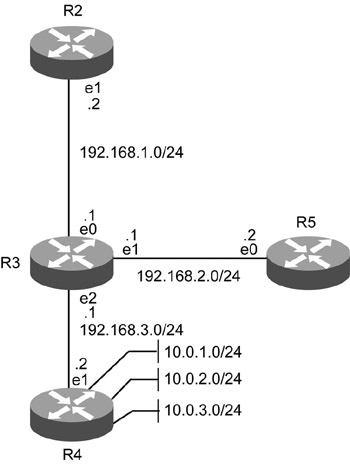
Figure 7.6: An IGRP case study.
In Figure 7.6, the configuration of R4 is as shown in Listing 7.32.
Listing 7.32 Configuration of R4
 |
R4#conf t R4(config)#ip routing R4(config)#router igrp 100 R4(config-router)#network 10.0.1.0 R4(config-router)#network 10.0.3.0 R4(config-router)#exit R4(config)#interface ethernet 1 R4(config-if)#ip address 192.168.3.2 255.255.255.0 R4(config-if)#exit R4(config)#exit R4#
|
The problem is that routing packets are not reaching R4 from network 10.0.2.0, which is connected to R4. To troubleshoot this problem, verify the IP route in R4 using the show ip route command. This command output shows only two network ids connected. The third network with network id 10.1.2.0 is not connected. The output of the show ip route command is shown in Listing 7.33.
Listing 7.33 Output of the show ip route Command
|
R4#show ip route Codes: C - connected, S - static, I - IGRP, R - RIP, M - mobile, B - BGP D - EIGRP, EX - EIGRP external, O - OSPF, IA - OSPF inter area E1 - OSPF external type 1, E2 - OSPF external type 2, E - EGP i - IS-IS, L1 - IS-IS level-1, L2 - IS-IS level-2, * - candidate default U - per-user static route Gateway of last resort is not set C 10.0.1.0/24 is directly connected, Loopback1 C 10.0.3.0/24 is directly connected, Loopback3 C 192.168.3.1/24 is directly connected, Ethernet0
|
Reconfigure R4 with the configuration for network 10.1.2.0 as shown in Listing 7.34.
Listing 7.34 Reconfiguration of R4
|
R4#conf t R4(config)#ip routing R4(config)#router igrp 100 R4(config-router)#network 10.0.1.0 R4(config-router)#network 10.1.2.0 R4(config-router)#network 10.0.3.0 R4(config-router)#exit R4(config)#interface ethernet 1 R4(config-if)#ip address 192.168.3.2 255.255.255.0 R4(config-if)#exit R4(config)#exit R4#
|
Verify routing information again using the show ip route command. The output for the command is shown in Listing 7.35.
Listing 7.35 Output of the show ip route Command
|
R4#show ip route Codes: C - connected, S - static, I - IGRP, R - RIP, M - mobile, B - BGP D - EIGRP, EX - EIGRP external, O - OSPF, IA - OSPF inter area E1 - OSPF external type 1, E2 - OSPF external type 2, E - EGP i - IS-IS, L1 - IS-IS level-1, L2 - IS-IS level-2, * - candidate default U - per-user static route Gateway of last resort is not set C 10.0.1.0/24 is directly connected, Loopback1 C 10.0.2.0/24 is directly connected, Loopback1 C 10.0.3.0/24 is directly connected, Loopback3 C 192.168.3.1/24 is directly connected, Ethernet0
|
In Listing 7.35, the text in bold shows that network 10.0.2.0 is correctly configured.
Now all networks connected to R4 are correctly configured, and routing updates are sent properly to R4.

EAN: 2147483647
Pages: 130
- Structures, Processes and Relational Mechanisms for IT Governance
- Measuring and Managing E-Business Initiatives Through the Balanced Scorecard
- Measuring ROI in E-Commerce Applications: Analysis to Action
- Technical Issues Related to IT Governance Tactics: Product Metrics, Measurements and Process Control
- Governance in IT Outsourcing Partnerships