Basic Concept of Data Warehousing
A data warehouse is a system with its own database. It draws data from diverse sources and is designed to support query and analysis. To facilitate data retrieval for analytical processing, we use a special database design technique called a star schema.
1.2.1 Star Schema
The concept of a star schema is not new; indeed, it has been used in industry for years. For the data in the previous section, we can create a star schema like that shown in Figure 1.1.
Figure 1.1. STAR SCHEMA
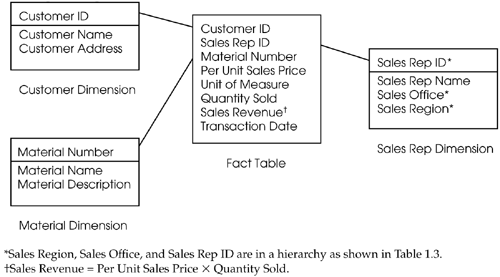
The star schema derives its name from its graphical representation – that is, it looks like a star. A fact table appears in the middle of the graphic, along with several surrounding dimension tables. The central fact table is usually very large, measured in gigabytes. It is the table from which we retrieve the interesting data. The size of the dimension tables amounts to only 1 to 5 percent of the size of the fact table. Common dimensions are unit and time, which are not shown in Figure 1.1. Foreign keys tie the fact table to the dimension tables. Keep in mind that dimension tables are not required to be normalized and that they can contain redundant data.
As indicated in Table 1.3, the sales organization changes over time. The dimension to which it belongs – sales rep dimension – is called the slowly changing dimension.
The following steps explain how a star schema works to calculate the total quantity sold in the Midwest region:
- From the sales rep dimension, select all sales rep IDs in the Midwest region.
- From the fact table, select and summarize all quantity sold by the sales rep IDs of Step 1.
1.2.2 ETTL – Extracting, Transferring, Transforming, and Loading Data
Besides the difference in designing the database, building a data warehouse involves a critical task that does not arise in building an OLTP system: to extract, transfer, transform, and load (ETTL) data from diverse data sources into the data warehouse (Figure 1.2).
Figure 1.2. ETTL PROCESS
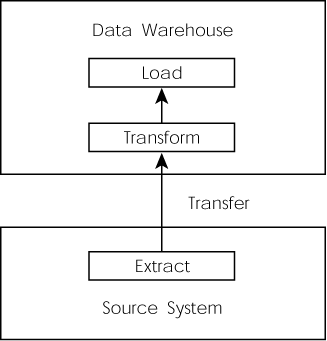
In data extraction, we move data out of source systems, such as an SAP R/3 system. The challenge during this step is to identify the right data. A good knowledge of the source systems is absolutely necessary to accomplish this task.
In data transfer, we move a large amount of data regularly from different source systems to the data warehouse. Here the challenges are to plan a realistic schedule and to have reliable and fast networks.
In data transformation, we format data so that it can be represented consistently in the data warehouse. For example, we might need to convert an entity with multiple names (such as AT&T, ATT, or Bell) into an entity with a single name (such as AT&T). The original data might reside in different databases using different data types, or in different file formats in different file systems. Some are case sensitive; others may be case insensitive.
In data loading, we load data into the fact tables correctly and quickly. The challenge at this step is to develop a robust error-handling procedure.
ETTL is a complex and time-consuming task. Any error can jeopardize data quality, which directly affects business decision making. Because of this fact and for other reasons, most data warehousing projects experience difficulties finishing on time or on budget.
To get a feeling for the challenges involved in ETTL, let's study SAP R/3 as an example. SAP R/3 is a leading ERP (Enterprise Resources Planning) system. According to SAP, the SAP R/3 developer, as of October 2000, some 30,000 SAP R/3 systems were installed worldwide that had 10 million users. SAP R/3 includes several modules, such as SD (sales and distribution), MM (materials management), PP (production planning), FI (financial accounting), and HR (human resources). Basically, you can use SAP R/3 to run your entire business.
SAP R/3's rich business functionality leads to a complex database design. In fact, this system has approximately 10,000 database tables. In addition to the complexity of the relations among these tables, the tables and their columns sometimes don't even have explicit English descriptions. For many years, using the SAP R/3 data for business decision support had been a constant problem.
Recognizing this problem, SAP decided to develop a data warehousing solution to help its customers. The result is SAP Business Information Warehouse, or BW. Since the announcement of its launch in June 1997, BW has drawn intense interest. According to SAP, as of October 2000, more than 1000 SAP BW systems were installed worldwide.
In this book, we will demonstrate how SAP BW implements the star schema and tackles the ETTL challenges.
Part I. Guided Tours
Business Scenario and SAP BW
- Business Scenario and SAP BW
- Sales Analysis A Business Scenario
- Basic Concept of Data Warehousing
- BW An SAP Data Warehousing Solution
- Summary
Creating an InfoCube
- Creating an InfoCube
- Creating an InfoArea
- Creating InfoObject Catalogs
- Creating InfoObjects Characteristics
- Creating InfoObjects Key Figures
- Creating an InfoCube
- Summary
Loading Data into the InfoCube
- Loading Data into the InfoCube
- Creating a Source System
- Creating an Application Component
- Creating an InfoSource for Characteristic Data
- Creating InfoPackages to Load Characteristic Data
- Checking Loaded Characteristic Data
- Entering the Master Data, Text, and Hierarchy Manually
- Creating an InfoSource for Transaction Data
- Creating Update Rules for the InfoCube
- Create an InfoPackage to Load Transaction Data
- Summary
Checking Data Quality
- Checking Data Quality
- Checking InfoCube Contents
- Using BW Monitor
- Using the Persistent Staging Area (PSA)
- Summary
Creating Queries and Workbooks
- Creating Queries and Workbooks
- Creating a Query Using BEx Analyzer
- Organizing Workbooks Using BEx Browser
- Using a Variable to Access a Hierarchy Node Directly
- Summary
Managing User Authorization
- Managing User Authorization
- Creating an Authorization Profile Using Profile Generator
- Creating an Authorization Object to Control User Access to the InfoCube Data
- Integrating Profile Generator and BEx Browser
- Summary
Part II. Advanced Topics
InfoCube Design
- InfoCube Design
- BW Star Schema
- InfoCube Design Alternative I Time-Dependent Navigational Attributes
- InfoCube Design Alternative II-Dimension Characteristics
- InfoCube Design Alternative III Time-Dependent Entire Hierarchies
- Other InfoCube Design Techniques
- Summary
Aggregates and Multi-Cubes
Operational Data Store (ODS)
- Operational Data Store (ODS)
- Creating an ODS Object
- Preparing to Load Data into the ODS Object, Then into an InfoCube
- Loading Data into the ODS Object
- Loading Data into the InfoCube
- Using 0RECORDMODE for Delta Load
- Summary
Business Content
- Business Content
- Creating an R/3 Source System
- Transferring R/3 Global Settings
- Replicating R/3 DataSources
- Installing Business Content Objects and Loading R/3 Data
- Summary
Generic R/3 Data Extraction
- Generic R/3 Data Extraction
- Creating Views in R/3
- Creating DataSources in R/3 and Replicating Them to BW
- Creating a Characteristic in BW
- Loading Data from R/3 into BW
- Summary
Data Maintenance
Performance Tuning
- Performance Tuning
- BW Statistics
- System Administration Assistant
- Tuning Query Performance
- Tuning Load Performance
- Summary
Object Transport
Appendix A. BW Implementation Methodology
Object Transport
Appendix B. SAP Basis Overview
Object Transport
- Object Transport
- Section B.1. SAP Basis 3-Tier Architecture
- Section B.2. Dispatcher, Work Processes, and Services
- Section B.3. Memory Management
Appendix C. Glossary
Appendix D. Bibliography

EAN: N/A
Pages: 106
