Section 1.2. What Is VB.NET?
1.2 What Is VB.NET?VB.NET is a programming language designed to create applications that work with Microsoft's new .NET Framework. The .NET platform in turn addresses many of the limitations of "classic" COM, Microsoft's Component Object Model, which provided one approach toward application and component interoperability. These limitations included type incompatibilities when calling COM components, versioning difficulties ("DLL hell") when developing new versions of COM components , and the need for developers to write a certain amount of code (mostly in C++) to handle the COM "plumbing." In contrast to VB, with its reliance on COM, VB.NET offers a number of new features and advantages. Let's take a look at some of these. 1.2.1 Object OrientationWith the release of Version 4, Visual Basic added support for classes and class modules and in the process became an object-oriented programming language. Yet the debate persists about whether Visual Basic is a "true" object-oriented language or whether it only supports limited features of object orientation. The debate centers around Visual Basic's support for inheritance , an object- oriented programming concept that allows a class to derive its properties and its functionality from another class. Proponents of the view that Visual Basic is object- oriented point to Visual Basic's support for interface-based programming and the use of virtual base classes. Yet relatively few VB programmers take advantage of interface-based programming. And interface-based programming itself does not allow a derived class to inherit the functionality of a base class; only virtual base classes can be inherited using the Implements keyword. While the object-oriented character of previous versions of VB may be in doubt, there is no question that VB.NET is an object-oriented programming language. In fact, even if VB.NET is used to write what appears to be procedural code, it is object-oriented "under the hood," so to speak. Let's take as a simple example the clearly procedural, nonobject-oriented program shown in Example 1-3. If we use ILDASM (.NET's intermediate language disassembler) to look at the IL generated for this source code (see Figure 1-1), we see that internally, modMain is in fact defined as a class that has two methods , Increment and Main. Figure 1-1. A procedural program shown using ILDASM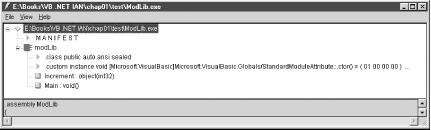 Example 1-3. A procedural program for VB.NETPublic Module modMain Public Sub Main( ) Dim x As Integer x = 10 MsgBox(Increment(x)) End Sub Private Function Increment(iVar As Integer) Return(iVar+1) End Function End Module 1.2.2 A Common Type SystemTraditionally, one of the problems of calling routines written in other languages from Visual Basic or of calling Visual Basic routines from other languages is that such inter-language calls presuppose a common type system. This is the case when calling Win32 API functions from Visual Basic, but it is also applies to attempts to call methods in a VB COM component from other languages or to call methods in a non-VB COM component from VB. For instance, until the addition of the AddressOf operator, which allows us to pass a pointer to a function or subroutine, there was no way to provide a callback function, which is required by most Win32 API enumeration functions. As another example, it is expected that members of structures passed to Win32 API functions be aligned on their natural boundaries, something that VB programmers had great difficulty accomplishing. Problems of type compatibility tended to occur most often when scripted applications were used to call and pass arguments to COM components. An excellent example is the attempt to pass an array from a script written in JScript to a COM component, since COM sees JScript arrays as a string of comma-delimited values rather than a COM-compatible array (called a SafeArray). The .NET platform removes these difficulties by providing a common type system. Ultimately, all data types are either classes or structures defined by or inherited from the .NET Framework Class Library. This common type system means that .NET components will be truly language-independent and that a .NET component written in one language will be seamlessly interoperable with .NET components written in any other .NET language. The problem of incompatible types simply disappears. On the surface, VB has retained its old type system. VB still supports the Long data type, for instance, although it is now a 64-bit data type instead of the 32-bit data type of VB 4 through VB 6. Casual inspection of the code shown in Example 1-4 suggests that VB has retained its type system. However, if we use ILDASM to examine the IL generated from this Visual Basic code, we see that VB data types are merely wrappers for data types provided by the .NET Framework. (See Figure 1-2.) Figure 1-2. Wrapping the .NET type system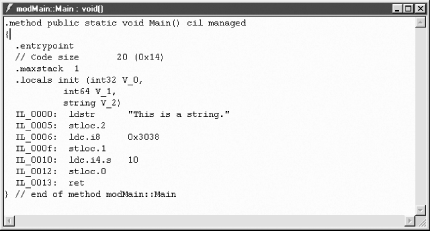 Example 1-4. Using the Visual Basic type systemPublic Module modMain Public Sub Main( ) Dim s As String = "This is a string." Dim l As Long = 12344 Dim i As Integer = 10 End Sub End Module The simple program in Example 1-5 also supports this conclusion. The program instantiates an integer of type Long, a standard Visual Basic data type. It then calls the ToString method ” a method of the Int64 class ” to convert that number to its string representation. In other words, the variable l in Example 1-5 is really an Int64 data type masquerading as a traditional VB Long data type. Example 1-5. Calling .NET type methods from a VB data typePublic Module modMain Public Sub Main( ) Dim l As Long = 64.31245 Dim s As String s = l.ToString MsgBox(s) End Sub End Module 1.2.3 Access to System Services: The Framework Class LibraryEver since VB added support for calls to routines in the Windows and Win32 APIs, many Visual Basic programmers came to regard API programming as a kind of black art. Not only was there a confusing and seemingly limitless array of functions that might be called, but also passing parameters to routines and receiving their return values often seemed to be a mysterious process. Moreover, with the growing emphasis on object-oriented programming, the Win32 API, with its function-based approach to programming, seemed more and more archaic. Although the Declare statement remains in VB and programmers can still call the Win32 API and routines in other external Windows DLLs, many of the common system services provided by the Win32 API, as well as by some COM components, are now provided by the .NET Framework Class Library. The Framework Class Library is a collection of types (classes, structures, interfaces, delegates, and enumerations) organized into namespaces. To get some sense of the difference in programming style between the Win32 API and the .NET Framework Class Library, as well as to appreciate the simplicity and ease with which the Framework Class Library can be accessed, compare Examples 1-6 and 1-7. Example 1-6 is a VB 6 routine that creates a value entry in the registry to load a particular program on Windows startup. Note that all API constants must be defined, as must the API functions themselves . In addition, the API functions must be called correctly. In particular, to avoid passing a BSTR rather than a C null- terminated string to the RegSetValueEx function, the string must be passed using the ByVal keyword. This is a common oversight that usually causes an application crash. In contrast, Example 1-7 shows the comparable VB.NET code that uses the RegistryKey class in the Microsoft.Win32 namespace of the .NET Framework Class Library. Note that the code is short and simple and, therefore, far less error-prone . Example 1-6. Writing to the registry using the Win32 APIPrivate Const ERROR_SUCCESS = 0& Private Const HKEY_CLASSES_ROOT = &H80000000 Private Const HKEY_CURRENT_CONFIG = &H80000005 Private Const HKEY_CURRENT_USER = &H80000001 Private Const HKEY_DYN_DATA = &H80000006 Private Const HKEY_LOCAL_MACHINE = &H80000002 Private Const HKEY_PERFORMANCE_DATA = &H80000004 Private Const HKEY_USERS = &H80000003 Private Const REG_SZ = 1 Private Const KEY_SET_VALUE = &H2 Private Declare Function RegCloseKey Lib "advapi32.dll" _ (ByVal hKey As Long) As Long Private Declare Function RegOpenKeyEx Lib "advapi32.dll" _ Alias "RegOpenKeyExA" _ (ByVal hKey As Long, ByVal lpSubKey As String, _ ByVal ulOptions As Long, ByVal samDesired As Long, _ phkResult As Long) As Long Private Declare Function RegSetValueEx Lib "advapi32.dll" _ Alias "RegSetValueExA" _ (ByVal hKey As Long, ByVal lpValueName As String, _ ByVal Reserved As Long, ByVal dwType As Long, lpData As Any, _ ByVal cbData As Long) As Long Private Sub LoadByRegistry( ) Const cPGM As String = "C:\Test\TestStartup.exe" Dim hKey As Long, nResult As Long nResult = RegOpenKeyEx(HKEY_CURRENT_USER, _ "Software\Microsoft\Windows\CurrentVersion\Run", 0, _ KEY_SET_VALUE, hKey) If nResult = ERROR_SUCCESS Then RegSetValueEx hKey, "MyVBApp", 0, REG_SZ, ByVal cPGM, Len(cPGM) RegCloseKey hKey End If End Sub Example 1-7. -Writing to the registry using the Framework Class Library Private Const cPGM As String = "C:\VB Forum\startup\TestStartup.exe" Private Shared Sub LoadByRegistry( ) Dim oReg As RegistryKey = Registry.CurrentUser Dim oKey as RegistryKey = _ oReg.OpenSubKey("Software\Microsoft\Windows\CurrentVersion\Run", _ True) oKey.SetValue("MyVBApp", cPGM) End Sub 1.2.4 A Common Runtime EnvironmentAlthough VB had traditionally shielded the developer from many of the intricacies of Windows as an operating system or of COM as a method for interoperability, nevertheless, some slight knowledge of how the system worked was essential, or the developer was sure to run into trouble sooner or later. For instance, consider the following code fragment for VB 6: Dim oObj As New cSimpleClass Set oObj = Nothing If oObj Is Nothing Then ' Perform cleanup End If Because of an idiosyncrasy of VB, objects declared and instantiated using the New keyword on the same line of code are not actually created until the first reference to that object. As a result, our attempt to determine if the object oObj is Nothing instead recreates the object, and our cleanup code never executes. This, at least, is usually a relatively benign error. Much more pernicious, however, are circular object references, where COM objects hold references to one another and therefore cannot be released, even though they've been set to Nothing in code. This situation creates a memory leak that eventually can result in a General Protection Fault. Under .NET, many problems like these are eliminated because of the .NET platform's Common Language Runtime (CLR). The CLR, as its name clearly implies, provides a variety of services to applications and processes running under the .NET platform, regardless of the language in which they were originally written. These services include memory management and garbage collection. They also include a unified system of exception handling, which makes it possible to use the same set of debugging tools on all code, regardless of the particular .NET language in which it was written. |

EAN: N/A
Pages: 503