Hack 27 Use the Knoppix Live Installer
| < Day Day Up > |
| While Knoppix includes a lot of great software, everything you need simply won't fit on one CD, but with the live-software installer, you can install extra packages directly to ramdisk . Starting with Version 3.4, Knoppix has the ability to install new software while running from a CD. If you need a virus scanner [Hack #78] , you can install it directly to the home directory, and it works without touching your hard drives . Click K Menu knoppix@ttyp0[knoppix]$ knx-live-inst.sh You should see a disclaimer that states that this is still an experimental feature (Figure 3-7). Don't worry. In my tests, the program doesn't have any problems. Figure 3-7. Live installer disclaimer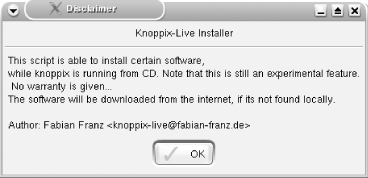 In the next window, you can choose from a variety of programs to install (Figure 3-8). The live installer automatically downloads the program you choose from the Internet, installs it, and creates a menu entry under K Menu Figure 3-8. The live installer supports a variety of programs from virus scanners to Flash plug-ins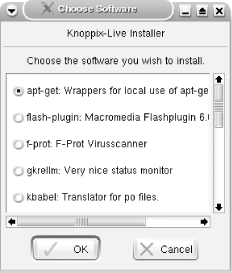 There are a number of programs you can install:
Figure 3-9. The Knoppix F-Prot GUI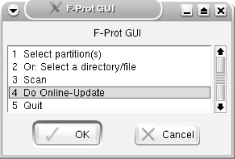
3.8.1 Caching and ReuseIf you've taken advantage of the installer, you've probably downloaded almost 30 MB of apt-get files and nearly 10 MB for tuxracer . The moment you reboot, everything is gone and must be downloaded again. There should be a way around it, and there iscaching. All programs installed by the live installer are stored in a local cache in ~/.knx-live-inst/cache/ . Each program is stored in its own AppDirs ( ~/Software/program_name ), and wrappers to all binaries are stored in ~/.dist . AppDirs is a concept taken from klik [Hack #30] . In ~/.dist/var/lib/apt/lists , you can find huge lists of installable packages. To store the cache and the lists, back up the ~/.knx-live-inst and ~/.dist/var/lib/apt/lists directories and restore them at the next boot, or use a persistent home directory [Hack #21] . With either method, all programs are run after a reboot as if nothing has happened . If you save your configuration [Hack #21] , you must reinstall those programs, but you won't have to download the programs again. Automatically reinstall programs from the cache with the noninteractive command-line mode for knx-live-inst.sh : knoppix@ttyp0[knoppix]$ knx-live-inst.sh -ni A short help page and a list of available programs appear. To demonstrate the noninteractive mode, install f-prot : knoppix@ttyp0[knoppix]$ knx-live-inst.sh -ni -s f-prot To automatically (re)install all programs that are available from the cache, type the following command: knoppix@ttyp0[knoppix]$ for i in ~/.knx-live-inst/cache/*; do knx-live-inst.sh -ni -s $(basename $i); done; 3.8.2 History of Live InstallationLive-installation scripts are relatively new to Knoppix. The first live installation script was for the Flash plug-in, and it was published just last year in March of 2003. The post can still be found at http://www.knoppix.net/forum/viewtopic.php?t=1495. Later, several other scripts were written that installed other programs. The similarities of these installers were analyzed and put into a command-line all-in-one program. Starting with Knoppix 3.4, this all-in-one program was enhanced by a GUI and is the live installer you can now use. Fabian Franz |


 KNOPPIX
 | < Day Day Up > |
