Backing Up Songs to CD
| < Day Day Up > |
| You've put a long of hard work into your recording, editing, mixing, and mastering, so be sure to make regular backups . When you back up your song to CD, you are backing up all of your audio and the VS internal data surrounding that song. This internal data includes things such as locators, scenes, markers, Automix data, track parameter and effect settings, and Undo history.
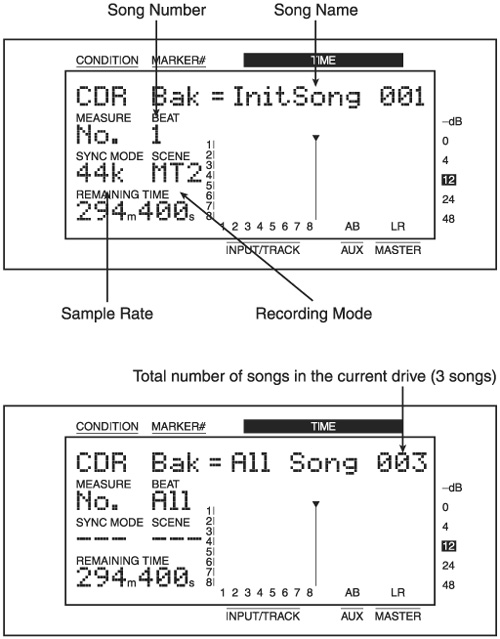
Backups can only be made of songs that reside on the internal hard drive. If you are using external SCSI hard drives , you'll first need to copy songs back to the internal hard drive before you can back them up. During the backup process, you can choose to back up either one song or all songs within a partition. This means if you had three songs on a particular partition, you could not back up Song 1 and Song 3 in a single step. Also, the backup works on a partition level, so there isn't any way to back up all songs in all partitions in a single step. When you create a backup, the CD is automatically finalized as part of the backup procedure. Additionally, since the backup contains your audio and the internal data in a proprietary format, this CD is not playable on a CD player, and the data cannot be read on a computer. To perform the backup, press the SONG Edit Condition button multiple times until you see SNG CD-R Backup? and then press YES. The VS will search for the SCSI CD burner, and it will briefly show some information about the CD burner in the display. Now you can choose which song to back up by using the jogwheel. If you want to back up all songs, turn the jogwheel counterclockwise until you see CDR Bak = All Song xxx, where xxx represents the total number of songs in the current partition. Figure 7.3 shows the display screen when selecting one song versus selecting all songs. Figure 7.3. When performing a backup, you can select one song or all songs At this point, if you press the YES button, the backup will begin. However, there are two additional settings that you can control, and these are only available if you press the If the amount of song data to back up is more than what will fit on a single CD, the VS will span the backup across multiple CDs.
|

| < Day Day Up > |
