Employee and Department Class
| I l @ ve RuBoard |
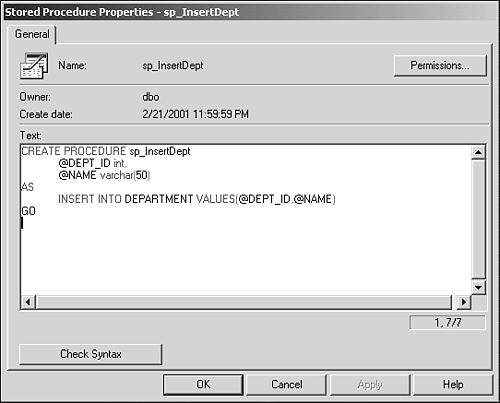
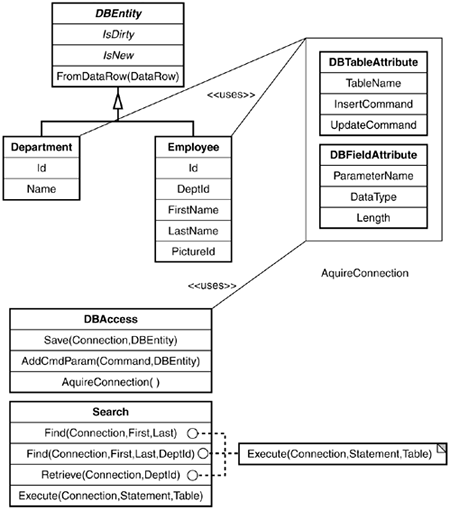
Employee and Department ClassWith the basic database framework in place, the next step is to create the Employee and Department classes and their respective stored procedures. To keep focused, the stored procedures will not implement any type of error checking or result codes. Instead, SQLServer constraints will be used to ensure that there are no primary or foreign key conflicts. Stored ProceduresThe Employee Browser will make use of only four simple stored procedures. SQL Server Enterprise Manager allows for viewing and creating user stored procedures from the management console. Figure 4.2.2 shows the stored procedure editor contained within SQL Server. Figure 4.2.2. SQL Server stored procedure editor. Using the editor, the following stored procedures need to be created: CREATE PROCEDURE sp_InsertDept @DEPT_ID int, @NAME varchar(50) AS INSERT INTO DEPARTMENT VALUES(@DEPT_ID,@NAME) GO CREATE PROCEDURE sp_UpdateDept @DEPT_ID int, @NAME varchar(50) AS UPDATE DEPARTMENT SET NAME = @NAME WHERE DEPT_ID = @DEPT_ID Go CREATE PROCEDURE sp_InsertEmployee @EMP_ID char(9), @DEPT_ID int, @FIRST_NAME varchar(25), @LAST_NAME varchar(25), @PIC_ID uniqueidentifier AS INSERT INTO EMPLOYEES VALUES(@EMP_ID,@DEPT_ID,@FIRST_NAME,@LAST_NAME,@PIC_ID) GO CREATE PROCEDURE sp_UpdateEmployee @EMP_ID char(9), @DEPT_ID int, @FIRST_NAME varchar(25), @LAST_NAME varchar(25), @PIC_ID uniqueidentifier AS UPDATE EMPLOYEE SET DEPT_ID = @DEPT_ID, FIRST_NAME= @FIRST_NAME, LAST_NAME = @LAST_NAME, PIC_ID = @PIC_ID WHERE EMP_ID = @EMP_ID GO These are about as easy as they come; no real work is taking place other than straightforward TSQL statements. If you need further information about TSQL, use the help within SQL Server to locate TSQL . The online help is very comprehensive and should address any questions you might have. Class ImplementationThe Employee and Department classes are nothing more than mapping models for the database information. As such, the only implementation code they provide is the properties that will be used when inserting or updating a particular record. Each class inherits from the abstract base class DBEntity and makes use of the custom attributes developed previously. Because the Department class is the smallest, it serves as a good starting point and its source appears in Listing 4.2.4. Listing 4.2.4 The Department Class 1: namespace Stingray.Data 2: { 3: using System; 4: using System.Data; 5: using System.Data.SqlClient; 6: 7: /// <summary> 8: /// Simple class for a Department 9: /// </summary> 10: [ 11: Stingray.Data.DBTableAttribute( 12: "DEPARTMENT", 13: InsertCommand="sp_InsertDept", 14: UpdateCommand="sp_UpdateDept" 15: ) 16: ] 17: public class Department : Stingray.Data.DBEntity { 18: 19: 20: /*****[Department Implementation]*****/ 21: private int m_Id; 22: private string m_Name; 23: 24: /// <summary> 25: /// Department Id Property 26: /// </summary> 27: [Stingray.Data.DBFieldAttribute("@DEPT_ID", DataType=SqlDbType.Int)] 28: public int Id { 29: get { return m_Id; } 30: set { 31: if( m_Id != (int)value) { 32: m_Id = value; 33: IsDirty = true; 34: } 35: } 36: } 37: 38: /// <summary> 39: /// Department Name property 40: /// </summary> 41: [Stingray.Data.DBFieldAttribute("@NAME", DataType=SqlDbType.VarChar)] 42: public string Name { 43: get { return m_Name; } 44: set { 45: if( m_Name != (string)value) { 46: m_Name = value; 47: IsDirty = true; 48: } 49: } 50: } 51: 52: /// <summary> 53: /// 54: /// </summary> 55: /// <param name="data"> </param> 56: public override bool FromDataRow( DataRow data ) { 57: this.m_Id = (int)data["DEPT_ID"]; 58: this.m_Name = (string)data["NAME"]; 59: return true; 60: } 61: 62: } 63: } The Department class represents a very simple mapping of data from the DEPARTMENT table into a class structure. The custom attributes are used by the DBAccess class to insert or update a DEPARTMENT record as needed. The same implementation style is used to create the Employee class in Listing 4.2.5. Listing 4.2.5 The Employee Class 1: namespace Stingray.Data 2: { 3: 4: using System; 5: using System.Data; 6: using System.Data.SqlClient; 7: 8: /// <summary> 9: /// The Employee Class 10: /// </summary> 11: /// 12: [ 13: Stingray.Data.DBTableAttribute( 14: "EMPLOYEE", 15: InsertCommand="sp_InsertEmployee", 16: UpdateCommand="sp_UpdateEmployee") 17: ] 18: public class Employee : DBEntity 19: { 20: 21: /*****[Data Members]*****/ 22: private string m_EmpId; //SSN 23: private int m_DeptId; 24: private string m_FirstName; 25: private string m_LastName; 26: private Guid m_PicId; 27: 28: /*****[Properties]*****/ 29: [ 30: Stingray.Data.DBFieldAttribute("@EMP_ID", DataType=SqlDbType.Char,Length=9) 31: ] 32: public string Id { 33: get { return m_EmpId; } 34: set { 35: if(m_EmpId != (string)value) { 36: m_EmpId = (string)value; 37: IsDirty = true; 38: } 39: } 40: } 41: 42: 43: [ 44: Stingray.Data.DBFieldAttribute("@DEPT_ID", DataType=SqlDbType.Int) 45: ] 46: public int DeptId { 47: get { return m_DeptId; } 48: set { 49: if( m_DeptId != (int)value ) { 50: m_DeptId = (int)value; 51: IsDirty = true; 52: } 53: } 54: } 55: 56: [ 57: Stingray.Data.DBFieldAttribute("@FIRST_NAME", DataType=SqlDbType.VarChar) 58: ] 59: public string FirstName { 60: get { return m_FirstName; } 61: set { 62: if(m_FirstName != (string)value) { 63: m_FirstName = (string)value; 64: IsDirty = true; 65: } 66: } 67: } 68: 69: 70: [ 71: Stingray.Data.DBFieldAttribute("@LAST_NAME", DataType=SqlDbType.VarChar) 72: ] 73: public string LastName { 74: get { return m_LastName; } 75: set { 76: if( m_LastName != (string)value) { 77: m_LastName = (string)value; 78: IsDirty = true; 79: } 80: } 81: } 82: 83: [ 84: Stingray.Data.DBFieldAttribute("@PIC_ID", TestingNow that the basic entities are in place, a small test program can be devised to ensure that the code is working as expected. The test program in Listing 4.2.6 also serves as a code example of how to use the classes constructed so far. Listing 4.2.6 Test Example 1: namespace TestBed 2: { 3: using System; 4: using System.Data; 5: using System.Data.SqlClient; 6: using Stingray.Data; 7: using System.Reflection; 8: 9: 10: 11: public class DBTest 12: { 13: 14: public static int Main(string[] args) 15: { 16: 17: SqlConnection dbCon = 18: new SqlConnection( 19: "user id=sa;password=;initial catalog=Stingray; data If all goes well, the test bed example should populate the DEPARTMENT table and display the select results. Also, using SQL Server Query Analyzer, a select statement can be executed to return all rows with the DEPARTMENT table, as shown in Figure 4.2.3. Figure 4.2.3. New records in the DEPARTMENT table. Simple Search SupportOne of the requirements for the Employee database is the ability to search for a particular employee. The search should allow for searching by name, name and department, or to list all employees in a given department. Instead of using a custom attribute, a search class will be created that returns results as a System.Data.DataSet class. The Search class will only provide static methods in the same vein as the DBAccess class. One reason for doing so is that neither class requires any state information so the added overhead of object allocation can be avoided. Our Search class will provide two methods: Find with one overload and Retrieve . The Find method will be used to locate an individual employee, but the method makes use of the SQL LIKE predicate. As such, any wild card matches will be returned. The overload Find method allows for a department ID to be specified and uses the same LIKE predicate for the name matching. The final method, Retrieve , takes a department Id and returns all employees from that department. Listing 4.2.7 contains the source for the Search class. Listing 4.2.7 The Search Class 1: namespace Stingray.Data 2: { 3: using System; 4: using System.Data; 5: using System.Data.SqlClient; 6: 7: /// <summary> 8: /// Basic search class 9: /// </summary> 10: public class Search 11: { 12: 13: /// <summary> 14: /// Try and locate an employee 15: /// </summary> 16: /// <param name="ActiveConnection"> </param> 17: /// <param name="FirstName"> </param> 18: /// <param name="LastName"> </param> 19: public static DataSet Find( SqlConnection ActiveConnection, 20: string FirstName, 21: string LastName ) { 22: string SelectStmt = 23: string.Format( 24: "SELECT * FROM EMPLOYEE WHERE FIRST_NAME LIKE '{ 0} %' and LAST_NAME The implementation for Search is fairly straightforward and does not really involve any heavy-duty database sorcery. Each method requires an SqlConnection object, which is assumed to be connected to the database. The return type from each method is a DataSet object. In .NET, a DataSet object is very much a generic data container and can be used in data classes such as the SqlAdapter class. It is important not to draw a parallel between a DataSet and a RecordSet . In fact, a DataSet can be used to hold multiple tables where as a RecordSet contains records from a single result set. As with the previous database classes, a small test application will give a better understanding of how to make use of the Search class (see Listing 4.2.8). Listing 4.2.8 Test 2 1: namespace TestBed 2: { 3: using System; 4: using System.Data; 5: using System.Data.SqlClient; 6: using Stingray.Data; 7: 8: public class TestBed2 9: { 10: public static void Main( ) 11: { 12: SqlConnection dbCon = 13: new SqlConnection( 14: "user id=sa;password=;initial catalog=Stingray; data With the implementation and testing of the Search class, the data layer is complete. Figure 4.2.13 illustrates the development effort to this point with a pseudo UML-style diagram. The next step in developing the Employee database is to create ASP.NET pagelets and aspx pages for displaying and editing employee information along with a search page. Figure 4.2.4. Current object model. |
 DataType=SqlDbType.UniqueIdentifier) 85: ] 86: public Guid PictureId { 87: get { return m_PicId; } 88: set { 89: if( m_PicId != (Guid)value) { 90: m_PicId = new Guid( ((Guid)value).ToString( ) ); 91: IsDirty = true; 92: } 93: } 94: } 95: 96: /// <summary> 97: /// Create from a row of data 98: /// </summary> 99: /// <param name="data"> </param> 100: public override bool FromDataRow( DataRow data ) { 101: this.Id = (string)data["EMP_ID"]; 102: this.DeptId = (int)data["DEPT_ID"]; 103: this.FirstName = (string)data["FIRST_NAME"]; 104: this.LastName = (string)data["LAST_NAME"]; 105: if( data["PIC_ID"].ToString() != "") 106: this.m_PicId = new Guid( data["PIC_ID"].ToString( ) ); 107: 108: this.IsNew = false; 109: return true; 110: } 111: 112: 113: /*****[Constructor(s)]*****/ 114: public Employee() { 115: //What to do?? 116: IsNew = true; 117: IsDirty = false; 118: } 119: 120: } 121: }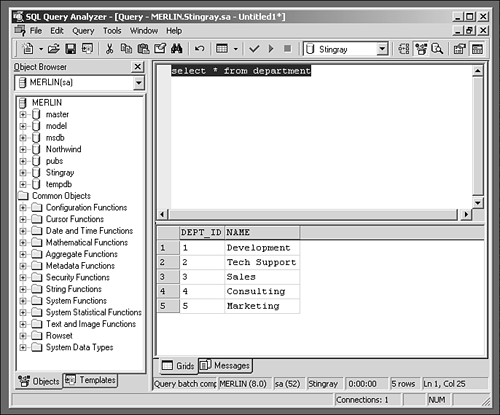
| I l @ ve RuBoard |

EAN: 2147483647
Pages: 204