The Internet Protocol (IP)
| Although the Internet protocol is the second component of the TCP/IP acronym, it is perhaps the more important of the two. IP is the basic protocol in the suite that provides the information used for getting packets from one place to another. IP provides a connectionless, unacknowledged network service, and also provides the addressing mechanism used by TCP/IP. The following main features distinguish IP from other protocols:
IP Is a Connectionless Transport ProtocolIP is connectionless ”each packet is separate from the others. From the IP standpoint, each packet is unrelated to any other packet. IP does not contact the destination computer or network device and set up a route that will be used to send a stream of data. Instead, it just accepts data from a higher-level protocol, such as TCP or UDP, formats a package that contains addressing information, and sends the packet on its way using the underlying physical network architecture. The information found in the IP datagram header is used on a hop-by-hop basis to route the datagram to its destination. When a higher-level protocol uses IP to deliver a series of information packets, there is no guarantee that each packet created by the IP layer will take the same route to get to the eventual destination. It is quite possible for a series of packets created by a higher-level protocol to reach the destination in a sequence out of order from how they were transmitted. IP doesn't even care whether packets arrive at their destination. That function is left to the protocol that uses IP for delivery. This doesn't mean that IP is a useless protocol, however ”it just means that the higher-level protocols (such as TCP) that use IP need to provide for some kind of error checking, packet sequencing, and acknowledgment. You'll learn more about this subject in the section "The Transmission Control Protocol (TCP)," later in the chapter, when we talk about how TCP sets up a connection and acknowledges sent and received packets. IP Is an Unacknowledged ProtocolIP does not check to see whether the datagrams it sends out ever make it to their destination. It just formats the information into a packet and sends it out on the wire. Thus, it is considered to be an unacknowledged protocol. The overhead involved in acknowledging receipt of a datagram can be significant. Leaving out an acknowledgment mechanism enables IP to be used by other protocols and applications that do not require this functionality, and thus eliminates the overhead associated with acknowledgments. Applications and protocols that do need to know that a datagram has been successfully delivered will not use the IP protocol. Instead, they can implement the acknowledgment mechanism found in the TCP protocol. One way of thinking about this relationship between IP and upper-level protocols is to consider how the postal service works. If you send a letter through the mail, you have no way to know when ”or even whether ”the letter was correctly delivered. Unless you pay the extra money to get a signed receipt of delivery returned to you, you can't be sure that the letter ever reached its destination. IP Is an Unreliable ProtocolBecause IP is connectionless and because it does not check to see whether packets arrive at their destination, and because packets may arrive out of order, IP is considered an unreliable protocol. Or, to put it another way, it's a best-effort delivery service. IP doesn't perform routing functions (that task is left up to routers and routing protocols), and IP can't guarantee what route a datagram will take through the network. Another reason it is considered unreliable is that IP implements a Time to Live (TTL) value that limits the number of network routers or host computers through which a datagram can travel. When this limit is reached, the datagram is simply discarded. Because no acknowledgment mechanism is built into IP, it is unaware of this kind of situation. The reason for this is to solve problems associated with routing. For example, it's quite possible for an administrator to configure a router incorrectly, causing an endless loop to be created in a network. If it were not for the TTL value, the packet could continue to pass from one router to another, and another, forever. The TTL value is used mainly to prevent just this type of situation from occurring. IP Provides the Address Space for the NetworkAddressing is one of the most important functions implemented in the IP layer. In earlier chapters you learned that network adapter cards use a burned-in address, usually called a Media Access Control (MAC) address. These addresses are determined by the manufacturer of the network card, and the address space created is considered to be a "flat" address space. That is, there is no organization provided by MAC addresses that can be used to efficiently route datagrams from one system or network to another. On an Ethernet card, for example, a MAC address is composed of two parts . The first part of the MAC address identifies the manufacturer of the network card. The remaining octets (or bytes) are assigned, usually in a serial fashion, to the cards the manufacturer produces. The MAC address assigned to each adapter is unique and is made up of a 6-byte address (48 bits), which is usually expressed in hexadecimal notation to make it easier to write. For example, 00-80-C8-EA-AA-7E is much easier to write than trying to express the same address in binary, which would be a string of zeros and ones 48 bits long (in this example, 000000001000000011001000111010101010101001110011). IP addresses are also made up of two components : a network address and a host address. By allowing a network address, it is possible to create a hierarchy that allows for an efficient routing mechanism when sending data to other networks. Whereas a particular network might consist of systems that have network adapters from multiple vendors , and thus have MAC addresses that are seemingly random numbers , IP addresses are organized into networks. Because of this, routers don't have to keep hundreds of millions of MAC addresses in a memory cache to deliver datagrams. Instead, they just need a table of addresses that tells them how to best route a datagram to the network on which the host system resides. Just What Does IP Do?IP takes the data from the Host-to-Host layer (as shown earlier in Figure 25.1) and fragments the data into smaller packets (or datagrams) that can be transferred through the network. On the receiving end, IP then reassembles these packets and passes them up the protocol stack to the higher-level protocol that is using IP. To get each packet delivered, IP places the source and destination IP addresses into the packet headers. IP also performs a checksum calculation on the header information to ensure its validity. Note, however, that IP does not perform this function on the data portion of the packet.
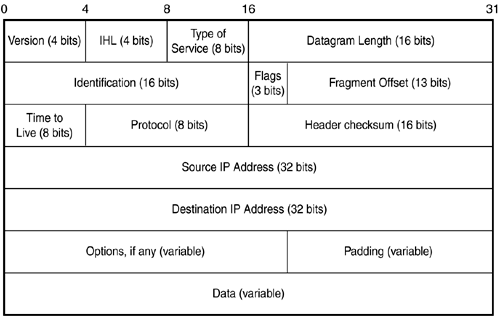
As already noted, TCP/IP allows for networks made up of different underlying technologies to interoperate . While one network might use the Ethernet 802 frame format, another might use FDDI. Each of these lower-level frames has its own particular header that contains information needed by that technology to send frames through the physical network media. At this lower level in the protocol stack, the IP packet rides in the data portion of the frame. After IP adds its header information to the message it receives from a higher-level protocol, and creates a packet of the appropriate size, it passes the packet to the Network Access layer, which wraps the IP packet into an Ethernet frame, for example. At the receiving end the Ethernet frame header information is stripped off, and the IP datagram is passed up the stack to be handled by the IP protocol. Similarly, the IP header information is stripped off by the higher-level protocols that use IP, such as TCP or UDP. Examining IP Datagram Header InformationIn Figure 25.3 you can see the format of an IP packet. In the IP header you will find the addressing information that is used by routers and other network devices to deliver the packet to its eventual destination. Figure 25.3. The IP header contains information concerning addressing and routing the packet. These are the header fields of the IP packet:
The Options Field and Source RoutingThe Options field is optional. Source routing (which is discussed in Chapter 49, "Firewalls"), for example, can be implemented using this field. Although IP usually lets other protocols make routing decisions (that is, the path the packet takes through the network), in most cases it is possible to specify a list of devices for the route instead. As shown in Table 25.1, IP can use two options for routing purposes. These are loose source routing (option number 3) and strict source routing (option number 9). Table 25.1. Option Classes and Option Numbers
Hackers can use source routing to force a packet to return to their computer, using a predefined route. Using source routing with TCP/IP should be discouraged. For more information, see Chapter 49. Each of these techniques for source routing provides a list of addresses that the packet must pass through. Loose source routing uses this list but doesn't necessarily use it in all cases ”other routes can be used to get to each machine addressed in the list. When strict source routing is used, however, the list must be followed exactly; if it cannot, the packet will be discarded. IP AddressingAlthough most people think of IP as the transport protocol used by higher-level protocols, one of its more important functions is to provide the address space used by the TCP/IP suite. Earlier in this chapter we discussed the difficulty of having to create a routing table that consists of hundreds of millions of actual hardware addresses, providing for no built-in organization capability. IP addresses are used for just this purpose: to provide a hierarchical address space for networks. Each network adapter has a hard-coded network address that is 48 bits long. When data packets are sent out on the wire of the local area network (LAN) segment, this MAC address is used for the source and destination addresses that are embedded in the Ethernet frame, which encapsulates the actual IP packet. After an IP packet reaches the destination network, the router sends the packet out onto the network segment that contains the destination. The MAC address is used from there on to deliver the data. On a LAN segment, MAC addresses can be used efficiently because most LAN segments consist of just a few hundred or a few thousand host computers. This number of addresses can easily be stored in network devices, such as bridges or switches. IP Addresses Make Routing PossibleBecause the IP address is composed of two components, the network address and the host computer address, it is a simple matter to construct routers that use the network portion of the address to route packets to their destination networks. After the packet has arrived at a router on the destination network, the host portion of the address is used to locate the destination computer. Without the capability to designate a network address, as well as a host address, the hierarchical address space could not exist, and routing would require routing tables that literally would have to store every address of every computer or device on the network. In such a scenario the IP address would have no advantage over the MAC address. As it stands, IP gets a packet to the destination network by limiting routing tables to storing only network addresses allowing routing to be a simple and more efficient process. IP addresses allow you to organize a collection of networks in a logical hierarchical fashion. There are three kinds of IP addresses:
Additionally, there are address classes, which are used mainly to define the size of the network and host portions of the IP address. IP Address ClassesThe Internet is a collection of networks that are all joined together by routers to create a larger network. The name itself says it all. The Internet Protocol (IP) makes this possible because it allows for addressing each network that is attached to the Internet, as well as identifying the host computers that reside on each network. When packets are routed through the Internet (or through a private corporate network that uses TCP/IP ”an intranet), the IP address is used to get the data to the destination network. When the data packet is delivered to a router on the destination network, the actual hardware address (MAC address) of the computer is used to deliver the packet to the correct computer. This is done by taking the host portion of the IP address and consulting a table that maps hardware addresses to IP host addresses for the local network. If no match is found, the Address Resolution Protocol (ARP) is used on the local wire to find out the hardware address, and it is added to the table. The important factor here is that it's possible to assign an address both to networks and to the individual hosts.
An IP address is 4 bytes long (32 bits). Whereas MAC addresses usually are expressed in hexadecimal notation, IP addresses usually are written using dotted -decimal notation. Each byte of the entire address is converted to its decimal representation, and then the 4 bytes of the address are separated by periods to make it easier to remember. As you can see in Table 25.2, the decimal values are much easier to remember than their binary equivalents. Table 25.2. IP Addresses Are Expressed in Decimal Notation
As you can see, it is much easier to write the address in dotted-decimal notation (150.204.200.27) than to use the binary equivalent (10010110110011001100100000011011).
Because IP addresses are used to route a packet through a collection of separate networks, it is important to know what part of the IP address is used as the network address and what part is used for the host computer's address. IP addresses are divided into three major classes (A, B, and C) and two less familiar ones (D and E). Each class uses a different portion of the IP address bits to identify the network. There is a need for classifying networks because there is a need to be able to create networks of different sizes. Whereas a small LAN might have only a few computers or a few hundred, larger networks can have thousands or more networked computers. The class system of IP addresses is accomplished by using a different number of bits of the total address to identify the network and host portions of the IP address. Additionally, the first few bits of the binary address are used to indicate which class an IP address belongs to. The total number of bits available for addressing is always the same: 32 bits. Because the number of bits used to identify the network varies from one class to another, it should be obvious that the number of bits remaining to use for the host computer part of the address will vary from one class to another also. This means that some classes will have the capability to identify more networks than others. Conversely, some will have the capability to identify more computers on each network. The first 4 bits of the address tell you what class an address is a member of. In Table 25.3, you can see the IP address classes along with the bit values for the first 4 bits. The bit positions that are marked with an "x" in this table indicate that this value makes no difference in the determination of IP address class. Table 25.3. The First 4 Bits of the IP Address Determine the Class of the Address
Class A AddressesAs shown in Table 25.3, any IP address that has a zero in the first bit position is a Class A address. The values for the remaining bits make no difference. Also, you can see that any address that has 10 for the first 2 bits of the address is a Class B address, and so on. Remember that these are bit values, and as such are expressed in binary. These are not the decimal values of the IP address when it is expressed in dotted-decimal notation. Class A addresses range from all zeros (binary) to a binary value of 0 in the first position followed by seven 1 bits. Converting each byte of the address into decimal shows that Class A addresses range from 0.0.0.0 to 127.255.255.255, when expressed in the standard dotted-decimal notation.
Keeping in mind that the class system for IP addresses uses a different number of bits for the network portion of the address, the Class A range of networks is the smallest. That is because Class A addresses use only the first byte of the address to identify the network. The rest of the address bits are used to identify a computer on a Class A network. Because the first bit of the first byte of the address is always zero, this leaves only 7 bits that can be used to create a network address. Because only 7 bits are available, there can be only 127 network addresses (binary 01111111 = 127 decimal) in a Class A network. It is not possible to have 128 network addresses in this class because, to express 128 in binary, the value would be 10000000, which would indicate a Class B address. However, Class A networks can contain the largest number of host computers or devices on each network, because they use the remaining 3 bytes to create the host portion of the IP address. Three bytes can store a value, in decimal, of up to 16,777,215 (that's 24 bits all set to 1 in binary). Counting zero as a possibility (0 “16,777,215), this means that a total of 16,777,216 (2 to the 24th power) addresses can be expressed using 3 bytes. To summarize, there can be a total of 127 Class A networks, and each network can have up to 16,777,216 unique addresses for computers on the network. The range of addresses for Class A networks is from 0.0.0.0 to 127.255.255.255. When you see an address that falls in this range, you can be sure that it is a Class A address. Class B AddressesThe first 2 bits of an IP address need to be examined to determine whether it is a Class B address. If the first 2 bits of the address are set to 10, the address belongs in this class. Class B addresses range from 1 followed by 31 zeros to 10 followed by 30 ones. If you convert this to the standard dotted-decimal notation, this is 128.0.0.0 to 191.255.255.255. In binary, the decimal value of 128 decimal is 10000000. The decimal value of 191 translates to 10111111 in binary. Both of these values in binary have 10 as the first two digits, which places them in the Class B IP address space. Because the first 2 bytes of the Class B address are used to address the network, only 2 remaining bytes can be used for host computer addresses. If you do the calculations, you'll find that there can be up to 16,384 possible network addresses in this class, ranging from 128.0 to 191.255 in the first 2 bytes. There can be 65,536 (2 to the 16th power) individual computers on each Class B network. You might wonder why the number of network addresses and the number of host addresses aren't the same in the Class B address range, because they both use 2 bytes. It's simple: Just remember that the network portion of the Class B address always has 1 for the first bit position and 0 for the second bit position. That zero in the second position is what keeps the number of network addresses less than the number of host computer addresses. In other words, the largest host address you can have in a Class B network, expressed in binary, is 10111111, which is 191 in decimal. Because there is no restriction on the value of the first two digits of the host portion of the address, it is possible to have the host portion set to all ones, giving a string of 16 ones, which would be 255.255 in dotted-decimal notation. Class C AddressesThe Class C address range always has the first 3 bits set to 110. If you convert this to decimal, this means that a Class C network address can range from 192.0.0.0 to 223.255.255.255. In this class the first 3 bytes are used for the network part of the address, and only a single byte is left to create host addresses. Again, doing the math (use that Windows calculator!), you can see that there can be up to 2,097,152 Class C networks. Each Class C network can have up to 256 host computers (0 “255). This allows for a large number of Class C networks, each with only a small number of computers. Other Address ClassesThe first three address classes are those used for standard IP addresses. Class D and E addresses are used for different purposes. The Class D address range is reserved for multicast group use. Multicasting is the process of sending a network packet to more than one host computer. The Class D address range, in decimal, is from 224.0.0.0 to 239.255.255.255. No specific bytes in a Class D address are used to identify the network or host portion of the address. This means that a total of 268,435,456 possible unique Class D addresses can be created. Finally, Class E addresses can be identified by looking at the first 4 bits of the IP address. If you see four 1s at the start of the address (in binary), you can be sure you have a Class E address. This class ranges from 240.0.0.0 to 255.255.255.255, which is the maximum value you can specify in binary when using only 32 bits. Class E addresses are reserved for future use and are not normally seen on most networks that interconnect through the Internet.
Up to this point we have identified the possible ranges that could be used to create IP addresses in the various IP address classes. There are, however, some exceptions that should be noted. As previously discussed, an address used to uniquely identify a computer on the Internet is known as a unicast address. Several exceptions take away from the total number of addresses that are possible in any of the address classes. For example, any address that begins with 127 for the first byte is not a valid address outside the local host computer. The address 127.0.0.1 (which falls in the Class A address range) is commonly called a loopback address and is normally used for testing the local TCP/IP stack to determine whether it is configured and functioning correctly. If you use the ping command, for example, with this address, the packet never actually leaves the local network adapter to be transmitted on the network. The packet simply travels down through the protocol stack and back up again to verify that the local computer is properly configured. You can use this address to test other programs. For example, you can Telnet to the loopback address to find out whether the Telnet program is working on your computer. This assumes that you have a Telnet server running on the computer. Other exceptions include the values of 0 and 255. When used in the network portion of an address, zeros imply the current network. For example, the address 140.176.0 is the address of a Class B network, and the value of 193.120.111.0 is the address of a Class C address. The number 255 is used in an address to specify a broadcast message. A broadcast message is sent out only once but doesn't address a single host as the destination. Instead, such a packet can be received by more than one host, hence the name "broadcast." Broadcasts can be used to send a packet to all computers on a particular network or subnet. The address 140.176.255.255 would be received by all hosts in the network defined by 140.176.0. After subtracting these special cases, you can see in Table 25.4 the actual number of addresses for Classes A through C that are available for network addressing purposes. Table 25.4. IP Addresses Available for Use
There is another exception to usable addresses that fall within the IP address space. This is not dictated by an RFC or enforced by TCP/IP software. Instead, it is a convention followed by many network administrators to make it easy to identify routers. Typically you will find that an IP address that has as its last octet the value of 254 is a router. When you stick to this convention, it is easy to remember the default gateway when you are setting up a computer. It's the computer's address, with 254 used as the last octet. Subnetting Made Simple!The IP address space, although large, is still limited when you think of the number of networked computers on the Internet today. For a business entity (or an Internet service provider) to create more than one network, it would appear that more than one range of addresses would be needed. A method of addressing called subnetting was devised that allows a single contiguous address space to be further divided into smaller units called subnets . If you take a Class B address, for example, you can have as many as 65,534 host computers on one network. That's a lot of host computers! There aren't many companies or other entities in the world today that need to have that many hosts on a single network. Subnetting is a technique that can be used to divide a larger address space into several smaller networks called subnets. So far, you've learned about using part of the IP address to identify the network and using part of the address to identify a host computer. By applying what is called a subnet mask, it is possible to " borrow " bits from the host portion of the IP address and create subnets. A subnet mask is also a 32-bit binary value, just like an IP address. However, it's not an address, but instead is a string of bits used to identify which part of the total IP address is to be used to identify the network and the subnet. The subnet mask is expressed in dotted-decimal format just like an IP address. Its purpose is to "mask out" the portion of the IP address that specifies the network and subnet parts of the address.
Because subnet masks are now required for all IP addresses, the A, B, and C address classes that were just described all have a specific mask associated with them. The Class A address mask is 255.0.0.0. When expressed as a binary value, 255 is equal to a string of eight 1s. Thus, 255.0.0.0 would be 11111111000000000000000000000000. Using Boolean logic, this binary subnet mask can be used with the AND operator to mask out (or identify) the network and subnet portion of the IP address. Using the AND operator, the TRUE result will be obtained only when both arguments are TRUE . If you use the number 1 to represent TRUE and use 0 to represent FALSE , it's easy for a computer or a router to apply the mask to the IP address to obtain the network portion of the address. Table 25.5 shows how the final values are obtained. Table 25.5. Boolean Logic Is Used for the Subnet Mask
A Class A address, as you can see, will have a subnet mask of 255.0.0.0. The only portion of the IP address that is used with this mask to be the network address is those bits contained in the first byte (11111111 in binary). Similarly, a subnet mask for a Class B address would be 255.255.0.0 (11111111111111110000000000000000 in binary), and for a Class C address it would be 255.255.255.0 (a lot of ones!). Because we've already set aside certain values at the beginning of an IP address to identify what class the address belongs to, what value can be gained by using subnet masks? Each subnet mask just discussed blocks out only the portion of the IP address that the particular class has already set aside to be used as a network address. The value comes by using part of the host component of the IP address to create a longer network address that consists of the classful network address plus a subnet address. By modifying the subnet mask value, we can mask out additional bits that make up part of the host portion of the address, and thus we can break a large address space into smaller components. To put it simply, subnetting becomes useful when you use it to take a network address space and further divide it into separate subnets.
If you use a subnet mask of 255.255.255.128, for example, and convert it to binary, you can see that a Class C address can be divided into two subnets. In binary, the decimal value of 128 is 10000000. This means that a single bit is used to create two distinct subnets. If you were to use this mask with a network address of 192.113.255, you would end up with one subnet with host addresses ranging from 192.113.255.1 to 192.113.255.128 and a second subnet with host addresses ranging from 192.113.255.129 to 192.113.255.254. (In this example, addresses that end in all zeros or all ones are not shown because those addresses are special cases and are generally not allowed as host addresses ”192.113.255.0, for example.) To take subnetting one step further, let's use a mask of 255.255.255.192. If you take the decimal value of 192 and convert it to binary, you get 11000000. Applying this subnet mask to a Class C network address space yields four subnets. Each subnet using the remaining bits of the host address can have up to 62 host computers. The reason you have four subnets is that the first 2 bits of the last byte of the subnet mask are 11. Because the first 2 bits are ones, there are four possible subnet values you can express using these two digits (11 in binary equals 3 ”if you count zero, you have four values that can be expressed using 2 bits). When this mask is applied to a byte, there are only 6 bits remaining to be used for host addresses. Because you cannot use a host address of all ones or all zeros, this means that although the largest number you can store in 6 bits is 63, you must subtract 2 from this value. This leaves only 1 “62 for host addresses on these subnets.
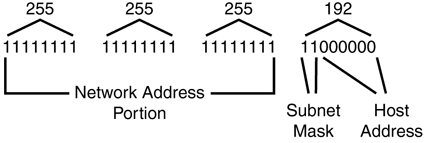
In Figure 25.4, you can see that the IP address now consists of three parts: the network address, the subnet address, and the host address. Figure 25.4. A subnet mask can be used to identify the network address, subnet address, and host portions of the IP address. The first thing you should do when preparing to subnet an address space is decide how many host addresses will be needed on each subnet. Then convert this number to its binary value. Looking at the binary value, you can see how many bits you will need for the host portion of the address space. If you then subtract that value from the number of bits available (which is 8 if you're subnetting the last byte of a Class C address), you can calculate what the decimal equivalent would be for a binary number that contains that number of leftmost bits set to one. Suppose you wanted to create subnets that would allow you to put up to 30 computers on each subnet. First, determine what 30 is when converted to binary: 11110. You can see that it takes 5 bits to represent the decimal value of 30 in binary. After you subtract this from 8, you have left only 3 bits that can be "borrowed" from the Class C host part of the address (8 “ 5 = 3). In binary, this mask would be 11100000. If you convert this value to decimal, you get 224. The next question to ask is how many subnets can you create using this mask? Because only 3 bits are left, just figure out the largest number you can express using 3 bits in binary. You'll come up with a value of all 1s (111), which translates to 7 in decimal. Therefore, you can have seven possible subnets, or eight if you include zero as a possibility. After you've calculated what your subnet mask needs to be, you'll need to calculate what the actual host addresses must be for each subnet. The first subnet address would be 000. Because the IP address is expressed in dotted decimal notation, calculate how many addresses you can store in an 8-bit binary value that always begins with 000, and then translate that to decimal: 00000001 to 00011110, which is 1 “30 in decimal.
Continuing the process, the second subnet address would be 001, and the third would be 011. The range of host addresses that could be created for a subnet value of 001 is 00100001 to 00111110, which is 33 “62 in decimal. The range of hosts on the second subnet would be from 192.113.255.33 to 192.113.255.62. Simply continue this process and you'll be able to figure out the correct subnet addresses, based on the mask you've chosen . It's possible to further divide the Class C address space by using up to 6 bits for the subnet mask, but this would leave only two usable host addresses and is not very practical. However, it can be done!
Classless Interdomain Routing Notation and SupernettingAs we discussed earlier in this chapter, the system of classifying IP addresses (A, B, C) worked well when the Internet was much smaller. The class system and subnetting is still widely used on local network routers. However, on the Internet backbone routers, a system called Classless Interdomain Routing (CIDR) is the method used to determine where to route a packet. This technique is also referred to as supernetting . CIDR can be considered a technique that uses a subnet mask that ignores the traditional IP class categories. Why is CIDR needed? When the IP address class system was introduced, it was simple for routers to use the first byte of the IP address to figure out the network number, and thus make routing an easy task. For example, for an IP address of 140.176.232.333, the router would recognize that 140 falls in the Class B address range, so the network number would be 140.176.0. A quick glance at the routing table was all that was necessary to determine the next hop to which a packet should be routed to get to its network. As the Internet continued to grow (or explode, as some might say), the huge number of Class B and Class C networks that were being added meant that routing tables on Internet backbone routers were also growing at a fast rate. Eventually, there would come a point where it would be impossible to efficiently route packets if routing tables continued to grow. CIDR allows for address aggregation. That is, a single entry in a routing table can represent many lower-level network addresses. Another reason why CIDR was needed is that much of the classful address space is wasted . This happens at both ends of the spectrum. Consider a small network at the low end, with a total of 254 usable addresses in a Class C address block. If the owner of that address space has a network with only 50 or 100 computers, that means that more than half of the available host addresses are essentially lost to the Internet. At the high end, a Class A network has a total of 16,777,216 possible host addresses. How many organizations need 16 million host addresses? By dropping the address class constraints, and instead using a subnet mask to specify any number of contiguous bits of the IP address as the network address, it is possible to carve up the total 32-bit address space into finer blocks that can be allocated more efficiently.
CIDR uses a specific notation to indicate which part of the IP address is the network portion and which is the host portion. The CIDR notation syntax is the network address followed by / # , where # is a number indicating how many bits of the address represent the network address. This / # is commonly called the network prefix . Table 25.6 shows the network prefix values for A, B, and C network classes. Table 25.6. CIDR Network Prefix Notation for A, B, and C IP Address Classes
However, because CIDR no longer recognizes classes, it's quite possible to have a network address like 140.176.123.0/24. Thus, while 140 would indicate that only 16 bits are used as the network portion of the address when using classful addressing, the /24 notation would specify that the first 24 bits are used, and the remaining 8 bits would be used for host addressing. Using the /24 notation allows the former class B address space to be allocated in smaller blocks than the class system allows. In Table 25.7 you can see how this system allows for networks that range in size from 32 hosts to more than 500,000 hosts. The middle column shows the equivalent of a Class C network address space that the CIDR prefix creates, and the last column shows the number of hosts that would exist in the network. Table 25.7. Use of CIDR Network Prefix Notations
In Table 25.7, note that I've expressed the Class C equivalent networks that can be created. However, when using the /16 prefix, you get 256 Class C size networks, which is the same thing as a single Class B network. To continue this train of thought, a /15 prefix will allow you to create two Class B “ sized networks, and so on. Using CIDR, blocks of addresses can be allocated to ISPs that in turn subdivide the address space efficiently when they create address spaces for clients. One drawback is that a network that is composed completely of CIDR routing would require, in order to operate most efficiently, that addresses remain with the ISP under which a particular block is owned. This means that if your company decides to move to a different ISP, you would most likely have to obtain a new address block and therefore have to reconfigure your network addresses. If you use Network Address Translation and a private address space on your internal corporate network, this would be only a minimal problem. Another problem with CIDR is that some host clients might not support it. That is, if the TCP/IP stack recognizes the different classes, it might not operate if you try to configure it using a subnet mask that does not match the traditional Class A, B, or C values. Again, because most routers do support this capability, you can solve this problem by using the CIDR addresses for your routers and using NAT and a private address space for the internal network.
|

EAN: 2147483647
Pages: 434