Design Elements for Perimeter Security
|
| One of the reasons we have so many choices when architecting network perimeter defense is because resources differ in the sensitivity of their information and the likelihood that they will be successfully exploited. For example, a web server running Apache and hosting static HTML pages is generally subject to fewer risk factors than an Oracle database storing order information for the organization's customers.
In a world where we are free to permute security components in any imaginable manner, some design elements are seen more often than others. We cover some of the more basic patterns here to put you in the right frame of mind, and we discuss more specialized architectures in subsequent chapters. Firewall and RouterThe firewall and the router are two of the most common perimeter security components. In Parts I and II of this book, we described different types of these devices and explained what roles they play in defending the network. In this section, we concentrate on the relationship between the router and the firewall and go over several configurations you are likely to encounter when setting up and securing your network. Figure 12.1 illustrates one of the most common ways to deploy a router and a firewall together. The Corporate Subnet hosts "private" systems used by the organization's internal users, and the Screened Subnet hosts "public" servers that need to be accessible from the Internet. In this scenario, no internal server can be accessed from the Internet; for example, instead of opening TCP port 25 on the firewall to the internal mail server, we route SMTP traffic through mail relay that is hosted in the Screened Subnet. Figure 12.1. Deploy a router with a firewall behind it.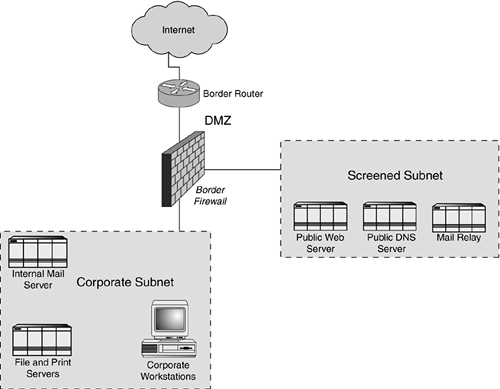 Basic FilteringIn the configuration described previously, the router is responsible for performing the routing functions it was designed forit links the site to the Internet. It often makes sense to use the router's packet-filtering capabilities to filter out some of the "noise" that we might not care to see in the firewall's logs or that we want to stop at the very edge of the network. We described a similar setup in Chapter 2, "Packet Filtering," and Chapter 6, "The Role of a Router," where the router was configured to perform basic egress and ingress filtering as well as to disable dangerous routing options, control the flow of ICMP messages in and out of our network, and so on. Generally, we do not want to block too much at the router because in this configuration, most of the monitoring efforts will be focused on the firewall. By blocking the majority of network traffic at the router, we might not have a complete view of the denied packets in the firewall's logs, and correlating events that are logged at the router and the firewall might be too draining for many organizations. Access ControlIn the scenario described previously, the firewall has primary access control responsibilities. This is where we will implement the policy of blocking all traffic by default and explicitly allowing only those protocols our business requires. In this case, the firewall becomes the manifestation of the business rules the security policy defines. By this point of the design, you should have a good understanding of what your business needs are (see the first half of this chapter if you are not sure), so implementing the firewall rule set should not be too daunting of a task. Note Even if your hosts are located in a screened subnet behind a firewall, they should be hardened to withstand attacks that the firewall might let through or that might be launched if the firewall is bypassed. The extent to which you need to tighten the systems' configuration depends on the sensitivity of their data and the likelihood that they will be compromised. Note that in some cases, placing systems onto the Screened Subnet might not be appropriate. Perhaps this is because the firewall is too much of a bottleneck, or because the system is not trusted to be located on the same subnet as the servers in the Screened Subnet. In this case, you might consider placing this system into the DMZ, between the border router and the firewall. You will need to use the router's packet-filtering capabilities to control access to this system from the Internet. You will also need to configure the firewall to regulate communications between this system and the Corporate Subnet. Router Under the ISP's ControlISPs can provide you with an Ethernet connection to their networking equipment, eliminating the need to set up your own border router, but not giving you control over how their router is maintained and configured. You would then typically place your firewall behind the ISP's router. In some respects, this simplifies the task of setting up and administrating your network because you have to maintain one fewer component. At the same time, you cannot trust that the ISP configured the router in the same way you would have configured it. Note Lack of control over the border router might conflict with the business requirements of your organization. In such cases, you might need to devise technical solutions or make business arrangements that give you greater control over the router's configuration. This architecture is not very different from the one discussed previously. Not having control over the router simply means that you might not have the level of defense in depth you could have had if you had tightened the router's configuration yourself. One of the major limitations of such a configuration could be lack of detailed information about blocked traffic. If the ISP relies on the router to block unwanted traffic, your firewall never gets a chance to log it. If this is the case, consider asking your ISP to relax access control restrictions that the router enforces or to share the router's logs with you. Router Without the FirewallIn Chapter 6, we presented the configuration in which the border router was the only device that separated the internal network from the Internet. With firewalls becoming a staple of security best practices, this design is becoming less and less common. However, it might still be appropriate for organizations that decide that risks associated with the lack of the firewall are acceptable to their business. When properly configured, routers can be quite effective at blocking unwanted traffic, especially if they implement reflexive access lists or if they use the firewall feature set built in to high-end routers. It is common to find routers at various other points on the internal network, not just at the border of the perimeter. After all, the router's primary purpose is to connect networks, and a company might need to connect to networks other than the Internet. For instance, if your organization has several geographically distinct sites, you will use routers to connect them. In such cases, the routers will probably be decoupled from the firewall. Even when you are using routers with private WAN connections, such as T1s or frame relay links, lock down the devices, tightening their configuration by disabling unnecessary services and setting up required access control lists. This approach is compatible with the defense-in-depth methodology we've been discussing, and it helps protect the network against a multitude of threats we might not be aware of yet. Firewall and VPNFirewalls and VPNs are often discussed in the same context. Firewalls are generally responsible for controlling access to resources, and VPN devices are responsible for securing communication links between hosts or networks. Examining how VPNs interact with firewalls is important for several reasons:
When deciding how to incorporate a VPN component into the network architecture, we have two high-level choices: maintaining the VPN module as its own device, external to the firewall, and integrating the VPN with the firewall so that both services are provided by the same system. Each approach has its intricacies, strengths, and weaknesses. We will present the general overview here, leaving a detailed discussion of VPN integration for Chapter 16, "VPN Integration." Firewall with VPN as External DeviceMany design choices allow us to set up a VPN endpoint as a device that is external to the firewall. Some of the placement options for VPN hardware include these:
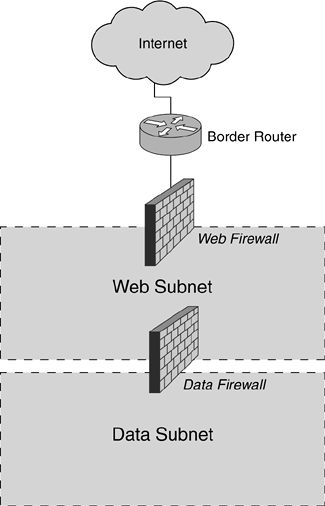
NAT is the cause of some of the most frequently occurring problems when VPN equipment is deployed separately from the firewall. For example, outbound packets that pass through the VPN device before being NATed by the firewall might not pass the integrity check at the other end of the VPN connection if an authentication scheme is being used, such as IPSec's Authentication Header (AH). This is because AH takes into account the packet's headers when it calculates the message digest signature for the packet. Then the NAT device modifies the source address of the packet, causing the message digest verification to fail on the other end of the VPN connection. Another issue with VPN devices located behind the firewall is address management; some VPN specifications require VPN devices to be assigned a legal IP address. For example, when authenticating VPN devices using X.509 certificates, the IKE phase of IPSec might fail if the certificates were bound to each gateway's IP addresses, which were then rewritten by NAT.8 Placing VPN hardware in front of the firewall, closer to the Internet, helps avoid potential NAT and address management problems, but it might introduce other concerns associated with all NAT deployments. As you probably know, many applicationssuch as those that use Microsoft's Distributed Component Model (DCOM) protocolsdo not work with some NAT implementations. This is because generic NAT processors translate addresses only in the packet's header, even though some application-level protocols embed addressing information in packet payload as well. Another disadvantage of placing VPN devices in front of the firewall is that they cannot enjoy the protection the firewall offers. If the system serving as the VPN endpoint is compromised, the attacker might gain access to information whose confidentiality is supposed to be protected by the VPN. Firewall and VPN in One SystemWhen deploying a device that integrates VPN and firewall functionality into a single system, you will most likely recognize some cost savings over the solutions in which the two devices are separated. Most of these savings will not come from the cost of initial deployment because VPN functionality on a firewall is likely to require additional software licenses and possibly a hardware upgrade. An integrated solution is generally less expensive to maintain, though, because you have fewer systems to watch over. Additionally, a commercial VPN solution such as Check Point VPN-1 integrates with the GUI used to manage Check Point's firewall. Most integrated solutions do not have the NAT-related problems discussed earlier, and they enjoy robust access control capabilities offered by the firewall component of the device. One of the biggest drawbacks of an integrated solution is that you might be limited in the choices you can make with regard to optimally deploying your VPN and firewall components. Firewall products that match most closely to your business needs might not be as well suited to their VPN components. Similarly, under some situations, you will benefit from deploying an external specialized VPN device, and purchasing an integrated solution might lock you into having VPN and firewall components on the same system. Hopefully, we've given you an idea of some of the choices and dilemmas you will face when integrating a VPN component into your perimeter architecture. Further discussion about VPN placement scenarios can be found in Chapter 16. Multiple FirewallsSome designs call for the use of multiple firewalls to protect the network. This makes sense when you want to provide different levels of protection for resources with different security needs. Such scenarios might involve deploying firewalls inline, one behind another, to segment resources with different security requirements. Firewalls can also be deployed in parallel, next to each other and equidistant from the Internet. Using multiple firewalls provides the designer with the ability to control access to resources in a fine-grained manner. On the other hand, costs of setting up and maintaining your network increase dramatically as you add more firewalls. Some products, such as Check Point FireWall-1, provide an intuitive interface for controlling multiple firewalls from a single system. Others, such as NetFilter, might require more significant efforts for keeping firewall configurations in sync with the organization's security policy. Inline FirewallsInline firewalls are deployed one behind another, and traffic coming to and from the Internet might be subjected to access control restrictions of multiple firewall devices. This is not as unusual of a configuration as you might think. Consider the typical architecture in which a single firewall is located behind the border router. If you use the router's access list functionality to control access to resources instead of doing only basic packet filtering on it, the router is acting very much like a firewall. The idea here might be to have redundancy in your access enforcement points; that way, if one device doesn't stop malicious traffic, the one behind it might. If locating one firewall-like device right behind another seems wasteful to you, another inline configuration, presented in Figure 12.2, might make more sense. Here, we take advantage of the subnets with different security levels created by multiple firewalls. The closer the subnet is to the Internet, the less secure it is. In such an architecture, we could place web servers behind the first firewall, while keeping more sensitive resources, such as database servers, behind the second firewall. The first firewall could be configured to allow traffic to hit web servers only, whereas the second firewall would only allow web servers to talk to the database servers. Figure 12.2. When multiple inline firewalls are employed, the most sensitive information should be kept behind the second firewall.
One of the biggest problems with environments incorporating inline firewalls is that of manageability. Not only do you need to set up, maintain, and monitor multiple firewalls, but you need to support multiple firewall policies. If, for example, you need to allow a system behind multiple firewalls to connect to the Internet, you need to remember to modify the rule sets of both firewalls. Commercial firewalls, such as Check Point FireWall-1 and Cisco PIX, provide software solutions for managing multiple firewalls from a single console, and they allow you to ensure that all inline firewalls are properly configured. If you determine that a device protected by inline firewalls needs to communicate directly with the Internet, you might also consider restructuring the network's design to minimize the number of firewalls to be traversed. Firewalls in ParallelMany times you might be compelled to set up firewalls in parallel with each other. We can design architectures that incorporate firewalls in parallel in many ways. In most such configurations, the firewalls protect resources with different security needs. When firewalls are set up inline, as discussed in the previous section, packets destined for the hosts deep within the organization's network might be delayed because they need to go through several access control devices. With parallel firewalls, this is not a significant concern because the firewalls are equidistant from the Internet. In a parallel configuration, we can deploy firewalls that are each tuned specifically for the resources they are protecting. One such scenario is shown in Figure 12.3. Here, we use an application gateway and a stateful firewall, each protecting a different set of systems. Figure 12.3. When parallel firewalls are employed, delays are avoided because the firewalls are equidistant from the Internet.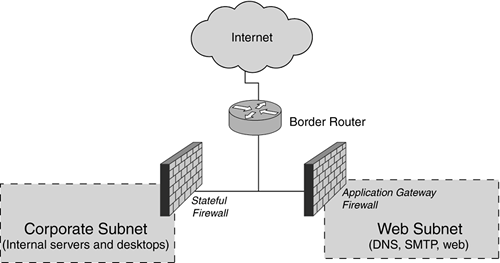 In this example, we assume that our business requires the use of robust proxy-level capabilities of an application gateway to protect Internet-accessible systems such as web, SMTP, and DNS servers. We are okay with the generally slower performance of the proxying firewall for this purpose. At the same time, we need the flexibility of a stateful firewall for the corporate network, which hosts internal workstations and servers. By deploying two different firewalls in parallel, we are able to take advantage of the best-of-breed functions offered by each type of device. At the same time, we do not have the luxury of placing a system behind multiple layers of firewalls, as would be the case with the inline configuration. |
|

EAN: 2147483647
Pages: 230