| Now that we've created the necessary fields, we can use the New Layout/Report wizard to design the report.  Switch to Layout mode (View > Layout Mode), and choose Layouts > New Layout/Report. The opening screen of the New Layout/Report wizard appears. Switch to Layout mode (View > Layout Mode), and choose Layouts > New Layout/Report. The opening screen of the New Layout/Report wizard appears.
 Elect to Show records from Main, enter Account Summary Report in the Layout Name box, uncheck the option to Include in layout menus, and select Columnar list/report as the layout type. Click Next to continue. Elect to Show records from Main, enter Account Summary Report in the Layout Name box, uncheck the option to Include in layout menus, and select Columnar list/report as the layout type. Click Next to continue.
 On the Choose Report Layout screen, select Report with grouped data and click both check boxes (Include subtotals and Include grand totals). Click Next. On the Choose Report Layout screen, select Report with grouped data and click both check boxes (Include subtotals and Include grand totals). Click Next.
 On the Specify Fields screen, move these three fields into the Layout fields list (in order): Account Type, Description, Value. Click Next to continue. On the Specify Fields screen, move these three fields into the Layout fields list (in order): Account Type, Description, Value. Click Next to continue.
 On the Organize Records by Category screen, specify Account Type as the grouping field (moving it into the Report Categories List). Doing so instructs FileMaker to create a subgroup for each account type, such as savings bonds. Click Next to continue. On the Organize Records by Category screen, specify Account Type as the grouping field (moving it into the Report Categories List). Doing so instructs FileMaker to create a subgroup for each account type, such as savings bonds. Click Next to continue.
 On the Sort Records screen, Account Type is already included as the primary sort field. Move Description into the Sort order list as the second sort field, and click Next to continue. On the Sort Records screen, Account Type is already included as the primary sort field. Move Description into the Sort order list as the second sort field, and click Next to continue.
 We'll use the Value Summary field to calculate subtotals and a grand total for the report. We'll use the Value Summary field to calculate subtotals and a grand total for the report.
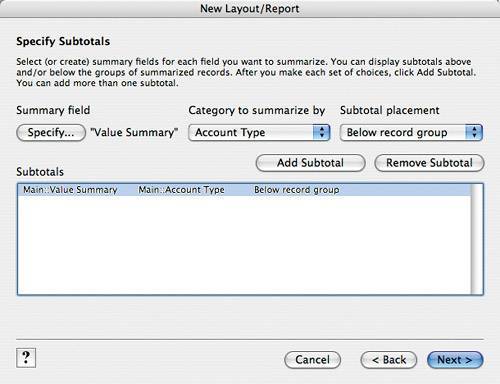 On the Specify Subtotals screen, click the Specify button, select Value Summary in the Specify Field dialog box, and click OK. Ensure that Account Type and Below record group are selected in the drop-down lists, and then click the Add Subtotal button. Click Next to continue.  On the Specify Grand Totals screen, click the Specify button, select Value Summary in the Specify Field dialog box, and click OK. Ensure that End of report is selected in the Grand total placement drop-down list, and then click Add Grand Total. Click Next to continue. On the Specify Grand Totals screen, click the Specify button, select Value Summary in the Specify Field dialog box, and click OK. Ensure that End of report is selected in the Grand total placement drop-down list, and then click Add Grand Total. Click Next to continue.
 On the Select a Theme screen, select Aqua Screen. Click Next to continue. On the Select a Theme screen, select Aqua Screen. Click Next to continue.
 On the Header and Footer screen, set Header, Top center to Layout Name; set Footer, Bottom left to Current Date; and set Footer, Bottom right to Page Number. Click Next to continue. On the Header and Footer screen, set Header, Top center to Layout Name; set Footer, Bottom left to Current Date; and set Footer, Bottom right to Page Number. Click Next to continue.
 On the Create a Script for this Report screen, select Do not create a script. Click Next to continue. On the Create a Script for this Report screen, select Do not create a script. Click Next to continue.
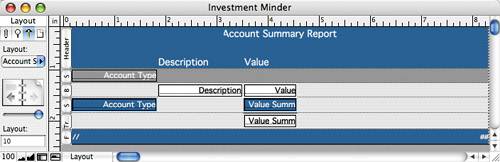
 On the final screen, select View the report in Layout mode and click Finish. Here's how the generated layout should look: On the final screen, select View the report in Layout mode and click Finish. Here's how the generated layout should look:
 | 