Transpose
| < Day Day Up > |
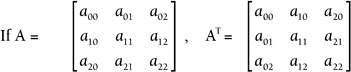
| The last matrix operation you need for future chapters is the transpose . This operation is used in Chapter 6 when we discuss the differences between OpenGL and DirectX. The transpose is a simple yet powerful operation. So far, we've used the row and column location to designate a particular entry. The transpose operation simply swaps each entry's row and column. The transpose can be applied to any size matrix, but we'll look at a 3x3 first so that you can quickly spot the pattern.
NOTE The T superscript is the symbol for transpose, so the transpose of matrix A is written as A T . Example 5.10: Transpose of a 3 x 3 Matrix Solution
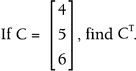
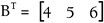
Notice that the transpose of a 3x3 matrix is another 3x3 matrix. If the original matrix is not square, the transpose changes the size, because the rows and columns are swapped. That means that a 3x1 matrix becomes a 1x3. This happens anytime you take the transpose of a vector. Example 5.11: Transpose of a Vector Solution
Again, the transpose can be applied to any size matrix. Just remember that the dimensions swap as well as each entry's row and column location.
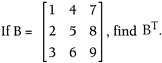
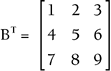
Example 5.12: Transpose of a Matrix If Solution
This final operation is deceptively simple. Let's see how we can accomplish this in code to transpose a 4x4 matrix: Matrix4X4 transpose4X4Matrix(Matrix4X4 a) { Matrix4X4 temp; for(int i = 0;i<4;i++) { for(int j=0;j<4;j++) { temp.index[i][j] = a.index[j][i]; } } return temp; } As soon as you have discovered an organized way to swap rows and columns, it can be calculated quickly. You might want to experiment with writing a function that calculates the transpose; all you need is a systematic method of swapping each entry's row and column. Again, we will revisit this operation in the next chapter, and you'll see just how useful it can be in programming. Self-AssessmentFor each of the following pairs of matrices, check to see if the product is defined. If it is, calculate the product.
|
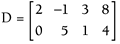 , find D T .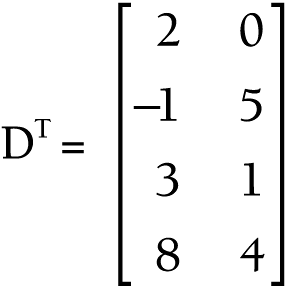


| < Day Day Up > |

EAN: 2147483647
Pages: 143