Working with Widths and Margins
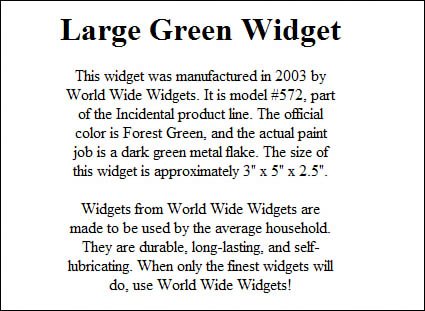
| We'll end this chapter with a handful of templates that play around with text widths and margins. Why tinker with margins, you ask? Because putting a little white space here and there or using an inset for selected page elements helps both to divide your listing into separate sections and to subtly move the eye toward the most important elements on the page. When it comes to making a text element wider or narrower, or insetting it from the left or right margin, we have to turn to cascading style sheet code. CSS lets us use margin-left and margin-right properties, which set the left and right margins for an elementsomething you can't easily do with traditional HTML. Template 6.27. Narrow Centered Description One of the problems with using big blocks of centered text is that the eye can't easily read long lines of centered text. If you like centered text but want to improve readability, consider the template shown in Figure 6.27which makes the text easier to read by shortening the line length. Figure 6.27. Wide title with narrow centered description. This code makes liberal use of the margin-left and margin-right properties to set the left and right margins. We've specified a 250-pixel margin for both the left and right sides of the main text paragraphs, which creates a very narrowand easily readablecentered description. <h1 style="text-align: center">This is the title</h1> <p style="text-align: center; margin-left: 250px; margin-right: 250px"> This is the first paragraph of the description </p> <p style="text-align: center; margin-left:250px; margin-right:250px"> This is the second paragraph of the description </p> Template 6.28. Wide Centered Description with Narrower Terms of Service Another approach is to keep the text description at normal width and use a narrower text block for the terms of service, as shown in Figure 6.28. This helps to set off the TOS from the more important description text. Figure 6.28. Centered description with narrower terms of service.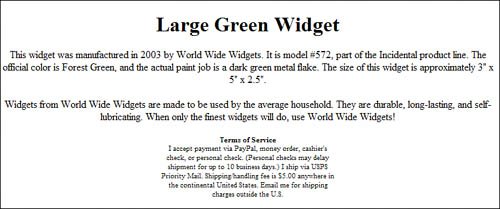 This code uses the margin-left and margin-right properties to set 250-pixel left and right margins for the TOS paragraph. Naturally, you can choose different margins as your tastes dictate. <h1 style="text-align: center">This is the title</h1> <p style="text-align: center"> This is the first paragraph of the description </p> <p style="text-align: center"> This is the second paragraph of the description </p> <p style="text-align: center; font-size: 8pt; margin-left: 250px; margin-right: 250px"> <strong>Terms of Service</strong><br> This is the terms of service </p> Template 6.29. Left-Aligned Description with Offset Terms of Service Here's a template that uses left-aligned text but still manages to set the TOS apart from the description text. This is done by offsetting the TOS by 100 pixels; the TOS is still left-aligned, but now looks much more like a separate text element, as you can see in Figure 6.29. Figure 6.29. Left-aligned description with an offset terms of service section.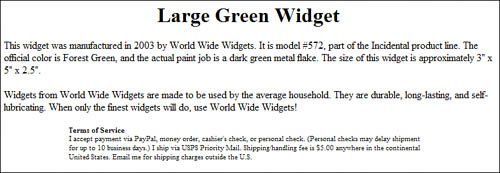 The code for this template left-aligns all the text elements in the listing, save for the title. The TOS paragraph is defined by margin-left and margin-right properties to display more toward the middle of the page. <h1 style="text-align: center">This is the title</h1> <p style="text-align: left"> This is the first paragraph of the description </p> <p style="text-align: left"> This is the second paragraph of the description </p> <p style="text-align: left; font-size: 8pt; margin-left: 100px; margin-right: 100px"> <strong>Terms of Service</strong><br> This is the terms of service </p> Template 6.30. Wide Centered Overview with Narrower Left-Aligned Offset Description This template uses different margins to give the overview paragraph a different look from the main text description. The key here is to use wider margins and larger type for the overview paragraph, and narrower margins (and regular-sized type) for the regular paragraphs. As you can see in Figure 6.30, this combination of large type and wider margins makes the overview look much bigger than the descriptiona very neat effect. Figure 6.30. Wide centered overview paragraph with a narrower left-aligned offset description and terms of service.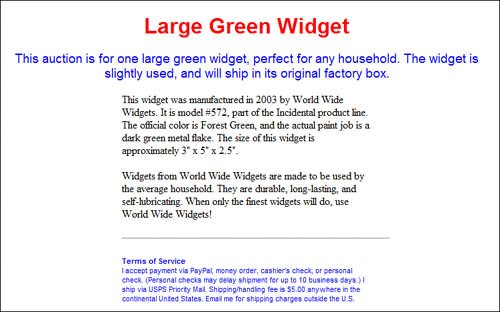 Note that the code for this template incorporates a lot of different formatting effects from throughout this chapter. The title is formatted with centered, red, Arial text; the overview is formatted with centered, blue, 14 point Arial text; the description paragraphs are formatted with default size and font (Times Roman) but with 200-pixel left and right margins; there's a 300 point horizontal rule before the terms of service; and the TOS itself is formatted as 8 point blue Arial text with 200-pixel left and right margins (same as the description). It's a good example of how all these various codes can be grouped together to create complex effects. <h1 style="text-align: center; font-family: Arial; color: red">This is the title</h1> <p style="text-align: center; font-size: 14pt; color: blue; font-family: Arial"> This is the overview paragraph. </p> <p style="text-align: left; margin-left: 200px; margin-right: 200px"> This is the first paragraph of the description </p> <p style="text-align: left; margin-left: 200px; margin-right: 200px"> This is the second paragraph of the description </p> <hr style="text-align: left; width: 300pt; margin-left: 200px"> <p style="text-align: left; font-family: Arial; font-size: 8pt; margin-left: 200px; margin-right: 200px; color: blue"> <strong>Terms of Service</strong><br> This is the terms of service </p> |


EAN: 2147483647
Pages: 101