Tool 81: Forced Association
| AKA | Direct Association |
| Classification | Idea Generating (IG) |
Tool description
The forced association technique is an idea generation tool that allows a team to associate or connect pairs of unrelated concepts, ideas, or terms to search for potential solutions, improved processes, or new products and services.
Typical application
-
To generate ideas for new products and services.
-
To provide an opportunity for team creativity and innovation.
-
To allow an individual or team to think in many different ways.
Problem-solving phase
| Select and define problem or opportunity | |
| → | Identify and analyze causes or potential change |
| → | Develop and plan possible solutions or change |
| Implement and evaluate solution or change | |
| Measure and report solution or change results | |
| Recognize and reward team efforts |
Typically used by
| Research/statistics | |
| 1 | Creativity/innovation |
| 4 | Engineering |
| Project management | |
| Manufacturing | |
| 3 | Marketing/sales |
| Administration/documentation | |
| Servicing/support | |
| Customer/quality metrics | |
| 2 | Change management |
 |
before
-
Brainstorming
-
Brainwriting pool
-
Phillips 66
-
Reverse brainstorming
-
Focus group
after
-
Criteria filtering
-
Run-it-by
-
Different point of view
-
Consensus decision
-
Team process assessment
|
Notes and key points
-
Brainstorm several lists of 10 concepts, ideas, and terms. This enables a team to significantly increase the number of possible connections.
Step-by-step procedure
-
STEP 1 The team brainstorms four or five lists of 10 unrelated concepts, ideas, or terms.
-
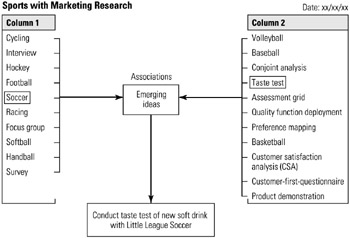
STEP 2 The team then mixes all items of randomly selected items and assigns them to two columns. See example Sports with Marketing Research.
-
STEP 3 The team systematically scans each pair and checks for emerging ideas.
-
STEP 4 This process continues and potential ideas are recorded.
-
STEP 5 Lastly, the team performs criteria filtering to produce a list of high potential or great ideas.
Example of tool application

EAN: 2147483647
Pages: 326