| The following steps show how to extend the Windows Communication Foundation by adding a transport binding element for sending and receiving messages via Internet mail protocols. The starting point is a simple application that uses TCP, a protocol that the Windows Communication Foundation already supports. After a binding element for the Internet mail protocols has been added to the Windows Communication Foundation's Channel Layer, the application will be modified to use those protocols instead. Adding support for additional transports to the Windows Communication Foundation is made considerably easier by a sample that does just that, which is among the samples in the Microsoft Windows SDK referred to in the introduction. The sample adds support for the User Datagram Protocol (UDP). See the Initial Solution Work To see the solution work using one of the built-in transports, do the following: Download the code for this book, and copy the code associated with this chapter to the folder C:\WCFHandsOn. The code is all in a folder called CustomTransport and contains a single Visual Studio solution with the same name. After the code has been copied, there should be a folder that looks like the one shown in Figure 8.1. Figure 8.1. Custom transport solution folder. 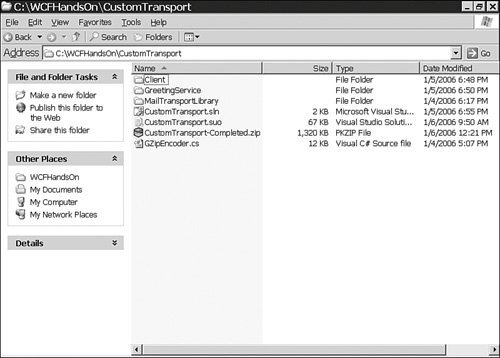 Open the solution C:\WCFHandsOn\CustomTransport\CustomTransport.sln in Visual Studio 2005. The solution incorporates three projects. One project is for building a Greeting Service, which receives and displays a greeting from a client. A second project is for building a client of the Greeting Service. The third project, the MailTransportLibrary project, is currently empty. The Windows Communication Foundation extensions for communicating via Internet mail protocols will be added to that project. Confirm that the startup project property of the solution is configured as shown in Figure 8.2. Figure 8.2. Custom transport solution startup project property. 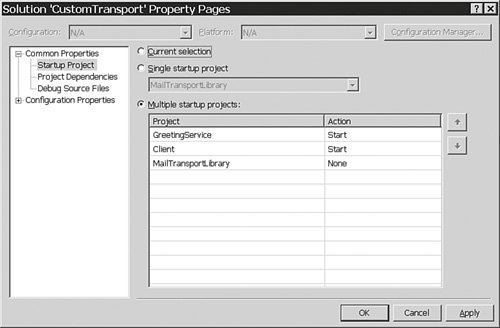 Start debugging the solution. The console application of the Greeting Service should appear, followed by the console application of its client. When the console of the Greeting Service shows some activity, enter a keystroke into the console for the client. A message should appear in the console of the service, as shown in Figure 8.3. Figure 8.3. The Greeting Service. 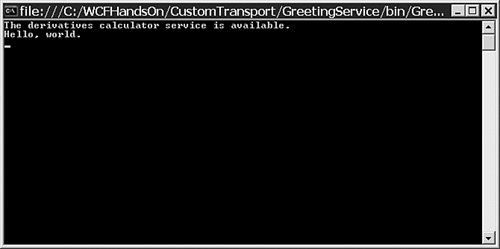 Stop debugging the solution.
Understand the Initial Solution See how the initial solution works: Open the file IGreeting.cs in the GreetingService project. It contains this simple service contract: using System; using System.Collections.Generic; using System.ServiceModel; using System.Text; namespace CustomTransport { [ServiceContract] public interface IGreeting { [OperationContract(IsOneWay=true)] void Greeting( string greeting); } }Look in the file GreetingService.cs in the GreetingService project. It contains a service type that implements that contract: using System; using System.Collections.Generic; using System.Text; namespace CustomTransport { public class GreetingServiceType: IGreeting { #region IGreeting Members void IGreeting.Greeting( string greeting) { Console.WriteLine(greeting); } #endregion } }Open the file Program.cs in the GreetingService project, which has code for hosting the service within an application domain. That code is shown Listing 8.1. In that code, the sole endpoint of the service is configured in the code using the AddServiceEndpoint() method of the ServiceHost class, rather than being configured via a configuration file. Listing 8.1. The Service Host using System; using System.Collections.Generic; using System.Configuration; using System.ServiceModel; using System.Text; namespace CustomTransport { public class Program { public static void Main(string[] args) { Type serviceType = typeof(GreetingServiceType); string tcpBaseAddress = ConfigurationManager.AppSettings["TCPBaseAddress"]; Uri tcpBaseAddressURI = new Uri(tcpBaseAddress); Uri[] baseAdresses = new Uri[] { tcpBaseAddressURI}; using(ServiceHost host = new ServiceHost( serviceType, baseAdresses)) { host.AddServiceEndpoint( typeof(IGreeting), new NetTcpBinding(), ConfigurationManager.AppSettings[ "GreetingEndpointAddress"]); host.Open(); Console.WriteLine( "The derivatives calculator service is available." ); Console.ReadKey(); host.Close(); } } } }
|
Look at the code for the client in the Program.cs file of the Client project. That code is reproduced in Listing 8.2. Here, too, the properties of the endpoint of the service are specified in code, rather than in a configuration file.
Listing 8.2. The Client using System; using System.Collections.Generic; using System.Configuration; using System.ServiceModel; using System.Text; namespace CustomTransport { public class Program { public static void Main(string[] args) { Console.WriteLine("Press any key when the service is ready."); Console.ReadKey(); IGreeting proxy = new ChannelFactory<IGreeting>( new NetTcpBinding(), new EndpointAddress( ConfigurationManager.AppSettings["GreetingServiceAddress"])) .CreateChannel(); proxy.Greeting( "Hello, world."); ((IChannel)proxy).Close(); Console.WriteLine("Press any key to exit."); Console.ReadKey(); } } }
|
The Internet Mail Protocols The Internet mail protocols are the Simple Mail Transfer Protocol (SMTP), which is for sending mail, and the Post Office Protocol Version 3 (POP3) (Official Internet Protocol Standards 2006). Therefore, to proceed through the instructions that follow for adding support for the Internet mail protocols to the Windows Communication Foundation, and to see the results, one needs to have access to an SMTP server and a POP3 server. Most Internet service providers offer access to an SMTP server and a POP3 server to their subscribers. Readers who are using a Windows server operating system may choose to install and configure the POP3 service provided with their operating system. Installing the POP3 service also provides support for SMTP. Building an Internet Mail Transport Binding Element Recall that adding support for an additional transport protocol to the Windows Communication Foundation really means adding a new transport binding element to the Channel Layer. Add a transport binding element for Internet mail to the solution now. Getting Started In adding support for additional transport protocols to the Windows Communication Foundation, one is advised to begin from a working sample. In this case, the aforementioned sample for UDP provided in the Windows SDK for use with the Windows Communication Foundation will be adapted to accommodate SMTP and POP3: By default, the SDK installer places the UDP sample in the folder C:\Program Files\Microsoft SDKs\Windows\v1.0\samples\Allsamples\WindowsCommunicationFoundation\TechnologySamples\Extensibility\Transport\Udp. The parts of that sample that will be required in the following steps are in the subfolder CS\UdpTransport. Copy all the files in that subfolder with the extension .cs to the folder C:\ C:\WCFHandsOn\CustomTransport\MailTransportLibrary, except the file UdpListenerFactory.cs, which is not required. Add those files to the MailTransportLibrary project of the CustomTransport solution. Build the MailTransportLibrary project to ensure that nothing has gone missing. Rename each of the modules in the project that have Udp in their names, replacing Udp with Mail. Open each of the modules that now has Mail in its name, and look for the name of each class in the class definitions contained in the module. Right-click on that name and choose Refactor and Rename from the context menu. Substitute Mail for Udp in the name of the class in the Rename dialog shown in Figure 8.4, clear the Preview Reference Changes option, and click OK. With the refactoring facility in Visual Studio 2005, it should take less than 5 minutes to change the names of all the classes and all the references to them. When the task is complete, build the project to confirm that no errors have been made. Figure 8.4. The Visual Studio Rename dialog. 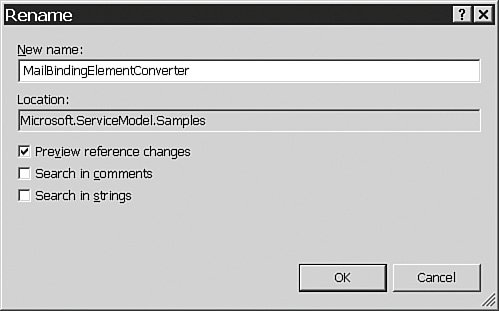
Specifying a Scheme for the Internet Mail Transport Protocols The initial part of a URI is called the scheme. In the URI http://localhost:8000/Derivatives/Calculator the scheme is http. In the Windows Communication Foundation, schemes provide the link between the addresses and the bindings of endpoints. Thus, in ServiceHost host = new ServiceHost( typeof(GreetingServiceType), new Uri[]{ new Uri("http://localhost:8000/Service/"), new Uri("net.tcp://localhost:8010/Service/") }); host.AddServiceEndpoint( typeof(IGreeting), new NetTcpBinding(), "Greeting");
the base address of the Greeting endpoint is the second of the two base addresses of the service, net.tcp://localhost:8010/Service/, because the scheme of that base address is the scheme associated with the TCP transport protocol of the endpoint's NetTcpBinding. So, in adding support for the Internet mail transport protocols to the Windows Communication Foundation, it is necessary to specify the scheme for the base addresses of any endpoints with Internet mail transport protocol bindings. The choice of the scheme is arbitrary. The scheme that will be used is smtp.pop3: Open the module that should now be named MailChannelHelpers and modify the Scheme constant in the MailConstants class, replacing soap.udp with smtp.pop3, like so: static class MailConstants { internal const string EventLogSourceName = "Microsoft.ServiceModel.Samples"; internal const string Scheme = "smtp.pop3"; internal const string UdpBindingSectionName = "system.serviceModel/bindings/sampleProfileUdpBinding"; internal const string UdpTransportSectionName = "udpTransport"; internal const int WSAETIMEDOUT = 10060; [...] }Use Visual Studio 2005's Find in Files command, which one accesses by choosing Edit, Find and Replace, Find in Files from the menus, and find all instances of the expression soap.udp in the solution. That process should turn up this line of code in the MailPolicyStrings class, public const string TransportAssertion = "soap.udp"; as well as this line in the SampleProfileMailBinding class, which represents a small imperfection in the sample: public override string Scheme { get { return "soap.udp"; } }Change them both like this: public const string TransportAssertion = MailConstants.Scheme; public override string Scheme { get { return MailConstants.Scheme; } }
The Listener Recall, from the foregoing description of how protocols are implemented in the Windows Communication Foundation, that a listener typically does its work of listening for messages by listening on a socket. That should certainly be true of a UDP listener. What needs to be accomplished next in providing support for the Internet mail protocols is to modify the code in the UDP transport protocol sample by which the listener listens on a socket for messages conveyed via the UDP protocol, in such a way that the listener instead uses the socket to retrieve mail messages from a POP3 server. If one was to search the code in the MailTransportLibrary project for references to the .NET Framework's Socket class, one would find that an instance of that class is instantiated in the MailChannelListener class, and that the work of listening for UDP messages on that socket gets underway in that class' StartReceiving() method, which is shown in Listing 8.3. Listing 8.3. The StartReceiving() Method void StartReceiving(object state) { Socket listenSocket = (Socket)state; IAsyncResult result = null; try { lock (ThisLock) { if (base.State == CommunicationState.Opened) { EndPoint dummy = CreateDummyEndPoint(listenSocket); byte[] buffer = this.bufferManager.TakeBuffer(maxMessageSize); result = listenSocket.BeginReceiveFrom( buffer, 0, buffer.Length, SocketFlags.None, ref dummy, this.onReceive, new SocketReceiveState(listenSocket, buffer)); } } if (result != null && result.CompletedSynchronously) { ContinueReceiving(result, listenSocket); } } catch (Exception e) { Debug.WriteLine("Error in receiving from the socket."); Debug.WriteLine(e.ToString()); } }
|
Modify the method to receive messages via the POP3 Internet mail protocol: Comment out the StartReceiving() method, and insert the alternative version in Listing 8.4, which is also provided in the file C:\WCFHandsOn\CustomTransport\StartReceiving.txt. Listing 8.4. The Revised StartReceiving() Method private void StartReceiving(object state) { try { while (base.State == CommunicationState.Opened) { lock (ThisLock) { if (this.listenSockets.Count == 0) { IPHostEntry host = Dns.GetHostEntry(uri.Host); IPAddress address = host.AddressList[0]; this.CreateListenSocket(address, this.uri.Port); } this.POP3Reception(); } Thread.Sleep(5000); } } catch (Exception exception) { Debug.WriteLine("Error in receiving from the socket."); Debug.WriteLine(exception.ToString()); } } private void POP3Reception() { const string LineTerminator = "\r\n"; const string MessageTerminator = "."; StringBuilder messageBuffer = null; Regex regularExpression = new Regex(@"(^\+OK\s)(\d*)([\s])(\d*)"); Match match = null; int messageCount; int mailDropSize; string mailMessage = null; Message message = null; byte[] buffer = null; this.LogIn(); string response = null; response = this.Transmit("STAT", null); if (this.ErrorResponse(response)) { throw new Exception("Error retrieving count of new messages."); } if (!(regularExpression.IsMatch(response))) { throw new Exception("Error parsing count of new messages."); } match = regularExpression.Match(response); messageCount = int.Parse(match.Groups[2].Value); mailDropSize = int.Parse(match.Groups[4].Value); for (int messageIndex = 1; messageIndex <= messageCount; messageIndex++) { messageBuffer = new StringBuilder(); while (true) { response = this.Transmit( string.Format("RETR {0}", messageIndex), mailDropSize); if (this.ErrorResponse(response)) { throw new Exception("Error retrieving message."); } if (response.StartsWith(MessageTerminator)) { if (!(response.EndsWith( MessageTerminator + LineTerminator))) { response = response.Substring(1); } } if (response.EndsWith(MessageTerminator + LineTerminator)) { messageBuffer.Append( response.Substring( 0, response.Length - LineTerminator.Length)); break; } messageBuffer.Append(response); } mailMessage = messageBuffer.ToString(); response = this.Transmit( string.Format("DELE {0}", messageIndex), null); if (this.ErrorResponse(response)) { throw new Exception("Error deleting message."); } buffer = Encoding.ASCII.GetBytes(mailMessage); message = messageEncoderFactory.Encoder.ReadMessage( new ArraySegment<byte>(buffer, 0, buffer.Length), bufferManager); if (message != null) { ThreadPool.QueueUserWorkItem( new WaitCallback(DispatchCallback), message); } else { EventLog.WriteEntry( MailConstants.EventLogSourceName, "A message was dropped because it was not in the expected format.", EventLogEntryType.Warning); } } response = this.Transmit("QUIT", null); if (this.ErrorResponse(response)) { throw new Exception("Error updating mailbox."); } this.CloseListenSockets(TimeSpan.Zero); } private bool ErrorResponse(string response) { if (response.StartsWith("-ERR")) { return true; } return false; } private void LogIn() { if (this.ErrorResponse( this.Transmit(string.Format("USER {0}", this.userName), null))) { throw new Exception("Username rejected."); } if (this.ErrorResponse( this.Transmit(string.Format("PASS {0}", this.password), null))) { throw new Exception("Password rejected."); } } private string Transmit(string message, int? bufferSize) { if (message != null) { this.listenSockets[0].Send( Encoding.ASCII.GetBytes(string.Concat(message, "\r\n"))); } byte[] buffer = new byte[ bufferSize != null ? bufferSize.Value + 512 : 512]; int bytesRead = this.listenSockets[0].Receive(buffer); StringBuilder builder = new StringBuilder(); builder.Append(Encoding.ASCII.GetChars(buffer), 0, bytesRead); return builder.ToString(); }
|
Add these C# using statements to those already in the module to incorporate the namespaces of some familiar .NET Framework classes to which we refer in our new StartReceiving() method: using System.Text; using System.Text.RegularExpressions; The new StartReceiving() method works in the same way that Internet mail reader applications typically do. It connects to a POP3 server that it knows, logging in with credentials associated with an account that it knows. Then it queries the server for the number of new messages that have been received that were sent to the account, and retreives each of those messages, instructing the server to delete each message after it has been retrieved. It then disconnects from the server, and goes to sleep for a time, after which it repeats the process.
Each message that is received gets sent on to the input channel that the Dispatcher is waiting for with this line of code: ThreadPool.QueueUserWorkItem(new WaitCallback(DispatchCallback), message);
That line was simply taken from one of the methods that the original StartReceiving() process invoked, namely the ContinueReceiving() method, which is no longer used. Reflecting on this process that is encoded in the new StartReceiving() method, one can identify all the other changes that have to be made in constructing the Internet mail protocol listenter. There are three such changes. To begin with, the new code connects to the POP3 server and then disconnects on each cycle. Although that is characteristic of what Internet mail readers do, it is different from what the original code for the UDP listener did, which was to open a socket and simply wait for data to arrive. So one thing that has to be done is change how the connection is managed. Also, credentials have to be provided to log on to the POP3 server. Hence, properties will need to be added to an Internet mail transport binding element by which users can supply credentials that the code can access and use to connect to the POP3 server. Providing custom properties is a common task when one is adding custom binding elements to the Windows Communication Foundation. The third change that needs to be made concerns the format of the data retrieved from the POP3 server. The intention is for the messages that will be exchanged via Internet mail to be SOAP documents embedded in the bodies of Internet mail messages. Consequently, from among the bytes that are retrieved from the POP3 server representing each message, it will be necessary to extract the SOAP document and use that to yield a message, a message that will then be added to the input channel for the Dispatcher to retrieve and dispatch. Recall that, in the architecture of the Windows Communication Foundation's Channel Layer, transport protocol listeners use message encoders to assemble the streams of bytes they receive into messages. So it will be necessary to provide a message encoder that is familiar with the format of Internet mail messages and able to extract SOAP documents from within them. Managing the Connection to the Server The original code for opening the UDP socket was invoked in the code shown in Listing 8.5. Listing 8.5. Opening the UDP Socket protected override void OnOpen(TimeSpan timeout) { if (uri == null) { throw new InvalidOperationException( "Uri must be set before ChannelListener is opened."); } base.OnOpen(timeout); if (this.listenSockets.Count == 0) { if (uri.HostNameType == UriHostNameType.IPv6  uri.HostNameType == UriHostNameType.IPv4) { listenSockets.Add( CreateListenSocket( IPAddress.Parse(uri.Host), uri.Port)); } else { listenSockets.Add( CreateListenSocket(IPAddress.Any, uri.Port)); if (Socket.OSSupportsIPv6) { listenSockets.Add( CreateListenSocket(IPAddress.IPv6Any, uri.Port)); } } } } uri.HostNameType == UriHostNameType.IPv4) { listenSockets.Add( CreateListenSocket( IPAddress.Parse(uri.Host), uri.Port)); } else { listenSockets.Add( CreateListenSocket(IPAddress.Any, uri.Port)); if (Socket.OSSupportsIPv6) { listenSockets.Add( CreateListenSocket(IPAddress.IPv6Any, uri.Port)); } } } }
|
Modify the original code in this way: Comment out the code by which the UDP socket is opened, as shown in Listing 8.6. Listing 8.6. Removing the Code for Opening a UDP Socket protected override void OnOpen(TimeSpan timeout) { if (uri == null) { throw new InvalidOperationException( "Uri must be set before ChannelListener is opened."); } base.OnOpen(timeout); if (this.listenSockets.Count == 0) { /* if (uri.HostNameType == UriHostNameType.IPv6 uri.HostNameType == UriHostNameType.IPv4) { listenSockets.Add( CreateListenSocket( IPAddress.Parse(uri.Host), uri.Port)); } else { listenSockets.Add( CreateListenSocket(IPAddress.Any, uri.Port)); if (Socket.OSSupportsIPv6) { listenSockets.Add( CreateListenSocket(IPAddress.IPv6Any, uri.Port)); } } */ } }
|
Next, replace the original, lengthy CreateListenSocket() method with this simpler one that serves the more modest requirements of the new StartReceiving() method: Socket CreateListenSocket(IPAddress address, int port) { Socket listenSocket = new Socket( address.AddressFamily, SocketType.Stream, ProtocolType.Tcp); listenSocket.Connect(this.uri.Host, this.uri.Port); this.listenSockets.Add(listenSocket); if (this.ErrorResponse(this.Transmit(null, null))) { throw new Exception("Failure to connect."); } return listenSocket; }Finally, modify the OnOpened() method, omitting some statements that assumed that a socket would be kept open: protected override void OnOpened() { base.OnOpened(); Socket[] socketsSnapshot = listenSockets.ToArray(); WaitCallback startReceivingCallback = new WaitCallback(StartReceiving); ThreadPool.QueueUserWorkItem(startReceivingCallback); }
Providing the Account Credentials To provide credentials for logging on to the POP3 server, do as follows: Look again at the LogIn() method that was added earlier, and that is used by the new version of the StartReceiving() method: private void LogIn() { if (this.ErrorResponse( this.Transmit(string.Format("USER {0}", this.userName), null))) { throw new Exception("Username rejected."); } if (this.ErrorResponse( this.Transmit(string.Format("PASS {0}", this.password), null))) { throw new Exception("Password rejected."); } }In supplying credentials to the POP3 server, the LogIn() method refers to the userName and password fields of the MailListenerFactory, which are, as yet, undeclared. So add declarations of those fields to the MailListener factory now: class MailChannelListener : ChannelListenerBase<IInputChannel> { #region member_variables BufferManager bufferManager; //The UDP network sockets. List<Socket> listenSockets; int maxMessageSize; MessageEncoderFactory messageEncoderFactory; bool multicast; AsyncCallback onReceive; Uri uri; InputQueue<IInputChannel> channelQueue; //The channel associated with this listener. MailInputChannel currentChannel; object currentChannelLock; string userName = null; string password = null; #endregionTo see how values might be assigned to those fields, examine the constructor of the MailListenerFactory, which is shown in Listing 8.7. Listing 8.7. Original MailListenerFactory Constructor internal MailChannelListener( MailTransportBindingElement bindingElement, ChannelBuildContext context) : base(context.Binding) { #region populate_members_from_binding_element this.maxMessageSize = bindingElement.MaxMessageSize; this.multicast = bindingElement.Multicast; this.bufferManager = BufferManager.CreateBufferManager( bindingElement.MaxBufferPoolSize, bindingElement.MaxMessageSize); IMessageEncodingBindingElement messageEncoderBindingElement = context.UnhandledBindingElements. Remove<IMessageEncodingBindingElement>(); if (messageEncoderBindingElement != null) { this.messageEncoderFactory = messageEncoderBindingElement.CreateMessageEncoderFactory(); } else { this.messageEncoderFactory = MailConstants.DefaultMessageEncoderFactory; } this.channelQueue = new InputQueue<IInputChannel>(); this.channelQueue.Open(); this.currentChannelLock = new object(); this.listenSockets = new List<Socket>(2); #endregion }
|
The constructor receives, as a parameter, an instance of the binding element. If properties can be added to the binding element by which a user can provide a username and password for the POP3 server, those properties could be used to assign values to the userName and password fields of the MailListenerFactory. Therefore, make the necessary amendments to the MailListenerFactory constructor, as shown in Listing 8.8. Listing 8.8. Revised MailListenerFactory Constructor class MailChannelListener : ChannelListenerBase<IInputChannel> { #region member_variables BufferManager bufferManager; //The UDP network sockets. List<Socket> listenSockets; int maxMessageSize; MessageEncoderFactory messageEncoderFactory; bool multicast; AsyncCallback onReceive; Uri uri; InputQueue<IInputChannel> channelQueue; //The channel associated with this listener. MailInputChannel currentChannel; object currentChannelLock; string userName = null; string password = null; #endregion
|
Then add the necessary properties to the MailTransportBindingElement class in the MailTransportBindingElement.cs module, as shown in Listing 8.9. Listing 8.9. MailTransportBindingElement Account Properties #region CONFIGURATION_Properties private string userName = null; private string password = null; public string UserName { get { return this.userName; } set { this.userName = value; } } public string Password { get { return this.password; } set { this.password = value; } }
|
Finally, modify the copy constructors of the MailTransportBindingElement class to ensure that when one instance of the class is constructed from another, the values of the newly added properties propagate properly: protected MailTransportBindingElement(MailTransportBindingElement other) : base(other) { this.maxBufferPoolSize = other.maxBufferPoolSize; this.maxMessageSize = other.maxMessageSize; this.multicast = other.multicast; this.userName = other.userName; this.password = other.password; }Compile the MailTransportLibrary project to ensure that no mistakes have been made up to this point.
Providing an Internet Mail Encoder The new code for the listener has mail messages that are retrieved from the POP3 server transformed into Windows Communication Foundation messages by an Internet mail encoder. That is done with this line of code in the POP3Reception() method that is invoked by the new version of the StartReceiving() method: message = messageEncoderFactory.Encoder.ReadMessage( new ArraySegment<byte>(buffer, 0, buffer.Length), bufferManager);
The next task is to develop that encoder. Developing an encoder for the Windows Communication Foundation is another task that is accelerated considerably by starting from a sample. The aforementioned SDK provided for use with the Windows Communication Foundation also has a sample of a custom encoder. It is an encoder for translating messages in and out of a compression format.The compression encoder uses the standard Windows Communication Foundation text encoder internally, because the messages that are being compressed and decompressed are SOAP text messages. Specifically, incoming messages are translated out of the compression format into the SOAP text format, and then passed to the text encoder, which understands the SOAP text format, and translates the SOAP text into Windows Communication Foundation messages. Outgoing messages are translated into the SOAP text format by the standard text encoder, and then translated into the compression format. This sample is perfectly suited for adaptation to the current task of working with Internet mail messages. Messages received in Internet mail format will have SOAP text messages incorporated within them. The Internet mail encoder can extract the SOAP text messages from the Internet mail messages, and pass the SOAP text message on to the standard Windows Communication Foundation text encoder to be made into Windows Communication Foundation messages. Conversely, for outgoing Windows Communication Foundation messages, the text encoder can be used to translate them into SOAP text documents, which the Internet mail encoder can then insert into the bodies of Internet mail messages: The code for a sample compression encoder is provided in C:\WCFHandsOn\CustomTransport\GZipEncoder.cs. Add that module to the MailTransportLibrary project of the CustomTransport solution. Change the name of the module to MailEncoder.cs. Change the sole namespace declaration in the module to look like this: namespace Microsoft.ServiceModel.Samples Use Visual Studio 2005's refactoring facility as before to replace any occurrence of compression in the name of a class in that module with mail, being careful to preserve the case of the original. Thus, the classes originally named Compression MessageEncoderFactory, CompressionMessageEncoder, CompressionMessageEncodingBindingElement, and CompressionMessageEncodingSection will be renamed MailMessageEncoderFactory, MailMessageEncoder, MailMessageEncodingBindingElement, and MailMessageEncodingSection. Locate these lines of code in what should now be called the MailMessageEncoder class: public override string ContentType { get { return compressionContentType; } } public override string MediaType { get { return compressionContentType; } }Modify those lines of code so they read like this: public override string ContentType { get { return this.innerEncoder.ContentType; } } public override string MediaType { get { return this.innerEncoder.MediaType; } }The core of a Windows Communication Foundation message encoder is its overrides of the abstract base MessageEncoder class' abstract ReadMessage() and WriteMessage() methods. In the next two steps, those overrides will be modified to produce Windows Communication Foundation messages from SOAP text messages extracted from incoming Internet mail messages, and to create SOAP text messages to be embedded in Internet mail messages from outgoing Windows Communication Foundation messages. Change the override of the ReadMessage() method so that it looks like the code in Listing 8.10. Listing 8.10. The MessageEncoder's ReadMessage() Method public override Message ReadMessage(ArraySegment<byte> buffer, BufferManager bufferManager) { string mailMessage = new StringBuilder().Append( Encoding.ASCII.GetChars(buffer.Array)).ToString(); int position = mailMessage.IndexOf(@"<s:Envelope"); if (position >= 0) { string body = mailMessage.Substring(position); position = body.LastIndexOf("</s:Envelope>"); if (position >= 0) { body = body.Substring(0, (position + "</s:Envelope>".Length)); } byte[] soapBuffer = Encoding.ASCII.GetBytes(body); Message message = this.innerEncoder.ReadMessage( new ArraySegment<byte>( soapBuffer, 0, soapBuffer.Length), bufferManager); message.Properties.Encoder = this; return message; } return null; }
|
That code extracts the portion of an incoming Internet mail message that contains a SOAP text document. It passes that to the standard text encoder, which yields a Windows Communication Foundation message from it. Now change the override of the WriteMessage() method so that it looks like this: public override ArraySegment<byte> WriteMessage( Message message, int maxMessageSize, BufferManager bufferManager, int messageOffset) { ArraySegment<byte> buffer = innerEncoder.WriteMessage( message, maxMessageSize, bufferManager, messageOffset); return buffer; }This code takes an outgoing Windows Communication Foundation message and uses the standard text encoder to translate that into a SOAP text document ready to be incorporated into the body of an Internet mail message. Build the MailLibraryProject of the CustomTransport solution to ensure that there are no errors. The work on the Internet mail listener is now complete. There is now a custom Windows Communication Foundation listener that knows how to receive Internet mail messages. Thanks to the sample provided with the SDK, everything that had to be written had to do with communicating with a POP3 server and decoding the data retrieved from it, which is precisely what one would expect to have to do in adding support for Internet mail to the Windows Communication Foundation. It was not necessary to write any Windows Communication Foundation plumbing, and all that was required to write the code was some knowledge of the POP3 protocol. So, if one is a .NET developer, and has expertise, for instance, in developing solutions with International Business Machine's WebSphere MQ products, then one can expect, in extending the Windows Communication Foundation to support communicating via those products, that one's existing expertise will suffice for that task.
The Output Channel All that remains to be done in adding support for Internet mail communications to the Windows Communication Foundation is to provide for the sending of messages via Internet mail. Recall from the explanation of how the Windows Communication Foundation implements protocols that messages are sent via the methods of output channels: Locate the Send() method of the MailOutputChannel class in the MailOutputChannel.cs module of the MailTransportLibrary project. It is shown in Listing 8.11. Listing 8.11. The MailOutputChannel's Send() Method public void Send(Message message) { base.ThrowIfDisposedOrNotOpen(); ArraySegment<byte> messageBuffer = EncodeMessage(message); try { int bytesSent = this.socket.SendTo( messageBuffer.Array, messageBuffer.Offset, messageBuffer.Count, SocketFlags.None, this.remoteEndPoint); if (bytesSent != messageBuffer.Count) { throw new CommunicationException( string.Format( CultureInfo.CurrentCulture, "A Udp error occurred sending a message to {0}.", this.remoteEndPoint)); } } catch (SocketException socketException) { throw MailChannelHelpers.ConvertTransferException(socketException); } finally { // we need to make sure buffers // are always returned to the BufferManager parent.BufferManager.ReturnBuffer(messageBuffer.Array); } }
|
Replace the code of that method with this code: public void Send(Message message) { base.ThrowIfDisposedOrNotOpen(); ArraySegment<byte> messageBuffer = EncodeMessage(message); try { MailMessage mailMessage = new MailMessage(); mailMessage.To = this.remoteAddress.Uri.LocalPath.TrimStart(new char[] { '/'}); mailMessage.From = this.fromAddress; mailMessage.Subject = string.Empty; mailMessage.Priority = MailPriority.High; mailMessage.Body = new StringBuilder().Append( System.Text.Encoding.ASCII.GetChars( messageBuffer.Array)).ToString(); SmtpMail.SmtpServer = this.remoteAddress.Uri.Host; SmtpMail.Send(mailMessage); } finally { parent.BufferManager.ReturnBuffer(messageBuffer.Array); } }Add a reference to the System.Web .NET assembly to the MailTransportLibrary project of the CustomTransportSolution. Add this using clause to those already in the MailOutputChannel.cs module of that project to incorporate the classes in the System.Web namespace: using System.Web.Mail; The code added in the precediing few steps is a straightforward application of the familiar classes of the System.Web.Mail namespace to transmit an outgoing message via Internet mail. The only outstanding issue is that, in this line of code in the revised Send() method, mailMessage.From = this.fromAddress; it is assumed that the output channel has been supplied with an address to provide as the address from which the outgoing mail message originated. As in the case of the credentials that were needed to access the POP3 server to retrieve incoming messages, it would be desirable to retrieve that address from a property of the binding element that the user can configure. Getting the values of user-configurable properties of binding elements down to output channels is a common task in adding support for additional transport protocols to the Windows Communication Foundation. To accomplish the task, begin by declaring the field that is being used to store the source address in the MailOutputChannel class: class MailOutputChannel : ChannelBase, IOutputChannel { #region member_variables EndpointAddress remoteAddress; Uri via; EndPoint remoteEndPoint; Socket socket; MessageEncoder encoder; MailChannelFactory parent; string fromAddress = null; #endregionModify the constructor of the MailOutputChannel class to initialize the field from a property of the channel factory: internal MailOutputChannel(MailChannelFactory factory, EndpointAddress remoteAddress, Uri via, MessageEncoder encoder) : base(factory) { #region ADDRESSING_validate_arguments this.fromAddress = factory.FromAddress;Add the definition of the property to the MailChannelFactory class in MailChannelFactory.cs: #region simple_property_accessors string fromAddress = null; public string FromAddress { get { return this.fromAddress; } set { this.fromAddress = value; } }Modify the constructor of the MailChannelFactory class so that the value of the property is retrieved from a property of the binding element that is passed to the MailChannelFactory constructor: internal MailChannelFactory( MailTransportBindingElement bindingElement, ChannelBuildContext context) : base(context.Binding) { #region populate_members_from_binding_element this.fromAddress = bindingElement.FromAddress;Add the property to the properties of the MailTransportBindingElement class: #region CONFIGURATION_Properties private string userName = null; private string password = null; private string fromAddress = null; public string FromAddress { get { return this.fromAddress; } set { this.fromAddress = value; } }Modify the copy constructor of the MailTransportBindingElement as before to ensure that the value of the new property propagates correctly: protected MailTransportBindingElement(MailTransportBindingElement other) : base(other) { this.maxBufferPoolSize = other.maxBufferPoolSize; this.maxMessageSize = other.maxMessageSize; this.multicast = other.multicast; this.fromAddress = other.fromAddress; this.userName = other.userName; this.password = other.password; }The chain of information that needed to be constructed is now complete. The value that was required in the output channel is now retrieved from a property of the channel factory, that, in turn, is set by a property of the binding element that a user can configure. Compile the MailTransportLibrary to ensure that no errors have been made.
Testing the New Internet Mail Protocol Binding Element To test the new Internet mail protocol binding, modify the client and service applications of the initial solution to use the new binding. Follow these steps: | | 1. | For the original code of the Greeting Service, in the Program.cs module of the GreetingService project, substitute the code in Listing 8.12. That code constructs a binding from the MailMessageEncodingBindingElement and the MailTransportBindingElement. The base address provided for the service is the URI of a POP3 server, with the scheme that was selected for the Internet mail protocol, smtp.pop3, as the prefix. The address of the endpoint that uses the Internet mail binding is an Internet mail account on the POP3 server.
Listing 8.12. Internet Mail Service using System; using System.Collections.Generic; using System.Configuration; using System.ServiceModel; using System.Text; using Microsoft.ServiceModel.Samples; namespace CustomTransport { public class Program { public static void Main(string[] args) { Type serviceType = typeof(GreetingServiceType); string mailBaseAddress = "smtp.pop3://localhost:110/"; Uri mailBaseAdressURI = new Uri(mailBaseAddress); Uri[] baseAdresses = new Uri[] { mailBaseAdressURI}; MailTransportBindingElement transportBindingElement = new MailTransportBindingElement(); transportBindingElement.UserName = "WCFHandsOnReader@WCFHandsOn.COM"; transportBindingElement.Password = "pass@word1"; MailMessageEncodingBindingElement encodingBindingElement = new MailMessageEncodingBindingElement(); CustomBinding binding = new CustomBinding(new BindingElement[] { encodingBindingElement, transportBindingElement }); using(ServiceHost host = new ServiceHost( serviceType, baseAdresses)) { host.AddServiceEndpoint( typeof(IGreeting), binding, "WCFHandsOnReader@WCFHandsOn.COM"); host.Open(); Console.WriteLine( "The derivatives calculator service is available." ); Console.ReadKey(); host.Close(); } } } }
|
The value one should use in the server name portion of the URI provided as the base address of the service should be the name of the POP3 server of the reader's own Internet mail account. Similarly, the Internet mail account used as the address of the service's endpoint should also be the reader's own. Also, the values provided for the UserName and Password properties of the MailTransportBindingElement object should be the reader's credentials for the POP3 server of the reader's Internet mail account.
| | | 2. | Replace the original code of the client application, in the Program.cs module of the Client project, with the code in Listing 8.13. Again, the values supplied for the UserName and Password properties of the MailTransportBindingElement object should be the reader's credentials for the reader's own Internet mail account. The value of the FromAddress should be the name of that account. The address of the service is given as smtp.pop3://localhost:110/WCFHandsOnReader@WCFHandsOn.COM in Listing 8.12. For localhost, the reader should substitute the name of the POP3 server of the reader's Internet mail account, and for WCFHandsOnReader@WCFHandsOn.COM, the reader should substitute the name of the reader's Internet mail account.
Listing 8.13. Internet Mail Client using System.Configuration; using System.ServiceModel; using System.Text; using Microsoft.ServiceModel.Samples; namespace CustomTransport { public class Program { public static void Main(string[] args) { Console.WriteLine("Press any key when the service is ready."); Console.ReadKey(); MailTransportBindingElement transportBindingElement = new MailTransportBindingElement(); transportBindingElement.UserName = "WCFHandsOnReader@WCFHandsOn.COM"; transportBindingElement.Password = "pass@word1"; transportBindingElement.FromAddress = "WCFHandsOnReader@WCFHandsOn.COM"; MailMessageEncodingBindingElement encodingBindingElement = new MailMessageEncodingBindingElement(); CustomBinding binding = new CustomBinding(new BindingElement[] { encodingBindingElement, transportBindingElement }); IGreeting proxy = new ChannelFactory<IGreeting>( binding, new EndpointAddress "smtp.pop3://localhost:110/WCFHandsOnReader@WCFHandsOn.COM")) .CreateChannel(); proxy.Greeting( "Hello, world."); ((IChannel)proxy).Close(); Console.WriteLine("Press any key to exit."); Console.ReadKey(); } } }
|
| 3. | Start debugging the solution. The console application of the Greeting Service should appear, followed by the console application of its client. When the console of the Greeting Service shows some activity, enter a keystroke into the console for the client. After a short time, mostly depending on the speed at which messages are relayed by the SMTP and POP3 servers used, a message should appear in the console of the service, as it did in the original solution, as shown in Figure 8.3 earlier. However, in this case, the message will have been transmitted via the Internet mail protocols, rather than via TCP, as it had been before.
|
The custom Internet mail binding element is selected and configured in code in Listings 8.12 and 8.13, rather than being selected and configured using an application configuration file. Custom binding elements can be selected and configured using configuration files, though. How to provide for that option is covered in Chapter 13, "Representational State Transfer and Plain XML Services." |
