Flylib.com

Books Software


Exposing Trojan Programs


Exposing Trojan Programs

Like the wooden horse of legend that the Greeks used to infiltrate the city of Troy, a Trojan program poses as one thing yet actually contains another. Like a virus, a Trojan requires an executable program that the user launches to initiate infection. Often, a Trojan appears to be a harmless game, utility, or program, but when a user launches the Trojan program the malicious code it contains is activated, and the computer becomes infected (see Figure 7-8).
click to expand
Figure 7-8: A Trojan program

Crackers use Trojans to spread viruses and worms, to install backdoors and spy- ware, or to steal and destroy data. The payload or purpose of a Trojan varies from program to program. Some computer worms create Trojan files containing copies of themselves in order to trick users into launching copies of the worm. Some worms create Trojans and copy them into shared directories of Kazaa and other peer-to-peer network services. This way, other users might download the Trojan and infect their machines.

The best way to protect yourself against Trojan programs is to avoid launching executables received in your e-mail and to install and maintain a computer antivirus program. If you download any software from the Internet, scan it to make sure it isn’t infected before you install or launch it.


Discovering Internet Worms

In 1988, Robert Morris, a graduate student at Cornell University, created and released the Morris Internet Worm, a self-replicating program that spread throughout the Internet. The worm replicated out of control and crashed more than 6,000 computers ( roughly 10 percent of connected computers, most of them servers), bringing the Internet to its knees.

To put the effect of the Morris Worm in perspective, the Internet was much smaller in 1988. At that time, commercialization of the Internet had just occurred, and most Internet users were at universities and government agencies. In 1988, the Internet had approximately 56,000 connected machines; by 2004, the number of machines is anyone ’s guess. It’s simply too hard to count, but some estimates put the number of hosts at more than 231 million. Regardless of exact numbers , it is easy to see how much more of an impact worms can have on the Internet by today’s standards.

On The Web 

A company called the Internet Systems Consortium conducts a biannual survey of Internet hosts. For more information about the Internet Systems Consortium and the data that it collects, visit www.isc.org .

In contrast to a computer virus, a worm is an autonomous program that can spread across networks and replicate without user intervention. While most worm programs are malicious and designed to attack systems, researchers originally designed worms to automate useful network tasks . However, during this research it became apparent that people could also use worms to attack systems.

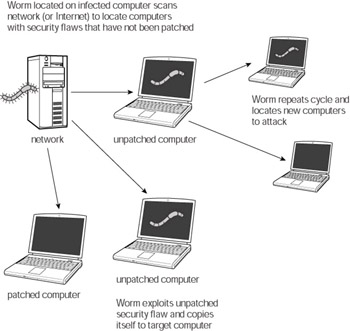
To access and infect computers across a network, worms exploit known vulnerabilities in applications and operating systems. First, the creator of the worm must release the program into the wild, meaning it has to be on a computer connected to a network (wireless or wired), which is in turn connected to the Internet. Once on a networked machine, the worm scans the network to locate machines with known vulnerabilities that haven’t been patched to correct the flaw. This leaves those computers vulnerable to attack. When it locates a susceptible target, the worm exploits the vulnerability and copies itself into the memory and onto the hard drive of the target computer. Once it has infected a new computer it begins the cycle again and spreads to other susceptible computers (see Figure 7-9).

click to expand
Figure 7-9: Computer worm infection cycle

Some worms spread themselves via e-mail in addition to spreading via network connections (see Figure 7-10). The worms do this by scanning the address book file of a user’s e-mail program and then sending copies of themselves to the addresses they locate. Many worms can generate random subject lines and disguise the copies that they send as some other random file name the same way viruses do. When spreading via e-mail, these worms require that the recipient of an infected message launch or open the attachment containing the copy of the worm. Once the user unwittingly activates the worm, it can then spread over the network by e-mailing itself from the new computer.

click to expand
Figure 7-10: Worms spread via alternate methods

You can sufficiently protect your computer from worms by taking the following precautions :

  • Install antivirus software, and update the software regularly

  • Install software and operating system updates as soon as they are available

  • Don’t open suspicious e-mail attachments, even from people that you know

Antivirus software will detect and eliminate worms in e-mail attachments, on your hard drive, and in your computer’s memory. Update your antivirus software’s definitions regularly so that they remain current and can adequately defend your computer. If the software has an automatic update feature, activate it. This will make it more likely that your antivirus program will remain current as well.

Because most worms exploit vulnerabilities in applications and system software, patching these software bugs will cut off the worm’s avenue of attack. Software vendors patch most vulnerabilities before crackers can figure out how to exploit them. This means that if your computer has all the available patches installed, it’s less likely that a worm will infect your computer via this route.

Note 

As a reminder, if you reinstall your system software or applications, be sure that you also reapply all of the patches because patching will be undone when the operating system and applications return to their original prepatched state.

{% if main.adsdop %}{% include 'adsenceinline.tpl' %}{% endif %}

Just as I said for viruses, don’t open suspicious e-mail attachments, even if they appear to be from someone you know. Often, an executable file can be disguised as what appears to be a harmless document; so, don’t open something thinking it’s safe just because it doesn’t end in . exe .

Caution 

Crackers often attempt to trick users into launching Trojans by disguising them as system/security patches or worm/virus removal utilities. Often, they distribute them via e-mail that appears to come from Microsoft.

Microsoft does not send patches via e-mail to any of its customers — so, don’t be fooled. Because there are hundreds of millions of people using Microsoft products, it is impossible to contact customers in this way. It’s up to you to go to Microsoft’s Web site and download updates.