Examining Computer Viruses
Computer viruses are analogous to biological viruses in many ways. A biological virus consists of nothing more than a strand of genetic code in a protein case, and it must hijack a living cell to make copies of itself. Like a biological virus, a computer virus is code that requires assistance to reproduce, but rather than hijacking a cell, a computer virus infects an executable program.
When a user launches an infected program, it activates the virus. The virus then adds itself to other programs, and in some cases may execute a secondary function or payload (see Figure 7-4). The payload may be a harmless joke, like a funny message on the screen, or it may destroy data by overwriting essential system files or deleting documents.
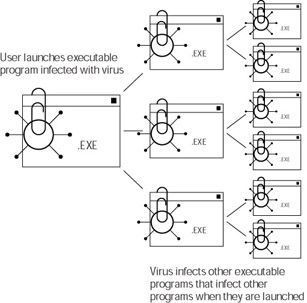
Figure 7-4: A computer virus infecting executable programs
A computer virus can’t spread by itself; it must infect an executable program that a user then launches. Even common e-mail macro viruses follow this rule, infecting executable macros in e-mail programs, which a user then activates by launching an attachment.
A computer virus generally follows a simple life cycle (see Figure 7-5) that, again, is analogous to the life cycle of biological viruses. The cycle begins with its creation and ends with its identification and termination. The cycle may begin again with the modification of the virus (creation of a variant) and its subsequent release. The steps in the computer virus life cycle are:
-
Creation, or birth
-
Release, or initial distribution of the virus
-
Trigger, either a date or event (optional)
-
Activation
-
Detection
-
Elimination or removal
-
Modification
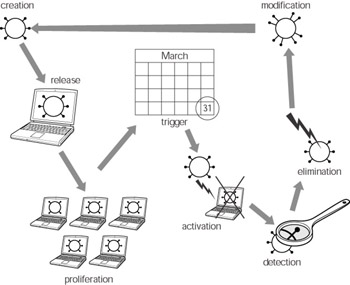
Figure 7-5: The life cycle of a computer virusNote Other types of malware, including worms and blended threats, follow a similar cycle.
Dangerous and double extensions
Because viruses infect executable files, it’s important that you don’t arbitrarily execute files that you receive as e-mail attachments. Not all executable files end with the .exe file extension. Table 7-1 lists some other file extensions that indicate executable files and their associated programs.
| File Extension | Associated Program or Function |
|---|---|
| EXE | An executable file, application, or program. |
| VBS | Visual Basic Script. Executable code created with Microsoft Visual Basic. |
| BAT | Batch file (example: autoexec.bat). Although initially created for MS DOS, batch files will still execute on newer Windows operating systems including Windows 2000 and Windows XP. |
| COM | Another executable file, program, or application. |
| PIF | Program Information File. A link to an executable DOS file that stores information about window settings for the DOS file. |
| LNK | A windows shortcut used to link to an executable file. |
| SCR | A Windows screen saver file. |
| VBE | A Visual Basic Encoded script file, similar to a VBS file. It executes in the same way. |
| JS | A JavaScript external file, used to contain executable JavaScript rather than embedding the script directly in a web page. Potentially dangerous. |
| HTA | An executable HTML application file that can be embedded on a Web page. |
| SHS | An executable Windows OLE (object linking and embedding) package that can act as a container for executable code. |
If you encounter an attachment with an extension you don’t recognize, be safe. Don’t open the file. Data files don’t represent a threat, because data files aren’t executable. Although data files can be infected with malicious code, opening the files does not activate the code because data files are not executed like application files are. Malicious code located in a data file requires an infected executable program to execute it.
An example of this is a file-infecting macro virus. The malicious code — in this case a Microsoft Word macro — is embedded in a Word document. In order for the macro virus to execute, Microsoft Word must run the macro. This is why disabling Microsoft Word’s macro feature defeats macro viruses.
Because data files are usually harmless, crackers and virus writers take advantage of this to trick people into opening executable attachments. They can use double extensions to confuse people or even hide the real extension of a file. The following file names are examples of this:
-
Iloveyou.txt.exe
-
account_info.doc.pif
-
yourmessage.jpg.scr
In each of these examples, the false file extension that indicates a data file is followed by the actual file extension indicating that the file is actually an executable file. Windows allows the “.” character in a file name and recognizes the last three letters following the final “.” as the actual file extension. The problem is that if you have enabled the Hide extensions for known file types option, Windows will hide the actual extension and only shows the file name with the first, false extension. Figure 7-6 illustrates this and displays one of the preceding example files in a folder window with the known extensions hidden.
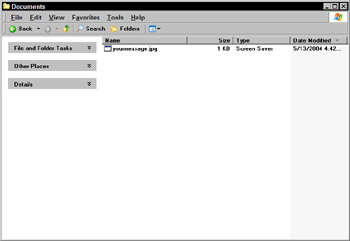
Figure 7-6: A document with its extension hidden
All of the executable files appear to be harmless data files, and an unsuspecting user is likely to launch one of them inadvertently. Another method for hiding the actual extension is to create a long file name with nonprinting characters like spaces:
| yourmessage.jpg . | scr |
Figure 7-7 shows this file displayed in a folder list. In the top window, the last extension is hidden because of the long file name and will remain hidden even if the system is not configured to hide known extensions. In the bottom window, you can see the actual file extension, but only by making the Name column extremely wide.
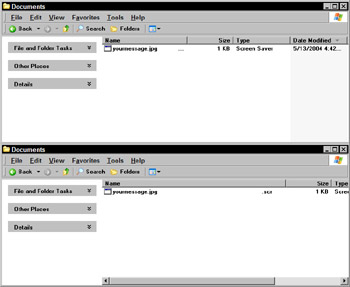
Figure 7-7: A double extension can be hidden by a long file name with blank spaces
The Microsoft fink-fund
In late 2003, Microsoft announced the creation of a $5 million antivirus reward program (now called the fink-fund by the security community) that provides monetary rewards to any person who provides information leading to the arrest and conviction of the creators of malicious software.
Microsoft placed the first bounties on the heads of the creators of the Sobig virus, the MSBlast worm, and the Mydoom.B worm. Each reward currently stands at $250,000. Because the creators of malware often seek bragging rights trying to prove their technical prowess, it’s likely that someone knows who these people are (especially fellow crackers). Microsoft hopes that the fund will give persons with knowledge of the virus writers’ identities incentive to come forward and identify them.
So far, no arrests have resulted due to the bounty placed on the heads of these people, but it’s likely that this approach will aid in the investigation of future malware.
| On The Web | For more information about the Microsoft antivirus reward program, visit www.microsoft.com/security/antivirus/. |

EAN: 2147483647
Pages: 145
- Article 352 Rigid Nonmetallic Conduit Type RNC
- Article 390 Underfloor Raceways
- Article 702 Optional Standby Systems
- Example No. D10 Feeder Ampacity Determination for Adjustable-Speed Drive Control [See 215.2, 430.24, 620.13, 620.14, 620.61, Tables 430.22(E), and 620.14]
- Example No. D12 Park Trailer (See 552.47)