Report Serving Architecture
Once you finish building your report and have it looking exactly the way you want, it is time to share that report with others. This is the time when your report moves from safe, childhood life inside a report project to its adult life on a Report Server. This is known as deploying the report. Let me assure you, reports pass through deployment much easier than you and I passed through adolescence!
Report Server
The Report Server is the piece of the puzzle that makes Reporting Services the product it is. This is the software environment that enables you to share your report with the masses, at least those masses who have rights to your server. Figure 1–4 shows the basic structure of the Report Server.
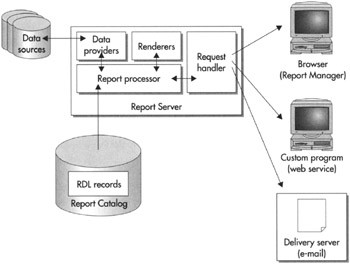
Figure 1–4: Report serving architecture
Report Catalog
When a report is deployed to a Report Server, a copy of the report’s RDL definition is put in that server’s Report Catalog. The Report Catalog is a set of databases used to store the definitions for all the reports available on a particular Report Server. It also stores the configuration, security, and caching information necessary for the operation of that Report Server.
Even though you may use any ODBC- or OLE DB-compliant data source to supply data to your reports, the Report Catalog database can only exist in SQL Server 2000 or SQL Server 2005. The Report Catalog database is created as part of the Reporting Services installation process. Except for creating regular backups of any Report Catalog databases, it is probably a good idea to leave the Report Catalog alone.
Report Processor
When a report needs to be executed, the report processor component of the Report Server directs the show. The report processor retrieves the RDL for the report from the Report Catalog. It then reads through this RDL to determine what will be needed for the report.
The report processor orchestrates the operation of the other components of the Report Server as the report is produced. It takes the output from each of the other components and combines them together to create the completed report.
Data Providers
As the report processor encounters dataset definitions in the report RDL, it retrieves the data to populate that dataset. It does this by first following the instructions in the report’s data source for connecting to the database server or file that contains the data. The report processor selects a data provider that knows how to retrieve information from this type of data source.
The data provider then connects to the source of the data and selects the information required for the report. The data provider returns this information to the report processor, where it is turned into a dataset for use by the report.
Renderers
Once all the data for the report has been collected, the report processor is ready to begin processing the report’s layout. To do this, the report processor looks at the format requested. This might be HTML, PDF, TIFF, or one of several other possible formats. The report processor then uses the renderer that knows how to produce that format.
The renderer works with the report processor to read through the report layout. The report layout is combined with the dataset, and any repeating sections of the report are duplicated for each row in the dataset. This expanded report layout is then translated into the requested output format. The result is a report ready to be sent to the user.
Request Handler
The request handler is responsible for receiving requests for reports and passing those requests on to the report processor. Once the report processor has created the requested report, the report handler is also responsible for delivering the completed report. In the next section, you learn about the various methods the request handler uses for delivering reports.
Report Delivery
We have discussed how a report is created by the Report Server. What we have not discussed is where that report is going after it is created. The report may be sent to a user through the Report Manager website. It may be sent in response to a web service request that came, not from a user, but from another program. It may also be e-mailed to a user who has a subscription to that report.
Report Manager Website
One way for users to request a report from the Report Server is through the Report Manager website. This website is created for you when you install Reporting Services. Figure 1–5 shows a screen from the Report Manager website.
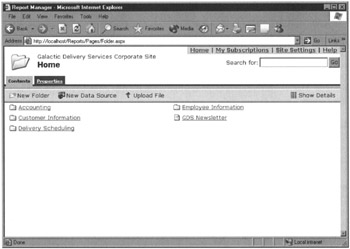
Figure 1–5: The Report Manager website
The Report Manager website organizes reports into folders. Users can browse through these folders to find the report they need. They can also search the report titles and descriptions to locate a report.
The Report Manager also includes security that can be applied to folders and reports. With this security, the site administrator can create security roles for the users who will be accessing the site. These security roles control which folders and reports a user is allowed to access. You learn about security when we look at the Report Manager in Chapter 10.
In the Report Manager, reports are always displayed using the HTML format. Once a report has been displayed as an HTML page, the user can then export the report into any of the other available formats.
Subscription Delivery
If the users do not want to go to the report, the request handler can make the report go to them. In other words, users do not necessarily need to come to the Report Manager website to receive a report. They can have the report delivered to them through a subscription service. The Report Manager enables users to locate a report on the site, and then subscribe to it, so it will be delivered to them in the future.
When users subscribe to a report, they provide an e-mail address to which the report will be delivered, either as the body of the e-mail or as an e-mail attachment, depending on the requested format. Users can specify the format for the report at the time they create their subscription.
The site administrator can also set up report subscriptions. These function like a mass mailing, using a list of e-mail addresses. Rather than requiring each user to access the Report Manager to create their own subscription, the site administrator can create one subscription that is delivered to every user in the list.
Web Service Interface
In addition to delivering reports to humans, either at their request or on a subscription basis, the request handler can deliver reports to other software applications. This is done through a series of web services. A web service is a mechanism that allows programs to communicate with each other over the Internet.
A program calls a web service on the Report Server, requesting a particular report in a particular format. The request handler relays this request to the report processor, just like any other request for a report. The completed report is returned to the program that originated the request as the response to the web service request.
Web services use a standard called the Simple Object Access Protocol (SOAP). SOAP is supported by both Windows and non-Windows environments, so a program running on a non-Windows computer that supports SOAP can receive a report created by Reporting Services.

EAN: 2147483647
Pages: 115