Section 10.2. X Servers
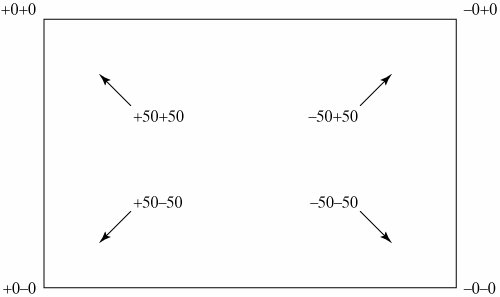
10.2. X ServersAn X server starts up and "takes over" the bitmapped display on a computer system. This may happen automatically when a user logs in or it may happen when the user executes a specific command, depending on the configuration of the system. Usually at the time the X server starts, one or two X clients are also started. X clients are programs that will communicate with one or more X servers in order to communicate with a user. Some other program must be started that will allow the user access to the system (a screen being driven by an X server but not running any application would provide no way of running any other programs). On Linux systems, desktop tools and a window manager are started along with the X server, as we will see later. On systems that don't start an X server for you at login time, you can log in and run the startx command, either by typing "startx" manually or by adding the command to your .login or .profile script so the server will be started automatically when you log in. Most Linux installation processes configure the system to start the X Window System automatically when a user logs in. In this case, a display manager puts up a login banner on the screen to prompt someone to log in. 10.2.1. Screen GeometryThe layout of the screen managed by the X server is called geometry. A bitmapped display has a certain size measured in pixels. Pixels are the dots on a display that can be set to on or off (white or black) or to some color value. A small screen might be 600 x 480 (a typical low-resolution PC monitor). A larger screen might be 1280 x 960 pixels or even larger for very high-resolution graphics screens. Screen geometry is specified by referencing either a specific position on the screen (i.e., 500 x 200) or positions relative to a corner of the screen. Position +0+0 is the upper left corner of the screen, -0-0 is the lower right corner (-0+0 is the upper right, +0-0 lower left). Therefore, +50+50 would be 50 pixels away from the upper left corner of the screen in both the X and Y directions. We will see examples of this when we discuss X clients. Figure 10-1 shows the positioning of various geometry specifications. Figure 10-1. X Window System screen geometry specifications. 10.2.2. Security and AuthorizationAs you may have guessed by now, the ability to scribble on any computer screen in your network could lead to security problemsnot so much because the act of writing on someone else's screen is anything more than annoying, if the recipient does not want it, but because I/O to an X server is just that, input and output. Write access to an X server also gives you the ability to query that system for a current copy of the display or even keyboard input. Because of this, the X Window System has a certain amount of security built into the X server. It isn't highly rated security, but it is enough to keep the casual snoop from gaining unauthorized access. By default, the X server running on any computer system only allows X clients on that same system to talk to it. The X server does not accept connections from "foreign" X clients without knowing who they are. This causes the default configuration of an X server to be very much like a traditional window system, where only applications running on that computer can write to that computer's display. In order to take advantage of the network capabilities of the X Window System, you must allow outside access. The xhost command (an X client) is used to allow X clients on other systems to display to your system (Figure 10-2).
For example: $ xhost +bluenotewill allow X clients running on the computer called "bluenote" to write to the display on the system where the xhost utility was run. Later, when whatever you needed to run is finished, you can disallow access with the command: $ xhost -bluenoteIn a secure environment where you aren't afraid of other systems writing to your display, you can allow any X client on the network to write to your display with the command: $ xhost +You can also take away access to all remote X clients with: $ xhost - |

EAN: 2147483647
Pages: 339