Configuration and Deployment
Overview
Leave no stone unturned.
-Euripides
The .NET Framework provides an extensible infrastructure that enables you to define configuration settings for all types of applications including, but not limited to, ASP.NET applications. All applications, no matter the platform and the working model, should always be driven by configurable settings read from an external storage medium. Simply by updating the configuration file, developers and system administrators should be able to change the way in which the application works as well as the elements of the user interface. In other words, to the extent possible, applications should always be designed in a parametric way and according to the theoretical principles of attribute-based programming.
The .NET Framework defines a tailor-made, XML-based API to access configuration files and, in doing so, forces developers to adopt a common, rich, and predefined schema for storing application settings. In the more general context of the .NET configuration scheme, ASP.NET applications enjoy specific features such as a hierarchical configuration scheme that allows settings inheritance and overriding at various levels—machine, application, or specific directories.
Configuration files are typically created offline or during the development of the application. They are deployed with the application and can be changed at any time by administrators. Changes to such critical files are promptly detected by the ASP.NET runtime and cause all the pages to recompile. ASP.NET pages can use the classes in the System.Configuration namespace to read from configuration files but not to write back. The .NET Framework, in fact, provides no ad hoc API to create or edit configuration files. However, because configuration files are plain XML files, the XML API can be used to modify any contents. You should note, though, that by default ASP.NET applications have no permissions to write or create files.
In this chapter, after a bird's-eye look at the overall .NET Framework configuration engine, we'll specifically delve into the ASP.NET configuration machinery. We'll see how to fine-tune the ASP.NET runtime and review the whole collection of parameters you can set for an individual application. Finally, we'll see how to store custom data in a configuration file and top off the discussion by covering deployment issues.
Configuration in the NET Framework
The .NET Framework provides three basic types of configuration files: machine, security, and application. Despite their different contents and goals, all configuration files are XML documents and share the same schema. For example, all configuration files begin with a node and then differentiate their contents and child nodes according to the final goal and the information they contain.
The XML Schema of Configuration Files
Configuration files are standard XML files that follow a given schema. The schema defines all possible settings for machine, security, and application files. The .NET Framework provides made-to-measure classes to read configuration settings, but no writing facilities are provided. You need to be familiar with XML writers if you want to directly edit the configuration files. (In light of this, bear in mind that XML elements and attribute names are strictly case-sensitive.)
All configuration files have their root in the element. Table 12-1 lists the first-level children of the element. Each node has a specified number of child elements that provide a full description of the setting. For example, the element optionally contains the tag in which you can store information about the users who can safely access the ASP.NET application.
|
Element |
Description |
|---|---|
|
Contains custom application settings in the specified XML format. |
|
|
Describes the configuration sections for custom settings. If this element is in a configuration file, it must be the first child of the root. |
|
|
Cryptography schema; describes the elements that map friendly algorithm names to classes that implement cryptography algorithms. |
|
|
Run-time settings schema; describes the elements that configure assembly binding and run-time behavior such as probing and assembly redirect. |
|
|
Startup settings schema; contains the elements that specify which version of the common language runtime (CLR) must be used. |
|
|
Describes the elements that specify trace switches and listeners that collect, store, and route messages. |
|
|
Network schema; specifies elements to indicate how the .NET Framework connects to the Internet, including the default proxy, authentication modules, and connection parameters. |
|
|
Settings schema; configures the client and server applications that exploit the .NET Remoting. |
|
|
It's the ASP.NET-specific configuration section; contains the elements that control all aspects of the behavior of an ASP.NET application. |
Because we're focusing on ASP.NET applications, only the section has particular importance for us and only that will be covered in detail. However, this doesn't mean that, as an ASP.NET developer, you'll never be using other sections—most certainly you will!
For example, you'll need and if you plan to persist user-profile information on the server, read working information such as connection strings, or specify advertising pictures to rotate. The element defines the sections that will be used to group information in the rest of the document. The element contains user-defined nodes whose structure has been previously defined in the node. You might need to interact with the section if you want to use a custom trace listener that logs to an application-defined file. You'll probably need if some special rules for probing assemblies are required. Furthermore, if the ASP.NET application performs calls to some remote component, you must adjust settings in the section.
The elements in Table 12-1 are used to compose the various .config files that all .NET applications are based on in some way. Let's learn a bit more about their internal structure.
The Machine Configuration File
The machine configuration file is named machine.config and is located in the CONFIG subdirectory of the .NET Framework installation path. The first path shown in the following code is typical of version 1.0 of the .NET Framework; the second path refers to version 1.1 of the .NET Framework:
C:WINNTMicrosoft.NETFrameworkv1.0.3705CONFIG
C:WINNTMicrosoft.NETFrameworkv1.1.4322CONFIG
The machine.config file contains machinewide settings that apply to assembly binding, built-in remoting channels, and the ASP.NET runtime. In particular, the machine.config file contains information about the browser capabilities, registered HTTP handlers, and page compilation. Here's an excerpt from machine.config that shows compilation and assembly default settings:

| Note |
The lines in boldface type refer to changes in version 1.1 of the .NET Framework. Also, notice that the version number of the assemblies in version 1.1 is 1.0.5000.0. |
Declaring a section in the machine.config file enables you to exploit those settings from within any ASP.NET application that runs on that computer. Note, though, that settings defined in machine.config can be overwritten and even canceled in the application configuration file (web.config). More on this later in the "ASP.NET Applications Configuration" section.
Security Configuration Files
Security configuration files contain information about the code groups and the permission sets associated with a policy level. A code group is a logical grouping of code that specifies certain conditions for membership. Any code that meets the given criteria can be included in the group. Code groups have associated permission sets. A permission set, in turn, defines the resources that can be accessed at execution time. A policy level describes all the security measures for the specified context—enterprise, machine, or user. The CLR grants permissions to an assembly based on the minimum set of permissions granted by any of the policy levels.
Security configuration files have names and locations that depend on the policy level. The configuration file for the enterprise policy level is named enterprisesec.config and resides in the same directory as the machine.config file. Contained in the same folder, the security.config file characterizes the machine policy level. The enterprise level groups security settings for the entire enterprise; the machine policy level, on the other hand, defines the security for the local machine. Both levels can be configured only by an administrator.
The user policy configuration file affects the code in all the processes associated with the user. Named security.config, the file resides in a folder under the user profile subtree. The path for a machine running version 1.1 of the .NET Framework is shown here.
C:Documents and Settings[UserName]Application DataMicrosoft
CLR Security Configv1.1.4322
| Caution |
Editing the contents of the security files, and thereby modifying the security policies, is a potentially critical task that should be accomplished using the .NET Framework Configuration administrative tool (an MMC snap-in named mscorcfg.msc) or the Code Access Security Policy tool (a command-line tool named caspol.exe). |
Application Configuration Files
Application-specific configuration files contain settings consumed by the CLR as well as by the application itself. The CLR reads information such as the assembly binding policy, the location of remote objects, and ASP.NET runtime settings. The application can read settings that correspond to the parameters it needs to work within. The name and location of the application configuration file depend on the application's model, which can be one of the following: Windows Forms or console executable, ASP.NET application or Web service, or Internet Explorer–hosted application. Table 12-2 shows the names used.
|
Application Type |
Configuration File |
|---|---|
|
Windows Forms |
[ApplicationName].exe.config |
|
Console |
[ApplicationName].exe.config |
|
ASP.NET |
web.config |
|
Web service |
web.config |
|
Hosted by Internet Explorer |
The name of the file doesn't have to follow specific rules, but the location must be on the same virtual directory as the application. |
More often than not, configuration files contain sensitive information the CLR and the ASP.NET runtime need to know and process. Both the CLR and the ASP.NET runtime treat XML files that have a particular name (for example, web.config) as special resources. For this reason, you can't really use different names for them. What you can do, instead, is move the application-specific information—the content of the section—to a distinct file. (More on this later in the "Persisting Application Settings" section.) If you move system information out of the web.config file, that information will easily be ignored by the ASP.NET runtime and might affect the overall functionality of the application.
Managing Configuration Settings
All sections used in a configuration file must be declared in the initial section. The following code snippet demonstrates how the section is declared in machine.config:
The element has no other role than marking and grouping a few child sections, thus creating a sort of namespace for them. In this way, you can have sections with the same name living under different groups. The
element takes two attributes—name and type. The name attribute denotes the name of the section being declared. The type attribute indicates the name of the managed class that reads and parses the contents of the section from the configuration file. The value of the type attribute is a comma-separated string that includes the class and full name of the assembly that contains it.
The
element also has two optional attributes—allowDefinition and allowLocation—specifically targeted at ASP.NET applications. These two attributes are ignored by configuration readers controlled by other types of applications. The allowDefinition attribute specifies which configuration files the section can be used in. Feasible values for the allowDefinition attribute are in Table 12-3.
|
Value |
Description |
|---|---|
|
Everywhere |
The section can be used in any configuration file. (Default.) |
|
MachineOnly |
The section can be used only in the machine.config file. |
|
MachineToApplication |
The section can be used in the machine.config file and in the application's web.config file. You cannot use the section in web.config files located in subdirectories of the virtual folder. |
The allowLocation attribute determines whether the section can be used within the section. The section in a machine.config file allows you to apply the specified machinewide settings only to the resources below a given path. (More on the element later in the "The Section" section.)
Many sections in the configuration files support three special elements named , , and . The element adds a new setting to the specified section, while removes the specified one. The element clears all the settings that have previously been defined in the section. The and elements are particularly useful in ASP.NET configuration files in which a hierarchy of files can be created. For example, you can use the element in a child web.config file to remove settings that were defined at a higher level in the configuration file hierarchy.
The and elements don't affect the actual data stored in the configuration file. Removing a section doesn't erase the related data from the file, it simply removes the data from the in-memory tree of settings that ASP.NET builds and maintains for an application.
| Note |
Sections are a necessary syntax element in configuration files. However, you don't need to declare sections in all application-specific web.config files. When processing a web.config file, in fact, the reader builds a configuration tree starting from the root machine.config file. Because all standard sections are already declared in the machine.config that ships with the .NET Framework, your application needs to declare only custom sections you plan to use. Finally, bear in mind that an exception is thrown if a configuration section lacks a corresponding entry in the section and when the layout of the data does not match the declaration. |
The ConfigurationSettings Class
To programmatically read application settings, you use the ConfigurationSettings class from the System.Configuration namespace. ConfigurationSettings is a small, sealed class that simply provides one static method (GetConfig) and one static property (AppSettings).
The AppSettings property is a read-only NameValueCollection object designed to get the information stored in the section. If no setting is specified, or if no section exists, an empty collection is returned. The GetConfig method returns the configuration settings for the specified section, as shown here:
public static object GetConfig(string sectionName);
Although the method signature indicates an object return type, the actual return value you get from a call to GetConfig is determined by the handler class specified for the requested section. Internally, the GetConfig method first determines the name and location of the configuration file to access and then proceeds by creating a specialized XML text reader to operate on the XML document.
A more specialized tool for reading application settings is the AppSettingsReader class. This class provides a single method, named GetValue, for reading values of a particular type from the configuration file. The GetValue method takes two arguments—the name of the setting to retrieve and the type to return—as shown here:
public object GetValue(string key, Type type);
The GetValue method retrieves the value of the given setting using the AppSettings property and then performs an automatic cast to the specified type. Unlike the AppSettings property of the ConfigurationSettings object, the GetValue method works in a strongly typed way.
Section Handlers
A section handler is a .NET Framework class that implements the IConfigurationSectionHandler interface. It interprets and processes the configuration settings stored in a section and stores them in an appropriate object. The XML schema of the input data and the type of the returned object depend on the implementation of the section handler. A few predefined section handlers exist and are listed in Table 12-4. All these section handlers belong to the System.Configuration namespace and are implemented in the System assembly.
|
Class |
Description |
|---|---|
|
DictionarySectionHandler |
Reads name/value pairs, and groups them in a hash-table object. |
|
IgnoreSectionHandler |
The System.Configuration classes ignore the sections marked with this handler because their contents will be processed by other components. This handler is an alternative to using and declaring custom handlers. |
|
NameValueFileSectionHandler |
Reads name/value pairs from a file referenced in the section, and groups them in a NameValueCollection object. This handler allows you to link an external, custom file to web.config. |
|
NameValueSectionHandler |
Reads name/value pairs, and groups them in a NameValueCollection object. |
|
SingleTagSectionHandler |
Reads settings from attributes stored in a single XML node. The data is returned as a hash table. |
The IgnoreSectionHandler handler deserves a bit more attention. The handler simply tells the system's configuration reader to ignore any data stored under the specified section. It could be argued that one shouldn't flood a system's .config file with data that will be processed outside the standard configuration pipeline. Although this is a strong recommendation for user code, some system modules (for example,.NET Remoting) store some of their general settings in the machine.config file but then use internal readers to process the information. To preserve file consistency and avoid exceptions, the IgnoreSectionHandler handler is used. A better alternative is either using a custom configuration file or defining a custom section handler.
Later in this chapter in the "Creating New Configuration Sections" section, we'll discuss how to create custom sections and a custom section handler to manage the configuration of an ASP.NET application. By now, you should have enough background information to fully understand the details of the configuration machinery of ASP.NET applications.
ASP NET Applications Configuration
Configuration in ASP.NET is based on the machine.config file plus any number of web.config files. The web.config file is in fact optional, and there's no need to have one in the virtual folder if nothing in the application is configurable. An application can also have multiple web.config files, deployed at any time in different subdirectories. Note that the settings stored in a web.config file apply to the pages contained in the same folder level and below. Any web.config file can extend, restrict, and override settings defined at an upper level, including the machine level. If no configuration file exists in an application folder, the settings that are valid at the upper level are applied.
A sapient use of the settings in machine.config and web.config files allows you to declaratively restrict access to given folders and even specify a different set of features. For example, the following web.config file restricts access to the folder that contains it to all users except the administrator.
You simply have to add the code in boldface type to the web.config file in another directory to activate the same restriction.
| Note |
ASP.NET protects its configuration files from direct Web access by instructing Internet Information Services (IIS) to block browser access to configuration files. An HTTP access error 403 (forbidden) is returned to all browsers that attempt to request a .config as a URL. |
The ASP NET Configuration Hierarchy
The configuration machinery in ASP.NET is hierarchical by nature. Although, the application settings are located in different files—machine.config and web.config—they originate a single in-memory graph of settings that can take different forms on different directories. The machine.config file contains settings valid at the machine level—that is, for all .NET and ASP.NET applications running on that machine. You can imagine the configuration information in ASP.NET as given by a unique XML document with the schema outlined in Table 12-1. The nodes of this document are populated with the information read from both machine.config and all the web.config files available within the context of the application.
From an ASP.NET-only viewpoint, the contents of machine.config represent the tree of settings that all Web applications hosted on the machine initially share. You can customize and adapt the inherited machinewide settings for each application by creating one or more web.config files. In the end, the tree of settings for the application is unique even though it physically spans multiple files.
The syntax of machine.config and web.config files is identical—both are XML files based on the same schema. The ASP.NET runtime processes configuration information hierarchically, proceeding from a root common to all applications on the machine—machine.config—down to all the web.config files found in the various folders of the particular application. When an ASP.NET application starts, all configurable parameters are set to the default values defined in machine.config. These values can be overridden in the first place by a web.config file placed in the root folder. The web.config file can also add new application-specific settings. In theory, a root web.config file can also clear all the settings in the original machine.config and replace them altogether. You can also define extra web.config files in child folders to apply other settings to all the resources contained in the subtree rooted in the folder. Also in this case, the innermost web.config can overwrite, restrict, or extend the settings defined at upper levels. Figure 12-1 illustrates how ASP.NET processes system and application settings for each page in the Web site.
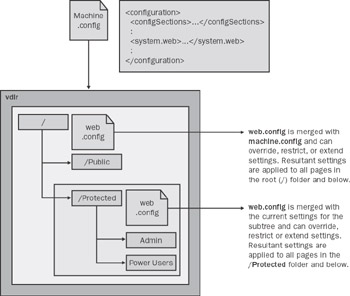
Figure 12-1: ASP.NET configuration is hierarchical by nature.
Applications don't need to read from machine.config. Configuring the machine file is an administrative task and should be performed offline when the application is deployed or during periodical maintenance. Applications, on the other hand, might have the need to read from web.config files—that is, the application-specific repository for configuration information. Data that applications might want to read from web.config is applicationwide data, such as connection strings to databases, URLs to connect to user-interface elements, and pieces of software that need to be enabled or disabled.
In no case should the application write to either machine.config or web.config. Unlike desktop applications, a typical Web application doesn't need to track on the server applicationwide and with dynamically changing settings. However, in some cases you might have the need to persist some noncritical and nonsensitive data on the server (for example, user profile data). A few severe drawbacks apply, though, if you use web.config instead of databases or custom files.
First, the web.config files require administrative privileges to be modified. In addition, consider that by default ASP.NET applications run under the ASPNET account, which provides no writing permissions. Furthermore, any modification made to web.config automatically invalidates all the dynamic assemblies created for the application. Hence, all the pages will be recompiled with the next request to reflect the changes in the configuration. You can understand, then, that especially for large-scale Web sites with hundreds of pages, repeated and generalized compilations are a serious issue that leads to dramatic performance hits. We'll return to this topic later in the "Persisting Application Settings" section.
| Important |
Bear in mind that the ASP.NET configuration system covers only ASP.NET-specific resources, which are not typically all types of resources employed in a Web site. ASP.NET-specific resources are only those registered to be handled by aspnet_isapi.dll—that is, .aspx, .ascx, .asmx, .ashx, and a few others. The complete list has been discussed in Chapter 2, in the "The IIS Resource Mappings" section. Note that the list doesn't include common resource types such as HTML, TXT, GIF, and JPEG files. All these resources, HTML pages for example, are always accessible by all users regardless of the contents of the section. The reason for this behavior is that to improve performance IIS handles those resources internally without involving external modules such as the ASP.NET ISAPI extension. |
The Section
The section provides an alternative technique to apply different settings to various subdirectories of the same application. Instead of defining child web.config files, you can create a single web.config file in the root folder and specify settings on a per-directory basis. Basically, the element lets you create embedded configuration sections associated with a particular directory. From a functional point of view, this is equivalent to having a web.config file in each directory.
Centralized Configuration
The element has two attributes: Path and allowOverride. Path represents the virtual path to which the embedded settings apply. The following snippet shows how it works:
The defining characteristic of this approach is that you have a single, centralized web.config file to maintain. This feature saves you from the burden of maintaining several web.config files, but it also introduces some unpleasant side-effects that in the long run can turn out to be quite harsh. For example, any change to the file results in a new compilation for all the pages in the application. If you maintain distinct web.config files, the compilation occurs only for the pages really affected by the change.
Optimizing the distribution of pages and configuration files is a key aspect to improving the performance of ASP.NET Web sites. If some of your pages are subject to frequent configuration updates, you're probably better off isolating them in a subdirectory with a child web.config. Next, use the element in the root file for all pages that are relatively static from the configuration point of view.
The element can also be used within the machine.config file. Interestingly, in this case you can also specify different machinewide settings for various Web applications. In this case, though, you must indicate the application name prefixed by the IIS name of the Web site. (The Web site name is read in the IIS Manager.)
We'll return to and machine.config later in this chapter in the "Updating Configuration Options" section when discussing the deployment of ASP.NET applications.
Unmodifiable Settings
The second attribute you can specify—allowOverride—allows you to lock some settings at both the machine level and application level. By grouping settings in a element with the allowOverride attribute set to false, you tell the ASP.NET configuration system to raise an exception whenever a protected setting is overridden in a lower-level .config file.
The ultimate goal of this feature is to enable administrators to control the settings of a server that provides ASP.NET hosting. When a new application is installed in production, changes might be required on the target machine to reflect the native environment of the application. Updating the machine.config file on the production machine is not an issue as long as yours is the only application running or if you can directly control and configure all the applications hosted on that machine. However, in an application-hosting scenario, the administrator might decide to lock some machine settings to prevent installed applications from modifying them.
Machine settings wrapped in a element and adorned with the allowOverride attribute set to false cannot be modified in lower-level configuration files. In this way, the administrator can preserve, to the extent possible, the integrity of the hosting environment and guarantee that all applications run under the same conditions.
| Note |
By default, nearly all predefined sections can appear within a section. The exceptions are , , , and . In general, sections can be disallowed from any section by using the allowLocation attribute. The allowLocation attribute of the element determines the section's capability of being customized for a particular path. Set it to false, and the section is not allowed to be used within a section. |
The Section
The section contains all the configuration elements that set up the ASP.NET runtime environment and controls how ASP.NET applications behave. Table 12-5 shows all feasible first-level elements and their override level.
|
Section |
Overridable |
Description |
|---|---|---|
|
Machine, application |
Sets the authentication mechanism. |
|
|
Everywhere |
Indicates authorized users. |
|
|
Everywhere |
Lists known browser capabilities. |
|
|
Everywhere |
Lists predefined client targets. |
|
|
Everywhere |
Settings for batch compilation. |
|
|
Everywhere |
Settings for custom error pages. |
|
|
Everywhere |
Lists known mobile browser capabilities. Supported only in version 1.1 of the .NET Framework. |
|
|
Everywhere |
Settings for application localization. |
|
|
<httpHandlers> |
Everywhere |
Lists registered HTTP handlers. |
|
Everywhere |
Lists registered HTTP modules. |
|
|
Everywhere |
HTTP runtime settings. |
|
|
Everywhere |
Sets impersonation. |
|
|
Everywhere |
Encryption key for sensitive data. |
|
|
Everywhere |
Lists device-specific class adapters for Web controls. Supported only in version 1.1 of the .NET Framework. |
|
|
Everywhere |
Controls features of ASP.NET pages. |
|
|
Machine |
Configures the process model. |
|
|
Machine, application |
Defines allowed trust levels. |
|
|
Machine, application |
Configures the Session object. |
|
|
Everywhere |
Configures the tracing system. |
|
|
Machine, application |
Defines the default trust level. |
|
|
Everywhere |
Locates client scripts. |
|
|
Everywhere |
Configures Web services. |
Each of the elements listed in Table 12-5 features its own schema and provides attributes and enumerations to pick values from.
The Section
The section allows you to configure a Web site for various types of user authentication, including form-based authentication as well as Passport and IIS-driven authentication. This section has two mutually exclusive subsections— and —and the mode attribute to control the authentication mode requested by an application.
Allowable values for the mode attribute are shown in Table 12-6.
|
Value |
Description |
|---|---|
|
Forms |
Makes use of a custom form to collect logon information. |
|
Passport |
Exploits the authentication services of Microsoft Passport. |
|
None |
Indicates ASP.NET should not enforce any type of authentication, which means only anonymous users can connect or the application itself provides a built-in mechanism. |
|
Windows |
Exploits any authentication services of IIS—basic, digest, NTLMKerberos, or certificates. This is the default mode. |
When using the forms authentication, you should specify a few parameters: name, loginURL, protection, timeout, path. The name attribute refers to the name of the cookie that transmits logon information from the client. The default name is .ASPXAUTH, while the path to store the cookie is set in the path attribute. The cookie expires a few minutes after being issued. The timeout attribute (which has a default of 30) controls its lifetime. The cookie can be protected using encryption, a validation key attached to the data, or both. The protection attribute specifies how the protection is implemented. The default is All, which means both Validation and Encryption flags are used. The initial attempt to authenticate is conducted through the cookie. If it fails, a login page is displayed. The URL of the login page is returned by the loginURL attribute and is login.aspx by default.
| Note |
In version 1.1 of the .NET Framework, requireSSL (false) and slidingExpiration (true) are also supported. The former indicates whether the cookie should be sent only over SSL (Secure Sockets Layer). The latter specifies whether the cookie should automatically be reissued if it is about to expire. |
The section supports the element, which in turn has a nested element. The element lets you define the user credentials against which authentication should be performed. You should avoid using the element because you end up having passwords stored in a text file. The element features a passwordFormat attribute to set the encryption algorithm to use to protect the user's password.
Finally, when the Passport mode is used, the entire burden of authentication is shifted to the Passport services. However, the redirectURL attribute on the element lets you specify the page to redirect to if authentication is required but the user is unknown to the Passport service.
The Section
The section is used to define a declarative filter to control access to the resources of the application. The section contains two subsections named and , which can be used to allow and deny access to users. Both elements feature three attributes—users, roles, and verbs—filled with a comma-separated list of names, as the following code demonstrates:
The element authorizes access to any user whose name appears in the list—that is, to all users with any of the specified roles. Authorized users can execute only the HTTP verbs (for example, POST and GET) indicated by the verbs attribute.
Conversely, the element prohibits listed users from executing the specified actions. The default setting allows all users free access to the resources of the application. When specifying the user name, a couple of shortcuts are allowed. The asterisk (*) means all users, whereas the question mark (?) stands for the anonymous user.
The Section
The section enumerates the characteristics and capabilities of the supported browsers, including—in version 1.1 of the .NET Framework—mobile devices. The section is tightly coupled with the HttpBrowserCapabilities class (and MobileCapabilities in version 1.1), which allows the ASP.NET runtime to gather technical information about the browser that is running on the client. An ASP.NET application identifies the browser through the Browser property of the intrinsic Request object. Internally, the Request object first looks at the user-agent information that comes with the HTTP request and then matches this information against the content of the section. If a match is found, an instance of the HttpBrowserCapabilities class is created and filled with the available information. The newly created object is then made available to the application via the Browser property.
| Note |
To detect the capabilities of a mobile device, you use the same Request.Browser property. In this case, though, you might want to cast the return value to MobileCapabilities. The MobileCapabilities class inherits from and extends the HttpBrowserCapabilities class. |
Under the section, you find a fair number of commercial browsers described in terms of their run-time capabilities, such as cookies, tables and frames support, script languages accepted, XML DOM, and operating system. The element can be declared at any level in the application, thus making it possible for you to enable certain levels of browser support for certain applications. The list of available browsers can be updated as required to detect future browsers and browser capabilities.
The Section
The section adds aliases for specific user agents that ASP.NET pages can target through the ClientTarget property. In other words, the section defines the allowable values for the ClientTarget property of the Page. By default, the following aliases are defined: ie5, ie4, uplevel, and downlevel. As the names suggest, the first two indicate Internet Explorer 5.5 and Internet Explorer 4.0, respectively. Note that in ASP.NET, an up-level browser is meant to be Internet Explorer 4.0 (the first browser to support Dynamic HTML), while a down-level browser is currently undefined.
Bear in mind that setting the ClientTarget property to one of the values listed by the section forces the HttpBrowserCapabilities object for the page to return the capabilities of the specified browser, rather than the capabilities of the actual requesting client.
The Section
The section contains all the default settings the ASP.NET runtime uses when it compiles requested pages. In this section, you'll find information about automatically referenced assemblies, compiler options, and languages available for ASP.NET pages. The section features the attributes shown in Table 12-7.
|
Attribute |
Description |
|---|---|
|
batch |
Indicates whether page batch compilation is supported. Feasible values are true or false. The default is true. |
|
batchTimeout |
Indicates the time-out period (in seconds) for batch compilation. If batch compilation cannot be completed in 15 seconds, the current page is compiled to a single assembly. Previously compiled pages remain in the batched assembly. |
|
debug |
Indicates whether to include or not to debug information in the generated assemblies. The default is false. |
|
defaultLanguage |
Specifies the default programming language for ASP.NET pages. Feasible language names are defined in the subtag. The default is VB. |
|
explicit |
Specifies the setting (true or false) of the Visual Basic Explicit compile option. The default is true. |
|
maxBatchGeneratedFileSize |
Specifies the maximum size (in KB) of the generated page class files that can fit in a batch compilation. The setting is meant to control the final size of the generated page assemblies. By default, this is set to 3000KB. |
|
maxBatchFileSize |
Specifies the maximum number of pages per batch compilation. By default, this is set to 1000 pages. |
|
numRecompilesBeforeAppRestart |
Indicates the number of page recompiles that can occur before the AppDomain is restarted to prevent performance degradation. The default is 15. The attribute is not supported at the directory level—that is, in a child web.config file. |
|
strict |
Indicates the setting (true or false) of the Visual Basic Strict compile option. The default is false. |
|
tempDirectory |
Specifies the directory in which temporary files generated during compilation should be stored. By default, files are stored in the same directory as the generated assemblies. |
The tag contains two subtags— and . The former tag defines all the assemblies that are automatically referenced by the page compiler. The latter tag enumerates the available ASP.NET compilers. To define the assemblies to reference or to remove an assembly from the list of references, you use , , and tags and identify assemblies by name, not by path and extension. The asterisk (*) character denotes all assemblies in the application's Bin directory and in the .NET Framework installation path.
The tag doesn't accept wildcards (*) for the assembly attribute. In addition, the assembly name must match the name of an assembly that has been previously added using . The tag removes from compilation all assemblies defined in upper-level directories. The list of default assemblies has been discussed in the "The Processing Directives of a Page" section in Chapter 1. A new assembly is automatically linked in the .NET Framework version 1.1 for mobile controls. If you don't want to target those browsers, drop the assembly in the application's web.config file.
The section defines the aliases you can use to specify the language of a page. The aliases are specified using the language attribute. The extension attribute denotes the file extensions allowed for that language. Finally, the type attribute indicates the name of the class that provides the compiler object model and the related assembly. In the .NET Framework version 1.1, the J# compiler has been added.
A couple of optional attributes for the section are warningLevel and compilerOptions. You can use these attributes to specify the desired warning level and any other extra compiler options you need.
The Section
The section specifies the error-handling policy for an ASP.NET application. By default, when an error occurs on a page, the local host sees the detailed ASP.NET error page, while remote clients are shown a custom error page or a generic page if no custom page is specified. This policy is controlled through the Mode attribute. The Mode attribute can be set to On, Off, or RemoteOnly, which is the default. If set to On, custom error pages are displayed both locally and remotely; if set to Off, no special error-handling mechanism is active and all users receive the typical ASP.NET error page with the original runtime's or compiler's error message and the stack trace.
Error pages can be specified in two ways. You can provide a generic error page as well as error-specific pages. The custom but generic error page is set through the defaultRedirect attribute of the element. This setting is ignored if the mode is Off.
The section supports a repeatable child tag that is used to associate a custom page with a particular error code. You should note that only certain status codes are supported. Some error codes, such as 403, might come directly from IIS and never get to ASP.NET. The tag has two optional attributes, redirect and statusCode. The redirect attribute points to the URL of the page, whereas statusCode specifies the HTTP status code that will result in an error. If custom mode is enabled but no error-specific page is known, the default redirect is used. If custom mode is enabled but no custom page is specified, the ASP.NET generic error page is used.
The Section
This section is new to version 1.1 of the .NET Framework and is aimed at improving device-specific rendering of mobile Web Forms pages. The tight integration between mobile controls and the Web Forms architecture makes ASP.NET mobile pages capable of rendering to a variety of devices automatically. The settings in the section of machine.config map some of the Web controls to device-specific classes through underlying driver classes known as adapters. This scheme works well as long as you can assume that a control, say a link, is always rendered with the same type of control on various devices. If this is not the case, and if on a certain device a link must be rendered differently, say by using a button, the developer must make a specific effort to render the link.
To customize a mobile Web Forms application for specific types of devices, you define a set of device filters for the application, and then in the code specify the filter to use for each type of device. For example, the following code uses the construct:
The device-specific filters are defined in machine.config or web.config by using a syntax similar to the following:
ASP.NET defines two types of device filters: comparison evaluators and evaluator delegates. With comparison evaluators, ASP.NET reads the compare attribute value from the connected device and compares it to the argument value. If the comparison to perform requires more complex code, you define an evaluator method in a class. The name of the class is set in the type attribute, whereas the name of the method is set in the method attribute. The signature of the method is as follows:
static bool EvaluatorMethod(
 MobileCapabilities capabilities,
 string compareArgument)
The Section
The section configures the globalization settings of ASP.NET applications, so that requests and responses take into account encoding and culture information. The attributes of the section are shown in Table 12-8.
|
Attribute |
Description |
|---|---|
|
requestEncoding |
Specifies the assumed encoding of each incoming request, including posted data and the query string; default is UTF-8. |
|
responseEncoding |
Specifies the content encoding of responses; default is UTF-8. |
|
fileEncoding |
Specifies the encoding for ASP.NET resource files (.aspx, .asmx, and .asax). Unicode and UTF-8 files saved with the byte order mark prefix are recognized regardless of the value of fileEncoding. |
|
culture |
Specifies the culture to be used to process requests. |
|
uiCulture |
Specifies the culture name the Resource Manager should use to look up locale-dependent resources at run time. |
Note that, if specified, the Accept-Charset attribute in the request overrides the default requestEncoding setting. If you remove any encoding setting from the configuration files, ASP.NET defaults to the server's locale. In the majority of cases, requestEncoding and responseEncoding have the same value.
Valid names for the culture and uiCulture attributes are non-neutral culture names such as en-US, en-AU, and it-IT. A culture name is made of two elements—the language and country—and both are to be specified in this context.
The Section
The section lists all HTTP handlers currently registered to process incoming requests. This section supports , , and tags. The elements are processed sequentially. If an identical verb/path combination is specified at a lower configuration level (for example, in a child web.config), the last call wins and overrides the previous setting. To add a new HTTP handler, you must specify attributes as shown below:
Table 12-9 describes the tag attributes.
|
Attribute |
Description |
|---|---|
|
path |
Specifies the path to the resources on which the handler will operate. Typically, the path is either the name of a single resource or a wildcard expression such as *.aspx. All resources identified by the path will be handled by the specified class. |
|
type |
Comma-separated string that contains the name of the handler class and the assembly in which the class is defined. |
|
validate |
Optional attribute that controls the loading policy of the handlers. If set to false, the handler won't be loaded until strictly necessary to serve a request. |
|
verb |
Indicates the HTTP verbs that trigger the handler. It can be a comma-separated list of verbs (for example, "GET, PUT, POST") or the asterisk (*), which means all HTTP verbs. |
To be effective, the directive must exactly match the verb and path of a previous attribute. Wildcard characters are not supported.
The Section
The section lists all HTTP modules currently registered to hook up requests as they are processed by the ASP.NET pipeline. Similar to , the section supports , , and tags. Also in this case, elements are processed in a top-down fashion and settings defined at an upper level can be overridden in child configuration files.
The element supports only the name and type attributes. The name attribute assigns a friendly and possibly evocative name to the module. This name is used to define ad hoc handlers for the module's events in the global.asax file. For example, the Session_Start event handler in the global.asax owes its name to the following declaration in the section:
The name Session identifies the SessionStateModule. Such a module fires two events, named Start and End. Default handlers for those events in the global.asax follow a common naming convention that uses the name of the object plus an underscore (_) and the name of the event.
The type attribute on the element points to a comma-separated string formed by the name of the class and the related assembly.
The Section
The section configures some run-time parameters for the ASP.NET pipeline. Interestingly enough, the section can be declared at any level, including subdirectory levels. This fact accounts for the great flexibility that allows you to set up the run-time environment with the finest granularity. Configurable attributes are listed in Table 12-10.
|
Attribute |
Description |
|---|---|
|
appRequestQueueLimit |
Specifies the maximum number of requests the application is allowed to queue before returning error 503—Server too busy. The default is 100. |
|
enableKernelOutputCache |
Enables the http.sys cache on IIS 6.0 and higher. The default is true. Ignored under IIS 5.0. Supported only in version 1.1 of the .NET Framework. |
|
enableVersionHeader |
Outputs a header with the ASP.NET version with each request. The default is true. Supported only in version 1.1 of the .NET Framework. |
|
executionTimeout |
Specifies the maximum number of seconds a request is allowed to execute before ASP.NET automatically times it out. The default is 90 seconds. |
|
maxRequestLength |
Indicates the maximum accepted size (in KB) of a Web request. No request is accepted if its overall length exceeds the threshold of 4 MB. |
|
minLocalRequestFreeThreads |
Indicates the minimum number of free threads to allow execution of new local requests. The default threshold value is set to 4. |
|
minFreeThreads |
Indicates the minimum number of free threads needed to allow execution of new Web requests. The default threshold value is set to 8. |
|
useFullyQualifiedRedirectUrl |
Indicates whether client redirects must be automatically converted to fully qualified URLs (true) or used as specified in the page source code (false). The default is false. |
Note that ASP.NET won't process a request if not enough free threads are available in the thread pool. When this happens, the request is queued to the application until the threshold set by the appRequestQueueLimit is exceeded. But why, in the default case, does ASP.NET need at least 8 free threads to execute a request? These free threads are at the disposal of ongoing requests (for example, downloads of linked images, style sheets, and user controls) should they issue child requests to complete processing.
Another small number of threads (4 by default) is kept reserved for child requests coming through the local host. If the request has been generated locally—that is, the client IP is 127.0.0.1 or matches the server IP—it is scheduled on one of the threads in the pool reserved for local calls. Often local requests originate as child requests—for example, when an ASP.NET page invokes a Web service on the same server. There's no need in this case to consume two threads from the pool to serve two related requests, one of which is waiting for the other to terminate. By using an additional thread pool, you actually assign local requests a slightly higher priority and reduce the risk of deadlocks.
The Section
The section controls the identity of the ASP.NET application. It supports three attributes: impersonate, userName, and password. The key attribute is impersonate, which is set to false by default, which means the application does not impersonate any client user.
When impersonate is set to true, each request is served by ASP.NET impersonating either the Windows user currently logged on or the user specified through the userName and password attributes.
The Section
Valid at the machine and application levels, the section configures the keys to encrypt and decrypt the data in the cookie used with forms authentication.
Supported attributes are validationKey, decryptionKey, and validation. The first two attributes specify the encryption and decryption keys. An encryption key is a sequence of characters whose length ranges from a minimum of 40 to a maximum of 128 characters. The validation attribute, on the other hand, indicates the type of encryption used. Allowable values are SHA1 (the default), MD5, and 3DES.
By default, the validation keys are autogenerated at setup time and stored in the Local Security Authority (LSA). LSA is a protected subsystem of Windows NT– based operating systems that maintains information about all aspects of local security on a system.
The Section
This section is supported in version 1.1 of the .NET Framework and defines mappings between ASP.NET mobile controls and adapter classes. To support multiple devices, the mobile Web Forms architecture employs a driver-like model based on the concept of a device adapter. ASP.NET mobile pages and controls are totally device independent, but under the hood a set of ad hoc classes, called device adapters, provide a device-specific presentation layer. Let's consider the following excerpt from machine.config:
The output for WML-enabled devices (for example, cell phones) is generated by the WmlPageAdapter class, while the control Panel is rendered through the WmlPanelAdapter class. The classes involved change if you look at another type of device, but the high-level front-end—that is, the code you write in Visual Studio—is always the same. The predicateClass and predicateMethod attributes point to a static method in the specified class that is called to evaluate whether the adapter set is appropriate for the current device.
The Section
The section sets default values for many of the @Page directive attributes and declaratively configures the run-time environment for a Web page. Table 12-11 enumerates the supported attributes.
|
Attribute |
Description |
|---|---|
|
autoEventWireup |
Indicates whether page events are automatically assigned to event handlers with a particular name (for example, Page_Load). Set to true by default. |
|
buffer |
Indicates whether or not response buffering is enabled. Set to true by default. |
|
enableSessionState |
Indicates whether session state is enabled. Set to true by default; also accepts as values false and ReadOnly. The session state is disabled altogether if the attribute is set to false; it is accessible only for reading if set to ReadOnly. |
|
enableViewState |
Specifies whether view state is enabled. Set to true by default. |
|
enableViewStateMac |
Specifies whether the view state of a page should be checked for tampering on each page postback. Set to true by default. |
|
pageBaseType |
Indicates the base code-behind class that .aspx pages inherit by default—that is, unless a code-behind class is explicitly provided. The default class is System.Web.UI.Page. The new class name must include assembly information. |
|
userControlBaseType |
Indicates the code-behind class that .ascx user controls inherit by default. The default class is System.Web.UI.UserControl. The new class name must include assembly information. |
|
validateRequest |
Indicates that ASP.NET examines all input from the browser for potentially dangerous data. Set to true by default. Supported only in version 1.1 of the .NET Framework. |
In particular, the pageBaseType attribute (and likewise the userControlBaseType attribute) is an extremely powerful setting you might want to leverage when all your application pages inherit from a common code-behind class. In this case, instead of modifying all the pages, you centralize the setting in the web.config file at the level (machine, application, or subdirectory) you want.
The validateRequest attribute is a new security-related feature of the .NET Framework version 1.1 designed to add a small line of defense against nave implementations of Web applications. If set to true—the default—ASP.NET uses a regular expression to check form fields and query strings for potentially malicious values. If a match is found, ASP.NET rejects the request and raises an HttpRequestValidationException exception. Bear in mind that validateRequest is not a silver bullet that can stop all attacks. We'll return to security best-practices in Chapter 15, but for now realize that instead of relying on the services of validateRequest, a well-done application should implement a serious data-validation layer.
The Section
This section configures the ASP.NET process model—that is, the procedure that brings an ASP.NET Web request to be processed in the ASP.NET HTTP pipeline. Note that under IIS 5.0 the attributes of the section are actually read by unmanaged code—the aspnet_isapi.dll ISAPI extension. For this reason, you need to restart IIS to apply changes. For the same reason, you can never override any section attributes in a web.config file. The section can exist only within a machine.config file.
Table 12-12 lists the parameters you can set to fine-tune the ASP.NET process model under IIS 5.0. Some of the following attributes might remind you of attributes we've already covered in other sections. Bear in mind, though, the attributes listed in Table 12-12 affect the ASP.NET worker process (aspnet_wp.exe) rather than a particular ASP.NET Web application.
|
Attribute |
Description |
|---|---|
|
clientConnectedCheck |
Indicates how long a request can stay in the queue before ASP.NET checks whether the client is still connected. The default is 5 seconds. |
|
comAuthenticationLevel |
Specifies the authentication level for DCOM security. Can be Default, None, Connect, Call, Pkt, PktIntegrity, or PktPrivacy. The default setting is Connect. |
|
comImpersonationLevel |
Specifies the impersonation level for COM security. Can be Default, Anonymous, Identify, Impersonate, or Delegate. The default setting is Impersonate. |
|
cpuMask |
Bitmask that indicates which CPUs can run worker processes in a multiprocessor environment. The attribute is used only if webGarden is true. The aspnet_isapi.dll schedules one process per each CPU set in the mask. By default, all CPUs are enabled. |
|
enabled |
Specifies whether the process model is enabled. The default is true on IIS 5.0 and false on IIS 6.0. |
|
idleTimeout |
Indicates the time after which the process is automatically terminated if idle. The default is Infinite. |
|
logLevel |
Specifies the type of events to be logged to the event log. Acceptable values include All, None, and the default Errors. When set to All, all events are logged; when set to None, no event is ever logged. When set to Errors, memory limits, deadlocks, and process-recycling shutdowns are recorded, in addition to unexpected failures. |
|
maxWorkerThreads |
Indicates the maximum number of worker threads per CPU in the thread pool. The default is 20 (a total of 20xN threads on a machine with N CPUs). |
|
maxIoThreads |
Indicates the maximum number of IO threads per CPU in the thread pool. The default is 20 (a total of 20xN threads on a machine with N CPUs). |
|
memoryLimit |
Indicates the percentage of the system's memory the process is authorized to consume before it is restarted. The default is set to 60%. |
|
password |
Along with userName, determines the identity of the ASP.NET process. By default, it is set to AutoGenerate—a special keyword used in conjunction with the userName value of Machine to make the process run under the ASPNET account. |
|
pingFrequency |
Indicates the frequency used by aspnet_isapi.dll to ping ASP.NET worker processes. By default, processes are pinged every 30 seconds. |
|
pingTimeout |
Indicates the time after which aspnet_isapi.dll restarts a nonresponsive process. By default, the process is given 5 seconds to respond if pinged. |
|
requestLimit |
Indicates the number of requests the ASP.NET worker process can serve before being shut down and replaced. The default is Infinite. |
|
requestQueueLimit |
Indicates the number of requests the ASP.NET process can queue before returning error 503 (Server too busy.) The default is 5000. |
|
responseDeadlockInterval |
Indicates the time after which a process with queued requests that has not returned a response is considered deadlocked and is shut down. The default is 3 minutes. |
|
responseRestartDeadlockInterval |
Indicates the time that must elapse between two successive process restarts due to deadlocks. This is set to 9 minutes by default. |
|
restartQueueLimit |
Indicates the number of requests kept in queue while the ASP.NET process is restarting. The default value is 10. |
|
serverErrorMessageFile |
Indicates the name of the file whose contents will be used as the error message in case of fatal errors. If specified, the file must have a fully qualified path or a path relative to the location of machine.config. The attribute is not set by default, and the "Server Unavailable" message is used. |
|
shutdownTimeout |
Specifies the time allowed for the worker process to shut itself down once timed out. If the process fails, the aspnet_isapi.dll kills it. The default timeout is 5 seconds. |
|
timeout |
Specifies the allowed lifetime (in minutes) for the ASP.NET worker process. Once expired, the process is shut down and ASP.NET launches a new process. The default lifetime is Infinite. |
|
userName |
Along with password, determines the identity of the ASP.NET process. By default, the attribute is set to Machine, which runs the process under the unprivileged ASPNET account. By changing this attribute, you can have the ASP.NET process impersonate a given Windows user (for example, System). If a domain is not specified, the current machine name is assumed to be the domain name. |
|
webGarden |
If set to false, indicates that a single worker process is used. On a Web garden machine, the CPU usage is scheduled by Windows. When set to true, the cpuMask attribute is used to indicate which CPUs can run ASP.NET processes. At most, one process per CPU is allowed. webGarden is set to false by default. |
Note that time quantities are typically expressed in the HH:MM:SS format. For example, the 00:00:05 string is interpreted as 5 seconds. The word Infinite indicates an infinite time or an infinite number as appropriate.
When ASP.NET runs under IIS 6.0 in native mode, the IIS 6.0 process model is used. The net effect of this is that all settings in the section are ignored in favor of similar settings entered in the IIS 6.0 metabase through ad hoc user interface (UI) tools.
The Section
In the section, you define xxxmappings between security levels and policy files. The section can be configured at the application level but not in subdirectories. The section contains one or more elements with name and policyFile attributes.
The name attribute can be set to Full, High, or Low in all versions of the .NET Framework. In version 1.1, Minimal and Medium levels are also allowed. The None level, on the other hand, is supported only in version 1.0 of the .NET Framework. Each trust level identifies a particular security level that you map to a policy file in a element.
Note that in ASP.NET the Full level of trust doesn't need to have an associated policy file full of permission sets and code-group definitions. The reason is that ASP.NET doesn't add extra security settings in case of Full trust, so in such cases the content of the policyFile attribute is ignored.
The Section
The section stores session-state settings for the current application. The section determines behavior and implementation details of the ASP.NET Session object. The Session object can work in different modes to accommodate the application's requirements for performance, robustness, and data reliability. The mode attribute determines the working mode of Session—one of the ASP.NET intrinsic objects we'll cover in greater detail in Chapter 14.
In Table 12-13, you can see the list of acceptable attributes for the element. The mode attribute is the only mandatory attribute. Some attributes are mutually exclusive.
|
Attribute |
Description |
|---|---|
|
cookieless |
Boolean setting that specifies whether sessions should use cookies. By default, this is set to false, which means cookies are used to identify client sessions. |
|
mode |
Specifies the implementation mode of the Session object. Acceptable values are Off, InProc, StateServer, and SQLServer. When set to Off, session-state management is disabled and the Session object is not available to the application. InProc is the default working mode and stores session data locally in the Web server's memory. This behavior is identical to ASP applications. Alternatively, the session state can be stored on a remote server (StateServer) or in a SQL Server database (SQLServer). |
|
sqlConnectionString |
Used when mode is set to SQLServer; specifies the connection string for the SQL Server database to use for storing session data. The default connection string in machine.config can be one of the following: data source=127.0.0.1;uid=sa;pwd= data source=127.0.0.1;Integrated Security=SSPI |
|
stateConnectionString |
Used when mode is set to StateServer; specifies the server name and port where session state should be stored. The default string is: tcpip=127.0.0.1:42424 |
|
stateNetworkTimeout |
Indicates the timeout in seconds for network operations when the mode is StateServer. By default, this is set to 10. |
|
timeout |
Indicates how long a session can be idle before expiring. The timeout is expressed in minutes and is 20 by default. |
The section contains declarations and configuration data, but more is needed to have the Session object work outside of the ASP.NET process. In Chapter 14, we'll cover the Session object in detail. We'll also review the steps necessary to set up and configure a remote server or SQL Server database to store session data.
The Section
Tracing refers to the program's capability of sending informative messages about the status of the execution. In general, tracing represents a way to monitor the behavior of an application in a production environment, whereas debugging is used for development time testing. We covered tracing and debugging in Chapter 4.
In the .NET Framework, tracing is provided through a unified, abstract API that utilizes ad hoc drivers to physically output the messages. These drivers are called listeners and redirect the tracing output to the specified target—typically a log file or an output stream. ASP.NET tracing is just an aspect of.NET Framework tracing. You can configure ASP.NET tracing at two levels and in two different group sections of the configuration files— and . In both cases, the actual section with configuration data is named .
In the group section, the section features two attributes—named autoflush and indentsize—and a couple of child elements— and . autoflush specifies whether all registered trace listeners automatically flush the buffer after every write operation. The default is false. indentsize simply indicates how many blanks are to be used to indent the output text. The default indentation size is four blanks.
Under the element, you can register a particular listener class so that it will receive from any trace information that the pages generate. Listeners are registered using the familiar , , and subelements.
To add a listener to the ASP.NET tracing system, you must give it a name and indicate the class and assembly in which it resides. In the preceding code snippet, we registered a listener that writes to the MyApp.log file. The listener is not based on a custom class but is simply an instance of one of the system-provided listeners—the class TextWriteTraceListener. Finally, initializeData is an optional attribute that must be set with any string you need to pass to the listener's constructor. Whether this attribute is optional or mandatory depends on the characteristics of the listener. The text writer listener needs it to be the name of the log file.
If you create custom listeners, the element lets you define dynamic parameters for controlling the activity of the listener at run time.
The element in the section defines attributes that can modify the behavior of application-level tracing. The attributes are listed in Table 12-14.
|
Attribute |
Description |
|---|---|
|
enabled |
Set to true or false, depending on whether you want to enable tracing or not. The default is false. |
|
localOnly |
Setting of true makes the trace viewer application (trace.axd) available only on the local host; false makes it available also remotely. The default is true. |
|
pageOutput |
If true, trace output is displayed both in the trace viewer and in each requested page; if false, the output goes only to the viewer. The default is false. Regardless of this global setting, individual pages can enable tracing using the Trace attribute of the @Page directive. |
|
requestLimit |
Indicates the maximum number of trace results available in trace.axd. The default value is 10. |
|
traceMode |
Indicates the criteria by which trace records are to be sorted and displayed. Acceptable values are SortByTime (the default) or SortByCategory. Sorting by time means that records are displayed in the order in which they are generated. A category, on the other hand, is a user-defined name that can be optionally specified in the trace text. |
The Section
The section configures the trust level under which the application will be run and determines the code-access security restrictions applied to the application. The default value is Full, which means ASP.NET applications run on the Web server as fully trusted applications and are allowed to do whatever their account is allowed to do. In other words, the CLR is not sandboxing the code. The actual security restrictions applied to ASP.NET applications (for example, the inability to write files or write to the registry) are not a sign of partial trust, but more simply the effect of the underprivileged account (ASPNET) under which ASP.NET applications normally run.
The following code snippet shows the default setting in machine.config. Note that the section cannot be set at a subdirectory level:
Allowable values for the level attribute are all the entries defined in the section. The originUrl attribute is a sort of misnomer. If you set it, what really happens is quite simple: the specified URL is granted the permission to access an HTTP resource using either a Socket or WebRequest class. The permission class involved with this is WebPermission. Of course, the Web permission is granted only if the specified level supports that. Medium and higher trust levels do.
| Note |
The section can be allowed only at the machine level and application level because of technical reasons, not because of security concerns. An ASP.NET application runs in its own AppDomain, and the trust level for that application is set applying the appropriate security policy to the AppDomain. Although policy statements can target specific pieces of code, the AppDomain is the lowest level at which a security policy can be applied. If the CLR has a policy level more granular than the AppDomain, you can define different trust levels for various portions of the ASP.NET application. |
The Section
The section contains only the clientScriptsLocation attribute that specifies the default path to ASP.NET client script files. These files are included in the HTML code generated for .aspx pages when these pages require client-side functionalities such as smart navigation and client-side control validation.
The preceding code snippet represents the default contents of the section. The content of clientScriptsLocation, properly expanded, is the URL used for script includes. The aspnet_client directory is automatically created under the Web server's root when you install ASP.NET. The two placeholders in the string represent subdirectories whose name might change in future versions of ASP.NET. The first placeholder is always set to system_web. The second placeholder expands to a subdirectory name based on the version of the .NET Framework.
aspnet_client/system_web/1_0_3705_0
In version 1.0, the full path used at run time is the one just shown, and the folder contains the following JScript files: smartnav.js, smartnavie5.js, and webuivalidation.js. In version 1.1, only smartnav.js and webuivalidation.js are included, and the folder changes to this:
aspnet_client/system_web/1_1_4322_0
You can use the same folder to store script files employed by any custom ASP.NET control you might write. You can also change the default path to retrieve the system's client-side file, although I can't see any valid reason for doing so. If you do so, though, make sure you also move or copy the aforementioned .js files.
The Section
The section controls the settings of Web services created using ASP.NET. The section contains several subsections to configure the supported protocols, SOAP extensions that need to run, Web services help page, and more. The default content for the section is shown in the following code, and as you can see, contains only information about protocols and help pages:
Table 12-15 lists the supported subsections.
|
Section |
Description |
|---|---|
|
protocols |
Defines the transmission protocols that ASP.NET supports and can use to decrypt Web service client requests |
|
serviceDescriptionFormatExtensionTypes |
Defines additional classes that extend how a service description is generated for all Web services |
|
soapExtensionTypes |
Registers the SOAP extensions to run with all the Web services |
|
soapExtensionImporterTypes |
Registers the SOAP extensions to run when a service description for a Web service is accessed to create a proxy class |
|
soapExtensionReflectorTypes |
Registers the SOAP extensions to run when a service description is generated for all Web services |
|
wsdlHelpGenerator |
Specifies the .aspx page that generates the Web service help page displayed when a .asmx Web service is requested |
In addition to using SOAP, a Web service can also be invoked through HTTP GET and POST commands. In ASP.NET 1.1, HTTP POST and GET are disabled by default. In version 1.0, if you want to disable HTTP-GET and HTTP-POST for a particular Web service, just remove the related rows in the section. As an administrator, you might decide to disable HTTP-GET and HTTP-POST for Web only for a particular Web service or for all Web services. In the former case, put the following code in the application's web.config file:
To disable HTTP-GET and HTTP-POST for all Web services hosted on a Web server, comment the related elements out.
The Documentation protocol is the key that enables the ASP.NET runtime to deliver a help page when you point your browser directly to an .asmx resource. If you disable the protocol, no help page will ever be generated when a user navigates to a Web service URL but a "Request format is unrecognized" error is displayed.
If you want to maintain the help page functionality but change the structure and contents of the page, modify the href attribute of the element:
Of course, the help page can be customized for all hosted Web services (by updating machine.config) or only for a particular Web service (by updating web.config).
Reading User Configuration Data
Custom configuration data for ASP.NET applications is normally stored in the section and read from there using the AppSettings object. The following code snippet shows a simple web.config file that contains the connection string of the application:
The syntax of the section is defined as follows:
The element adds a new setting to the internal collection. This new setting has a value and is identified by a unique key. The element removes the specified setting from the collection. The setting is identified using the key. Finally, the element clears all settings that have previously been defined in the section.
Using the ConfigurationSettings Class
The connection string is an example of the typical application-specific information you might want to store in web.config. As mentioned, is the section reserved for application-specific settings. Settings in —for example, a ConnectionString parameter—can be read using the following code:
string connStr = ConfigurationSettings.AppSettings["ConnectionString"];
As mentioned earlier, the ConfigurationSettings class is defined in the System.Configuration namespace and provides access to settings in a specified configuration section. The AppSettings property of the class is a read-only NameValueCollection object designed to get the information stored in the section. The use of a NameValueCollection object stems from the following section declaration in machine.config:
The class responsible for reading the application settings is a section handler—NameValueFileSectionHandler—that specifically interprets and packages the read information as name/value pairs. If this scheme does not meet your needs, the most viable workaround is writing your own section handler.
The NameValueFileSectionHandler Class
Before going any further with the building of a custom section handler, let me clarify a point about the default section handler. The MSDN documentation mentions the NameValueSectionHandler class as the default reader of application configuration settings. If you snoop into the machine.config file, though, you'll see that the registered section handler is the NameValueFileSectionHandler class. What's up?
The MSDN documentation doesn't provide further information about the NameValueFileSectionHandler class; it notes only that the class is intended to be used only by the .NET Framework. The NameValueFileSectionHandler class is actually a wrapper for the NameValueSectionHandler class and provides an extra, although undocumented, feature. In particular, the NameValueFileSectionHandler section handler also allows the application settings to be stored in a separate file in accordance with the following syntax:
The contents of the file pointed to by the file attribute is read as if it is an section in the configuration file. Note that the root element of the file must match .
| Tip |
In general, you can use the NameValueFileSectionHandler class wherever a NameValueSectionHandler is acceptable. In doing so, you automatically inherit the ability of storing settings in an external file. Using external files is advantageous because although any changes will be effective for the application, they do not touch web.config and do not cause page recompilation. |
The NameValueFileSectionHandler object processes the contents of the embedded file using the NameValueSectionHandler class. If no file is embedded in the section but the default documented schema is used, the two section handlers are functionally equivalent. Just the possibility of using a linked but external file opens up interesting opportunities to efficiently store ASP.NET user data. We'll return to this shortly in the "Persisting Application Settings" section.
Creating New Configuration Sections
The predefined XML schema for configuration files fits the bill in most cases, but when you have complex and structured information to persist, none of the existing schemas appear to be powerful enough. At this point, you have two possible workarounds. You can simply avoid using a standard configuration file and instead use a plain XML file written according to the schema you feel is appropriate for the data. Alternatively, you can embed your XML configuration data in the standard application configuration file but provide a tailor-made configuration section handler to read it.
Suppose you want to store in a .config file enough information to create a link collection for the page header. Each physical hyperlink is characterized by a URL, a display name, and possibly a ToolTip. You need a table row object to fully represent it. Subsequently, a collection of links becomes a collection of data rows—an ADO.NET DataTable object. In this version of the .NET Framework, no section handler object is capable of reading a DataTable object out of a .config file or XML stream. The only object that can be read is the DataSet. So our goal will be writing a DataSet section handler.
A Custom DataSet Section Handler
The DatasetSectionHandler class implements the IConfigurationSectionHandler interface and provides the default empty constructor. The most interesting part of the handler's code is the interface's Create method—the only method on the interface:
object Create(
 object parent,
 object configContext,
 XmlNode section
);
The Create method reads the contents specified through the section argument and then merges the resultant DataSet object with the parent object if a non-null parent object has been passed. Because configuration inheritance proceeds from top to bottom, the base DataSet object for merging is the parent.
The XML data to be parsed is passed via an XmlNode object—that is, an object that represents the root of an XML DOM subtree. To make an XML DOM subtree parsable by the DataSet object's ReadXml method, you must wrap it in an XmlNodeReader object—that is, an XML reader object capable of reading the .NET Framework implementation of the XML DOM. The full source code for the DataSet section handler is as follows:
using System;
using System.Data;
using System.Xml;
using System.Configuration;

namespace ProAspNet.CS.Ch12
{
 public class DatasetSectionHandler : IConfigurationSectionHandler
 {
 // Constructor(s)
 public DatasetSectionHandler()
 {
 }

 // IConfigurationSectionHandler.Create
 public object Create(
 object parent, object context, XmlNode section)
 {
 DataSet ds;

 // Clone the parent DataSet if not null
 if (parent == null)
 ds = new DataSet();
 else
 ds = ((DataSet) parent).Clone();

 // Read the data using a node reader
 DataSet tmp = new DataSet();
 XmlNodeReader nodereader = new XmlNodeReader(section);
 tmp.ReadXml(nodereader);

 // Merge with the parent and return
 ds.Merge(tmp);
 return ds;
 }
 }
}
You can use the DatasetSectionHandler class only with a custom section. To define a custom section in a web.config file you resort to the initial section and define a and a
. Note that the element is optional but strongly recommended to avoid name conflicts. The type attribute of the element indicates the class name and assembly of the section handler to use.
type="ProAspNet.CS.Ch12.DatasetSectionHandler, DatasetSectionHandler_CS" /> MS Press http://mspress.microsoft.com Go to the Microsoft Press Web site Wintellect http://www.wintellect.com Join the Wintellectuals
The actual data finds its place within the MyAspNetApp/Links subtree. To programmatically retrieve this information, you use the GetConfig method of the ConfigurationSettings class.
void Page_Load(object sender, EventArgs e)
{
 DataSet ds;
 ds = (DataSet) ConfigurationSettings.GetConfig("MyAspNetApp/Links");
 BuildPageHeader(ds.Tables["Link"]);
}
In the preceding code snippet—an excerpt from the book samples—the internal BuildPageHeader procedure extracts the collection of
elements and processes them to create a tabstrip of hyperlinks as shown in Figure 12-2.
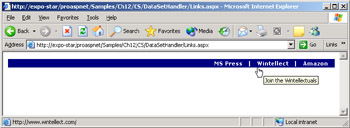
Figure 12-2: A page generated that reads link information from a local web.config file.
Persisting Application Settings
ASP.NET pages might need to persist some settings on the server, although this doesn't happen as frequently as with desktop applications. Keeping in mind that machine.config should never be touched, there are three possibilities for persisting settings on the server: using the section of the application's web.config, using a custom XML or text file, or storing information in a database. Determining the best option requires weighing a number of factors, including the amount of information to write, the API used to write, security implications, speed of retrieval, and miscellaneous undesired side-effects.
Writing to web.config
By default, an ASP.NET application has no permission to write to any server-side file, either existing or to be created, and this includes web.config. (As an aside, consider that by default web.config can be edited only by users in the Administrators group.) To be able to programmatically modify web.config, at least one of the two following requirements must be met: either your ASP.NET application is granted write permissions or the security settings of the web.config file are changed to enable full control by the account running the ASP.NET application.
One quick way to solve the issue is by adding the ASPNET user to the list of users that have full control over the file. (See Figure 12-3.) You first right-click the web.config file in the specified folder, and then select the Security tab. Click Add to show the list of all users, and select ASPNET. Next, enable the user to read or write the file.
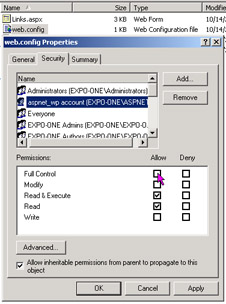
Figure 12-3: Changing the security settings of web.config, making it modifiable by ASP.NET applications.
At this point, you can programmatically overwrite web.config; but is it really worthwhile? The first consideration to make is that web.config is kept in memory, so the leaner you keep the file, the better. More important, any change to the file provokes all pages affected by that copy of web.config to be recompiled on next access. My recommendation is not to use web.config, especially if you're adding settings to the section. If the name/value scheme supported by suits your needs, you might want to resort to a linked external file. Look at the following file:
It is perfectly equivalent to the following, probably more common, format:
value="DATABASE=northwind;SERVER=localhost;UID=sa;" />
The content in boldface type is the actual content of the data.config file. You must be granted rights to write to the data.config, but at least changes don't affect web.config and don't cause pages to recompile. Interestingly enough, you don't need to change the API to access information in an external file. That you embed in web.config or move it to a linked file is completely transparent to the page. The following code does the same regardless of the physical location of the requested application setting:
string connStr = ConfigurationSettings.AppSettings["ConnectionString"];
The logic necessary to detect and handle the different situations is buried in the code of the NameValueFileSectionHandler.
In summary, as long as the scheme of fits your bill, there's really no reason for not using an external file.
Writing to Custom Files
Custom files, both XML or plain text, are a good solution when the name/value scheme of is too rigid for your data. In such cases, you might want to use a custom file to store data in a format that better fits your needs—for example, a DataSet schema. Unfortunately, you can't use the standard configuration classes to do this and must resort to a custom I/O API as well. That's not too difficult, though. In most cases, in fact, ADO.NET and XML classes can easily do the job for you.
However, with a small refinement to the code of the aforementioned DataSet section handler, you can make it support an external file as well:
public object Create(object parent, object context, XmlNode section)
{
 DataSet ds;
 if (parent == null)
 ds = new DataSet();
 else
 ds = ((DataSet) parent).Clone();

 // If a "file" attribute exists, load the DataSet from there.
string datasetFile = "";
XmlAttribute a;
a = (XmlAttribute) section.Attributes.RemoveNamedItem("file");
if (a != null)
datasetFile = a.Value;

DataSet tmp = new DataSet();
if (datasetFile != null && datasetFile != "")
{
// Read content from the file
tmp.ReadXml(datasetFile);
}
 else
 {
 // Read this section
 XmlNodeReader nodereader = new XmlNodeReader(section);
 tmp.ReadXml(nodereader);
 }

 // Merge with the parent if any
 ds.Merge(tmp);
 return ds;
}
The DataSet section handler now checks for a file attribute and, if any is found, loads the settings from there. In light of this, the MyAspNetApp section in web.config looks like the following:
The contents of the data.config file is the XML normal form of the desired DataSet:
 MS Press
 http://mspress.microsoft.com
 Go to the Microsoft Press Web site
 Wintellect
 http://www.wintellect.com
 Join the Wintellectuals
Note that the data.config file (or whatever name you want to use) must be indicated with full path information. In this way, you can use a custom data schema without rejecting the configuration API and without causing too many page recompiles.
Writing to Databases
For a number of reasons, writing to databases is perhaps the best approach. First, neither the ASP.NET application nor files need to be granted special write permissions. Second, the database can easily handle concurrent accesses and ensure a much better speed when retrieving inserted information. In addition, you can set up and exploit the benefits of sorting, indexing, and filtering.
| Note |
Although the configuration system doesn't provide facilities to updatae, add, or remove settings, ADO.NET and XML do. ADO.NET commands or adapters let you update rows on the configuration database (whose schema is completely up to you), while the XML DOM is a great tool for working on XML data. Because configuration files are not expected to be very large, using XML DOM is preferable to XML writers for its higher level of abstraction. |
ASP NET Applications Deployment
One of the coolest features of .NET assemblies is that they are self-describing components. An application that wants to know about the internal characteristics of an assembly has only to ask! The .NET reflection API is the programming interface by which a client can interrogate an assembly. This fact eliminates the need of using the registry (or any other sort of centralized repository) to track paths and attributes of binary components. Another pleasant effect of the assembly's structure is that side-by-side execution is now a snap, and ASP.NET applications take advantage of it on a regular basis. In practice, whenever you update a page, two versions of the "same" assembly live side-by-side for awhile without interference and conflict.
Installing a .NET application in general, and an ASP.NET application in particular, is a matter of performing an xcopy—that is, a recursive copy of all the files to the target folder. Aside from some inevitable emphasis and promotion, the xcopy deployment is not pure hype—but it is not pure reality either. However, the xcopy deployment expression, which is often used to describe setup procedures in .NET, communicates the gist of .NET deployment: you don't need to do much more than copy files. In particular, there's no need to play with the registry, no components to set up, and no local files to create. Or at least, nothing of the kind is needed just because the .NET Framework mandates it.
Creating a Setup
An ASP.NET application is made of a bunch of ASP.NET resources (mostly *.aspx, *.asax, *.asmx, *.ascx, and *.ashx files), some assemblies, one or more configuration files, and other static resources such as HTML pages, images, style sheets, and client-side scripts. To set up an application, you need to accomplish the following simple steps:
- (X)Copy the files All files must be copied mirroring the tree you (with a little help from Visual Studio .NET) configured at development time. You create as many subdirectories as needed, plus a Bin subdirectory under the root folder of the application. If a web.config file is needed, place it in the root folder; make sure lower-level configuration files are copied where appropriate.
- Set up the IIS virtual directory The virtual folder is a fundamental piece in the deployment of an ASP.NET application. Typically, the virtual folder—an entry in the IIS metabase—is created by the setup application. However, you can also create it interactively through the IIS Manager or via a script.
- Install assemblies in the global assembly cache (GAC) In most cases, an ASP.NET application doesn't need to copy custom assemblies in the GAC. All the application-specific assemblies are to be copied in the Bin subfolder of the root. This is an important requirement to fulfill if you want the application to run correctly in production. To install an assembly in the GAC, you can use the gacutil.exe tool available with the .NET Framework SDK. Note also that GAC-enabled assemblies must have a strong name and be distributed with an extra .snk file.
While homemade setups can be easily and effectively created, in a real-world scenario you need a professional setup procedure. Visual Studio .NET can help a lot with this by providing an ad hoc project type. Typically, you add a setup project to the main project that builds an ASP.NET application; however, you can also create a setup as a standalone project and manually add all the files needed.
A Web Setup Project
As we saw in Chapter 1, a setup project creates a .msi (Windows Installer file) package plus a couple of executables. On those systems in which the Windows Installer is correctly installed and configured, you need to deploy only the .msi package. Generally, you should deploy all the files created by the setup. If the Windows Installer is not available on the target machine, the other executables generated will install it and then yield to the .msi file. The setup project also provides the option to create a cabinet (.cab) file. However, for ASP.NET applications you might want to create a .msi package, given the fact that the Windows Installer is normally installed together with the .NET Framework SDK.
Although the Visual Studio .NET UI presents a Web setup project as a particular type of setup project (as shown in Figure 12-4), it really differs from an ordinary setup only in the additional ability to create and configure IIS virtual folders.
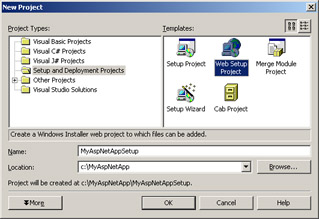
Figure 12-4: The New Project window of Visual Studio .NET.
A setup project modifies the toolbar of the Solution Explorer to let you specify custom actions, specify registry entries, modify user interface elements such as pages of the wizard, startup picture, and more. Figure 12-5 shows the Solution Explorer window.
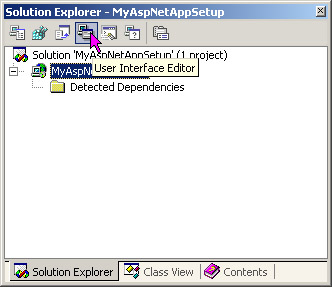
Figure 12-5: The Solution Explorer of a Web Setup Project.
Custom Actions
The setup can accept custom actions—that is, command-line executables that are called during the execution of the setup. The Custom Action Editor in the Solution Explorer lets you connect existing programs to the setup. The parameters you can pass to the custom executable must be static values and cannot be any information that the user specified at setup time.
For tighter integration between the base setup and custom modules, you might want to write an installer class. An installer class is a managed class that inherits from the Installer class defined in the System.Configuration.Install namespace. The class provides up to four overrides for typical setup events. By writing such a component, you could, for example, remove or initialize needed databases or files. The methods of the Installer class take a collection with as many dynamic parameters as you need to pass. (For more information on installers, refer to the .NET Framework documentation.)
| Tip |
The Web setup project lets you configure any new virtual directory you need to create through handy properties in the Properties window. However, if you don't need a setup because yours is an extremely simple ASP.NET application or because you need to pass only a ZIP to your ISP or client, you might want to use the following simple VBScript application to create an IIS virtual folder:
Set iis = GetObject("IIS://LocalHost/w3svc/1
/Root")Set vdir = iis.Create("IIsWebVirtualDir",
vdirName)vdir.AccessRead = Truevdir.AccessScript
= Truevdir.Put "Path", vdirPath Const POOLED =
 2 vdir.AppCreate2 POOLEDvdir.Put "AppFriendlyName",
 vdirName vdir.SetInfo
|
Programmatically Configuring the ACL of a File
As mentioned, for an ASP.NET application to write or create a file (including text and XML files and Microsoft Access databases), writing permissions should be granted. This can be accomplished by updating the worker process account from ASPNET to System, but it's an operation that hides some dark sides. First, by doing this, you significantly lessen your security level by allowing ASP.NET code to access all server resources, as in ASP. Second, for any updates to the section to take effect, IIS must be restarted.
A less intrusive, but equally effective, approach entails changing the security settings on a single file. Of course, this can be done only on existing files. If you need to work on well-known files, add them to the setup with a zero length and avoid creating them from within ASP.NET code. In this way, you can adjust the security settings offline. If there's no other way than creating files dynamically, you must apply security changes at the directory level.
Earlier I described a manual procedure to give the ASPNET account write permissions on a given file or directory. In most cases, this is enough because the administrator wants to know exactly what's going on and doesn't allow you to run a regular setup. However, should you have the need to accomplish that task programmatically, how can you proceed?
The manual procedure edits the Access Control List (ACL) of the specified file by adding, in this case, a new entry. In version 1.1 of the .NET Framework, no class is provided to accomplish this task. The bad news is that you must resort to a managed class to wrap some calls to a bunch of Win32 API functions—in particular, to the SetNamedSecurityInfo API function available from advapi32.dll. The good news is that some sample code doing just that is already available at http://www.gotdotnet.com/team/csharp/code/default.aspx.
An even better approach to the problem—because it is simpler—is using an extremely handy utility available from the System32 folder of Windows 2000 and Windows XP operating systems. The utility is named cacls.exe (pronounced cackles) and does just what we need—edit the ACL of a given file or directory. The following command line shows how to configure data.config so that ASP.NET applications can write to it:
cacls.exe data.config /E /G ASPNET:F
The /E switch indicates that you want to edit the security descriptor, not replace it as the default would do. The /G switch indicates that you want to add a new user for the file with the specified privileges. If the specified user exists, the settings for the account are modified. The ASPNET:F argument indicates that you want to give the ASPNET user full control over the file. (For more options, see the command-line help of the utility.)
This trick is not just effective, but it is also easily plugged into a Visual Studio .NET setup project. This is accomplished through the mechanism of custom actions that just let the installer run an external executable with constant and statically determined arguments. If you have the need to set an ACL programmatically, don't be afraid of resorting to an external executable; cacls.exe is commonly used in the way we've seen here. In fact, because the access control API is notoriously difficult to use, even seasoned C/C++ developers of Win32 applications often prefer to give up on the API and just use this utility. Want an example of a very popular application that makes use of cacls.exe? ASP.NET, of course!
Updating Configuration Options
More often than not, you don't need really complex and sophisticated setup procedures for ASP.NET applications. In addition, in most hosted application environments, you don't get to run installers and even if you could, you must have administrative privileges to do so. Most administrators want, and probably with good reason, to hold a tight rein over what goes on. All this doesn't mean you should disregard and neglect the setup, however.
The key fact about setups is that .NET significantly simplifies the deployment of applications. No matter the details, and no matter how many complex features you can easily stuff into a .msi file, deploying .NET applications does not require much more than an xcopy. This fact really reduces the cost of setup for consulting companies.
Configuring the Machine
In ASP.NET, there's a subtle point you should pay more attention to than, say, custom actions or custom bitmaps in the startup box. When you develop the ASP.NET code, you test it on a machine with its own machine.config file. When you deploy the application on a production box, you might not be able to restore the same settings. One possible reason is that the administrator does not want you to modify the current settings because they proved to be great for other applications.
You can work around the issue by simply replicating any needed machine.config settings into the application's web.config. However, if you are deploying your code to a service provider, you might find that many machine.config settings have been locked down and cannot be overridden. In this case, you should ask (or beg) the administrator to create a new application-specific section in the server's machine.config with all the machine settings needed for your application.
Replicating needed changes into the application's web.config is, however, preferable because it makes the entire application self-contained and hot-pluggable. It should always be the first option considered.
Deploying on a Web Farm
Deploying an ASP.NET application in a Web-farm scenario poses a few extra configuration issues you must be aware of. All machine.config files in the Web farm must be synchronized on the value of a few attributes. You can achieve this in two ways, the simplest of which is packing all attribute values in the application's web.config. This approach greatly simplifies the deployment because you only have to run the setup on all machines and no other changes are needed.
In an ISP scenario, though, in which some settings can be locked down at the machine.config level, the changes must be replicated in all the machine files of the farm. If multiple applications are configured to run, you create your own section; otherwise, a plain copy of the machine.config file will work just fine. But what are the attributes that need to be kept in sync?
Measures of Performance
To monitor the health and responsiveness of ASP.NET applications, a few measures are commonly used: throughput, response time, and scalability. The throughput is the number of requests per second that a Web application can serve. As such, it is the most critical factor for performance. Response time is defined as the time that elapses between the request and the arrival of the data on the client. This time can be expressed in two ways: Time-to-First-Byte (TTFB) and Time-to-Last-Byte (TTLB). TTFB is the time elapsed when the first byte hits the client. TTLB is the time elapsed when all the data has been delivered. Response time tends to be inversely proportional to the throughput. A sign of good performance is when you have an acceptable throughput with an acceptable response time. Scalability measures the application's ability to maintain (or improve) the performance as the number of requests and resources allocated grows.
Another relevant metric to measure the performance is performance data gathered by performance counters. ASP.NET provides two groups of performance counter objects—system and application. Among the system objects, you find counters for queued, disconnected, rejected requests, application restarts, sessions active, and timed out. Application counters include total hits to the cache, resource compilations, errors, and debugging requests.
The PerformanceCounter class in the System.Diagnostics namespace can be used to reference a particular counter and read its performance data. The class can also be used to publish custom performance data—for example, the frequency or the execution time of a particular operation that is critical to your application.
There are three information types that must be configured in the same way across the farm: forms authentication cookies, view-state message authentication check (MAC) generation, and session state. The relevant sections are listed in Table 12-16.
|
Section |
Description |
|---|---|
|
The keys used for encryption (validationKey attribute) and decryption (decryptionKey attribute) of the form's authentication cookie data must be identical on all machines. The validation attribute must also be replicated if the authentication check is enabled for the view state of one or more pages. The message authentication check (MAC) takes place if the @Page's EnableViewStateMac attribute is set to true. |
|
|
Settings for the section must coincide across the farm to enable the correct treatment of the client cookie. |
|
|
All machines must handle session data in the same way, whether through SQL Server or a remote server. |
Conclusion
The ASP.NET configuration system is based on a few XML files that are read when the application and the Web server start up. The ASP.NET ISAPI extension (aspnet_isapi.dll) hierarchically builds an in-memory tree of the configuration data and uses it to control the way in which a given application executes. Just the fact that an image of the configuration data is stored in memory since startup allows dynamic changes to the configuration that are promptly detected and applied to all related pages. Administrators have no need to restart the Web server for the new settings to apply—they just save the .config file and wait for users to renew their requests.
ASP.NET applications have many configurable settings. Also, the ASP.NET worker process exposes a fair number of accessible parameters—from the size of the thread pool to the frequency of process recycling, and from the maximum percentage of memory occupied to the number of pages that can be compiled into a single assembly. The various settings can all be controlled at different levels and overridden, extended, or restricted as appropriate. ASP.NET configuration is hierarchical by nature and lets you apply different configuration schemes at various levels of granularity—the machine, the Web site, or the folder.
Configuration files are probably the most critical aspect to consider when preparing the deployment of ASP.NET applications. Arranging a setup program has never been as easy as with Visual Studio .NET (not considering third-party products), but deciding how to replicate the settings of the native environment might not be trivial. ASP.NET applications, in fact, can be deployed on a Web farm or in an ISP scenario, which requires particular care of the machine.config and web.config files. All in all, though, the deployment at the time of ASP.NET is finally effective and time saving.
Finally, on the subject of performance, ASP.NET takes advantage of structural changes such as the just-in-time page compilation, process recycling, and various other caching mechanisms. It also provides a bunch of performance counters and utilities to measure the health and the performance of a Web site.
In the next chapter, we'll begin our in-depth exploration of the programming aspects of ASP.NET. The global.asax file and ASP-intrinsic objects such as Request and Response will constitute the bread and butter of Chapter 13.
Resources
- Top 10 Reasons for Systems Administrators to Use the .NET Framework (http:// msdn.microsoft.com/netframework/productinfo/topten/admins.asp)
- Best Practices for Deploying Your Mobile Application and Services (http:// msdn.microsoft.com/library/en-us/dnmitta/html/bestpracdeplmob.asp)
- Side-by-Side Execution of the .NET Framework (http://msdn.microsoft.com/library/en-us/dnnetdep/html/sidexsidenet.asp)
- Microsoft ASP.NET Setup and Configuration Pocket Reference, by James Avery (Microsoft Press, 2003)
Chapter 13 The HTTP Request Context
Part I - Building an ASP.NET Page
Part II - Adding Data in an ASP.NET Site
- The ADO.NET Object Model
- Creating Bindable Grids of Data
- Paging Through Data Sources
- Real-World Data Access
Part III - ASP.NET Controls
Part IV - ASP.NET Application Essentials
- Configuration and Deployment
- The HTTP Request Context
- ASP.NET State Management
- ASP.NET Security
- Working with the File System
- Working with Web Services
Part V - Custom ASP.NET Controls
- Extending Existing ASP.NET Controls
- Creating New ASP.NET Controls
- Data-Bound and Templated Controls
- Design-Time Support for Custom Controls
Part VI - Advanced Topics
Index

EAN: 2147483647
Pages: 209
- Integration Strategies and Tactics for Information Technology Governance
- An Emerging Strategy for E-Business IT Governance
- Measuring and Managing E-Business Initiatives Through the Balanced Scorecard
- Technical Issues Related to IT Governance Tactics: Product Metrics, Measurements and Process Control
- Governance in IT Outsourcing Partnerships
