Security
Overview
In any networked environment where resources are shared by more than one user, security is of utmost importance.
The Windows NT, 2000, and XP environments provide security to files, network shares, registry, Active Directory services, Exchange, and IIS servers.
The underlying security for these services is implemented using a security descriptor. A security descriptor contains security permissions that limit the types of operations that users and/or groups can perform. Security descriptors also contain auditing information. Auditing information can be used to report access to resources.
These permissions are stored in Access Control Lists (ACLs). The permissions ACL is called the Discretionary ACL (DACL), while object auditing is stored in the System Access Control List (SACL).
An ACL contains a list of Access Control Entries (ACEs). An ACE determines the individual permissions set for the object. An ACE object stores the access mask, which is a numeric value that determines the object permissions, access type (which either grants or denies access), and a trustee. The trustee is the user account or group that the permission is being applied to.
There are a few ways to manipulate Windows object security information. The ADSI 2.5 SDK includes an object that performs security operations by manipulating object security descriptors. This object can modify permissions on files, directory, and registry entries, but not file shares. It requires ADSI 2.5 to be installed.
WMI version 1.5 can manipulate security on file, directory, and network shares. WMI also can manipulate these resources on local and remote computers, as long as the remote computers are running WMI 1.5.
Choosing which technology to use depends upon the operations you are performing. The ADSI permissions object can perform registry security operations and is fast, but it requires the permissions object library from the ADSI 2.5 SDK to be installed on any machine to run. WMI can manipulate shares, access remote resources, and requires no additional component files to be installed, but it is slower and slightly more cumbersome to use.
Setting NT Share Security
Problem
You want to set NT share security.
Solution
Windows Management Instrumentation (WMI) version 1.1 and later provide classes to manipulate Windows NT and Windows 2000 share and file security.
The following sample grants the user Freds change permissions for the Data share on remote machine Odin. It requires the include file wmiinc.vbs, which is listed in Chapter 10:
Discussion
The WMI Win32_LogicalShareSecuritySetting class exposes security details for network shares under Windows NT, 2000, and XP. Permissions can be set and revoked using the GetSecurityDescriptor and SetSecurityDescriptor methods.
The ability to access share and file permissions is available in the latest WMI service (version 1.1 and later) for Windows NT, 2000, or XP. WMI version 1.5 is automatically installed on Windows 2000 and XP, whereas a separate installation is required under Windows NT.
While the security provider files are installed automatically with WMI, they must be manually registered by running the mofcomp utility on the secrcw32.mof file. The mofcomp utility is located under the WBEM directory, which you can find under the Windows NT/2000 system32 directory:
- Go to the command prompt.
- Change the directory to the WBEM directory located under your computer's system32 directory.
- Enter the following command line:
mofcomp secrcw32.mof
Once the MOF file is compiled, instances of the Win32_LogicalShareSecuritySetting class can be created. The security classes are stored under the rootcimv2 namespace.
Use the Win32_LogicalShareSecuritySetting class to manipulate share security. If you have connected to a WMI namespace using a WMI Services object, use the object's Get method to retrieve a Win32_LogicalShareSecuritySetting object by specifying the relative path to the share:
'create an instance of the WMI Services object, connecting to the
' rootcimv2 namespace on the local machine
Set objServices = _
 GetObject("winmgmts:{impersonationLevel=impersonate}!rootcimv2")
'get a reference to the share 'sharename'
Set objShare = _
 objServices.Get("Win32_LogicalShareSecuritySetting.Name='sharename'")
Chapter 10 provides more detailed information on how to connect to WMI Service objects.
References to shares can be retrieved using the GetObject method:
Const WMIMoniker = "winmgmts:{impersonationLevel=impersonate}!rootcimv2:"
Set objShare = GetObject(WMIMoniker & _
 "Win32_LogicalShareSecuritySetting.Name='sharename'")
This method bypasses the step of first creating a Services object. If you intend to manipulate more than one share, it's preferable to use the Services object's Get method, because it requires the establishment of a connection to a WMI namespace only once.
Remote shares can be manipulated by specifying the name of the remote computer in the WMI connection string:
Const WMIMoniker = "winmgmts:{impersonationLevel=impersonate}!"
'reference the 'data' share on remote computer odin.
Set objShare = GetObject(WMIMoniker & _
 "\odin
ootcimv2:Win32_LogicalShareSecuritySetting.Name='data'")
The only difference between this example and previous examples is the computer name is specified in the WMI connection string. You must have appropriate administrative security permissions to access resources on remote computers.
The share name referenced is not case-sensitive. If the share doesn't exist, a runtime error is generated. Note that the share must have a valid user or group assigned to it. If a share only has the Everyone group assigned to it, a "not found" error will occur when you attempt to reference it.
The Win32_LogicalShareSecuritySetting class exposes a GetSecurityDescriptor method that returns a reference to a security descriptor for the share. A security descriptor contains information about object ownership and security permissions. The syntax is as follows:
nResult = objInstance.GetSecurityDescriptor(objDescriptor)
If successful, the GetSecurityDescriptor method returns a Win32_SecurityDescriptor security descriptor object to the objDescriptor parameter. The GetSecurityDescriptor method returns 0 if a security descriptor is successfully returned.
Share permission information is exposed through the Discretionary Access Control List (DACL) collection property of the Win32_SecurityDescriptor class. The DACL property is a collection of Access Control Entry (ACE) Win32_ACE objects that determine the permissions assigned to the share.
Table 17-1 describes some of the properties exposed through the Win32_ACE class.
|
PROPERTY |
DESCRIPTION |
|---|---|
|
AccessMask |
Numeric value that determines permissions granted to trustee |
|
AceType |
0 = access allowed, 1 = access denied |
|
Trustee |
Win32_Trustee object |
The Win32_Trustee object identifies to whom the permission is granted. It exposes a Name property, which contains the trustee name in the format DomainAccountname. A SID property contains an array of binary values representing the unique SID for the account.
The following script gets a reference to a share called "data" on the local machine and lists the permissions for the share:
Dim objShare, objDescriptor, objACE, retval

Const WMIMoniker = "winmgmts:{impersonationLevel=impersonate}!"
'get a reference to the data share
Set objShare = _
 GetObject(WMIMoniker & "Win32_LogicalShareSecuritySetting.Name='Data'")

retval = objShare.GetSecurityDescriptor(objDescriptor)
'loop through each ACE in the DACL and output the trustee's access
For Each objACE In objDescriptor.dacl
 'list the trustee (account) name and associated permission
 Wscript.Echo objACE.Trustee.Name, objACE.AccessMask
Next
The permissions are determined by a combination of the AccessMask and AceType. Table 17-2 lists AccessMask and AceType values for NT share permissions.
|
PERMISSION |
ACETYPE |
ACCESSMASK |
|---|---|---|
|
No Access |
1 |
2032127 |
|
Full Access |
0 |
2032127 |
|
Change |
0 |
1245631 |
|
Read |
0 |
1179817 |
Share permissions are set using the SetSecurityDescriptor method. This method updates the security descriptor for the specified share security object. The syntax is as follows:
avar = objInstance.SetSecurityDescriptor(objDescriptor)
The objDescriptor parameter is the Win32_SecurityDescriptor to set for the share. SetSecurityDescriptor returns 0 if a security descriptor was successfully returned.
Unfortunately, there are no methods that provide simple addition or removal of trustee permissions. To add a new trustee, a new ACE must be added to the DACL array. To remove an entry, the DACL entry must be removed and the array resized accordingly.
When adding a new ACE to the DACL, you must set the SID for the account you want add to the DACL. The SID is stored as an array of bytes. The tricky part is to get the binary of representation of the SID for the particular account.
Account SIDs are exposed through the Win32_Account class as a string, but the Win32_Account class isn't keyed on the account name, so a sequential search of the class is required to find the appropriate account.
String representations of the SID cannot be used by the ACE SID property, but they can be used to reference a binary representation of the SID value from the Win32_SID class. The Win32_SID class stores the binary representation of the SID and is keyed on the SID string representation.
The GetBinarySID function defined in the wmiinc.vbs include file returns the SID of an account as an array of bytes. The syntax is as follows:
aSID = GetBinarySID(strAccount)
strAccount is the name of the account you want to return the SID for. It can be in format DomainAccount, ComputerAccount, or just the account name. If you do not specify a domain or computer, it will pick the first occurrence of the name if the name occurs for a domain and computer.
Windows NT and 2000 do not include a command-line utility to manipulate share permissions. The following script, shrmaint.wsf, is a command-line script that performs share permissions maintenance on local and remote shares:
The syntax for the script is as follows:
shrmaint.wsf /SHARE name [/MACHINE computer] [/GRANT user perms | REVOKE account]
The share for maintenance is specified by the name parameter. If the share resides on a remote computer, pass the computer parameter. To list the current permissions for a share, specify the share and optionally the name of the computer upon which the share resides:
shrmaint.wsf /SHARE Data /MACHINE Odin
If you want to modify share permissions, specify the /GRANT switch followed by the user or group name to modify followed by the permissions you want to apply. The following command-line statement would grant the user Joeb full access to the share Data on computer Odin:
shrmaint.wsf /SHARE Data /MACHINE Odin /GRANT Joeb Full
Share permissions can be Full, Change, Read, or NoAccess.
To revoke share permissions, use the /Revoke switch followed by the account you want to revoke permissions for:
shrmaint.wsf /SHARE Data /Revoke Joeb
WMI 1.1 or later must be installed on any local or remote machine you intend to manipulate shares on. You must have appropriate security access to set share security on local and remote computers.
See Also
The topic "Setting Security Descriptors" in the WMI SDK documentation. For more information, read the MSDN Library articles "Win32_LogicalFileSecuritySetting" (http://msdn.microsoft.com/library/en-us/wmisdk/r_32os3_5tnr.asp), "Win32_ACE" (http://msdn.microsoft.com/library/en-us/wmisdk/r_32os1_8nfp.asp), and "Win32_Trustee" (http://msdn.microsoft.com/library/en-us/wmisdk/r_32os6_6c6d.asp).
Setting File Permissions
Problem
You want to set file permissions.
Solution
The ADsSecurity.dll library that is included with the ADSI 2.5 SDK allows the manipulation of file and directory security.
The following sample sets Read/Execute permissions on the file report.doc for the user FredS:
'grant the user Freds Read/Execute permissions on the report.doc file
Const RIGHT_GENERIC_READ = 1179785
Const RIGHT_GENERIC_EXECUTE = 1179808
Const ACETYPE_ACCESS_ALLOWED = 0 Dim objDACL, objNewAce, objACE
Dim objSecurity, objSD
Set objSecurity = CreateObject("ADsSecurity") 'create security object
Set objSD = objSecurity.GetSecurityDescriptor("FILE://d:data
eport.doc")
Set objDACL = objSD.DiscretionaryAcl 'get the Discretionary ACL DACL
Set objNewAce = CreateObject("AccessControlEntry")

'Set the properties for the ACE. Set the trustee to be the Freds account,
objNewAce.Trustee = "AcmeFSmith"
'allow permissions to read and execute file
objNewAce.AccessMask = RIGHT_GENERIC_READ Or RIGHT_GENERIC_EXECUTE
'allow access to file
objNewAce.AceType = ACETYPE_ACCESS_ALLOWED

'add ACE to DACL
objDACL.AddAce objNewAce
'assign the DACL back to the security descriptor
objSD.DiscretionaryAcl = objDACL
'set the security descriptor for the file
objSecurity.SetSecurityDescriptor objSD
Discussion
ADSI does not provide built-in file security maintenance. The ADSI 2.5 SDK contains a Resource Kit DLL called ADsSecurity that implements file and directory permissions maintenance.
To use the DLL, install the ADSI 2.5 SDK and register the ADsSecurity.dll using regsvr32.exe.
The ADsSecurity.dll doesn't depend upon the SDK for support libraries, so it can be copied to a machine without the SDK installed. It does, however, require ADSI 2.5, which is installed by default on Windows 2000 and is a separate installation on Windows NT 4.0.
A Security object performs the retrieval and application of the security descriptors to files. The ProgID used to create a Security object is AdsSecurity.
To get a reference to the security descriptor of a file, invoke the GetSecurityDescriptor method:
Set objSD = objSecurity.GetSecurityDescriptor(strPath)
The strPath parameter is the path to the file or directory prefixed with FILE://. It has to be prefixed with FILE:// in order for the method to know what namespace to reference. The following snippet creates an instance of the Security object and retrieves the security descriptor for the file report.doc:
Set objSecurity = CreateObject("ADsSecurity")
Set objSD = objSecurity.GetSecurityDescriptor("FILE://d:data
eport.doc")
Set objDACL = objSD.DiscretionaryAcl
A runtime error will occur if the file or directory specified by strPath is not found.
The file's Discretionary ACL (DACL) contains a list of Access Control Entrie (ACEs) for the file. An ACE contains the permission settings required for an NT account. Each ACE contains a Trustee, AccessMask, and AceType property, which must be set before adding to the DACL.
The Trustee property is the name of the NT account associated with the security setting. This is in the format of the account name prefixed by the domain name:
'set the trustee to the account Fred for the Acme domain
objNewAce.Trustee = "AcmeFred"
The AccessMask property is a numeric value that determines the permissions applied to the file and is a combination of the access flag values in Table 17-3.
|
SECURITY RIGHT |
VALUE |
DESCRIPTION |
|---|---|---|
|
FILE_GENERIC_READ |
1179785 |
File read access |
|
FILE_GENERIC_WRITE |
1179926 |
File write access |
|
FILE_GENERIC_EXECUTE |
1179808 |
Allows execution of files |
|
FILE_GENERIC_DELETE |
65536 |
Allows deletion of files |
|
FILE_FULL_ACCESS |
2032127 |
Allows all access to file |
|
FILE_PERMISSION_ACCESS |
262144 |
Allows the user to change permission on file |
|
FILE_OWNERSHIP_ACCESS |
524288 |
Allows the user to change ownership off file |
The file access permissions can be combined to grant specific permissions, such as read and execute permissions:
objNewAce.AccessMask = FILE_GENERIC_READ Or FILE_GENERIC_EXECUTE
The ACE object's AceType property determines if the ACE permissions are granted or denied. The valid values are ACETYPE_ACCESS_ALLOWED (0) or ACETYPE_ACCESS_DENIED (1).
The AceType property should only be set to ACETYPE_ACCESS_DENIED for the Windows NT/2000 No Access permission, which denies the specified account any access to the file.
Apart from the No Access permission, the AceType should always be set to ACETYPE_ACCESS_ALLOWED.
Once the ACL has been set, add it to the DACL. To do so, use the DACL object's AddAce method:
objDACL.AddAce objNewAce
If an ACL already exists for the user, it will not replace the existing ACL. No error will occur if an ACL for a user is added that already exists.
If you require multiple accounts assignments to be added to the file, repeat the previous steps for each account required. Once all required permissions have been added to the DACL, assign it to the file's security descriptor object. Then use the Security object's SetSecurityDescriptor method to set the security descriptor for the file:
'assign the DACL back to the security descriptor
objSD.DiscretionaryAcl = objDACL
'set the security descriptor for the file
objSecurity.SetSecurityDescriptor objSD
Note that you can only manipulate security permissions on files and directories that are stored on NTFS partitions. If you want to remove an existing ACL, invoke the Remove method. The Remove method requires the ACE you want to remove as the parameter. You cannot remove an ACE by user account, so you must check the Trustee property for each ACE object in the DACL for the account you want to remove:
'remove user Freds from file data.doc
Set objSecurity = CreateObject("ADsSecurity")
Set objSD = objSecurity.GetSecurityDescriptor("FILE://d:datadata.doc")
Set objDACL = objSD.DiscretionaryAcl For Each objACE In objDACL
 If objACE.Trustee = "AcmeFredS" Then
 objDACL.RemoveAce objACE
 End If
Next
 objSD.DiscretionaryAcl = objDACL
 'set the security descriptor for the file
 objSecurity.SetSecurityDescriptor objSD
The following code sample performs the same operations as the Solution script but uses WMI instead of ADSI:
The script requires the GetBinarySID function from the include file wmiinc.vbs, which is listed in Chapter 10. The values that are used when setting permissions for the file are the same as those listed in Table 17-3.
WMI uses the Win32_LogicalFileSecuritySetting class to retrieve file security settings. You can retrieve the security settings from a file by specifying the path of the file:
Set objServices = GetObject("winmgmts:{impersonationLevel=impersonate}")
'get a reference to the security settings for d:data
eport.doc
 Set objFileSec = objServices.Get( _
 "Win32_LogicalFileSecuritySetting.Path='d:data
eport.doc'")
The path can be to any file on local or mapped network drives. The path cannot be in UNC format, such as \odind$data eport.doc.
You can access files on a remote machine that does not have any shared drives. For example, suppose you want to access the file d:data eport.doc on the remote computer Thor. Thor does not have the d: drive shared. Connect to the WMI Services on the computer Thor, and then get a reference to the file:
Set objServices = _
 GetObject("winmgmts:{impersonationLevel=impersonate}!\Thor")
'get a reference to the security settings for d:data
eport.doc
 Set objFileSec = objServices.Get(_
 "Win32_LogicalFileSecuritySetting.Path='d:data
eport.doc'")
Once you have reference to the remote file, you can change the security settings using the same steps as for a local computer.
You must be logged on with the appropriate security credentials to performany operation that requires file or directory permission modification.
See Also
For more information, read the MSDN Library article "SetSecurityDescriptor Method in Class Win32_LogicalFileSecuritySetting" (http://msdn.microsoft.com/library/en-us/wmisdk/r_32os3_1q3r.asp).
Setting Directory Security
Problem
You want to set security permissions for a directory.
Solution
To set directory permissions, two ACLs must be added: one for directory security and one to determine the permissions for files within the directory.
The following sample grants the user account "Freds" add and read access to the directory d:data :
Const OBJECT_INHERIT_ACE = 1
Const CONTAINER_INHERIT_ACE = 2
Const INHERIT_ONLY_ACE = 8 Const ACETYPE_ACCESS_ALLOWED = 0

'file access types
Const FILE_GENERIC_READ = &H120089
Const FILE_GENERIC_WRITE = &H120116
Const FILE_GENERIC_EXECUTE = &H1200A0
Dim objDACL, objNewAce, objACE, objNewAce2
Dim objSecurity, objSD, strTrustee
Set objSecurity = CreateObject("ADsSecurity")
Set objSD = objSecurity.GetSecurityDescriptor("FILE://d:data")
Set objDACL = objSD.DiscretionaryAcl
Set objNewAce = CreateObject("AccessControlEntry")
strTrustee = "AcmeFreds"
'set file access to directory so any FredS can
'read existing file in the directory.
Set objNewAce = CreateObject("AccessControlEntry")
objNewAce.Trustee = strTrustee
objNewAce.AccessMask = FILE_GENERIC_READ Or FILE_GENERIC_EXECUTE
objNewAce.AceType = ACETYPE_ACCESS_ALLOWED
'permissions are to be inherited to any new files in the directory
objNewAce.AceFlags = INHERIT_ONLY_ACE Or OBJECT_INHERIT_ACE
objDACL.AddAce objNewAce

'set directory permissions so FredS can add files
Set objNewAce2 = CreateObject("AccessControlEntry")
objNewAce2.Trustee = strTrustee
objNewAce2.AccessMask = FILE_GENERIC_READ Or _
 FILE_GENERIC_EXECUTE Or FILE_GENERIC_WRITE
objNewAce2.AceType = ACETYPE_ACCESS_ALLOWED
objNewAce2.AceFlags = CONTAINER_INHERIT_ACE
objDACL.AddAce objNewAce2
objSD.DiscretionaryAcl = objDACL
objSecurity.SetSecurityDescriptor objSD
Discussion
A Windows NT/2000/XP directory contains two ACLs: One determines directory permissions and one determines permissions to the files within the directory.
The file permissions determine the access to files in the directory. Any file copied, moved, or created in the directory is automatically assigned the file access permissions.
| Note |
The AccessMask property can be set to any combination of file access rights that are specified in Table 17-5. |
The AceFlags property must be set so that file properties are inherited by all files that are created or copied to the directory. To do this, the AceFlags property of the ACE object must be set to INHERIT_ONLY_ACE (8) or OBJECT_INHERIT_ACE (1).
The directory rights are similar to file rights. They determine the access a user has to the directory container object. A directory requires a separate ACE object to be applied to the DACL.
Set the AccessMask to determine what access the trustee has. (The rights that can be combined in the AccessMask can be any of the rights listed in Table 17-5 except for file generic read, write, execute, or delete permissions.) These are replaced with values that are listed in Table 17-4.
|
DIRECTORY CONTAINER RIGHT |
VALUE |
|---|---|
|
GENERIC_ALL |
&H10000000 |
|
GENERIC_EXECUTE |
&H20000000 |
|
GENERIC_WRITE |
&H40000000 |
|
GENERIC_READ |
&H80000000 |
The AceFlags property must be set so that the properties are inherited by all directories exist in the directory. To do this, the AceFlags property of the ACE object must be set to CONTAINER_INHERIT_ACE.
Setting directory permissions using WMI requires the same steps to be taken. The following script performs the same operation as the Solution script using WMI:
The rules and limitations for referencing directories and applying security to them using WMI are the same that apply to setting file security using WMI, as outlined in Solution 17.2.
To simplify permissions management, the following script component, ADSIFileSecurity.wsc, provides file security operations. The component performs permissions setting and enumeration on any specified file or directory:
The ProgID for the component is ENTWSH.FileSecurity. The component exposes two methods: ListSecurity and SetSecurity.
ListSecurity returns file and directory permissions in a similar format displayed using the Windows NT command-line permissions CACLS.EXE. To list security permissions, create an instance of the FileSecurity object and invoke the ListSecurity method:
strRights = objWS.ListSecurity(strPath)
The strPath parameter represents the path to a file or directory.
ListSecurity returns the account(s) with access followed by associated permissions on a separate line for each account:
'list the permissions for a file
'create an instance of the ENTWSH.FileSecurity object
Set objWS = CreateObject("ENTWSH.FileSecurity")
'list the permissions associated with a file
Wscript.Echo objWS.ListSecurity("D:data
eports.htm")
Permissions are represented with a single letter code that corresponds to a level of security access, as listed in Table 17-5.
|
ATTRIBUTE |
DESCRIPTION |
|---|---|
|
F |
Full access |
|
C |
Change-read, write, execute |
|
R |
Read |
|
W |
Write |
|
D |
Delete |
|
O |
Ownership |
|
P |
Permissions |
|
N |
None |
To set permissions, invoke the SetSecurity method:
bSuccess =objWS.SetSecurity(strPath, strPermissions, strTrustee)
The strPath parameter is the path to the directory of the file to set the security for. strPermissions is a string of one or more permissions to be assigned to the file or directory. The strTrustee parameter represents the user or group to be assigned the rights, and it must be in the format DomainAccountname.
To set the read, execute, delete, ownership, and permissions rights for the file d:data eports.doc for account ACMEFreds, use the following:
bSuccess = objWS.SetSecurity("d:data
eports.doc", "RXDOP", "ACMEFreds")
SetSecurity returns True if the security was successfully set; otherwise, it returns False.
If you are setting or listing permissions for a directory, you can specify two sets of security. One is the directory container access, which determines the access a trustee has to the directory. The second is file rights. The following example grants the user account Freds add and read permissions to the directory d:data:
bSuccess = objWS.SetSecurity("d:data ", "RWX:RX", "ACMEFreds")
Changing User Access to the Exchange Recipients Container
Problem
You want to change user access to an Exchange server 5.5 Recipients container.
Solution
You can use the AdsSecurity component included in the ADSI 2.5 SDK to retrieve a reference to the Exchange server container you want to manipulate. Add an ACE object for each account you want to grant or deny additional permissions to the container:
'Exchangesec.vbs
'sets Admin access to the Recipients container for the account Freds
Dim objSecurity, objSD, objDACL, objAce
Const ADS_ACETYPE_ACCESS_ALLOWED = 0
Const ADS_RIGHT_EXCH_ADD_CHILD = 1
Const ADS_RIGHT_EXCH_DELETE = 65536
Const ADS_RIGHT_EXCH_MAIL_ADMIN_AS = 32
Const ADS_RIGHT_EXCH_MODIFY_ADMIN_ATT = 4
Const ADS_RIGHT_EXCH_MODIFY_USER_ATT = 2

Set objSecurity = CreateObject("ADsSecurity")

Set objSD = objSecurity.GetSecurityDescriptor _
 ("LDAP://odin/cn=Recipients,ou=office,o=acme")
Set objDACL = objSD.DiscretionaryAcl
Set objAce = CreateObject("AccessControlEntry")
objAce.Trustee = "acmeFreds"
'set the access mask to provide admin access
objAce.AccessMask = ADS_RIGHT_EXCH_ADD_CHILD Or ADS_RIGHT_EXCH_DELETE Or _
 ADS_RIGHT_EXCH_MODIFY_ADMIN_ATT Or ADS_RIGHT_EXCH_MODIFY_USER_ATT Or _
 ADS_RIGHT_EXCH_MAIL_ADMIN_AS
objAce.AceType = ADS_ACETYPE_ACCESS_ALLOWED

objDACL.AddAce objAce
objSD.DiscretionaryAcl = objDACL
objSecurity.SetSecurityDescriptor objSD
Discussion
Exchange server allows for different levels of access to be set to different containers and objects. You might want to provide an administrative access to specific containers for certain users to maintain the objects in the container.
Different levels of security can be added to containers. To view container permissions under the Exchange Administrator application, select the container and choose File > Properties.
This will show the object's general "role" permissions, such as Admin access. These roles are combination of permission rights.
To view the actual rights in Exchange Admin, select Tools > Options, choose the Permissions tab, and select Show Permissions Page for all objects. When you view any object, including a mailbox, you will be able to see and modify the individual rights assigned to the object.
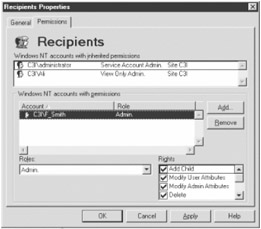
Figure 17-1: Exchange 5.5 Recipients properties
Get a reference to the security descriptor for the object you want to change the access to. Retrieve the DACL from the security descriptor:
Set objSD = objSecurity.GetSecurityDescriptor _
 ("LDAP://odin/cn=Recipients,ou=office,o=acme")
Set objDACL = objSD.DiscretionaryAcl
Add a new ACE with the access to be provided to the DACL:
objAce.Trustee = "acmefreds" 'specify trustee to set security for
objAce.AccessMask = ADS_RIGHT_EXCH_ADD_CHILD Or ADS_RIGHT_EXCH_DELETE Or _
 ADS_RIGHT_EXCH_MODIFY_ADMIN_ATT Or ADS_RIGHT_EXCH_MODIFY_USER_ATT Or _
 ADS_RIGHT_EXCH_MAIL_ADMIN_AS

objAce.AceType = ADS_ACETYPE_ACCESS_ALLOWED 'allow access
'add the ACE to the DACL
objDACL.AddAce objAce
objSD.DiscretionaryAcl = objDACL
objSecurity.SetSecurityDescriptor objSD
The AccessMask determines the access to the object. It is a combination of the Exchange security rights listed in Table 17-6.
|
CONSTANT |
VALUE |
DESCRIPTION |
|---|---|---|
|
ADS_RIGHT_EXCH_ADD_CHILD |
1 |
Adds a new child object in container |
|
ADS_RIGHT_EXCH_DELETE |
65536 |
Deletes objects |
|
ADS_RIGHT_EXCH_DS_REPLICATION |
64 |
Allows replication |
|
ADS_RIGHT_EXCH_DS_SEARCH |
256 |
Allows search access |
|
ADS_RIGHT_EXCH_MAIL_ADMIN_AS |
32 |
Provides administrative rights |
|
ADS_RIGHT_EXCH_MAIL_RECEIVE_AS |
16 |
Allows receive mail |
|
ADS_RIGHT_EXCH_MAIL_SEND_AS |
8 |
Allows send mail |
|
ADS_RIGHT_EXCH_MODIFY_ADMIN_ATT |
4 |
Allows the administration of object administrative attributes |
|
ADS_RIGHT_EXCH_MODIFY_SEC_ATT |
128 |
Allows the administration of object security (permission) attributes |
|
ADS_RIGHT_EXCH_MODIFY_USER_ATT |
2 |
Allows the administration of object user attributes |
To enumerate the security settings from an object, get a reference to the security descriptor on the object you want to check. Retrieve the DACL and loop through each ACE in the DACL:
Dim objSecurity, objSD, objDACL, objAce
Set objSecurity = CreateObject("ADsSecurity")

Set objSD = _
objSecurity.GetSecurityDescriptor("LDAP://odin/cn=Recipients,ou=acme,o=com")
Set objDACL = objSD.DiscretionaryAcl

For Each objAce In objDACL
 Wscript.Echo objAce.AccessMask, objAce.Trustee, _
 objAce.AceFlags, objAce.AceType
Next
It can be useful enumerating existing objects to determine the right values to be used for the objects you are setting access to.
See Also
Solution 15.1. Exchange.htm from the ADSI 2.5 SDK.
Copying a File with Its Security Settings
Problem
You want to copy a file together with file security settings.
Solution
You can use the FSO object to copy the specified file to a new destination, and then use the ADSI Resource Kit's AdsSecurity DLL to copy the security to the new file.
The following code snippet copies the file report.doc from one directory to another and then sets the security descriptor of the copied file to the security descriptor of the original:
Dim objSecurity, objSD, strSource, strDest, objFSO
Set objFSO = CreateObject("Scripting.FileSystemObject")
Set objSecurity = CreateObject("ADsSecurity")
strSource = "d:data
eport.doc"
strDest = "d:ackup
eport.doc "
'copy the file to the destination
objFSO.CopyFile strSource, strDest
' get the security descriptor for the file
 Set objSD = _
 objSecurity.GetSecurityDescriptor("FILE://" & strSource)

'copy the security descriptor from the original file to the copied file
objSecurity.SetSecurityDescriptor objSD, "FILE://" & strDest
Discussion
When you copy a file from one directory to another, the file inherits the security from the directory container it is being copied into.
The Resource Kit's AdsSecurity DLL's SetSecurityDescriptor method provides an optional parameter where you can specify the destination of the security descriptor you are setting:
objSecurity.SetSecurityDescriptor objSD[, path]
By default, SetSecurityDescriptor sets the security descriptor on the objSecurity object that it was read from. If the path parameter is specified, the security descriptor will be set on the object specified in the path. This can be used to duplicate security access from one object to another.
The SetSecurityDescriptor can be used to duplicate ADSI security from file, Exchange, LDAP, and registry objects.
The following script, frcopy.wsf, provides a command-line interface:
See Also
Rtk.htm from the ADSI 2.5 SDK.
Taking Ownership of Files
Problem
You want to take ownership of files.
Solution
You can get a reference to the file you want to take ownership of through the WMI CIM_DataFile class and invoke the TakeOwnership method:
'connect to WMI namespace on local machine
Set objServices = GetObject("winmgmts:{impersonationLevel=impersonate}")
'get a reference to data file
Set objFile = objServices.Get("CIM_DataFile.Name='d:data
eport.doc")
If objFile.TakeOwnership = 0 Then
 Wscript.Echo "File ownership successfully changed"
Else
 Wscript.Echo "File ownership transfer operation"
End If
Discussion
File and directory ownership can be set using the TakeOwnership method of the CIM_DataFile class. Ownership reverts to the account ID of the user executing the method. The syntax is as follows:
nResult = objFileDirectory.TakeOwnership
TakeOwnership returns 0 if successful. The objFileDirectory object represents either an instance of a CIM_DataFile class for a file or Win32_Directory or a CIM_Directory for a directory.
If the ownership of a directory is taken, the ownership of all files and subdirectories within the directory are set.
File and directory ownership can be determined through the Owner property of a Win32_SecurityDescriptor object. Get a reference to a file or directory object through the Win32_LogicalFileSecuritySetting class. Use the object's GetSecurityDescriptor method to return the Win32_SecurityDescriptor object.
The Owner property returns a Win32_Trustee object. The name of the owner account can be returned through the Name property:
Set objServices = GetObject("winmgmts:{impersonationLevel=impersonate}")
 Set objFileSec = objServices.Get(_
 "Win32_LogicalFileSecuritySetting.Path='d:data
eport.doc'")
nResult = objFileSec.GetSecurityDescriptor(objSD)
Wscript.Echo objSD.Owner.Name
See Also
For more information, read the MSDN Library articles "Win32_Directory" (http://msdn.microsoft.com/library/en-us/wmisdk/r_32os2_448p.asp) and "Win32_NTEventlogFile" (there is no specific CIM_DataFile documentation-this class inherits from CIM_DataFile) (http://msdn.microsoft.com/library/en-us/wmisdk/r_32os4_4ag5.asp).
Setting Active Directory Permissions
Problem
You want to grant security access to an Active Directory container.
Solution
The following script grants the user Fred Smith full access to the User container:
Const FULL_ACCESS = 983551
Dim objSecurity
Dim objContainer, objDACL , objACE
Set objACE = CreateObject("AccessControlEntry")
'get a reference to the users container for the Acme domain
Set objContainer = GetObject("LDAP://cn=users,dc=acme,dc=com")

Set objSecurity = objContainer.Get("ntSecurityDescriptor")
Set objDACL = objSecurity.DiscretionaryAcl
objACE.Trustee = "AcmeFreds"
objACE.AccessMask = FULL_ACCESS

objDACL.AddAce objACE
objSecurity.DiscretionaryAcl = objDACL
'write security descriptor back to container
objContainer.Put "ntSecurityDescriptor", objSecurity
objContainer.SetInfo
Discussion
Under Windows NT 4.0 and earlier, there was essentially a single list of users and groups. Only administrators or users who had been granted the appropriate permissions could manipulate accounts. Under NT 4.0 there is no way to delegate different levels of access to different groups of users. For example, you might want Fred in accounting to be able to create new users or modify existing accounting users' details.
Active Directory provides for delegation of administrative tasks. This allows for the account structure to be organized in a hierarchical fashion. Groups of users can be split into organizational units (not to be confused with user groups). See Chapter 14 for more information on organizational units.
Specific accounts can be granted varying levels of administrative access to the organizational units. So, for example, Fred Smith could be granted access to perform specific administrative tasks to the Accounting organizational unit.
Active Directory is not limited to storing user account details. Applications such as Exchange 2000 server use Active Directory to store configuration information and mailbox details.
As a result of the complexity and expandable nature of Active Directory, it is difficult to determine what properties and values are required when setting object permissions.
The easiest way to get an overview with permissions is to use a graphical interface such as the ADSI Edit program. ADSI Edit is included on the Windows 2000 CD. It is not installed with Windows 2000, but it is included as part of a support tools installation located under the support ools directory of the Windows 2000 installation CD.
To use the program, run the Adsiedit.msc management console application. Using this program, you can manipulate object permissions. Figure 17-2 shows ADSI Edit.
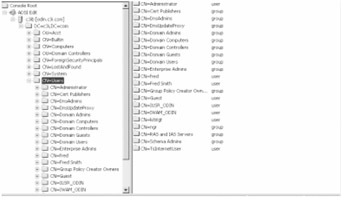
Figure 17-2: ADSI Edit
Right-click the object you want to view permissions for and select the Properties option, which will display the Object Properties dialog box. From this dialog box, select the Security tab, as shown in Figure 17-3.
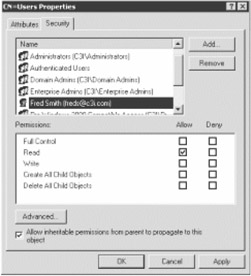
Figure 17-3: User object's Security properties
The dialog box displays a number of generic permission that can be set: Full Control, Read, Write, Delete All Child Objects, and Create All Child Objects. To set these permissions on an object using the Solution script as a model, change the AccessMask property of the ACE object to one of the values listed in Table 17-7.
|
ATTRIBUTE |
VALUE |
|---|---|
|
Full Control |
983551 |
|
Read |
131092 |
|
Write |
40 |
|
Create All Child Objects |
1 |
|
Delete All Child Objects |
2 |
Most of the operations in this table are combinations of different levels of security permissions. For example, the Read permission is a combination of listing and reading properties.
To view these and other permissions, click the Advanced button on the Security tab. A dialog box appears that lists all of the advanced permissions associated with the object, as shown in Figure 17-4.
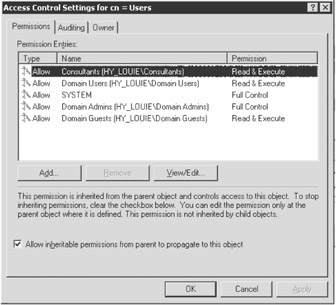
Figure 17-4: User object's Advanced properties
This dialog box lists the same accounts and groups as the "normal" security dialog box as well as additional individual permissions.
Clicking the View/Edit button for any account in the list brings up a dialog box similar to the one in Figure 17-5.
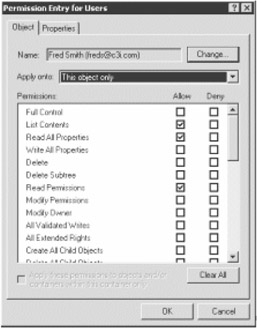
Figure 17-5: User object's Advanced permissions
This dialog box shows all permissions set for the object. You can set any of the individual permissions from this list.
For example, say you want to allow an account read access as well as the ability to create and delete user accounts. From the advanced user permissions dialog box, edit the permissions for the appropriate account and set the appropriate permissions, as shown in Figure 17-6.
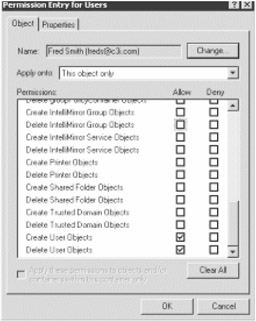
Figure 17-6: Setting advanced permissions
Once you set a specific combination of permissions, such as in the previous example, multiple entries will appear.
The Solution script demonstrates how to apply Full Access permissions for a user. This requires simply adding an ACE with the AccessMask property set to a specific value.
Setting individual permissions on objects complicates matters. For each permission you may get a specific entry in the security list. Unlike setting a permission such as Full or Read that requires the only the AccessMask property to be set, individual permissions require you specify the object you are applying the permissions to.
An object can be any individual permission, such as creating or deleting a user or file share. To set permissions for a specific object, you must set the ACE object's ObjectType property to the globally unique identifier (GUID) for the object. Getting the GUID is no easy task, and the AceType and Flags properties must have specific values to set object properties.
The easiest way to determine the values that you need to set is to apply permissions using a graphical interface, such as ADSI Edit, to an Active Directory object and programmatically enumerate the settings.
The following command-line program lists all ACE objects for a specified Active Directory object:
'listperms.vbs
'lists all permissions for a specified Active Directory object
Dim objSecurity, objArgs
Dim objContainer, objDACL , objACE
If Wscript.Arguments.Count <> 1 Then
 Wscript.Echo "Usage: listperms ADPath"
End If

Set objACE = CreateObject("AccessControlEntry")
'get a reference to users container
Set objContainer = GetObject(Wscript.Arguments (0))
 Set objSecurity = objContainer.Get("ntSecurityDescriptor")
Set objDACL = objSecurity.DiscretionaryAcl

For Each objACE In objDACL
 Wscript.Echo objACE.Trustee & ", " & objACE.AceFlags & _
 ", " & objACE.AceType & ", "& objACE.Flags & ", " & _
 objACE.AccessMask & ", "& objACE.ObjectType & ", "& _
 objACE.InheritedObjectType
Next
To use the command-line script, specify the LDAP path to an Active Directory object. To list the permissions for the Users organizational unit container for the Acme domain, use the following:
listperms "LDAP://cn=users,dc=acme,dc=com"
Use the enumerated ACE objects to determine what properties are set for a specific permission entry.
Table 17-8 lists the ACE property values for different permission settings. One is for Full Access and the second is if the Create and Delete user object permissions are granted to a user.
|
PERMISSION |
ACEFLAGS OBJECTTYPE |
ACETYPE |
FLAGS |
ACCESSMASK |
|---|---|---|---|---|
|
Full Access |
0 |
0 |
0 |
983551 |
|
Create and Delete user objects |
5 |
1 |
3 |
{BF967ABA-0DE6-11D0-A285- 00AA003049E2} |
Next, I'll cover the individual ACE properties and how they apply to the different permission settings. AceFlags determines how the ACE is inherited, and it can have any of the values listed in Table 17-9.
|
CONSTANT |
VALUE |
|---|---|
|
ADS_ACEFLAG_INHERIT_ACE |
2 |
|
ADS_ACEFLAG_NO_PROPAGATE_INHERIT_ACE |
4 |
|
ADS_ACEFLAG_INHERIT_ONLY_ACE |
8 |
|
ADS_ACEFLAG_INHERITED_ACE |
16 |
|
ADS_ACEFLAG_VALID_INHERIT_FLAGS |
31 |
|
ADS_ACEFLAG_SUCCESSFUL_ACCESS |
64 |
|
ADS_ACEFLAG_FAILED_ACCESS |
128 |
Both of the sample entries set the AceFlag to 0, and this indicates that the permission is not inherited and only applies to the current container object. If you want the permissions to be inherited to subcontainers, set the value to 2.
The AceType property values listed in Table 17-10 determine how the ACE permissions are applied.
|
CONSTANT |
VALUE |
|---|---|
|
ADS_ACETYPE_ACCESS_ALLOWED |
0 |
|
ADS_ACETYPE_ACCESS_DENIED |
1 |
|
ADS_ACETYPE_SYSTEM_AUDIT |
2 |
|
ADS_ACETYPE_ACCESS_ALLOWED_OBJECT |
5 |
|
ADS_ACETYPE_ACCESS_DENIED_OBJECT |
6 |
|
ADS_ACETYPE_SYSTEM_AUDIT_OBJECT |
7 |
If you are permitting access to a nonobject, set the value to 0. This applies to the Full Access or Read access type permissions. Setting the value to 1 will deny access. So if you want to deny all access to a user, set the AccessMask to 983551 (Full Access) and the AceType to 1. Table 17-12 lists AccessMask values.
If you are setting permissions on a specific object, you must either specify 5, which will grant access, or 6, which will deny access to the specific object.
The Flags property only needs to be set if you are setting permissions for an object, and you can have the values listed in Table 17-11.
|
CONSTANT |
VALUE |
|---|---|
|
ADS_FLAG_OBJECT_TYPE_PRESENT |
1 |
|
ADS_FLAG_INHERITED_OBJECT_TYPE_PRESENT |
2 |
Setting the Flags property to 1 indicates the security permissions apply to the object specified by the ObjectType property. If the value is 2, permissions are applied to the object specified by the InheritedObjectType property. Flags can be a combination, so the value 3 would apply the permissions to the object specified by the ObjectType and InheritedObjectType properties.
|
CONSTANT |
VALUE |
|---|---|
|
ADS_RIGHT_DS_CREATE_CHILD |
1 |
|
ADS_RIGHT_DS_DELETE_CHILD |
2 |
|
ADS_RIGHT_ACTRL_DS_LIST |
4 |
|
ADS_RIGHT_DS_SELF |
8 |
|
ADS_RIGHT_DS_READ_PROP |
16 |
|
ADS_RIGHT_DS_WRITE_PROP |
32 |
|
ADS_RIGHT_DS_DELETE_TREE |
64 |
|
ADS_RIGHT_DS_LIST_OBJECT |
128 |
|
ADS_RIGHT_DS_CONTROL_ACCESS |
256 |
|
ADS_RIGHT_DELETE |
65536 |
|
ADS_RIGHT_READ_CONTROL |
131072 |
|
ADS_RIGHT_WRITE_DAC |
262144 |
|
ADS_RIGHT_WRITE_OWNER |
524288 |
|
ADS_RIGHT_SYNCHRONIZE |
1048576 |
|
ADS_RIGHT_ACCESS_SYSTEM_SECURITY |
&H1000000 |
|
ADS_RIGHT_GENERIC_READ |
&H80000000 |
|
ADS_RIGHT_GENERIC_WRITE |
&H40000000 |
|
ADS_RIGHT_GENERIC_EXECUTE |
&H20000000 |
|
ADS_RIGHT_GENERIC_ALL |
&H10000000 |
The following sample permits the user Fred Smith to delete and create objects in the Users container:
The script references constants from the ADSI type library by referencing it by GUID.
To remove permissions from an object, you must check each ACE in the ACL for the account you want to remove. Once you have found the user you want to remove, call the ACL object's RemoveAce method, specifying the ACE object that you want to remove as a parameter. The following sample removes Fred Smith's permissions from the Users container:
 Set objACE = CreateObject("AccessControlEntry")
 'get a reference to users container
 Set objContainer = "LDAP://cn=users,dc=acme,dc=com"
 Set objSecurity = objContainer.Get("ntSecurityDescriptor")
Set objDACL = objSecurity.DiscretionaryAcl
'check each ACE for the account or permission you want to delete
 For Each objACE In objDACL
 If objACE.Trustee = "AcmeFreds "Then
 objDACL.RemoveAce objACE
 End If
 Next
End If
objSecurity.DiscretionaryAcl = objDACL
objContainer.Put "ntSecurityDescriptor", objSecurity
 objContainer.SetInfo
Foreword
- Introduction
- Shell Operations
- Logon Scripts and Scheduling
- Networking Resources
- File Operations
- Input/Output Streams
- Registry Operations
- Regular Expressions
- Application Automation
- Network Administration/WMI
- Internet Applications
- Messaging Operations
- Data Access
- System Administration
- Internet Information Server
- Exchange Server
- Security

EAN: 2147483647
Pages: 242
