Modeling Business Processes
| for RuBoard |
Getting back to the subject of modeling itself, once you've defined your application's purpose and functions, you're ready to begin modeling the business processes that will define the application. I'll take you step by step through modeling the business processes for database applications. Once the process modeling is complete, you'll continue with E-R diagramming, then proceed to logical data modeling. Once you're analysis and design phases are complete, you'll implement your database design by creating the objects of which it's composed . At this point, you're finished with the database foundation and ready to move on to developing the application and/or middleware elements.
Business process models chart the relationships between four basic modeling elements: processes, external entities, stores, and data flows. Additionally, qualifiers, resources, and data structures further define the relationships between these elements. Table 5-1 outlines each model element and how it relates to the other elements.
Now that you have a few basic modeling terms under your belt, let's get started.
Table 5-1. Business Process Modeling Elements
| Modeling element | Definition |
|---|---|
| Process | A task or decision to be carried out by an application or organization. Processes are expressed in terms of actions that are accomplished using resources. Examples of processes include hiring new employees , billing, tracking customer complaints, and so forth. |
| External entity | A person, organizational entity, or other object that is outside the business unit or application being described but interacts with it. External entities are either a source or destination of information in the system being modeled . Examples of external entities include customers, tenants, Congress, marketing, and so on. |
| Store | Data that is created, utilized, or changed by the system being modeled. Examples of stores include customer records, charts of accounts, account masters, property files, and so forth. |
| Flow | Goods or data moving between external entities, processes, and stores. Examples of flows include customer information, order shipment, express mail delivery, service request, and so forth. |
| Resource | An element of the system being modeled that is utilized in some way by a process. Examples of resources include a database server, a tape drive, a personnel manager, office supplies , and so on. |
| Qualifier | Further defines an external entity, flow, process, or store. For example, a qualifier may indicate that service requests are usually taken by phone or that employee hire information is sent to the home office via e-mail. |
| Data structure | Detailed information about the data contained in a store. Data structures enumerate the attributes of a store's contents. |
TIP
Naturally, you should settle on a notation style before you begin modeling. The obvious choice is UML (Unified Modeling Language), but there are many others. For business process modeling, other popular choices include Gane-Sarson, Merise, Yourdon-DeMarco, and Ward-Mellor. Some CASE tools support multiple modeling notations; some do not. Some even let you create your own or synthesize new ones from existing notions. Whatever the case, you'll want to settle on a notation and stick with it throughout the modeling process. Personally, I prefer Ward-Mellor notation.
Now that you at least have an idea of what you'll be modeling, let's proceed with translating the application functions you defined earlier into business process models.
Getting Started Modeling Your Business Processes
To see how the functions-to-processes transition works, let's return to the sample application I mentioned earlier. Recall that I mentioned an app whose statement of purpose was the following: "The RENTMAN System will facilitate rental property management."
Some sample application functions for RENTMAN were:
-
It will log and maintain property leases.
-
It will track ongoing property maintenance work.
-
It will generate tenant billing information.
-
It will provide historical information on individual properties.
Modeling is like swimming: The best way to learn is simply to jump in. To see how you model the business processes that correspond to application functions, let's model the processes required to accomplish the first functionlogging and maintaining property leases.
The task of modeling any business process goes like this:
-
Determine the external entities, processes, flows, and stores that are needed.
-
Decide how these elements relate to one another.
-
Diagram these elements and their relationships in the process model.
Because you know you'll be modeling rental property lease management, the following questions need answers:
-
What external entities are needed to log and maintain property leases?
-
What processes are involved?
-
What resources will these processes require?
-
What data stores will be needed?
-
How does data flow from one element to another?
In this case, you can already deduce the following:
-
You'll need at least one external entitythat of the prospective tenant.
-
Separate processes will be required to handle lease processing and lease execution.
-
Assuming the rental management company wants to track calls from prospective tenants, and wants to store tenant, lease, and property information separately, you'll need four data stores. These stores will stockpile calls, tenants, properties, and leases.
-
As far as data flow between these elements, you can assume the following:
-
Prospective tenants contact the lease clerk at the property management office to inquire about available properties or enter into a lease contract.
-
The lease clerk logs each call as it is received, regardless of whether it results in a lease.
-
The lease clerk checks available properties before forwarding a lease to the lease manager.
-
Once a lease has been verified by the lease clerk, it is forwarded to the lease manager for execution.
-
Tenant information that is received during the lease is kept on file by the lease clerk.
-
The lease manager keeps a record of executed leases.
-
With these facts in mind, let's begin building the business process model for managing lease information.
Adding External Entities
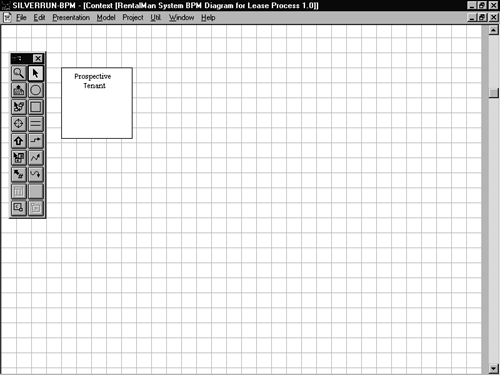
Begin by starting your modeling tool of choice and creating a new business process model. Next , find your tool's external entity object and drop it on to the upper left corner of your blank model. Set its name to Prospective Tenant. This object will represent the prospective tenant who will either inquire about available properties or who will call to enter into a lease on a particular property. Figure 5-3 illustrates what your model might look like so far.
Figure 5-3. Your new model with its first external entity in place.
Adding Processes
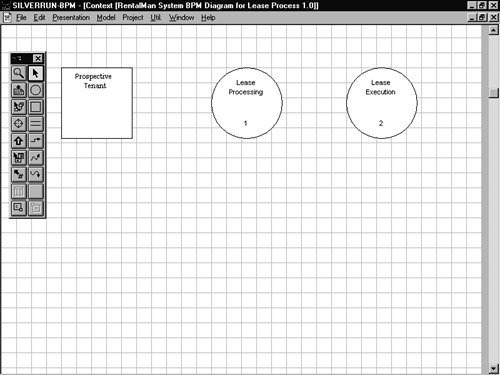
Drop two process objects onto your model: one onto the upper middle and one onto the upper right. Set the name of the first process to Lease Processing and the second to Lease Execution. The Lease Processing object represents the receipt and verification of lease information. It's the focal point of the whole leasing process. The Lease Execution process represents actual leasing of the property. It entails turning over the keys and other items to the new tenant and making a record of the new lease. Figure 5-4 illustrates what your model might look like with these two processes in place.
Figure 5-4. Your new model with its external entity and process objects in place.
Adding Stores
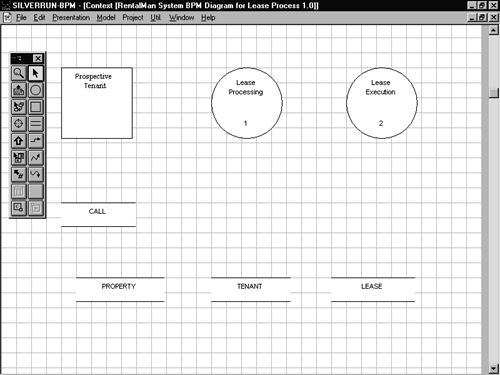
Now drop four data store objects onto the bottom of the model. These will represent the data stores with which the other model elements will interact. Name the first one CALL, the second PROPERTY, the third TENANT, and the fourth one LEASE. Your process objects will send and receive data from these stores. Figure 5-5 shows what your model might look like at this point.
Figure 5-5. Drop four store objects onto your new model.
Adding Flow Objects
Now that all your objects are in place, you're ready to define how they interrelate. You'll do this using flow objects.
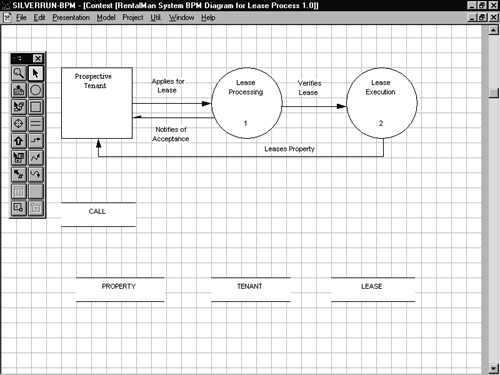
Connect the Prospective Tenant and Lease Processing objects using a flow object that runs from left to right. Set the text label of the flow to Applies for Lease. This represents the application by the prospective tenant for a new property lease.
Now connect the Lease Processing and Prospective Tenant objects using a flow object that runs from right to left. Set its text to Notifies of Acceptance. This object represents the interaction between the leasing office and the prospective tenant.
Connect the Lease Processing and Lease Execution objects using a left-to-right flow object. Set its text to Verifies Lease. This represents the fact that a lease is forwarded to the manager for execution after it has been verified.
Now connect the Lease Execution and Prospective Tenant objects with a flow object that runs right to left. Set its text to Leases Property. Figure 5-6 illustrates what your model might look like with these objects in place.
Figure 5-6. Flow objects allow you to establish relationships between elements in your model.
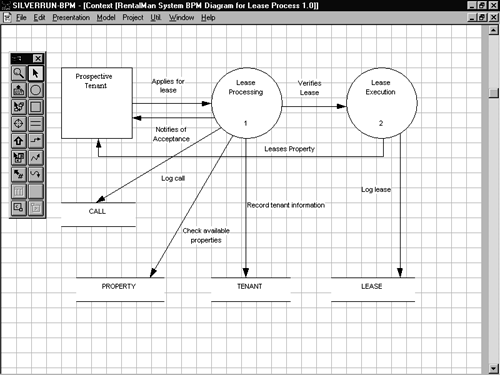
The remaining connections all have to do with interacting with your data stores. Study Figure 5-7 carefully , then add the flow objects necessary to make your model match it.
Figure 5-7. This model diagrams the process of leasing a property to a new tenant.
Adding Data Structures
You've now successfully modeled the process of leasing a property to a new tenant. You could further enhance the model, but the one you have so far is quite functional.
A useful (but optional) thing to do at this point is to define the structures representing the data your store objects will contain. Most modeling tools allow you to specify attributes for your store data that can be used later during the E-R modeling process. These are often termed data structures or something similar, and correspond roughly to entities in E-R diagrams and tables in a relational database design.
Often, you can determine attribute-level information from source documents and forms provided by your client or through user interviews. What you want to do is find out as much about the information the system will store, as early as possible. Enumerating your database attributes early on will save you time later.
The task of adding data structure definitions to a business process model usually has two parts : First, define the data structures; second, associate data structures with store objects.
Begin by adding three data structuresCALL, LEASE, and TENANTto your existing model (Figure 5-8).
Figure 5-8. Adding data structures.
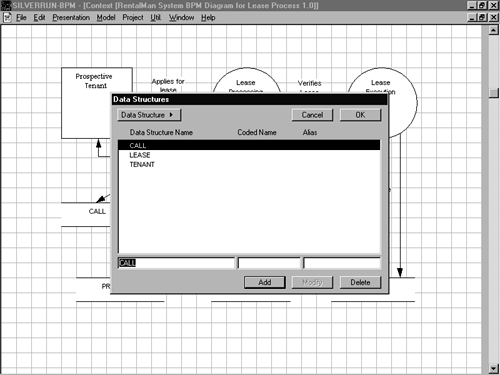
Once you've added all three data structures, the next step is to define their attributes. In some tools, this can be done in one step; in others, it takes multiple steps. Figure 5-9 illustrates the process of adding data structure attributes.
Figure 5-9. You can add elements to data structures.
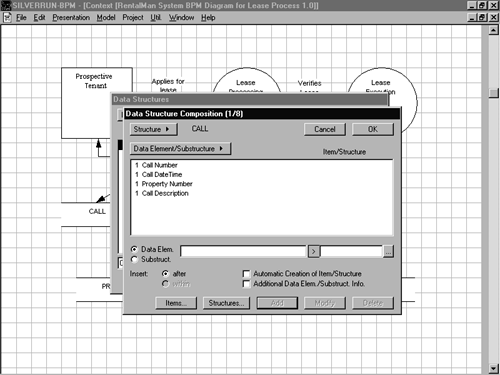
Let's now set up the attributes for each of the data structures you defined earlier. Add these elements to the CALL data structure:
-
Call Number
-
Call DateTime
-
Property Number
-
Call Description
Add these attribute elements to the LEASE data structure:
-
Lease Number
-
Tenant Number
-
Property Address
-
Property City
-
Property State
-
Property Zip
-
Property Addition
-
Property Bedrooms
-
Property LivingAreas
-
Property Bathrooms
-
Property GarageType
-
Property SchoolDistrict
-
Property Deposit
-
Property Rent
-
Property Range
-
Property Refrigerator
-
Property Dishwasher
-
Property CentralHeat
-
Property CentralAir
-
Property GasHeat
-
Property PrivacyFence
-
Property LastSprayDate
-
Property LastLawnDate
-
Lease BeginDate
-
Lease EndDate
-
Lease MovedInDate
-
Lease MovedOutDate
-
Lease Rent
-
Lease PetDeposit
-
Lease RentDueDay
-
Lease LawnService
Add these elements to the TENANT data structure:
-
Tenant Number
-
Tenant Name
-
Tenant Employer
-
Tenant EmployerAddress
-
Tenant EmployerCity
-
Tenant EmployerState
-
Tenant EmployerZip
-
Tenant HomePhone
-
Tenant WorkPhone
-
Tenant ICEPhone
-
Tenant Comments
Information such as this may come directly from lease applications, tenant records, and the like. Note that you're not attempting to normalize your data at this point. That comes later. For now, you just want to model, as closely as possible, the real-world objects with which your system will interact.
Notice that each attribute we add is prefixed with a store name. This is a good convention because these stores will later evolve into tables in the physical database. Doing things this way will likely help us during the E-R modeling stage.
Once you've set up your data structures, you're ready to link them to your store objects (Figure 5-10).
Figure 5-10. You can associate data structures with stores.
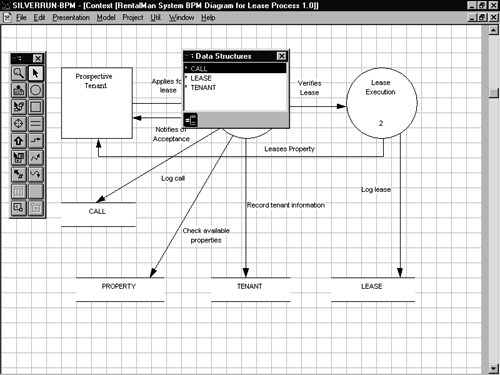
Now let's link your data structures with their corresponding store objects. Link the CALL data structure to the CALL store object, the TENANT data structure to the Tenant store and the LEASE data structure to the LEASE store object.
Once your data structures are linked to their corresponding stores, you're finished with modeling the business processes associated with leasing rental properties. The next step is modeling the entity relationships necessary to service the business process model you just built.
Before you're ready to begin, though, you need to save the business process model you just defined to disk. If your tool has the option of adding your model to a repository for reuse in other models, save it to the repository as well. This will likely make creating E-R and logical data models easier down the road.
| for RuBoard |
![The Guru[ap]s Guide to SQL Server[tm] Stored Procedures, XML, and HTML](/icons/blank_book.jpg "The Guru[ap]s Guide to SQL Server[tm] Stored Procedures, XML, and HTML")
EAN: N/A
Pages: 223