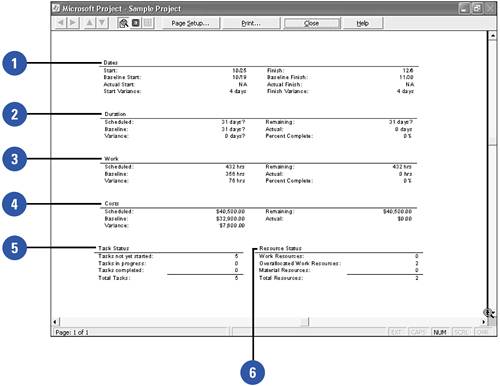
The Project Summary report is broken down into six basic sections: Dates, Duration, Work, Costs, Task Status, and Resource Status.
Dates ” This section shows start and finish dates, as well as start and finish variance at the project level. Finish variance particularly is a key indicator of the shape of the project. Is it tracking toward being on-time or late?
Duration ” This metric is generally tightly aligned with the Dates section because it's derived directly from the dates.
Work ” This section is broken into Scheduled, Baseline, Variance, Remaining, and Actual. Work is a key metric for determining whether the project is in good shape: Perhaps the dates are fine, but the Work value is extremely high. This generally means that either resources are working more hours, or you added more resources to the project.
Costs ” This metric is generally coupled tightly with Work. This section shows how the project is tracking with baseline cost.
Task Status ” This is an interesting section, as it shows the number of in-progress tasks, tasks not yet started, and completed tasks . Although these are interesting, don't be fooled by these numbers , as they are not really key management metrics.
Resource Status ” This section shows the number of material and work resources as well as the number of overallocated resources. This is an extremely important indicator of the project's health.
 This section shows start and finish dates, as well as start and finish variance at the project level. Finish variance particularly is a key indicator of the shape of the project. Is it tracking toward being on-time or late?
  This metric is generally tightly aligned with the Dates section because it's derived directly from the dates.
  This section is broken into Scheduled, Baseline, Variance, Remaining, and Actual. Work is a key metric for determining whether the project is in good shape: Perhaps the dates are fine, but the Work value is extremely high. This generally means that either resources are working more hours, or you added more resources to the project.
  This metric is generally coupled tightly with Work. This section shows how the project is tracking with baseline cost.
  This is an interesting section, as it shows the number of in-progress tasks, tasks not yet started, and completed tasks . Although these are interesting, don't be fooled by these numbers , as they are not really key management metrics.
  This section shows the number of material and work resources as well as the number of overallocated resources. This is an extremely important indicator of the project's health.