2.2 Thumbnail ClassIn our design, the image class is a container for image pixels and nothing else. Since the purpose of this application is to create thumbnail images, a thumbnail class is needed to handle file I/O and the thumbnail algorithm. The thumbnail class has the following properties:
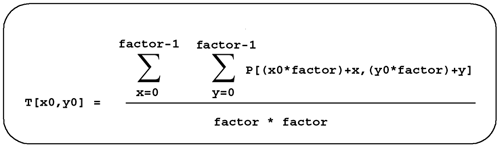
The complete definition of the thumbnail class is shown in Section 2.3.2 on page 16. 2.2.1 Thumbnail AlgorithmEach pixel in the thumbnail image is found by averaging a number of pixels in the input image. The pixel value in the thumbnail image, T(x0,y0) , is computed as shown in Figure 2.1, where factor is the desired reduction value. Figure 2.1. Computing the Thumbnail Pixel Value
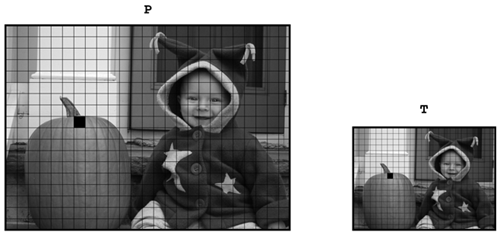
A picture helps clarify this equation. Each pixel in the original image
P
is reduced, by averaging pixel values in image
P
, to a corresponding point in the thumbnail image
T
using the equation from Figure 2.1. In Figure 2.2, we show how a group of pixels in the original image is reduced to the
Figure 2.2. Pictorial Representation of Thumbnail Computation
To further simplify our application, we ignore the condition created by integer arithmetic where the division by the reduction factor results in a fraction. For example, if the original image is
640x480
pixels in size, and the desired reduction factor is
6
, the thumbnail image will be
(640/6)x(480/6)
pixels in size or
106.67x80
. To avoid the
|
2.3 Implementation
This section shows the implementation of both the image class and the thumbnail classes. For brevity in the book, we have omitted many of the comments in the code snippets. We have
2.3.1 Image Class
We define our image class in
image.h
as
class apImage
{
public:
apImage ();
apImage (int width, int height);
~apImage ();
apImage (const apImage& src);
apImage& operator= (const apImage& src);
void swap (apImage& src);
void setPixel (int x, int y, unsigned char pixel);
unsigned char getPixel (int x, int y) const;
bool isValid () const { return pixels_ != 0;}
// Tests if the image data exists, and presumably valid.
int width () const { return width_;} // Image width
int height () const { return height_;} // Image height
class rangeError {}; // Exception class
private:
void init ();
void cleanup ();
// Initialize or cleanup the allocated image data
int width_; // Image width
int height_; // Image height
The implementation for the apImage class is straightforward. We'll start with memory allocation and deallocation.
Instead of duplicating code every time the image data is allocated or deleted, we define init() and cleanup() functions. The init() function uses the new operator to allocate memory for storing image data of size width x height . The orthogonal function is cleanup() which deletes any memory allocated to the apImage class, as shown here.
void apImage::cleanup ()
{
// Put the object back into its original, null state.
delete [] pixels_;
width_ = 0;
height_ = 0;
pixels_ = 0;
}
void apImage::init ()
{
// All memory allocation passes through this function.
if (width_ > 0 && height_ > 0)
pixels_ = new unsigned char [width_ * height_];
}
By using init() and cleanup() , our constructors and destructors become very simple.
apImage::apImage () : width_ (0), height_ (0), pixels_ (0)
{}
apImage::apImage (int width, int height)
: width_ (width), height_ (height), pixels_ (0)
{
init ();
}
apImage::~apImage ()
{
cleanup ();
}
The default constructor for
apImage
creates a
null image
which is an image with no memory allocation and zero width and height. Null images are very useful objects, and are necessary because some image processing operations can legitimately be null. For example, image processing routines often
apImage input;
...
apImage output = input.arbitraryAlgorithm (args);
if (!output.isValid()) {
// Error processing. arbitraryAlgorithm failed.
}
We define an assignment operator and copy constructor, because the one that the compiler automatically generates
apImage::apImage (const apImage& src)
: width_ (0), height_ (0), pixels_ (0)
{
if (src.isValid()) {
width_ = src.width ();
height_ = src.height ();
init ();
memcpy (pixels_, src.pixels_, width_ * height_);
}
}
apImage& apImage::operator= (const apImage& src)
{
if (&src != this) {
// Delete any existing data and recreate the source image
cleanup ();
width_ = src.width ();
height_ = src.height ();
init ();
memcpy (pixels_, src.pixels_, width_ * height_);
}
return *this;
}
As shown, our copy constructor and assignment operator use much of the same code. One way to eliminate this duplication is to use Sutter's technique for writing safe assignment operators. See [Sutter00]. In a
template<class T> void swap (T& a, T& b)
{
T copy(a);
a = b;
b = copy;
}
void apImage::swap (apImage& src)
{
::swap (width_, src.width_);
::swap (height_, src.height_);
::swap (pixels_, src.pixels_);
}
apImage& apImage::operator= (const apImage& src)
{
apImage temp (src);
swap (temp);
return *this;
}
The
swap<>
template function simply exchanges the data of two objects of the same type. It allows us to implement a
swap()
method for the
apImage
class that exchanges all of the data in the object with another
apImage
object. The assignment operator uses the copy constructor to create a copy of
src
, which is then exchanged with the existing data members of the object. When the assignment operator returns, the temporary
apImage
object is automatically
Our apImage class is complete once we define the functions that read and write image pixels. Both will throw rangeError if the coordinates do not specify a pixel within the image, or if the image is null.
void apImage::setPixel (int x, int y, unsigned char pixel)
{
if (x < 0 y < 0
x >= width_ y >= height_
!isValid())
throw rangeError ();
unsigned char* p = pixels_ + y*width_ + x;
*p = pixel;
}
unsigned char apImage::getPixel (int x, int y) const
{
if (x < 0 y < 0
x >= width_ y >= height_
!isValid())
throw rangeError ();
// Image data is stored a row at a time.
unsigned char* p = pixels_ + y*width_ + x;
return *p;
}
2.3.2 Thumbnail ClassNow we are ready to define the thumbnail image class, apThumbNail , which computes the thumbnail image from an input image. As with apImage , we initially keep the definition in apThumbnail.h as simple as possible, as shown here.
class apThumbNail
{
public:
apThumbNail ();
~apThumbNail ();
// The default copy constructor and assignment operator are ok
void createThumbNail (const char* inputFile,
const char* outputFile, int factor);
class invalid {}; // Exception class
private:
void readImage (const char* inputFile);
void writeImage (const char* outputFile) const;
unsigned char averagePixels (int x0, int y0, int factor);
apImage image_; // input image
apImage thumbnail_; // thumbnail image
};
In this class, we
Let's discuss the implementation of the thumbnail class, starting with the constructor and destructor.
apThumbNail::apThumbNail ()
{}
apThumbNail::~apThumbNail ()
{}
Although they are both empty, they do serve a purpose. A common mistake during development is to add a new data member to an object and forget to initialize it in the constructor. Defining a constructor makes it more likely that you will remember to initialize new data members.
In addition, you may
Let's skip ahead to the implementation of the
readImage()
and
writeImage()
functions. These functions are designed to read an image from a file and convert it into an
apImage
class, or to write an
apImage
to a file, respectively. There are numerous file formats designed to store image data, and we deal with them later. For now, we simulate these functions to quickly verify that the design is working properly, before getting bogged down in the details of supporting
void apThumbNail::readImage (const char* /*inputFile*/)
{
// Create a synthetic 64x64 image
image_ = apImage (64, 64);
try {
for (int y=0; y<image_.height(); y++)
for (int x=0; x<image_.width(); x++)
image_.setPixel (x, y, (unsigned char)(y % 255));
}
catch (apImage::rangeError) {
throw invalid ();
}
}
void apThumbNail::writeImage (const char* /*outputFile*/) const
{
// Save formatting state of stream
std::ios_base::fmtflags flags = std::cout.flags (std::cout.hex);
int width = std::cout.width (2);
for (int y=0; y< thumbnail_.height(); y++) {
for (int x=0; x< thumbnail_.width(); x++)
std::cout << (int) thumbnail_.getPixel (x, y) << " ";
std::cout << std::endl;
}
std::cout.flags (flags);
std::cout.width (width);
}
With that out of the way, we can look at the function that actually does the work.
createThumbNail()
takes the name of an input file, the
void apThumbNail::createThumbNail (const char* inputFile,
const char* outputFile,
int factor)
{
// Validate the arguments
if (inputFile == 0 outputFile == 0
factor <= 1)
throw invalid ();
// Read the source image
readImage (inputFile);
if (!image_.isValid())
throw invalid ();
// Create our internal thumbnail image
thumbnail_ = apImage (image_.width() / factor,
image_.height() / factor);
// Turn any rangeErrors from apImage into our invalid error
unsigned char pixel;
try {
for (int y=0; y<thumbnail_.height(); y++) {
for (int x=0; x<thumbnail_.width(); x++) {
// Convert to image_ coordinates to find the average
pixel = averagePixels (x*factor, y*factor, factor);
thumbnail_.setPixel (x, y, pixel);
}
}
}
catch (apImage::rangeError) {
throw invalid ();
}
writeImage (outputFile);
}
createThumbNail() calls averagePixels() to compute the average of pixels in the input image needed to compute a single pixel in the thumbnail image. To be precise, the pixels in a small factor x factor subset of image_ are summed and averaged as shown:
unsigned char apThumbNail::averagePixels (int x0, int y0,
int factor)
{
int sum = 0;
// Average factor x factor pixels in the input image
try {
for (int y=0; y<factor; y++) {
for (int x=0; x<factor; x++)
sum += image_.getPixel (x+x0, y+y0);
}
}
catch (apImage::rangeError) {
throw invalid ();
}
// This cast (an int to an unsigned char) is very safe
return static_cast<unsigned char>(sum / (factor * factor));
}
Although
apThumbNail
is a simple class, it can also be confusing, because it contains two images with different coordinate systems. In our example, the input image has dimensions
width
x
height
, while the thumbnail image has dimensions
width/factor
x
height/factor
. Coding mistakes can be made when these coordinate systems are
To decrease the
The following line creates the thumbnail image, given the dimensions of the input image, and is written to be
thumbnail_ = apImage (image_.width() / factor,
image_.height() / factor);
The line that computes the average isn't as obvious, so we add a comment: // Convert to image_ coordinates to find the average pixel = averagePixels (x*factor, y*factor, factor); |