Working with Operating System Files: Fault Tolerance
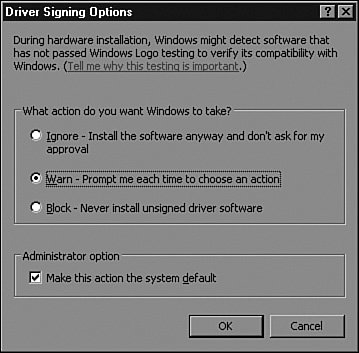
| Microsoft has made great strides in the reliability and performance associated with its Windows-based server and workstation platforms. This holds true today for Windows Server 2003. When servers are built using only hardware displaying the Designed for Windows Server 2003 logo, server failures due to driver conflicts or overwritten system files are relatively rare. To produce a reliable operating system that does not tolerate attempts to overwrite system files or allow the installation of hardware drivers that have not been certified to work with Windows Server 2003, Microsoft has created Windows File Protection to provide system file and hardware driver fault tolerance. Windows File ProtectionWindows File Protection has been designed to protect essential system files from being overwritten by third-party software manufacturers or by viruses. Each original system file has a unique Microsoft digital signature that is recognized by Windows File Protection. When a program attempts to overwrite a protected system file, the new file is checked for a Microsoft digital signature, version, and content; then either it is rejected or the existing file is replaced. Windows File Protection runs silently in the background and is used when an attempt to overwrite a system file is detected or when a system file has already been overwritten and needs to be replaced by a cached copy of the original system file. Windows File Protection restores the file from a DLL cache, if one has been created, or a pop-up window asking for the Windows Server 2003 CD will appear on the local server console. Currently, only the original operating system files, Microsoft service packs, and Microsoft patches and hotfixes contain a Microsoft digital signature. Hardware vendors who certify their hardware after a platform release date may offer certified drivers on their Web sites. Windows File Protection uses digital signatures or driver signing to identify and validate system files. When the system files need to be scanned or have a file replaced, the task can be carried out by using the File Signature Verification tool and the System File Checker tool. When the level of driver security needs to be configured, administrators can use the driver signing options of the server's system property pages. Driver SigningWindows Server 2003 allows an administrator to control the level of security associated with hardware drivers. Because Microsoft works closely with Independent Hardware Vendors (IHVs), Windows Server 2003 and Windows XP support extensive brands of hardware and server peripherals. When an IHV tests its hardware and passes certain Microsoft requirements, its hardware driver is certified, digitally signed by Microsoft, and in most cases, added to the Hardware Compatibility List (HCL) for the particular platform or operating system. To configure the security level of driver signing, perform the following steps:
Windows Hardware Quality LabThe Windows Hardware Quality Lab is the place where hardware is tested before it can receive the Designed for Windows logo. IHVs can send their hardware or actually go to the lab to test their hardware to have it certified and have the driver digitally signed by Microsoft. With Microsoft providing the environment for IHVs to test and certify their hardware, organizations can expect more dependable service from Microsoft servers running on several different hardware platforms. This gives organizations many options when they need to choose a server vendor or a specific hardware configuration. A Windows Server 2003 system that uses only certified hardware will be fully supported by Microsoft when hardware or software support is needed. File Signature Verification (Sigverif.exe)File Signature Verification is a graphic-based utility that can be used when it is suspected that original, protected system files have been replaced or overwritten after an application installation. This tool checks the system files and drivers to verify that all the files have a Microsoft digital signature. When unsigned or incorrect version files are found, the information, including filename, location, file date, and version number, is saved in a log file and displayed on the screen. To run this tool, choose Start, Run, and then type Sigverif.exe. When the window is open, click Start to build the current file list and check the system files. System File Checker (Sfc.exe)The System File Checker is a command-line tool that is similar in function to the File Signature Verification tool, but incorrect files are automatically replaced. Also, this command-line tool can be run from the command line, through a script, or from defined settings in Group Policy. The options include setting it to scan a system at startup, to scan only on the next startup, or to scan immediately. The default is that files are scanned during setup. The first time Sfc.exe is run after setup, it may prompt for the Windows Server 2003 CD to copy Windows system files to the DLL cache it creates. The cache is used to replace incorrect files without requiring the Windows Server 2003 CD. Note Sfc.exe scans and replaces any system files that it detects are incorrect. If any unsigned drivers are necessary for operation, do not run this utility; otherwise, the files may be replaced and cause your hardware to operate in ways you do not want. Sfc.exe options are configurable using Group Policy with settings found in Computer Configuration\Administrative Templates\System\Windows File Protection. |

EAN: 2147483647
Pages: 499