Flylib.com

Books Software


Establishing Tax Status of Inventory Items


Establishing Tax Status of Inventory Items

It's not unusual to prepare an invoice that includes both taxable and non-taxable items. For example, your invoice might be for services and inventory items. The inventory items might be taxable, but the services might not be subject to sales tax in your state. You certainly don't want to create two separate invoices for the taxable and non-taxable items. QuickBooks lets you specify what is taxable and what is not.

Select Lists, Item List from the menu.

Click an item for which you want to identify the tax status.

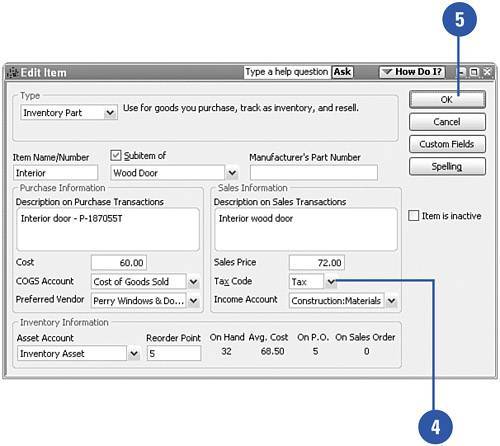
Press Ctrl+E to edit the item.

Set the Tax Code to Tax or Non depending on the tax status of the item.

Click OK.

Repeat this for all the items to which you want to assign tax status.

Press Esc to close the Item List when you are finished.
Did You Know?

You can assign the tax status of an item right on an invoice . When you look at an invoice form, you'll notice a tax column to the right of the items. You can make entries in this column or verify or change entries that already appear here.


Selling Tax Exempt Items

If your state's tax law allows you to exempt certain items from the sales tax calculation, you can make this exemption automatic when you set up the non-taxable items. Each state has different rules about what is and isn't taxable. For example, some states exempt sales of clothing from sales tax. Find out the rules for your state, and then set up your items accordingly .

Open the Item list by selecting Lists, Item List from the menu.

Double-click the item that you want to make tax exempt. The Edit Item window appears.

Change the Tax Code to Non to indicate that this is a non-taxable item.

Click OK.


Selling Items to Tax Exempt Customers

Some customers are exempt from paying sales tax. You need to acquire a tax-exempt number from the customers who tell you they are exempt. QuickBooks provides a place where you can enter this number. Then when you issue an invoice to that customer, tax is not charged. You don't have to make any changes on the invoice because the process of not taxing particular customers becomes automatic.

Click the Customer Center button on the Home page icon bar.

Click the Customer & Jobs tab.

Double-click the name of the customer not subject to sales tax, or press Ctrl+E to open the Edit Customer window.

Did You Know?

The Job Info tab might not appear in your Edit Customer window . You'll notice that the sample screen on this page does not include a Job Info tab. The Job Info tab appears in the Edit Customer window only when there are no specific jobs set up for the particular customer. If you have added individual jobs for this customer, the Job Info tab appears in the Edit Job window for each job. When you've already set up jobs, there is no need for a Job Info tab to appear in the main customer window.


Click the Additional Info tab.

Change the Tax Code to Non for non-taxable status.

If applicable , enter the customer's resale number.

Click OK to save your changes.

IMPORTANT

Double-click on Customer, not Job . When making changes such as indicating a tax-exempt customer, be sure you open the Customer's edit window, not the edit window for a Job. There is no option for setting sales tax information in the job windows .


Producing Monthly Sales Tax Reports

Every state has a different form that accompanies sales tax payments. Although QuickBooks does not prepare the sales tax form for each state, the program does provide a sales tax report. This report helps you fill out the sales tax form for the state or states to which you must make payments.

Open the Vendors menu and select Sales Tax.

Select Sales Tax Liability from the side menu.

Change the dates to reflect the time period that is covered by your current sales tax bill.

Click the Print button if you need to print the report.

Close the report.

Did You Know?

The sales tax report is comprehensive . The report contains the total sales for the time period, the amount of taxable sales, the amount of non-taxable sales, the tax rate for each type of sales tax you pay, and the amount of tax currently owed to each jurisdiction to whom you pay tax. You can use this information to fill out the necessary tax form(s).