5.6. Smart Albums
| < Day Day Up > |
5.5. FoldersObviously, Apple hit a home run when it invented the album concept. Let's face it: If there were a Billboard Top Software-Features Hits chart, the iPhoto albums feature would have been number one for months on end. Albums may have become too popular, however. It wasn't long before iPhoto fans discovered that their long list of albums had outgrown the height of the Source list. As a result, people grew desperate for some way to organize albums within albums, to create subfolders somehow. Apple's response in iPhoto 5 consisted of one word: "folders." If you choose File What's really nice about folders is that they can also contain other folders. That is, iPhoto is capable of more than a two-level hierarchy; you can actually create folders within folders within folders within folders, also as shown in Figure 5-9. Otherwise, folders work exactly like albums. You rename them the same way, drag them up and down the Source list the same way, delete them the same way, and duplicate them the same way. Clearly, the people have spoken. Tip: If you've nested a folder within a folder by accident , no problem. You can easily drag it back out again. Just drag the folder upward until it's just below the Last Rolls icons in the Source list ”watch the black horizontal line that shows where you are ”and then release the mouse.
|
 New Folder, iPhoto promptly creates a new, folder-shaped icon in the Source list called "untitled folder."(Type a name for it and then press Return or Enter.) Its sole purpose in life is to contain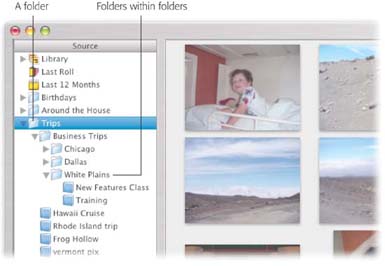
| < Day Day Up > |
