2.8 WebControls
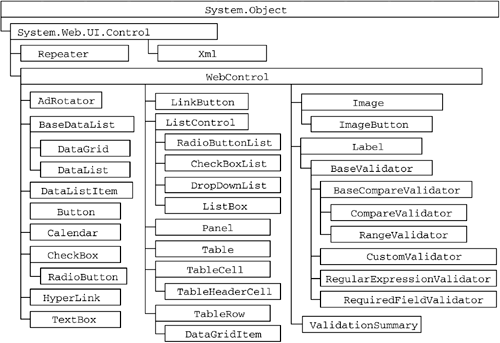
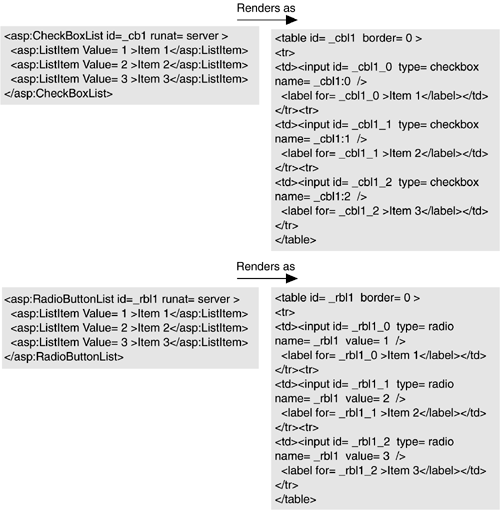
| Web Forms with HTML server-side controls is a compelling model in and of itself, but the HtmlControls are true to their browser counterparts and retain the many idiosyncrasies of HTML elements. Even more compelling would be a set of server-side controls that were not one-to-one mappings of HTML elements but programmatically friendlier controls that took care of mapping to the appropriate HTML elements. Enter WebControls . Most of the HTML elements you might place on a page can also be rendered by classes in the WebControl hierarchy. This is a set of classes parallel to the HtmlControl classes that provide a simplified, more uniform programming model and many more advanced composite controls, such as the DataGrid , Xml , Calendar , and Validation controls. Figure 2-8 shows the complete hierarchy of WebControls available in ASP.NET. Figure 2-8. WebControl Hierarchy This example shows the idiosyncratic nature of the HTML controls. To set the background color of an HtmlTable class to gray, you would assign gray to the BgColor property of the class. To set the background color of a span element via its server-side equivalent, the HtmlGenericControl , you would need to set the Style attribute to background-color :gray; . The analogous classes in the WebControls hierarchy would be Table and Label , both of which have a BackColor attribute that stores not a string but an instance of the System.Color class. So in each case, you would set the BackColor property to Color.Gray . This consistency in naming and sharing of common properties is found throughout the WebControls hierarchy. In addition to increased uniformity , the WebControls provide many more complex controls that render not as single HTML elements but as combinations of HTML elements based on control state. Many of these controls are discussed in detail in future chapters, including the validation and data binding controls. Other interesting controls that we look at now include the list controls, the Xml control, the Panel control, and the AdRotator control. 2.8.1 List ControlsASP.NET introduces several new list controls, all of which derive from the common base class ListControl . Each list control supports a collection of items (of type ListItemCollection ) and properties to set and retrieve the selected item (or index), data binding, and the ability to issue a POST back to the form when the selection is changed. Listing 2-13 shows the common properties of the ListControl class. Listing 2-13 ListControl Properties public class ListControl : WebControl { public virtual bool AutoPostBack {get; set;} public virtual string DataMember {get; set;} public virtual object DataSource {get; set;} public virtual string DataTextField {get; set;} public virtual string DataTextFormatString {get; set;} public virtual string DataValueField {get; set;} public virtual ListItemCollection Items {get; set;} public virtual int SelectedIndex {get; set;} public virtual ListItem SelectedItem {get;} public event EventHandler SelectedIndexChanged; //... } Two of the list controls should be familiar to anyone with HTML experience: DropDownList and ListBox . Each of these controls renders as HTML Select elements; the only difference is that ListBox renders with a Size attribute set to 4 (by default), so that it appears as a fixed list. The other two list controls are examples of controls that exist only as server-side controls: CheckBoxList and RadioButtonList . These controls give you a programmatic interface on the server similar to that of DropDownList and ListBox , but when they render to the client, they render as tables (or as span s if RepeatLayout is set to Flow ) with embedded input elements, because they have no direct equivalent in HTML. Figure 2-9 shows the rendering of two instances of these controls. Figure 2-9. Rendering of CheckBoxList and RadioButtonList Controls Several additional controls in the WebControls hierarchy provide interesting alternatives to hand-rendering HTML techniques. The Xml control provides a mechanism for performing XSL transforms on XML input as part of a page's output. The AdRotator control uses an XML file as input to render an image that changes with each post-back, which is useful for randomly displaying images, often for advertisements. Finally, the Panel control, which renders as a DIV element, is useful for containing groups of controls whose alignment or visibility you need to change programmatically. Listing 2-14 shows a sample .aspx page that uses all these controls together. Listing 2-14 Sample Use of Xml, AdRotator, and Panel Controls<! File: XmlAdPanel.aspx > <%@ Page language="c#" %> <HTML> <body> <form runat="server"> <asp:Xml id=_xml1 runat="server" DocumentSource="sample.xml" TransformSource="sampleTransform.xsl"> </asp:Xml><br/> <asp:AdRotator id=_ar1 runat="server" Width="468px" Height="60px" AdvertisementFile="pics.xml"></asp:AdRotator> <asp:Panel id=_p1 runat=server HorizontalAlign='center' Visible='true' bgColor='cornsilk'> <asp:Label id=_l1 runat=server>Panel label</asp:Label> <br/> <asp:TextBox id=_tb1 runat=server/> <br/> <asp:Button Text='Push me!' runat=server/> </asp:Panel> </FORM> </body> </HTML> |

EAN: 2147483647
Pages: 94