Addressing a Data Buffer
[Previous] [Next]
When an application initiates a read or write operation, it provides a data buffer by giving the I/O Manager a user-mode virtual address and length. As I said back in Chapter 3, "Basic Programming Techniques," a kernel driver hardly ever accesses memory using a user-mode virtual address because, in general, you can't pin down the thread context with certainty. Microsoft Windows 2000 gives you three ways to access a user-mode data buffer:
- In the buffered method, the I/O Manager creates a system buffer equal in size to the user-mode data buffer. You work with this system buffer. The I/O Manager takes care of copying data between the user-mode buffer and the system buffer.
- In the direct method, the I/O Manager locks the physical pages containing the user-mode buffer and creates an auxiliary data structure called a memory descriptor list (MDL) to describe the locked pages. You work with the MDL.
- In the neither method, the I/O Manager simply passes the user-mode virtual address to you. You work—very carefully!—with the user-mode address.
Figure 7-2 illustrates the first two methods. The last method, of course, is kind of a nonmethod in that the system doesn't do anything to help you reach your data.
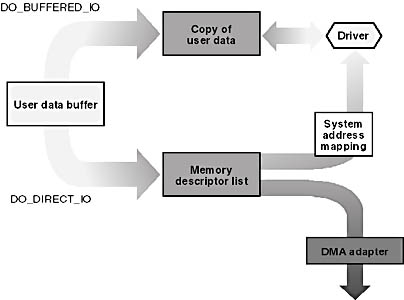
Figure 7-2. Accessing user-mode data buffers.
Specifying a Buffering Method
You specify your device's buffering method for reads and writes by setting certain flag bits in your device object shortly after you create it in your AddDevice function:
NTSTATUS AddDevice(...) { PDEVICE_OBJECT fdo; IoCreateDevice(..., &fdo); fdo->Flags |= DO_BUFFERED_IO; <or> fdo->Flags |= DO_DIRECT_IO; <or> fdo->Flags |= 0; // i.e., neither direct nor buffered } |
You can't change your mind about the buffering method afterward. Filter drivers might copy this flag setting and will have no way to know if you do change your mind and specify a different buffering method.
The Buffered Method
When the I/O Manager creates an IRP_MJ_READ or IRP_MJ_WRITE request, it inspects the direct and buffered flags to decide how to describe the data buffer in the new I/O request packet (IRP). If DO_BUFFERED_IO is set, the I/O Manager allocates nonpaged memory equal in size to the user buffer. It saves the address and length of the buffer in two wildly different places, as shown in boldface in the following code fragment. You can imagine the I/O Manager code being something like this—this is not the actual Microsoft Windows NT source code.
PVOID uva; // |
 user-mode virtual buffer address ULONG length; //
 In other words, the system (copy) buffer address is in the IRP's AssociatedIrp.SystemBuffer field, and the request length is in the stack->Parameters union. This process includes additional details that you and I don't need to know to write drivers. For example, the copy that occurs after a successful read operation actually happens during an asynchronous procedure call (APC) in the original thread context and in a different subroutine than the one that constructs the IRP. The I/O Manager saves the user-mode virtual address (my uva variable in the preceding fragment) in the IRP's UserBuffer field so that the copy step can find it. Don't count on either of these facts, though—they're subject to change at any time.
The I/O Manager also takes care of releasing the free storage obtained for the system copy buffer when something eventually completes the IRP.
The Direct Method
If you specified DO_DIRECT_IO in the device object, the I/O Manager creates a MDL to describe locked pages containing the user-mode data buffer. The MDL structure has the following declaration:
typedef struct _MDL { struct _MDL *Next; CSHORT Size; CSHORT MdlFlags; struct _EPROCESS *Process; PVOID MappedSystemVa; PVOID StartVa; ULONG ByteCount; ULONG ByteOffset; } MDL, *PMDL; |
Figure 7-3 illustrates the role of the MDL. The StartVa member gives the virtual address—valid only in the context of the user-mode process that owns the data—of the buffer. ByteOffset is the offset of the beginning of the buffer within a page frame, and ByteCount is the size of the buffer in bytes. The Pages array, which is not formally declared as part of the MDL structure, follows the MDL in memory and contains the numbers of the physical page frames to which the user-mode virtual addresses map.
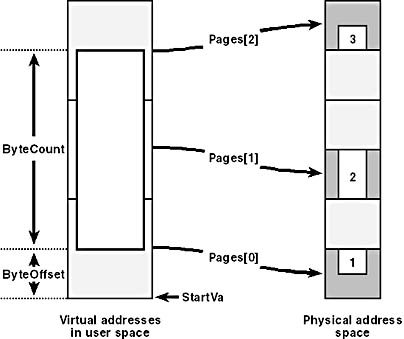
Figure 7-3. The memory descriptor list structure.
We never, by the way, access members of an MDL structure directly. We use macros and support functions instead—see Table 7-2.
Table 7-2. Macros and support functions for accessing an MDL.
| Macro or Function | Description |
|---|---|
| IoAllocateMdl | Creates an MDL |
| IoBuildPartialMdl | Builds an MDL for a subset of an existing MDL |
| IoFreeMdl | Destroys an MDL |
| MmBuildMdlForNonPagedPool | Modifies an MDL to describe a region of kernel-mode nonpaged memory |
| MmGetMdlByteCount | Determines byte size of buffer |
| MmGetMdlByteOffset | Gets buffer offset within first page |
| MmGetMdlVirtualAddress | Gets virtual address |
| MmGetPhysicalAddress | Gets physical address corresponding to a virtual address within the MDL-described region |
| MmGetSystemAddressForMdl | Creates a kernel-mode virtual address that maps to the same locations in memory |
| MmGetSystemAddressForMdlSafe | Same as MmGetSystemAddressForMdl but preferred in Windows 2000 |
| MmInitializeMdl | (Re)initializes an MDL to describe a given virtual buffer |
| MmPrepareMdlForReuse | Reinitializes an MDL |
| MmProbeAndLockPages | Locks pages after verifying address validity |
| MmSizeOfMdl | Determines how much memory would be needed to create an MDL to describe a given virtual buffer |
| MmUnlockPages | Unlocks the pages for this MDL |
You can imagine the I/O Manager executing code like the following to perform a direct-method read or write:
KPROCESSOR_MODE mode; // |
The I/O Manager first creates an MDL to describe the user buffer. The third argument to IoAllocateMdl (FALSE) indicates this is the primary data buffer. The fourth argument (TRUE) indicates that the Memory Manager should charge the process quota. The last argument (Irp) specifies the IRP to which this MDL should be attached. Internally, IoAllocateMdl sets Irp->MdlAddress to the address of the newly created MDL, which is how you find it and how the I/O Manager eventually finds it so as to clean up.
The key event in this code sequence is the call to MmProbeAndLockPages, shown in boldface. This function verifies that the data buffer is valid and can be accessed in the appropriate mode. If we're writing to the device, we must be able to read the buffer. If we're reading from the device, we must be able to write to the buffer. In addition, the function locks the physical pages containing the data buffer and fills in the array of page numbers that follows the MDL proper in memory. In effect, a locked page becomes part of the nonpaged pool until as many callers unlock it as locked it in the first place.
The thing you'll most likely do with an MDL in a direct-method read or write is to pass it as an argument to something else. DMA transfers, for example, require an MDL for the MapTransfer step you'll read about later in this chapter in "Performing DMA Transfers." Universal serial bus (USB) reads and writes, to give another example, always work internally with an MDL, so you might as well specify DO_DIRECT_IO and pass the resulting MDLs along to the USB bus driver.
Incidentally, the I/O Manager does save the read or write request length in the stack->Parameters union. It's nonetheless customary for drivers to learn the request length directly from the MDL:
ULONG length = MmGetMdlByteCount(mdl); |
The Neither Method
If you omit both the DO_DIRECT_IO and DO_BUFFERED_IO flags in the device object, you get the neither method by default. The I/O Manager simply gives you a user-mode virtual address and a byte count (as shown in boldface) and leaves the rest to you:
Irp->UserBuffer = uva; PIO_STACK_LOCATION stack = IoGetNextIrpStackLocation(Irp); if (reading) stack->Parameters.Read.Length = length; else stack->Parameters.Write.Length = length; <code to send and await IRP> |

EAN: 2147483647
Pages: 93