Creating a Form
| Every form must begin with a <form> tag, which can be located anywhere in the body of the HTML document. The form tag normally has two attributes, method and action: <form method="post" action="mailto:me@mysite.com"> Nowadays, the method is almost always post, which means to send the form entry results as a document. (In some special situations, you may need to use method="get", which submits the results as part of the URL header instead. For example, get is sometimes used when submitting queries to search engines from a web form. Because you're not yet an expert on forms, just use post unless your web server administrator tells you to do otherwise.) The action attribute specifies the address to which to send the form data. You have two options here:
The form given in Listing 18.1 and shown in Figure 18.1 includes just about every type of user input component you can currently use on HTML forms. Figure 18.2 shows how the form in Figure 18.1 might look after someone has filled it out. Refer to these figures as you read the following explanations of each type of input element. Listing 18.1. All Parts of a Form Must Fall Between the <form> and </form> Tags<?xml version="1.0" encoding="UTF-8"?> <!DOCTYPE html PUBLIC "-//W3C//DTD XHTML 1.1//EN" "http://www.w3.org/TR/xhtml11/DTD/xhtml11.dtd"> <html xmlns="http://www.w3.org/1999/xhtml" xml:lang="en"> <head> <title>Guest Book</title> </head> <body> <h1>My Guest Book</h1> <p> Please let me know what you think of my web pages. Thanks! </p> <form method="post" action="mailto:you@youremail.com" enctype="text/plain"> <p> What is your name? <input type="text" name="fullname" size="25" /><br /> Your e-mail address: <input type="text" name="e-address" size="25" /> </p> <p> Please check all that apply:<br /> <input type="checkbox" name="likeit" checked="checked" />I really like your Web site.<br /> <input type="checkbox" name="best" />One of the best sites I've seen.<br /> <input type="checkbox" name="envy" />I sure wish my pages looked as good as yours.<br /> <input type="checkbox" name="love" />I think I'm in love with you.<br /> <input type="checkbox" name="idiot" />I have no taste and I'm pretty dense, so your site didn't do much for me. </p> <p> Choose the one thing you love best about my web pages:<br /> <input type="radio" name="lovebest" value="me" checked="checked" />That gorgeous picture of you and your cats.<br /> <input type="radio" name="lovebest" value="cats" />All those moving poems about your cats.<br /> <input type="radio" name="lovebest" value="burbs" />The inspiring recap of your suburban childhood.<br /> <input type="radio" name="lovebest" value="treasures" />The detailed list of all your Elvis memorabilia. </p> <p> Imagine my site as a book, video, or album. Select the number of copies you think it would sell:<br /> <select size="3" name="potential"> <option selected="selected">Million copy bestseller for sure!</option> <option>100,000+ (would be Oprah's favorite)</option> <option>Thousands (an under-appreciated classic)</option> <option>Very few: not banal enough for today's public</option> </select> </p> <p> How do you think I could improve my site? <select name="suggestion"> <option selected="selected">Couldn't be better</option> <option>More about the cats</option> <option>More Elvis stuff</option> <option>More family pictures</option> </select> </p> <p> Feel free to type more praise, gift offers, etc. below:<br /> <textarea name="comments" rows="4" cols="55">I just want to thank you so much for touching my life.</textarea><br /> <input type="submit" value="Click Here to Submit" /> <input type="reset" value="Erase and Start Over" /> </p> </form> </body> </html> Figure 18.1. The form code shown in Listing 18.1 uses nearly every type of HTML form input element.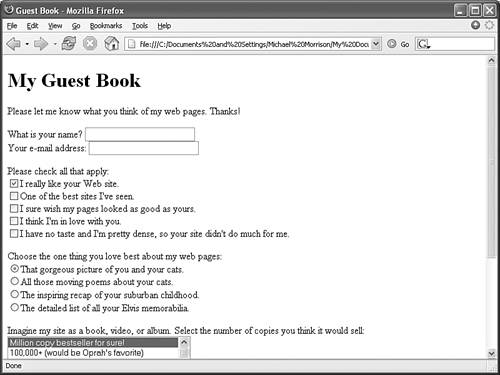 Figure 18.2. Visitors to your web site fill out the form and then click the Click Here to Submit button.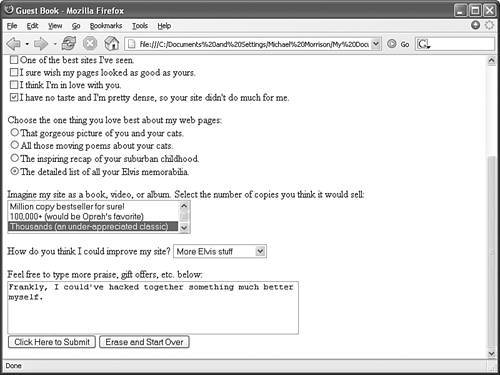 The code for this page (Listing 18.1) uses a <form> tag that contains quite a few <input /> tags. Each <input /> tag corresponds to a specific user input component, such as a check box or radio button. The next few sections dig into the <input /> tag in detail. |

EAN: 2147483647
Pages: 345