Creating a Distribution List


graphics/microsoft1.gif

A distribution list is a collection of contacts usually grouped together because of a specific task or association and then identified by one name . You can use a distribution list in your e-mail messages, task requests , and other distribution lists. When you address an e-mail message using a distribution list, you are sending the message to everyone whose address is included in the list. You can quickly display all the names in the distribution list by clicking the plus sign next to the Distribution List name. Because a distribution list often contains many names, it provides a faster, more efficient way to address an e-mail message to multiple recipients.

Create a Distribution List

graphics/one_icon.jpg

Click the Contacts button on the Navigation pane.

graphics/two_icon.jpg

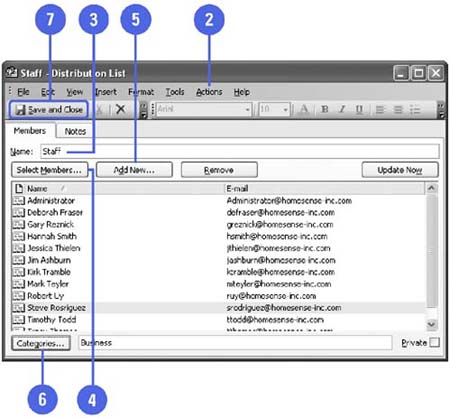
Click the Actions menu, and then click New Distribution List.

graphics/three_icon.jpg

Type the name for the distribution list.

graphics/four_icon.jpg

Click Select Members to select names from your Contacts folder.

graphics/five_icon.jpg

If necessary, click Add New, and then enter the display name and e-mail address for the person you want to add to the list. If you want to add this person to your Contacts folder, click the Add To Contacts check box, and then Click OK.

graphics/six_icon.jpg

Click Categories, check the category or categories you want to apply to this distribution list, and then click OK.

graphics/seven_icon.jpg

Click the Save And Close button.

graphics/02inf04.jpg

Did You Know?

You can sort a distribution list by category . If you associate a distribution list with a category, you can then sort and view the names in the list.

Frequently Asked Questions

Can I Share My Distribution List?

The distribution lists you create in your Contacts folder are available to you only, but you can share them. Distribution Lists are stored by default in your Contacts Folder. If you are using Microsoft Exchange Server, your Global Address List is available to everyone on the network and is maintained by someone appointed as the administrator. This distribution list might also contain public e-mail addresses.


Show Me MicrosoftR Office OutlookR 2003
ISBN: N/A
EAN: N/A
Year: 2003
Pages: 293

flylib.com © 2008-2017.
If you may any questions please contact us: flylib@qtcs.net