Page Fault Handling
Earlier, you saw how address translations are resolved when the PTE is valid. When the PTE valid bit is clear, this indicates that the desired page is for some reason not (currently) accessible to the process. This section describes the types of invalid PTEs and how references to them are resolved.
A reference to an invalid page is called a page fault. The kernel trap handler (introduced in Chapter 3) dispatches this kind of fault to the memory manager fault handler (MmAccessFault) to resolve. This routine runs in the context of the thread that incurred the fault and is responsible for attempting to resolve the fault (if possible) or raise an appropriate exception. These faults can be caused by a variety of conditions, as listed in Table 7-14.
Table 7-14 Reasons for Access Faults
| Reason for Fault | Result |
|---|---|
| Accessing a page that isn't resident in memory but is on disk in a page file or a mapped file | Allocate a physical page and read the desired page from disk and into the working set |
| Accessing a page that is on the standby or modified list | Transition the page to the process or system working set |
| Accessing a page that isn't committed (for example, reserved address space or address space that isn't allocated) | Access violation |
| Accessing a page from user mode that can be accessed only in kernel mode | Access violation |
| Writing to a page that is read-only | Access violation |
| Accessing a demand-zero page | Add a zero-filled page to the process working set |
| Writing to a guard page | Guard-page violation (if a reference to a user-mode stack, perform automatic stack expansion) |
| Writing to a copy-on-write page | Make process-private (or session-private) copy of page and replace original in process, session, or system working set |
| Referencing a page in system space that is valid but not in the process page directory (for example, if paged pool expanded after the process page directory was created) | Copy page directory entry from master system page directory structure and dismiss exception |
| On a multiprocessor system, writing to a page that is valid but hasn't yet been written to | Set dirty bit in PTE |
The following section describes the four basic kinds of invalid PTEs that are processed by the access fault handler. Following that is an explanation of a special case of invalid PTEs, prototype PTEs, which are used to implement shareable pages.
Invalid PTEs
The following list details the four kinds of invalid PTEs and their structure. Some of the flags are the same as those for a hardware PTE as described in Table 7-13.
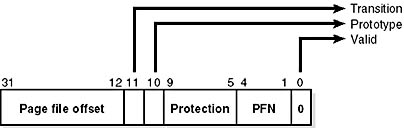
- Page file The desired page resides within a paging file. An in-page operation is initiated, as illustrated here:
- Demand zero The desired page must be satisfied with a page of zeros. The pager looks at the zero page list. If the list is empty, the pager takes a page from the free list and zeros it. If that list is empty, it takes a page from the standby list and zeros it. The PTE format is the same as the page file PTE shown in the previous entry, but the page file number and offset are zeros.
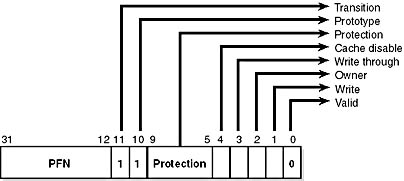
- Transition The desired page is in memory on either the standby, modified, or modified-no-write list. The page is removed from the list and added to the working set, as shown here:
- Unknown The PTE is zero, or the page table doesn't yet exist. In both cases, this flag means that you should examine the virtual address descriptors (VADs) to determine whether this virtual address has been committed. If so, page tables are built to represent the newly committed address space. (See the discussion of VADs.)
Prototype PTEs
If a page can be shared between two processes, the memory manager relies on a software structure called prototype page table entries (prototype PTEs) to map these potentially shared pages. An array of prototype PTEs is created when a section object is first created. These prototype PTEs are part of the segment structure, described at the end of this chapter.
When a process first references a page mapped to a view of a section object (recall that the VADs are created only when the view is mapped), the memory manager uses the information in the prototype PTE to fill in the real PTE used for address translation in the process page table. When a shared page is made valid, both the process PTE and the prototype PTE point to the physical page containing the data. To track the number of process PTEs that reference a valid shared page, a counter in the PFN database entry is incremented. Thus, the memory manager can determine when a shared page is no longer referenced by any page table and thus can be made invalid and moved to a transition list or written out to disk.
When a shareable page is invalidated, the PTE in the process page table is filled in with a special PTE that points to the prototype PTE entry that describes the page, as shown in Figure 7-16.
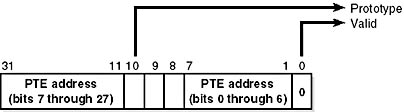
Figure 7-16 Structure of an invalid PTE that points to the prototype PTE
Thus, when the page is later accessed, the memory manager can locate the prototype PTE using the information encoded in this PTE, which in turn describes the page being referenced. A shared page can be in one of six different states as described by the prototype PTE entry:
- Active/valid The page is in physical memory as a result of another process that accessed it.
- Transition The desired page is in memory on the standby or modified list.
- Modified-no-write The desired page is in memory and on the modified-no-write list. (See Table 7-22.)
- Demand zero The desired page should be satisfied with a page of zeros.
- Page file The desired page resides within a page file.
- Mapped file The desired page resides within a mapped file.
Although the format of these prototype PTE entries is the same as that of the real PTE entries described earlier, these prototype PTEs aren't used for address translation—they are a layer between the page table and the page frame number database and never appear directly in page tables.
By having all the accessors of a potentially shared page point to a prototype PTE to resolve faults, the memory manager can manage shared pages without needing to update the page tables of each process sharing the page. For example, a shared code or data page might be paged out to disk at some point. When the memory manager retrieves the page from disk, it needs only to update the prototype PTE to point to the page's new physical location—the PTEs in each of the processes sharing the page remain the same (with the valid bit clear and still pointing to the prototype PTE). Later, as processes reference the page, the real PTE will get updated.
Figure 7-17 illustrates two virtual pages in a mapped view. One is valid, and the other is invalid. As shown, the first page is valid and is pointed to by the process PTE and the prototype PTE. The second page is in the paging file—the prototype PTE contains its exact location. The process PTE (and any other processes with that page mapped) points to this prototype PTE.
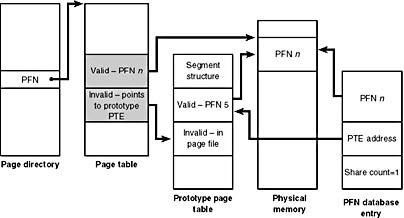
Figure 7-17 Prototype page table entries
In-Paging I/O
In-paging I/O occurs when a read operation must be issued to a file (paging or mapped) to satisfy a page fault. Also, because page tables are pageable, the processing of a page fault can incur additional page faults when the system is loading the page table page that contains the PTE or the prototype PTE that describes the original page being referenced.
The in-page I/O operation is synchronous—that is, the thread waits on an event until the I/O completes—and isn't interruptible by asynchronous procedure call (APC) delivery. The pager uses a special modifier in the I/O request function to indicate paging I/O. Upon completion of paging I/O, the I/O system triggers an event, which wakes up the pager and allows it to continue in-page processing.
While the paging I/O operation is in progress, the faulting thread doesn't own any critical memory management synchronization objects. Other threads within the process are allowed to issue virtual memory functions and handle page faults while the paging I/O takes place. But a number of interesting conditions that the pager must recognize when the I/O completes are exposed.
- Another thread in the same process or a different process could have faulted the same page (called a collided page fault and described in the next section).
- The page could have been deleted (and remapped) from the virtual address space.
- The protection on the page could have changed.
- The fault could have been for a prototype PTE, and the page that maps the prototype PTE could be out of the working set.
The pager handles these conditions by saving enough state on the thread's kernel stack before the paging I/O request such that when the request is complete, it can detect these conditions and, if necessary, dismiss the page fault without making the page valid. When the faulting instruction is reissued, the pager is again invoked and the PTE is reevaluated in its new state.
Collided Page Faults
The case when another thread or process faults a page that is currently being in-paged is known as a collided page fault. The pager detects and handles collided page faults optimally because they are common occurrences in multithreaded systems. If another thread or process faults the same page, the pager detects the collided page fault, noticing that the page is in transition and that a read is in progress. (This information is in the PFN database entry.) In this case, the pager issues a wait operation on an event specified in the PFN database entry. This event was initialized by the thread that first issued the I/O needed to resolve the fault.
When the I/O operation completes, all threads waiting on the event have their wait satisfied. The first thread to acquire the PFN database lock is responsible for performing the in-page completion operations. These operations consist of checking I/O status to ensure the I/O operation completed successfully, clearing the read-in-progress bit in the PFN database, and updating the PTE.
When subsequent threads acquire the PFN database lock to complete the collided page fault, the pager recognizes that the initial updating has been performed as the read-in-progress bit is clear and checks the in-page error flag in the PFN database element to ensure that the in-page I/O completed successfully. If the in-page error flag is set, the PTE isn't updated and an in-page error exception is raised in the faulting thread.
Page Files
Page files are used to store modified pages that are still in use by some process but have had to be written to disk (because of modified page writing). Page file space isn't reserved until pages are written out to disk, not when they are committed. However, the system commit limit is charged for private pages as they are created. Thus, the Process: Page File Bytes performance counter is actually the total process private committed memory, of which none, some, or all may be in the paging file. (In fact, it's the same as the Process: Private Bytes performance counter.)
The memory manager keeps track of private committed memory usage on a global basis, termed commitment, and on a per-process basis as page file quota. (Again, this memory usage doesn't represent page file usage—it represents private committed memory usage.) Commitment and page file quota are charged whenever virtual addresses that require new private physical pages are committed. Once the global commit limit has been reached (physical memory and the page files are full), allocating virtual memory will fail until processes free committed memory (for example, when a process exits).
Windows 2000 supports up to 16 paging files. When the system boots, the session manager process (described in Chapter 2) reads the list of page files to open by examining the registry value HKLM\SYSTEM\CurrentControlSet\Control\Session Manager\Memory Management\PagingFiles. If no paging files are specified, a default 20-MB page file is created on the boot partition. (Embedded versions, such as Windows NT 4 Embedded, have no page file by default.) Once open, the page files can't be deleted while the system is running because the System process (also described in Chapter 2) maintains an open handle to each page file.
EXPERIMENT
Viewing System Page FilesTo view the list of page files, look in the registry at HKLM\SYSTEM\CurrentControlSet\Control\Session Manager\Memory Management\PagingFiles. Don't attempt to add or remove page files by changing the registry setting. To add or remove page files, use the System utility in Control Panel. Click the Performance Options button on the Advanced tab, and then click the Change button.
To add a new page file, Control Panel uses the (internal only) NtCreatePagingFile system service defined in Ntdll.dll. Page files are always created as noncompressed files, even if the directory they are in is compressed. To keep new page files from being deleted, a handle is duplicated into the System process so that when the creating process closes the handle to the new page file, another process can still open the page file.
The performance counters listed in Table 7-15 allow you to examine private committed memory usage on a systemwide or per-page-file basis. There's no way to determine how much of a process's private committed memory is resident verses paged out to paging files.
Table 7-15 Committed Memory and Page File Performance Counters
| Performance Counter | Description |
|---|---|
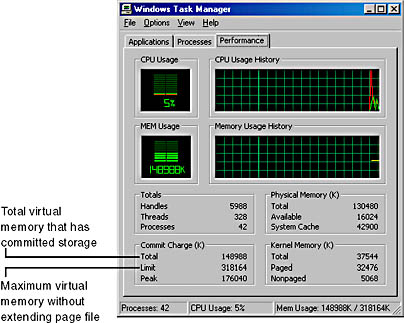
| Memory: Committed Bytes | Number of bytes of virtual (not reserved) memory that has been committed. This number doesn't necessarily represent page file usage because it includes private committed pages in physical memory that have never been paged out. Rather, it represents the amount of page file space that would be used if the process was completely made nonresident. |
| Memory: Commit Limit | Number of bytes of virtual memory that can be committed without having to extend the paging files; if the paging files can be extended, this limit is soft. |
| Paging File: % Usage | Percentage of the paging file committed. |
| Paging File: % Usage Peak | Highest percentage of the paging file committed. |
EXPERIMENT
Viewing Page File Usage with Task ManagerYou can also view committed memory usage with Task Manager by clicking its Performance tab. You'll see the following counters related to page files:

EAN: 2147483647
Pages: 121