Flylib.com

Books Software


Viewing All Tool Presets at Once


Viewing All Tool Presets at Once

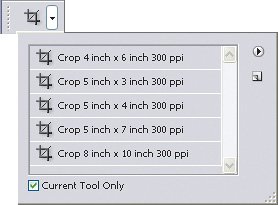
By default, the Tool Presets picker on the options bar lists only the presets for the tool selected in the Tools palette. If you'd rather see all presets for all tools, disable the Current Tool Only checkbox at the bottom of the Tool Presets list ( Figure 4.21 ). Showing presets for all tools can be useful if you want to change to a different tool and preset with just one click; otherwise you have to have the right tool selected before you can pick the preset you want. On the other hand, if you have a long list of presets, you might be able to find a preset more quickly if you narrow down the list by enabling Current Tool Only.

Figure 4.21. Disable the Current Tool Only checkbox to list tool presets for all tools.


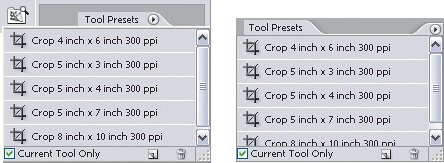
If you become a total preset junkie, you can display the Tool Presets lists as a palette ( Figure 4.22 ). Click the Tool Presets tab in the palette well or choose Windows > Tool Presets. In the Tool Presets palette, tool presets are always visible and you can position the palette anywhere on the screenno need to go to the options bar. If you always want to use tools with specific presets, you could conceivably go as far as using the Tool Presets list as your primary way of switching tools, even hiding the Tools palette if you don't really use it.

Figure 4.22. The Tool Presets list viewed in the palette well (left), and then dragged out of the palette well to become the Tool Presets palette (right).


Save your frequently used type specifications as tool presets for the type tools. Photoshop doesn't have paragraph or character styles, so you can use tool presets to store combinations options bar settings such as font, type size , and paragraph alignment.


Viewing and Managing All Presets at Once

Performing overall administration of your presets throughout Photoshop can be a bit of a challenge if you're trying to do it by going from palette to palette, because presets are spread out all over the place. Although the Tool Presets palette lists only tool presets, the Preset Manager ( Figure 4.23 ) lists all presets of all types in one place, while also giving you the ability to rename and delete presets, save them to disk as files, and load them from disk. Saving presets to disk is useful for things like distributing standard presets throughout a workgroup, or simply storing backup copies of presets separately from Photoshopa good idea in case you need to reinstall or upgrade Photoshop.

Figure 4.23. You can manage all presets in the Preset Manager dialog box.


To open the Preset Manager, choose Edit > Presets Manager. The Preset Manager command is also available on the palette menu for any presets palette. If you see presets in a dialog box, the Preset Manager command is in the menu that you get when you click the triangle button.

Some types of presets are easier to view as names (like tool presets), and others are easier to view graphically (like brushes). To change how the Preset Manager dialog box lists presets, click the pop-up menu icon and choose the way you want to list presets.

In the Preset Manager you see a column of buttons along the right side of the dialog box: Load, Save Set, Rename, and Delete. You can use those buttons to control which presets are stored inside and outside the document:

  • To change the name of a preset, select a preset and click Rename.

  • To delete a preset, select a preset and click Delete.

  • To save presets as a file on disk, select presets, click Save Set, enter a descriptive name, and click OK.

  • To import presets from a file on disk, click Load, select the presets file, and click Load.

In the Tool Presets list or palette, you can manage individual presets with a context menu. Context-click on a preset and you'll see the New Tool Preset, Rename Tool Preset, and Delete Tool Preset commands.

You can manage presets using the pop-up menu that appears with a preset list. For example, if you click the palette menu for the Styles palette, you see the Reset Styles, Load Styles, Save Styles, and Replace Styles commands. If you're looking at a list of presets in a place other than a palette, you can view the menu by clicking the round button with the triangle in itfor example, when you click the Tool Presets picker in the options bar.

In the Preset Manager dialog box, you can switch among preset types by using keyboard shortcuts. You can see the shortcuts in the pop-up menu at the top of the Preset Manager dialog box.


Restoring Default Presets

If you want to reset Photoshop presets back to their state out of the box, you can't do it in the Preset Manager. Instead, go to the preset list for each type of preset and choose the Default command at the bottom of the preset menu list. For example, to reset swatches, click the Swatches palette menu and choose Default Swatches. If you're not sure where preset lists are stored, see the section "Kinds of Presets" earlier in this chapter.