Interfacing with a Payment GatewayAn Example
Interfacing with a Payment Gateway An Example
A popular payment gateway service called PayFlow Pro is provided by VeriSign. PayFlow Pro's client-side component resides in the electronic storefront application. The client component interfaces with PayFlow Pro's servers owned by VeriSign. The PayFlow Pro client communicates with the PayFlow Pro servers, using HTTP requests sent via SSL. The HTTP request contains various parameters for processing the transaction.
This example features a PayFlow Pro interface implemented with Java Servlets. On the client side, the PayFlow Pro Java object is wrapped into a Java Servlet. Figure 3-10 shows what the page looks like in the Web browser.
Figure 3-10. Sample HTML page that interfaces with PayFlow Pro
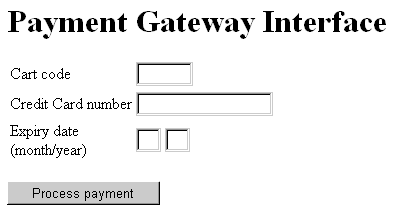
The following HTML code is from a sample HTML page that interfaces with the PayFlow Pro payment processing system and invokes the payment processing component:
<H1>Payment Gateway Interface</H1>
<p>
<form name=pfpro_form method=GET
action="https://payment.example.com/servlet/PFServlet/">
<table border=0>
<tr><td>Cart code</td><td><input type=text name=SHOPCART size=6></td></tr>
<tr><td>Credit Card number</td><td><input type=text name=CARDNUM size=16></td>
</tr>
<tr><td>Expiration date<br>(month/year)</td>
<td><input type=text name=EXPMONTH size=2>
<input type=text name=EXPYEAR size=2></td></tr>
</table>
<p><input type=submit value="Process payment">
</form>
The HTML page contains a form that invokes https://payment.example.com/servlet/PFServlet/. PFServlet invokes the PFPro Java object, which interfaces with the PayFlow Pro payment gateway. The HTML form accepts the following parameters:
| Parameter | Description |
| SHOPCART | Shopping cart code |
| CARDNUM | Customer's credit card number |
| EXPMONTH | Expiration month of credit card |
| EXPYEAR | Expiration year of credit card |
Each customer's shopping cart has a unique code associated with it. The PFServlet uses that code to process all the items in the shopping cart. Ideally, the shopping cart code is passed automatically to the payment processing system by the shopping cart session management system. The following is the code for the Java PFServlet.
import java.io.*;
import javax.servlet.*;
import javax.servlet.http.*;
import com.Signio.PFProAPI;
public class PFServlet extends HttpServlet {public void doGet (HttpServletRequest req, HttpServletResponse res) throws
ServletException, IOException
{PrintWrite rout;
PFProAPI pfObject = new PFProAPI();
String ver = pfObject.PNVersion();
// get HTML form parameters
String EXPMONTH = req.getParameter("EXPMONTH"); String EXPYEAR = req.getParameter("EXPYEAR"); String CARDNUM = req.getParameter("CARDNUM"); String SHOPCART = req.getParameter("SHOPCART");String EXPDATE = EXPMONTH + EXPYEAR;
// calculate total amount from the shopping cart contents
String AMOUNT = CalculateTotalAmount(SHOPCART);
// Receive PayFlow Pro username and password credentials from
// a stored repository
String username = PFCredentials.getUserName();
String password = PFCredentials.getPassword();
// Server hosting PayFlowPro payment gateway
String HostAddress = "test.signio.com";
String HostPort = "443";
// Construct the parameter string to be passed to PayFlow Pro
String ParmList =
"TRXTYPE=S&TENDER=C&USER=" + username + "&PWD=" + password +
"&ACCT=" + CARDNUM + "&EXPDATE=" + EXPDATE + "&AMT=" + AMOUNT +
"&COMMENT1[10]=TestPay&INVNUM=1234567890&STREET=120+WIGGINS+ST &ZIP=47907"; String Timeout = "30"; // Send request to process payment and receive a response int rc = pfObject.ProcessTransaction( HostAddress, HostPort, "", "", "", "", ParmList, Timeout); // Write the result res.setContentType("text/html"); out = res.getWriter(); // Customer response and receipt generation code goes here. // At the very end, the transaction is written out to the database.} The com.signio.PFProAPI package provides the PayFlow Pro Java object API calls. This package is imported and placed within the PFServlet code. Next pfObject is instantiated from the PFProAPI class. The pfObject is used to communicate with the PayFlow Pro servers.
Then the form parameters, described previously, passed to the PFServlet are processed. Once the parameters are received, the function CalculateTotalAmount() is used to process the contents of the customer's shopping cart and generate the total purchase amount to be passed for payment processing.
The next part of the code deals with setting up connection parameters for the payment gateway. First, the payment gateway credentials issued by PayFlow Pro to the merchant are retrieved from an internal repository. These credentials also can be hard-coded but doing so isn't good programming practice. Next the server's IP address and port numbers are set up. Finally, the string ParmList, containing a list of parameters to be passed as an HTTP request to the PayFlow Pro server, is created. These parameters indicate the transaction type (in this case a "Sale" indicated by an "S") and the payment method (a "C" for "Credit Card"). In addition, they provide the PayFlow Pro user name and password, the credit card number and expiration date, the amount to be debited, some comments regarding the transaction, the customer's invoice number, and the customer's address. Full details of these parameters are found in the PayFlow Pro's developer guide document available from VeriSign.
The request for payment processing is then issued by the pfObject.ProcessTransaction() method. The variable "rc" stores the response code received from the PayFlow Pro's payment gateway server. Typically, all the processing from the request to the response occurs within a few seconds.
The rest of the servlet code generates the appropriate results based on the response code. If the payment is accepted, the servlet generates an order confirmation and a receipt and initiates the order fulfillment process. If the payment is denied, the servlet generates an appropriate response to the customer. In the end, the transaction is recorded in the transactions database.

EAN: 2147483647
Pages: 156