Add Shading to Cells
You can add shading to cells to call attention to them.

-
Position the mouse
 inside the left edge of the cell you want to shade ( changes to
  ) and drag to select the cell.
 -
Click
 to display the Tables and Borders toolbar.
 -
Click the Shading icon
 to click a shading color.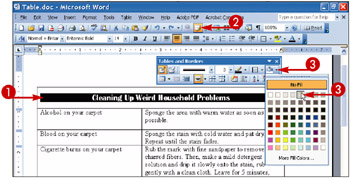
 Word applies the shading to the selected cells.
 -
Click anywhere to cancel the selection.
-
Click
 to close the Tables and Borders toolbar.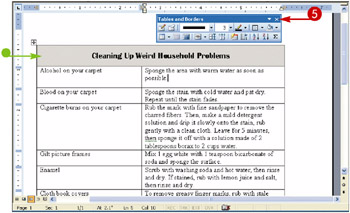

Teach Yourself VISUALLY Word 2003
ISBN: 0764539973
EAN: 2147483647
EAN: 2147483647
Year: 2004
Pages: 175
Pages: 175
Authors: Ruth Maran