Following a Methodical Order of Elimination
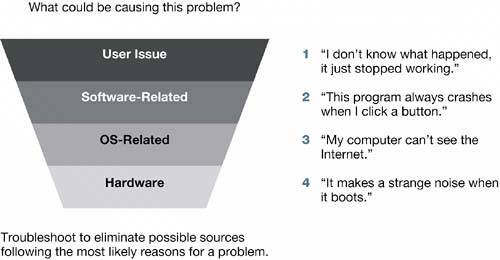
| Approaching a problem methodically is efficient and cost-effective. Most problems can be categorized and eliminated with careful troubleshooting. While troubleshooting, you should generally check for problems in the following order:
Statistically, most problems are user-, software-, or OS-related. Also, this order usually represents the least expensive to the most expensive repairs. If you approach your problem-solving in this order, you will be as efficient and cost-effective as possible.
User-Related ProblemsCheck for user-related problems while gathering information, duplicating the problem, and trying quick fixes. These include incorrectly set preferences, inadvertent errors, incompatibilities, and incorrect assumptions. Software-Related ProblemsSoftware can cause symptoms that look like hardware problems. Always check for software problems before assuming the problem is hardware-related. Report bugs if you find them (this is an instance where your notes will be helpful). OS-Related ProblemsYou can identify OS-related problems from general symptoms that affect all applications, or from specific symptoms, such as problems that prevent the startup process from completing. Most of this lesson focuses on OS-related problems. Hardware-Related ProblemsWhen you're convinced that the problem is not user-related, software- related, or OS-related, you should troubleshoot it as a hardware issue. Hardware problems are beyond the scope of this book; Apple's Knowledge Base at www.apple.com/support is an invaluable resource, as is the Peachpit Press book "Apple Training Series: Desktop and Portable Systems, Second Edition." If you isolate the problem to hardware, and you are an Appleauthorized service technician, follow the appropriate service procedures. Otherwise, contact an Appleauthorized service provider for repairs. |

EAN: 2147483647
Pages: 233