Chapter 1. Features of the iPod Photo
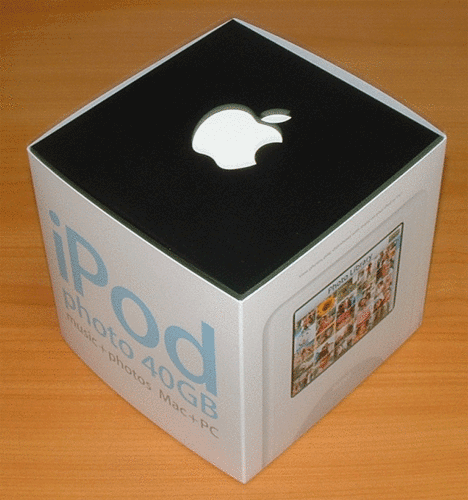
Apple has recently released the iPod photo (see Figure 1-1), a fourth generation (4G) iPod capable of displaying color photos. With its new enhanced
If you are the proud owner of the new iPod photo, congratulations! I know you are
Figure 1-1. The iPod photo packaging
|

1.1. Inside the Package
When you
Figure 1-2. The iPod photo package
The new iPod photo looks exactly the same as the 4G iPod (see Figure 1-3) except that it is slightly thicker and a bit heavier. Of course, it has a
Figure 1-3. The new iPod photo
The iPod photo spots a 2-inch (diagonal) 65,536-color LCD with LED backlight screen (see Figure 1-4).
Figure 1-4. The dimensions and screen
|
|
iPod |
Dimensions |
Weight |
|---|---|---|
|
4G iPod (20GB) |
4.1 x 2.4 x 0.57 inches |
5.6 ounces |
|
4G iPod (40GB) |
4.1 x 2.4 x 0.69 inches |
6.2 ounces |
|
iPod photo (40GB and 60GB) |
4.1 x 2.4 x 0.75 inches |
6.4 ounces |
|
1.2. Using FireWire or USB 2.0The iPod photo comes with two cables:
Figure 1-5. The Apple's iPod Dock Connector to FireWire cable
Figure 1-6. The Apple's iPod Dock Connector to USB 2.0 cable
If your computer (Mac or PC) has a 6-pin FireWire connector, you should use the iPod Dock Connector to FireWire cable to connect your iPod photo to the computer. Using this cable, you can sync and charge your iPod at the same time. If your computer (Mac or PC) has a USB 2.0 connector, you can use the iPod Dock Connector to USB 2.0 cable to connect your iPod photo to the computer.
If you are a PC
Figure 1-7. The 6-pin to 4-pin FireWire adapter
|
1.3. New DockThe iPod photo comes with a new Dock. Figure 1-8 shows the old Dock and the new Dock for iPod photo. The new Dock spots an S-video Out port. You can use the S-video cable to connect your iPod photo to an S-video-equipped TV or video device. Figure 1-8. The old and the new iPod Dock
|