2.2. Generalized markup Formatting markup is sufficient if your only goal is to create a single rendition and then print it. In 1969, IBM asked a young researcher named Charles Goldfarb (the name may sound familiar) to build a system for editing, searching, managing, and publishing legal documents. Goldfarb found that there were IBM products for each of these tasks but they could not communicate with each other. They could not share information! Each of them used different markup. They could not read each other's files, just as you may have had trouble loading WordPerfect files into Word or vice versa. The problem then, as now, was that to integrate these diverse products, a neutral document representation[2] was needed for the information – one that wasn't designed for a single product. [2] Sometimes called a file format. Goldfarb – later joined by two other IBM researchers, Ed Mosher and Ray Lorie – set out to solve this problem. The team recognized (eventually) that the solution would need to satisfy four principles: neutral data representation (markup language) Various computer programs and systems would need to be able to read and write information in the same representation. extensible markup There is an immeasurable variety of types of information that must be exchanged. The markup language must be extensible enough to support them all. rule-based markup There must be a formal way of describing the rules followed by documents of the same type. Computers must be able to read and enforce the rules.[3] [3] History is being compressed here somewhat. Computers that could "read and enforce the rules" didn't enter the picture until SGML. stylesheets For sharing to work, it must be possible to create document types that aren't renditions. The real information must be accessible in the abstract, independent of the formatting – or any other processing – instructions. Ideally, the latter should be in separate stylesheets. These principles are important far beyond the exchange of traditional documentation. In fact they underlie the exchange of any form of information. The IBM team's solution was the Generalized Markup Language (GML), which Goldfarb later drew on for his invention of the Standard Generalized Markup Language (SGML) – the parent of HTML and XML. In the following sections, we'll look at each of these principles in a bit more detail and see how they apply to Word. 2.2.1 Neutral data representation (markup language) The need for a neutral data representation is easy to understand. Tools cannot interchange information if they do not speak the same language. 2.2.2 Extensible markup The IBM team realized that the neutral representation should be specific to legal documents while at the same time being general enough to be used for things that are completely unrelated to the law. This seems like a paradox but it is not as impossible as it sounds! 2.2.2.1 Vocabularies This idea is a little more subtle to grasp, but vital to understanding XML. For example, lawyers and scientists both use Latin, but they do not use the same vocabulary. Similarly, in Example 2-2 we have Doug's newsletter article in XML, using a vocabulary that was designed for newsletter articles. In Example 2-3, however, we have the same article represented using a different vocabulary. Example 2-2. Doug's article, represented in article XML <?xml version="1.0" encoding="UTF-8" standalone="yes"?> <article xmlns="http://xmlinoffice.com/article" type="sales" > <title>Sales Update</title> <author>Doug Jones</author> <date>February 3, 2004</date> <body> <section> <header>A great month!</header> <para>This month's figures are a <em>huge</em> improvement over this month last year. We sold 1,342 widgets for a total revenue of $14,327.</para> </section> <section> <header>More work to do</header> <para>Let's not rest on our past success. Let's get out there and sell, sell, sell!</para> </section> </body> </article>
Example 2-3. Doug's article, represented in WordML XML (article WordML.xml) <w:body> <wx:sect> <wx:sub-section> <w:p><w:pPr><w:pStyle w:val="Heading1"/></w:pPr></w:p> </wx:sub-section> <wx:sub-section> <w:p> <w:pPr><w:pStyle w:val="Heading1"/></w:pPr> <w:r><w:t>Sales Update</w:t></w:r></w:p> <w:p><w:r><w:t>Doug Jones</w:t></w:r></w:p> <w:p><w:r><w:t>February 3, 2004</w:t></w:r></w:p><w:p/> <wx:sub-section> <w:p> <w:pPr><w:pStyle w:val="Heading2"/></w:pPr> <w:r><w:t>A great month!</w:t></w:r></w:p> <w:p/> <w:p> <w:r><w:t>This month's figures are a </w:t></w:r> <w:r><w:rPr><w:i/></w:rPr><w:t>huge</w:t></w:r> <w:r><w:t> improvement over this month last year. We sold 1,342 widgets for </w:t></w:r><w:proofErr w:type="gramStart"/> <w:r><w:t>a total</w:t></w:r><w:proofErr w:type="gramEnd"/> <w:r><w:t> revenue of $14,327.</w:t></w:r></w:p><w:p/> </wx:sub-section> <wx:sub-section> <w:p> <w:pPr><w:pStyle w:val="Heading2"/></w:pPr> <w:r><w:t>More work to do</w:t></w:r></w:p> <w:p><w:r><w:t>Let's not rest on our past success. Let's get out there and sell, sell, sell!</w:t></w:r></w:p><w:p/> <w:sectPr> <w:pgSz w:w="12240" w:h="15840"/> <w:pgMar w:top="1440" w:right="1800" w:bottom="1440" w:left="1800" w:header="720" w:footer="720" w:gutter="0"/> <w:cols w:space="720"/><w:docGrid w:line-pitch="360"/> </w:sectPr> </wx:sub-section> </wx:sub-section> </wx:sect> </w:body>
Before we look at the differences between the two XML representations, let's use Example 2-2 to learn the basics of XML: elements and tags, content and data, and attributes. elements and tags The document has one title element. It begins with a start-tag (<title>) and ends with a corresponding end-tag (</title>). The forward slash differentiates an end-tag from a start-tag. The purpose of the tags is to identify the type of element (title, in this case) and show where it starts and ends. content and data The text in between the tags is the content of the element. In the case of title the content is entirely data characters. However, the content of body has only markup that represents elements, and the first para has mixed content: data and an element (em). Elements that occur in the content of elements form a hierarchy. At the top is the document element (or root element): in this case, article. attributes An element can have properties besides its element type name and content. These are represented by name-value pairs called attributes. In the example, only article has attributes. The value of the one named id is the name of this particular article element, which is useful when a group of articles is combined in a newsletter. The xmlns attribute declares a namespace, which we explain in 2.6, "Namespaces", on page 39. The attribute names and element-type names, such as title, comprise a custom vocabulary specifically designed to describe newsletter articles. In contrast, Example 2-3 uses a vocabulary called the Word Markup Language (WordML).[4] [4] Whitespace added for readability. WordML uses XML, as do thousands of other data representations. However, the WordML vocabulary is unique. It was designed by Microsoft to be the XML equivalent of .doc and RTF. As such, it describes components and properties of the Word formatting model. Even if one of its element-type names were the same as one in some other vocabulary, it would probably not identify the same type of thing. (We explain WordML in detail in Chapter 5, "Rendering and presenting XML documents", on page 86.) The reason that generalized markup became successful is that users can create their own vocabularies to meet their needs. But all vocabularies use the standard markup language syntax (and other language constructs), so tools can be developed to do the large amount of common processing that is necessary for all vocabularies. 2.2.2.2 Abstractions and renditions Computers are not as smart as we are. If we want the computer to consider a piece of text to be written in a foreign language (for instance for spell-checking purposes) then we must label it explicitly foreign-phrase and not just put it in italics! The "foreign phrase" is the abstraction that we are trying to represent; italics is just a particular rendition of that abstraction for visual presentations. For audible presentations, the rendition might be a voice with an accent. Formatting markup is specific to a particular use of the information. Search engines cannot do very useful searching on italics because they do not know why something is italicized. It could be a foreign phrase but it could also be a citation of another document. In contrast, the search engine could do something very helpful with suitably-marked citation elements: it could return a list of those documents that are cited by other documents. Italics are a form of markup specific to a particular application: formatting. In contrast, the citation element is markup that can be used by a variety of applications. That is why Goldfarb named this form of markup generalized markup. Generalized markup is the alternative to formatting markup and other specialized single-use coding schemes. Caution  | Generalized markup is often called structured markup and the act of using it structuring a document. Unfortunately, "structured" is the most misused term in markup languages, with at least four different meanings (see 20.1, "Structured vs. unstructured", on page 430). This use of it implies that only abstractions have structure, which Figure 2-2 clearly refutes. It shows the Word template ProfessionalReport.dot with the Document Map and Style Area in view. The structural hierarchy is in the left pane and style codes are in the center. A Word template is not just a stylesheet, but also a guide to the structure of the rendition. Figure 2-2. Structure of a rendition 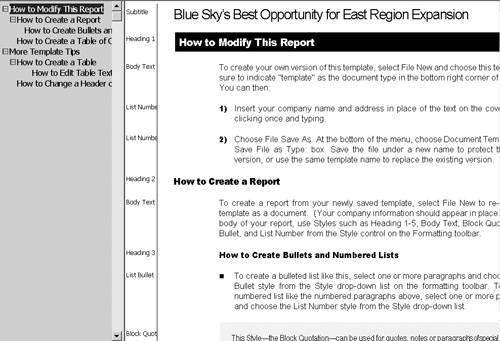
|
2.2.3 Rule-based markup If computer systems are to work with documents reliably, the documents have to follow certain rules. In retrospect we can see that this is important for interchanging information of all sorts, whether it is traditionally considered a document or not. For instance a courtroom transcript might be required to have the name of the judge, defendant, both attorneys and (optionally) the names of members of the jury (if there is one). Since humans are prone to make mistakes, the computer would have to enforce the rules for us. In other words the legal markup language should be specified in some formal way that would restrict elements appropriately. If the court stenographer tried to submit a transcript to the system without these elements being properly filled in, the system would check its validity and complain that it was invalid. Once again, this concept is today very common in the database world. Database people typically have several layers of checking to guarantee that improper data cannot appear in their databases. For instance syntactic checks guarantee that phone numbers are composed of digits and that people's names are not. Semantic checks ensure that business rules are followed (such as "purchase order numbers must be unique"). The database world calls the set of constraints on the database structure a schema. This word has also caught on in the XML world. Of course, court transcripts have a different structure from wills, which in turn have a different structure from memos. So you would need to rigorously define what it means for each type of document to be valid. In markup language terminology, each of these is a document type and the formal definition that describes each type is called a document type definition (DTD) or schema definition. These terms refer both to the vocabulary and the constraints on the vocabulary's use. Example 2-4 shows a simple DTD expressed with three XML element-type declarations. Example 2-5 shows the equivalent schema definition expressed using the XML Schema Definition Language (XSDL).[5] [5] XSDL is the only schema language that Office 2003 can support. We explain it in detail in Chapter 22, "XML Schema (XSDL)", on page 466. Example 2-4. Markup declarations <!ELEMENT Q-AND-A (QUESTION,ANSWER)+> <!-- This allows: question, answer, question, answer ... --> <!ELEMENT QUESTION (#PCDATA)> <!-- Questions are just made up of textual data --> <!ELEMENT ANSWER (#PCDATA)> <!-- Answers are just made up of textual data -->
Example 2-5. Schema definition <schema xmlns='http://www.w3.org/2001/XMLSchema' xmlns:qa='http://www.q.and.a.com/' targetNamespace='http://www.q.and.a.com/'> <element name="Q-AND-A"> <complexType> <sequence minOccurs="1" maxOccurs="unbounded"> <element ref="qa:QUESTION"/> <element ref="qa:ANSWER"/> </sequence> </complexType> </element> <!-- This allows: question, answer, question, answer ... --> <element name="QUESTION" type="string"/> <!-- Questions are just made up of textual data --> <element name="ANSWER" type="string"/> <!-- Answers are just made up of textual data --> </schema>
2.2.4 Stylesheets Of course, if you are using XML for publishing, you must still be able to generate high quality print and online renditions of the document. Your readers do not want to read XML text directly. Instead of directly inserting the formatting commands in the XML document, we usually tell the computer how to generate formatted renditions from the XML abstraction. For example in a print presentation, we can make the content of TITLE elements bold and large, insert page breaks before the beginning of chapters, and turn emphasis, citations and foreign words into italics. These rules are specified in a file called a stylesheet. The stylesheet is where human designers can express their creativity and understanding of formatting conventions. The stylesheet allows the computer to automatically convert the document from the abstraction to a formatted rendition. Stylesheets for XML invariably conform to the Extensible Style Language Transformations (XSLT) W3C recommendation. XSLT can do much more processing than formatting markup ever could. Often it is used for tasks that don't involve formatting at all. Moreover, XSLT stylesheets are normally written to apply to all documents of a given type, rather than a single document. Just as the DTD or schema sets the rules for markup, an XSLT stylesheet is a set of rules for processing, as depicted in Figure 2-3.[6] [6] We teach you how to create an XSLT stylesheet in Chapter 18, "XSL Transformations (XSLT)", on page 392. Figure 2-3. Rule-based processing 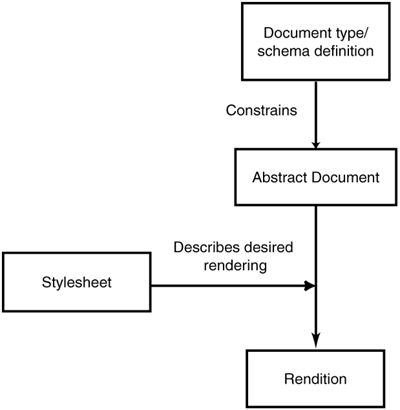
| 

