Transactions and JMS
 | ||
| ||
JMS uses the Java Transaction Service (JTS) to support transactions.
| Important | A series of incoming and outgoing messages can be grouped together into an atomic unit of work/transaction. |
There are several ways to use transactions with JMS. If you are using only JMS in your transactions, you can create and use a transacted JMS session. However, if you plan on mixing other operations, such as Enterprise JavaBeans (EJB) with JMS transactions, you are better off using the JTS javax.transaction.UserTransaction class in a non-transacted JMS session. This allows you more control over your transactional code while you develop the program since you may need to incorporate specific functionality in your programs based on your requirements to coordinate between JMS and other non-JMS transactional systems like EJB.
Transacted JMS Sessions
In JMS, transacted sessions are generally chained. That means, whenever a commit or rollback occurs in a transaction, the next transaction automatically begins.
The JTS UserTransaction Class
If you are using other transactional resources like EJBs along with JMS, or you have already created a javax.jts.UserTransaction object in an EJB, the EJB server will coordinate your transactions. If you create a JMS transacted session when you already have an existing javax.jts.UserTransaction object, a javax.jts.NotSupportedException should be thrown when you call any other transacted methods on the JMS Session object. The transaction manager throws this exception when a calling thread attempts to start a new transaction when the thread is already associated with a transaction because nested transactions are not supported in EJB.
When combining JMS and EJB operations in a single transaction, you can start the transaction from an EJB automatically, or you can create a javax.jts.UserTransaction object on your own. The javax.jts.UserTransaction.setTransactionTimeout() method takes an integer TransactionTimeout value that specifies how long a transaction can run before it times out. If a transaction times out, it is rolled back. If you have very long running transactions that exceeds this limit, you will need to increase this value to allow transactions to complete.
The pseudo-code for this will be similar to the following, but may vary depending on the J2EE application server you are using:
// Create a Transaction object, or look it up using JNDI javax.jts.UserTransaction userTransaction = new javax.jts.UserTransaction(); // Timeout the transaction if takes longer than specified userTransaction.setTransactionTimeout (36000); try { // start the transaction userTransaction.begin(); // Perform JMS and EJB operations // Commit the transaction userTransaction.commit(); } catch (Exception e) { userTransaction.rollback(); e.printStackTrace(); }
Distributed Transactions
The JMS specification does not require that users have to support distributed transactions. This is because, even though it is possible for JMS clients to handle transactions directly, it is believed that not many clients will need to do this. However, JMS specifies that if the user were to provide support for distributed transactions, it should be done through the Java Transaction API (JTA) javax.transaction.xa.XAResource. Similarly, if a JMS provider is also a distributed transaction monitor, it should provide control of the transaction through JTA. Support for JTA in JMS is however targeted at vendors who integrate JMS into their application server products.
JMS Transaction Examples
When a session is created as transacted, transactions are created. A transacted session is created by the first parameter passed in to the createQueueSession() method:
QueueSession session = connection.createQueueSession(true, Session.AUTO_ACKNOWLEDGE);
A value of true for the first parameter makes this a transacted session. Any message sent on a transacted session starts off a transaction. All messages sent on that session then become part of this transaction, until a QueueSession.commit() or a QueueSession.rollback() call is invoked.
As soon as a commit call is invoked, all the messages sent until that point are packaged into a transaction and are sent out to the server. The following figure depicts this scenario diagrammatically:
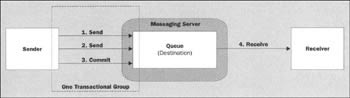
However, if the transaction were rolled back, all sent messages are destroyed, and all the consumed messages are automatically recovered. A commit or rollback call signifies the end of the current transaction and automatically starts off the next transaction.
In the following code sample, assume that we have obtained a reference to a transacted session object called senderSession and we have created a sender object called sender:
TextMessage textMessage1 = senderSession.createTextMessage(); TextMessage textMessage2 = senderSession.createTextMessage(); textMessage1.setText(stringData); textMessage2.setText(stringData); sender.send(textMessage1); sender.send(textMessage2);
In the code above, the messages textMessage1 and textMessage2 are not sent off immediately as soon as the send() method is invoked on the sender object. Instead they are buffered in an internal storage of the provider's client runtime until either a commit() or a rollback() operation is invoked. The transaction is committed as follows:
senderSession.commit();
As soon as the commit is called, both the messages (textMessage1 and textMessage2) are sent to the JMS messaging server as a single packaged unit.
On the other hand if a rollback is called at this point then both the messages (textMessage1 and textMessage2) would be discarded:
senderSession.rollback();
As such, a commit() or a rollback() invocation signifies the end of the current transaction and all subsequent operations on the session automatically become part of the next transaction. In essence, a transacted session always has a current transaction within which its work is done. For example, when working with a purchase order, if the order transaction is successful, the system commits it and moves on to the next transaction. However, if it is a failure, the system rollbacks the transaction and starts working with the next order. At any time the system is always processing some order and always has a current purchase request order on which work is done.
Transactions are not confined only to the message producer side of a messaging system. As shown in the next figure, it is also possible to have a transactional grouping that receives on the message consumer side:
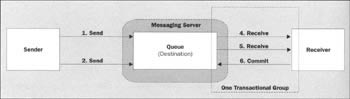
The following code snippet illustrates such a scenario:
QueueSession session = null; session = connection.createQueueSession(true, Session.AUTO_ACKNOWLEDGE) ; QueueReceiver receiver = session.createReceiver (queue); TextMessage request1 = (TextMessage) receiver.receive(); TextMessage request2 = (TextMessage) receiver.receive(); session.commit();
In the above scenario, if the transaction successfully commits, a new transaction is started for the subsequent receive operation. If however, something were to fail and the receiver were to rollback, all the messages that were received within this transaction, would be thrown back into the queue and the system would be taken to the state it was in before receiving messages on this transaction.
In such a scenario, the messages now become available to the next receiver as long as their expiration time has not been reached. The next receiver can them pick these messages up and start processing them if it wants to. The JMSRedelivered property is set for these types of messages. Any receiver can examine the property with a call to get JMSRedelivered() and decide whether to process the message or not.
In as similar fashion, it is also possible to group sends and receives together in one transactional group as shown here:
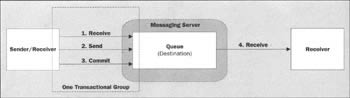
The following code snippet illustrates such a scenario:
QueueSession session = null; session = connection.createQueueSession(true, Session.AUTO_ACKNOWLEDGE); QueueReceiver receiver = session.createReceiver(queue); TextMessage request = (TextMessage) receiver.receive(); QueueSender sender = session.createSender(queue) ; TextMessage textMessage = session.createTextMessage(); textMessage.setText(stringData); sender.send(textMessage); session.commit();
We will be looking at how to use the javax.jts.UserTransaction class to co-ordinate transactions between JMS and other transactional resources like Enterprise JavaBeans when we look at EJB Messaging in Chapter 7.
In the rest of this chapter we are going to see how to develop an online banking application. There are a number of examples using JMS transactions in this application.
| ||

EAN: 2147483647
Pages: 154
- ERP System Acquisition: A Process Model and Results From an Austrian Survey
- The Second Wave ERP Market: An Australian Viewpoint
- Enterprise Application Integration: New Solutions for a Solved Problem or a Challenging Research Field?
- A Hybrid Clustering Technique to Improve Patient Data Quality
- Development of Interactive Web Sites to Enhance Police/Community Relations