Understanding Intrusion Detection
Overview
On June 11, 2003 the Gartner Group, a research and advisory firm, reported that intrusion-detection systems are a market failure, have failed to provide value relative to their costs, and will be obsolete by 2005. While this brought Gartner a lot of attention, the fact is that intrusion detection and prevention is here to stay, not as a silver bullet, but as part of a strong defense strategy. Many industry research groups and the thousands of companies that have deployed or are planning to deploy intrusion-detection and intrusion-prevention systems are a testament to the usefulness of this technology.
Intrusion detection has had its problems, such as false positives, operational issues in high-speed environments, and the difficulty of detecting unknown threats. In addition, intrusion prevention is still in its infancy. Most of the problems with intrusion detection are caused by improper implementation and misunderstanding of what the technology can and cannot do.
This book focuses on what intrusion detection and prevention can and cannot do. We will examine ways to get the most from this technology, and look at how it can be managed to benefit your organization.
This chapter will introduce intrusion-detection system (IDS) and intrusion-prevention system (IPS) technologies, explaining what they are, as well as pointing out their differences. We will examine why these systems may be important to your organization, and look at the general types of analysis processes used by both IDSs and IPSs. Finally, we will review the pros and cons of both IDS and IPS technologies and clear up some of the myths about them.
Intrusion Detection and Intrusion Prevention Basics
Any dictionary will provide a definition of intrusion, but its meaning in the computer security context has been debated. Many people consider intrusions to include unsuccessful attacks, while others see a distinct difference between attacks and intrusions. We’ll work with the definition that an intrusion is an active sequence of related events that deliberately try to cause harm, such as rendering a system unusable, accessing unauthorized information, or manipulating such information. This definition refers to both successful and unsuccessful attempts.
Security professionals may want to have IDS systems record information about both successful and unsuccessful attempts so that security professionals will have a more comprehensive understanding of the events on their networks. One way this can be done is by placing devices that examine network traffic, called sensors, both in front of the firewall (the unprotected area) and behind the firewall (the protected area) and comparing the information recorded by the two.
What Is an Intrusion Detection System (IDS)?
An intrusion-detection system (IDS) can be defined as the tools, methods, and resources to help identify, assess, and report unauthorized or unapproved network activity. The intrusion detection part of the name is a bit of a misnomer, as an IDS does not actually detect intrusions—it detects activity in traffic that may or may not be an intrusion. Intrusion detection is typically one part of an overall protection system that is installed around a system or device—it is not a stand-alone protection measure.
You can loosely compare firewalls to locked doors, intrusion detection to alarm systems, and intrusion prevention to guard dogs. Let’s say that you have a warehouse full of secret documents that you want to protect with a fence around the perimeter, an alarm system, locked doors, and security cameras. The locked doors will stop unauthorized individuals from entering the warehouse. By themselves, they do nothing to alert you of an intrusion, but they deter unauthorized access. The alarm system will warn you in case an intruder tries to get into the warehouse. By itself, it does nothing to prevent an intrusion, but it alerts you to the potential of an intrusion. The guard dog, in some instances, is able to prevent an intrusion by taking measures to thwart the attack from happening by biting intruders before they can enter the protected perimeter, thereby stopping the intrusion.
As you can see, the door locks, alarm system, and guard dog play separate but complementary roles in the protection of this warehouse. This is also true of firewalls and IDSs and IPSs. All of these are different technologies that can work together to alert you and can prevent intrusions into a network. In addition, how these technologies are implemented determines whether or not they increase security. For instance, in the warehouse example, the most effective strategy may be to place alarms and locks on all the windows and doors, as well as motion detectors inside the warehouse. You may also want several dogs deployed within the perimeter to watch for possible intruders. Implementing IDSs and IPSs is no different—the placement of the technology makes all the difference between a secure network and an unsecured one.
It is also important to note that IDSs and IPSs are just two of many methods that should be employed in a strong security program. Using a layered approach, or defense in depth, based on careful risk analysis is critical in any information protection program because a network is only as secure as its weakest link. This means that a network should have multiple layers of security, each with its own function, to complement the overall security strategy of the organization. Figure 1-1 illustrates a defense-in-depth approach that will protect a network on many levels.
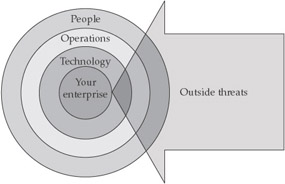
Figure 1-1: Defense in depth
IDSs work at the network layer of the OSI model (see Table 1-1), and passive network sensors are typically positioned at choke points on the network. They analyze packets to find specific patterns in network traffic—if they find such a pattern in the traffic, an alert is logged, and a response can be based on the data recorded. IDSs are similar to antivirus software in that they use known signatures to recognize traffic patterns thatmaybe malicious in intent.
|
Layer |
Function |
Protocols |
|---|---|---|
|
Application (user interface) |
This layer is used for applications, such as HTTP, specifically written to run over the network and allows accesses to network services. It handles issues like network transparency, resource allocation, and problem partitioning. The application layer is concerned with the user's view of the network, like formatting. In addition, this layer allows access to services that support applications and handle network access, flow, and recovery. |
DNS, FTP, TFTP, BOOTP, SNMP, RLOGIN, SMTP, MIME, NFS, FINGER, TELNET, APPC, AFP, |
|
Presentation (translation) |
The presentation layer helps to translate between the application and the network formats. This is also where protocol conversion takes place. |
Named Pipes, Mail Slots, RPC, NCP, SMB |
|
Session |
The session layer helps to establish, maintain, and end sessions across the network. |
NetBios |
|
Transport (packets; flow control and error-handling) |
The transport layer manages the flow control of data between parties across the network. |
TCP, ARP, RARP, SPX, NWLink, ATP, NetBEUI |
|
Network (addressing; routing) |
The network layer translates logical network addresses and names to their physical addresses and is responsible for addressing and managing network problems such as packet switching, data congestion, and routing. |
IP, ARP, RARP, |
|
Data link (data frames to bits) |
The data-link layer turns packets into raw bits on the sending end, and at the receiving end turns bits into packets. It handles data frames between the network and physical layers. |
|
|
Physical (hardware; raw bit stream) |
The physical layer transmits the raw bit stream over the physical cable or airwaves (when dealing with wireless). It defines cables, cards, and other physical aspects. |
IEEE 802, IEEE 802.2, ISO 2110, ISDN |
Types of IDS Systems
IDSs fall into one of three categories: host-based intrusion-detection system (HIDS), network-based intrusion-detection system (NIDS), and hybrids of the two.
A HIDS system will require some software that resides on the system and can scan all host resources for activity; some just scan syslog and event logs for activity. It will log any activities it discovers to a secure database and check to see whether the events match any malicious event record listed in the knowledge base.
A NIDS system is usually inline on the network, and it analyzes network packets looking for attacks. A NIDS receives all packets on a particular network segment, including switched networks (where this is not the default behavior) via one of several methods, such as taps or port mirroring. It carefully reconstructs the streams of traffic to analyze them for patterns of malicious behavior. Most NIDSs are equipped with facilities to log their activities and report or alarm on questionable events. In addition, many high-performance routers offer NID capabilities.
A hybrid IDS combines a HIDS, which monitors events occurring on the host system, with a NIDS, which monitors network traffic. Table 1-2 shows some of the differences between a HIDS and a NIDS.
|
NIDS |
HIDS |
|---|---|
|
Broad in scope (watches all network activities) |
Narrow in scope (watches only specific host activities) |
|
Easier setup |
More complex setup |
|
Better for detecting attacks from the outside |
Better for detecting attacks from the inside |
|
Less expensive to implement |
More expensive to implement |
|
Detection is based on what can be recorded on the entire network |
Detection is based on what any single host can record |
|
Examines packet headers |
Does not see packet headers |
|
Near real-time response |
Usually only responds after a suspicious log entry has been made |
|
OS-independent |
OS-specific |
|
Detects network attacks as payload is analyzed |
Detects local attacks before they hit the network |
|
Detects unsuccessful attack attempts |
Verifies success or failure of attacks |
The basic process for an IDS is that a NIDS or HIDS passively collects data and preprocesses and classifies them. Statistical analysis can be done to determine whether the information falls outside normal activity, and if so, it is then matched against a knowledge base. If a match is found, an alert is sent. Figure 1-2 outlines this activity.
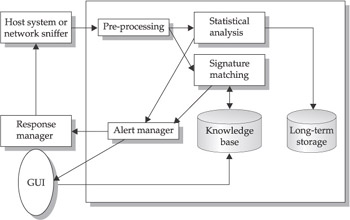
Figure 1-2: Standard IDS system
What Is an Intrusion Prevention System (IPS)?
It is still early in the development of intrusion-prevention systems (IPSs), but generally an IPS sits inline on the network and monitors it, and when an event occurs, it takes action based on prescribed rules. This is unlike IDSs, which do not sit inline and are passive. Some people see IPSs as next-generation IDS systems, because they take detection a step further, but others think in broader terms and consider the IPSs to be yet another tool in the security infrastructure that could help prevent intrusions. IPS has developed out of IDS, but they are really different security products that have different functionality and strengths.
Collecting Data
There are two primary ways to collect data on a switched network: port mirroring and network taps. Port mirroring, also referred to as spanning, is when copies of incoming and outgoing packets are forwarded from one port of a network switch to another port where the packets can be analyzed. Network taps are put directly in-line of the network traffic, and they copy the incoming and outgoing packets and retransmit them back out on the network. Both methods have advantages and disadvantages that should be explored when making implementation decisions.
IPS systems are similar in setup to IDS systems—an IPS can be a host-based IPS (HIPS), which work best at protecting applications, or a network-based IPS (NIPS). User actions should correspond to actions in a predefined knowledge base; if an action isn’t on the accepted list, the IPS will prevent the action. Unlike an IDS, the logic in an IPS is typically applied before the action is executed in memory. Other IPS methods compare file checksums to a list of known good checksums before allowing a file to execute, and to work by intercepting system calls.
An IPS will typically consist of four main components:
- Traffic normalizer
- Service scanner
- Detection engine
- Traffic shaper
The traffic normalizer will interpret the network traffic and do packet analysis and packet reassembly, as well as performing basic blocking functions. The traffic is then fed into the detection engine and the service scanner. The service scanner builds a reference table that classifies the information and helps the traffic shaper manage the flow of the information. The detection engine does pattern matching against the reference table, and the appropriate response is determined. Figure 1-3 outlines this process.
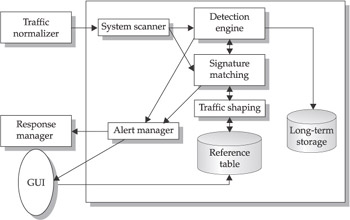
Figure 1-3: Standard IPS system
IDS vs IPS
IDS and IPS technology each have their own place in a security program because they perform separate functions. Table 1-3 clarifies some of the differences between them.
|
IDS |
IPS |
|---|---|
|
Installed on network segments (NIDS) and on hosts (HIDS) |
Installed on network segments (NIPS) and on hosts (HIPS) |
|
Sits on network passively |
Sits inline (not passive) |
|
Cannot parse encrypted traffic |
Better at protecting applications |
|
Central management control |
Central management control |
|
Better at detecting hacking attacks |
Ideal for blocking web defacement |
|
Alerting product (reactive) |
Blocking product (proactive) |
The History of Intrusion Detection and Prevention
Intrusion-prevention technology is fairly new and is still evolving, whereas intrusion detection has a bit more history behind it. However, both IDS and IPS have their roots in auditing. In 1980, James Anderson wrote a technical report called Computer Security Threat Monitoring and Surveillance for the U.S. Air Force. The paper showed that audit records could be used to help identify computer misuse and identify threat classifications, and it offered suggestions to improve auditing of systems to identify misuse.
In 1985, SRI International was funded by the U.S. Navy to develop intrusion-detection research. Dr. Dorothy Denning helped lead this team to develop a prototype that would analyze audit trails from government systems and track user activity. Her team named this system the Intrusion Detection Expert System (IDES), and it was the foundational research into IDS technology. One year later, in 1987, Dr. Denning published a paper called An Intrusion Detection Model for the 1986 IEEE Symposium on Security and Privacy that helped describe the basic workings of behavioral analysis. Behavioral analysis looks for deviations from the type of behavior that has been statistically baselined, such as relationships in packets and in what is being sent over a network.
While SRI was working on IDES for the Navy in 1987, Los Alamos National Laboratory was working on the Haystack project, which produced an IDS system that could analyze audit data against defined patterns. Several people from the Haystack project worked with designers and developers from University of California-Davis and Lawrence Livermore National Laboratory (and later Trident Data Systems) to develop an IDS called the Distributed Intrusion Detection System (DIDS) for the U.S. Air Force. DIDS became the basis for a commercial IDS (Net Stalker), with similar functionality, by Haystack Labs.
In 1989, Todd Heberlein, a student at the University of California, Davis, built an IDS system called Network System Monitor (NSM). NSM was different from IDES and DIDS in that it would analyze network traffic rather than system logs. NSM, along with the now commercially available Stalker IDS, helped to create new awareness and interest in IDS research for the commercial and public sectors.
The 1990s saw a great deal of improvement of and interest in IDS technology. The U.S. Air Force commissioned Science Applications International Corporation (SAIC) to develop the Computer Misuse Detection System (CMDS). Marcus J. Ranum created a commercial IDS called Network Flight Recorder (NFR). Christopher Klaus and Thomas E. Noonan founded Internet Security Systems (ISS) and released a network-based intrusion-detection system called RealSecure. In addition, the U.S. Air Force Cryptologic Support Center created an IDS system called Automated Security Incident Measurement (ASIM), which was the first IDS to incorporate both software- and hardware-based solutions. Some of the developers of ASIM formed the Wheel Group and commercialized the product. Cisco Systems acquired the Wheel Group in 1998, which ultimately led to Cisco Systems developing IDS to be included in their routers functionality. During this time, Haystack Labs and the former development team for SAIC merged to form the Centrax Corporation, and it released host-based intrusion detection for Windows NT called eNTrax.
Starting in the late 1990s, intrusion prevention emerged. In the beginning, just detectingattacks was a huge undertaking, but as that discipline matured, it was clear that we needed to go beyond detection and prevent attacks in real time. The ISS RealSecure product had some features such as the rs-kill feature that would “kill” or stop traffic based on specific patterns. In 1998, SNORT, an open source libpcap-based packet sniffer and logger, which can be used as a lightweight NIDS and was developed by Marty Roesch, was made available and allowed many people to use and become familiar with intrusion detection. In 1999, Okena Systems created one of the first IPSs called StormWatch based on their INCORE architecture (Intercept Correlate Rules Engine), which intercepts file and network actions and correlates rules and application states to make real-time decisions based on application behavior. Okena was acquired by Cisco Systems in 2003. The development of intrusion prevention has just begun.
| Note |
Libpcap is a system-independent interface for user-level packet capture, and it provides a portable framework for low-level network monitoring. Applications for libpcap include network statistics collection, security monitoring, network debugging, and so on. |
Why IDSs and IPSs are Important
IDSs and IPSs are important for many organizations, from small offices to large multinational corporations. IDSs and IPSs offer many benefits:
- Greater proficiency in detecting intrusions than by doing it manually
- In-depth knowledge bases to draw from
- Ability to deal with large volumes of data
- Near real-time alerting capabilities that help reduce potential damages
- Automated responses, such as logging off a user, disabling a user account, or launching automated scripts
- Strong deterrent value
- Built-in forensic capabilities
- Built-in reporting capabilities
These are all very good reasons to implement these technologies, but there are three main reasons that justify the need more than the others:
- Legal and regulatory issues In 1998, the U.S. Presidential Decision Directive 63 (PDD 63) established steps to increase the use of intrusion detection and prevention to protect the national infrastructure. British Standard 7799 was first published in February 1995 and identified a comprehensive set of controls defining “best practices” for information security. Regulations such as the Health Insurance Portability and Accountability Act of 1996 (HIPAA) and Gramm-Leach-Bliley Act of 1999 (GLBA) require audit controls to record and examine suspicious data-access activities. The preceding regulations may or may not be necessary, depending on the nature and location of your organization. In addition, implementation of an IDS/IPS program is not a requirement for complying with any of these, but will help to meet the requirements.
- Quantification of attacks IDS and IPS allow a systems administrator the opportunity to quantify attacks against the organization’s network for management. IDSs and IPSs both are able to build a profile of the types of attacks that are being tried against a network. This allows a stronger business case to be made for appropriate security measures, which can often be hard to justify. IPSs and IDSs can also provide evidence against attackers if litigation is desired.
- Establishment of an overall defense-in-depth strategy IDSs and IPSs have become a critical part of a strong defense-in-depth security program, and their use shows due diligence on the part of the organization because the organization is being proactive in the expectation of and reaction to intrusions. Both technologies will help provide protection for network and application layer vulnerabilities, as well as help to correlate and validate information from other devices, such as antivirus programs, firewalls, and routers.
IDS and IPS Analysis Schemes
IDSs and IPSs perform analyses, and it is important to understand the analysis process: what analysis does, what types of analysis are available, and what the advantages and disadvantages of different analysis schemes are.
What Is Analysis?
Analysis, in the context of intrusion detection and prevention, is the organization of the constituent parts of data and their interrelationships to identify any anomalous activity of interest. Real-time analysis is analysis done on the fly as the data travels the path to the network or host. This is a bit of a misnomer, however, as analysis can only be performed after the fact in near-real-time.
Clinton Administration’s Policy on Critical Infrastructure Protection
It is important to be familiar with the following legislative issues: The Clinton Administration’s Policy on Critical Infrastructure Protection: Presidential Decision Directive 63, May 22, 1998, was designed to set forth a policy for protecting critical infrastructure in the United States.
The Public Law 104-191 Health Insurance Portability and Accountability Act of 1996 helps improve portability and continuity of health insurance coverage in the group and individual markets. Among other things, it is designed to combat waste, fraud, and abuse in health insurance and health care delivery, to promote the use of medical savings accounts, to improve access to long-term care services and coverage, and to simplify the administration of health insurance.
The Financial Modernization Act of 1999, also known as the Gramm-Leach-Bliley Act or GLBA, includes provisions to protect consumers’ personal financial information held by financial institutions.
The fundamental goal of intrusion-detection and intrusion-prevention analysis is to improve an information system’s security. This goal can be further broken down:
- Create records of relevant activity for follow-up
- Determine flaws in the network by detecting specific activities
- Record unauthorized activity for use in forensics or criminal prosecution of intrusion attacks
- Act as a deterrent to malicious activity
- Increase accountability by linking activities of one individual across systems
Figure 1-4 illustrates the general idea of analysis. An IDS or IPS system will help identify-those anomalous activities that fall outside the realm of what is considered normal baseline activity for the environment. This is considered the general goal, but there is still much debate over how much anomalous data falls outside the realm of normal baseline activity. Some believe the gap is large, while others see very little difference between the two.
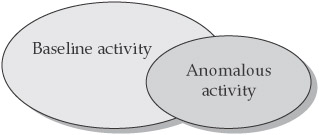
Figure 1-4: The relationship between baseline and anomalous network activity
The Anatomy of Intrusion Analysis
There are many possible data-analysis schemes for an analysis engine, and in order to understand them, the intrusion-analysis process can be broken down into four phases:
- Preprocessing
- Analysis
- Response
- Refinement
Preprocessing is a key function once data are collected from an IDS or IPS sensor. In this step, the data are organized in some fashion for classification. The preprocessing will help determine the format the data are put into, which is usually some canonical format or could be a structured database. Once the data are formatted, they are broken down further into classifications.
These classifications can depend on the analysis schemes being used. For example, if rule-based detection is being used, the classification will involve rules and pattern descriptors. If anomaly detection is used, you will usually have a statistical profile based on different algorithms in which the user behavior is baselined over time and any behavior that falls outside of that classification is flagged as an anomaly. Both pattern matching and anomaly detection are covered later in this chapter.
Upon completion of the classification process, the data is concatenated and put into a defined version or detection template of some object by replacing variables with values. These detection templates populate the knowledgebase which are stored in the core analysis engine:
- Detection of the modification of system log files
- Detection of unexpected privilege escalation
- Detection of Backdoor Netbus
- Detection of Backdoor SubSeven
- ORACLE grant attempt
- RPC mountd UDP export request
Once the prepossessing is completed, the analysis stage begins. The data record is compared to the knowledge base, and the data record will either be logged as an intrusion event or it will be dropped. Then the next data record is analyzed.
The next phase, response, is one of the differentiating factors between IDS and IPS. With IDS, you typically have limited prevention abilities—you are getting the information passively after the fact, so you will have an alert after the fact. Once information has been logged as an intrusion, a response can be initiated. With IPS, the sensor is inline and it can provide real-time prevention through an automated response. This is the essential difference between reactive security and proactive security.
Either way, the response is specific to the nature of the intrusion or the different analysis schemes used. The response can be set to be automatically performed, or it can be done manually after someone has manually analyzed the situation. For example, Network Flight Recorder (a commercial IDS) offers a feature that can send aTCPRST packet and kill a session.
The final phase is the refinement stage. This is where the fine-tuning of the IDS or IPS system can be done, based on previous usage and detected intrusions. This gives the security professional a chance to reduce false-positive levels and to have a more accurate security tool. This is a very critical stage for getting the most from your IDS or IPS system. The system must be fine-tuned for your environment to get any real value from it. There are tools, like Cisco Threat Response (CTR), that will help with the refining stage by actually making sure that an alert is valid by checking whether you are vulnerable to that attack or not.
Rule Based Detection (Misuse Detection)
Rule-based detection, also referred to as signature detection, pattern matching and misuse detection, is the first scheme that was used in early intrusion-detection systems. Rule-based detection uses pattern matching to detect known attack patterns.
Let’s look at how the four phases of the analysis process are applied in a rule-based detection system:
- Preprocessing The first step is to collect data about intrusions, vulnerabilities, and attacks, and put them into a classification scheme or pattern descriptor. From the classification scheme, a behavioral model is built, and then put into a common format:
- Signature Name The given name of a signature
- Signature ID A unique ID for the signature
- Signature Description Description of the signature and what it does
- Possible False Positive Description An explanation of any “false positives” that may appear to be an exploit but are actually normal network activity.
- Related Vulnerability Information This field has any related vulnerability information
- User Notes This field allows a security professional to add specific notes related to their network
The pattern descriptors are typically either content-based signatures, which examine the payload and header of a packet, or context-based signatures that evaluate only the packet headers to identify an alert. Note that pattern descriptors can be atomic (single) or composite (multiple) descriptors. An atomic descriptor requires only one packet to be inspected to identify an alert, while a composite descriptor requires multiple packets to be inspected to identify an alert. The pattern descriptors are then put into a knowledge base that contains the criteria for analysis.
- Analysis The event data are formatted and compared against the knowledge base by using a pattern-matching analysis engine. The analysis engine looks for defined patterns that are known as attacks.
- Response If the event matches the pattern of an attack, the analysis engine sends an alert. If the event is a partial match, the next event is examined. Note that partial matches can only be analyzed with a stateful detector, which has the ability to maintain state, as many IDS systems do. Different responses can be returned depending on the specific event records.
- Refinement Refinement of pattern-matching analysis comes down to updating signatures, because an IDS is only as good as its latest signature update. This is one of the drawbacks of pattern-matching analysis. Most IDSs allow automatic and manual updating of attack signatures.
Profile Based Detection (Anomaly Detection)
An anomaly is something that is different from the norm or that cannot be easily classified. Anomaly detection, also referred to as profile-based detection, creates a profile system that flags any events that strays from a normal pattern and passes this information on to output routines.
One key distinction between anomaly detection and other analysis schemes is that anomaly-based schemes not only define activities that are not allowed, but also activities that are allowed. In addition, anomaly detection is typically used for its ability to collect statistical behavior and characteristic behavior. Statistics are quantitative and characteristics are more qualitative. For example, “This server’s UDP traffic never exceeds 25 percent of capacity” describes a statistical behavior, and “User Stan321 does not normally FTP files outside of the company” describes a characteristic behavior.
Anomaly-based schemes fall into three main categories: behavioral, traffic pattern, and protocol. Behavioral analysis looks for anomalies in the types of behavior that have been statistically baselined, such as relationships in packets and what is being sent over a network. Traffic-pattern analysis looks for specific patterns in network traffic. Protocol analysis looks for network protocol violations or misuse based on RFC-based behavior.
Protocol analysis has the benefit of identifying possible attacks that are not yet publicized or that there is no known signature or remedy for.
| Note |
Requests for Comments (RFCs) are a series of notes about aspects of the Internet, such as protocols. A document can be sent to the Internet Engineering Task Force (IETF), which is a standards organization for the Internet, and they will determine whether it becomes an RFC. See www.faqs.org/rfcs/ for more info about RFCs. |
Again, let’s review the analysis model in the context of anomaly detection:
- Preprocessing The first step in the analysis process is collecting the data in which behavior considered normal on the network is baselined over a period of time. The data are put into a numeric form and is then formatted. Then the information is classified into a statistical profile that is based on different algorithms in the knowledge base.
- Analysis The event data are typically reduced to a profile vector, which is then compared to the knowledge base. The contents of the profile vector are compared to a historical record for that particular user, and any data that fall outside of the baseline normal activity is labeled a deviation.
- Response At this point, a response can be triggered either automatically or manually.
- Refinement The data records must be kept updated. The profile vector history will typically be deleted after a specific number of days. In addition, different weighting systems can be used to add more weight to recent behaviors than past behaviors.
Target Monitoring
Target-monitoring systems will report whether certain target objects have been changed or modified. This is usually done through a cryptographic algorithm that computes a cryptochecksum for each target file. The IDS reports any changes, such as a file modifications or program logon, which would cause changes in cryptochecksums
Tripwire software will perform target monitoring using cryptochecksums by providing-instant notification of changes to configuration files and enabling automatic restoration. The main advantage of this approach is that you do not have to continuously monitor the target files.
Stealth Probes
Stealth probes correlate data to try to detect attacks made over a long period of time, often referred to as “low and slow” attacks. Data are collected from a variety of sources, and it is characterized and sampled to discover any correlating attacks. This technique is also referred to as wide-area correlation, and it is typically a combination or hybrid approach that uses other detection methods to try and uncover malicious behavior.
Heuristics
The term heuristics refers to artificial intelligence (AI). In theory, an IDS will identify anomalies to detect an intrusion, and it will then learn over time what can be considered normal. To use heuristics, an AI scripting language can apply analysis to the incoming data.
Heuristics still leave a lot to be desired at this stage, but development is progressing. What is needed is a pattern-matching language that can use programming constructs to learn and identify malicious activity more accurately.
Hybrid Approach
We have examined the fundamental analysis schemes. You will find that there is much debate on which is considered the best approach. In actuality, they all have their merits and drawbacks, but when they are used together they can offer a more robust security system. Products that use a hybrid approach typically perform better, especially against complex attacks.
Example IDS Rules
We have looked at the theory of IDS patterns and analysis schemes. It seems appropriate at this point to examine few IDS rules to illustrate those concepts.
The following is an IDS rule from an open source network IDS called Snort that detects whether the NetBus back door is running on a system:
alert tcp $HOME_NET 12345:12346 -> $EXTERNAL_NET any (msg:"BACKDOOR
netbus active"; flow:from_server,established; content:"NetBus";
reference:arachnids,401; classtype:misc-activity; sid:109; rev:4;)
From this rule, we can see that Snort will send an alert if a TCP packet on ports 12345–12346 come through. If that happens, Snort sends the message of “BACKDOOR netbus active” and the message is given a class type of miscellaneous activity and a signature ID of 109. The signature is on its fourth revision.
The following Snort IDS signature detects a DNS zone transfer request:
alert udp $EXTERNAL_NET any -> $HOME_NET 53 (msg:"DNS zone transfer
UDP"; content: "|00 00 FC|"; offset:14; reference:cve,CAN-1999-0532;
reference:arachnids,212; classtype:attempted-recon; sid:1948; rev:1;)
From this signature, we can see that Snort sends an alert if a UDP packet on port 53 comes through. Snort sends the message “DNS zone transfer UDP” with a class type of attempted reconnaissance and a signature ID of 1948. This signature is on its first revision.
IDS IPS Pros and Cons
As stated earlier, IDS and IPS are two separate technologies that can complement each other. The following sections list the pros and cons of both technologies.
Intrusion Detection
The pros of intrusion detection include the following:
- Can detect external hackers as well as internal network-based attacks
- Scales easily to provide protection for the entire network
- Offers centralized management for correlation of distributed attacks
- Provides defense in depth
- Gives system administrators the ability to quantify attacks
- Provides an additional layer of protection
These are the cons:
- Generates false positives and negatives
- Reacts to attacks rather than preventing them
- Requires full-time monitoring
- Requires a complex incident-response process
- Cannot monitor traffic at higher transmission rates
- Generates an enormous amount of data to be analyzed
- Requires highly skilled staff dedicated to interpreting the data
- Susceptible to “low and slow” attacks
- Cannot deal with encrypted network traffic
- It is expensive
Intrusion Prevention
The pros of intrusion prevention include the following:
- Protects at the application layer
- Prevents attacks rather than simply reacting to them
- Can use a behavioral approach
- Provides defense in depth
- Permits real-time event correlation
The cons are as follows:
- Generates false positives that can create serious problems if automated responses are used
- Creates network bottlenecks
- It is a new technology
- It is expensive
Intrusion Detection and Intrusion Prevention Myths
There are several untrue intrusion-detection and intrusion-prevention myths. These assertions repeatedly come up, even though some are diametrically opposed to others.
Myth 1: Intrusion detection and intrusion prevention are basically the same technology. Many believe that because some IDS systems have TCP kill and RESET capabilities that they are pretty much the same thing as IPS. The truth is that each of these technologies are separate in design and in function. An IPS device sits inline, and all the packets have to pass through it. If a suspicious packet has been detected, it can be dropped. With IDS this is not the case—the suspicious packets are sent on to the internal interface to be analyzed, an alert is then sent, and a response generated. The latency involved in an IDS often results in a failed response. That is because an IDS is designed for detecting intrusions, not responding to them, though they do have some rudimentary response capabilities.
Myth 2: Intrusion-detection systems give too many false positives to be of any real value. It is true that IDSs do give what appear to be false positives. Typically, signatures released by vendors are accurate, but sometimes legitimate traffic sets them off. You need to properly fine-tune the IDS for your particular network. What often happens is that an organization implements IDS and doesn’t tune it, and soon the administrators feel overwhelmed by the alerts, which are mostly false positives. If an organization starts out on small segments of the network at a time and gets the IDS tuned to better understand what is and is not legitimate, the results will be better.
Myth 3: Intrusion detection will eventually replace firewalls. Wrong! This will not happen. IDSs and firewalls perform separate and distinct functions on the network. We will likely see that most firewalls have some IDS and IPS capabilities, but IDS and IPS are just single layers in a security program, and they are not meant to replace firewalls.
Myth 4: IDS systems are on the way out, and IPS and firewalls are the wave of the future. IDSs are far from becoming obsolete. We may see the integration of IDS and IPS capabilities within firewalls and routers, but the technology remains the same and the need is apparent. The wave of the future is seeing how the two can complement each other, not in debating which is better. There is some traffic that you do not want a response to, and that traffic is better passed off to an IDS.
Myth 5: IDSs are the wave of the future. This is the opposite of the previous myth, but the answer is much the same. Both IDS and IPS technologies have a place in securing a network or host. There is no one “silver bullet” that will take care of everything. Intrusion detection is here to stay, but it is not the only technology in the game—IPS is also needed.
Myth 6: IDSs and IPSs will catch or stop all network intrusions. This seems like a ridiculous statement to the technically minded, but it is often asked by management. Yes, IDS and IPS will help to prevent and deter some attacks, but they will never be able to catch everything.
Myth 7: When an organization implements IDS or IPS, it should need fewer security professionals.
There is some truth to this myth in that automating intrusion detection can reduce the number of individuals needed to detect security breaches in systems and networks. At the same time, however, one of the big issues with IDS and IPS is that they do a good job at finding attacks, but there needs to be a trained professional on the other end who can interpret and react to the information. While this may seem like additional overhead, the attacks would be there whether or not you detected them.
Myth 8: You need real-time detection in order to get any real value from an IDS. Real time is a bit of a misnomer, as the response and identification will always come after the attack has entered the network or host. A better approach is to ask whether the alert or response is accurate and is in time for the necessary response. While faster can be better, it also has disadvantages, such as cost and more difficult data handling—data that are received in real time needs to be handled in real time.
Summary
This chapter was an introduction to the basic concepts of intrusion detection. We looked at origins of intrusion detection and prevention and how it has developed over the years. We were able to examine the importance of intrusion detection in meeting many regulatory and legal needs as well as being a part of a defense in depth program. We examined the types of analysis schemes that can be used and how they are applied. We also discussed some of the various myths and realities of intrusion detection and prevention.
Part I - Intrusion Detection: Primer
- Understanding Intrusion Detection
- Crash Course in the Internet Protocol Suite
- Unauthorized Activity I
- Unauthorized Activity II
- Tcpdump
Part II - Architecture
Part III - Implementation and Deployment
Part IV - Security and IDS Management

EAN: 2147483647
Pages: 163
