Sample Logical Datacenter
Having introduced the various prototypes that make up a logical datacenter diagram, we'll now show what a typical logical datacenter might look like. The diagram in Figure 3-2 is based on the deployment configuration of a real-life .NET project that went live in 2003, and we'll describe the diagram in general before demonstrating how you can create a similar diagram specifically for our StockBroker running example.
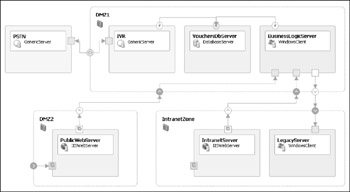
Figure 3-2
As you look at Figure 3-2, note that client endpoints are shown hollow and server endpoints are shown solid, with connection arrows flowing in the direction client-to-server. At this stage, we're keeping it simple by showing servers, zones, and the connections between them with no additional information about the required communication protocols.
For your information, this datacenter was designed to host a "virtual vouchers" system that enables electronic representations of mobile airtime vouchers, book tokens, meal vouchers, and so on to be issued and redeemed without any paper artifacts changing hands. (Actually, the nature of the system to be deployed matters very little to this discussion, but we wanted to satisfy your curiosity nonetheless.)
This datacenter comprises three zones:
-
DMZ1: A perimeter zone protected by an internal firewall, containing the core servers for business logic and the database
-
DMZ2: A separate perimeter zone protected by an external firewall, containing the public-facing web server
-
IntranetZone: The company-wide intranet providing a nonpublic web server and a legacy platform
Logical Datacenter Designer does not oblige you to place servers within zones, and we've illustrated that by placing the PSTN server (representing the telephone network) outside of any zone.
Datacenter zones
Now we'll take each of those zones in turn. For each zone, we describe the server(s) within the zone and the connections between the servers and the zone perimeter.
DMZ1
This zone represents the core protected zone, separated from all other zones by an internal firewall. The zone encloses the following key servers that are crucial to the operations:
-
The Interactive Voice Response (IVR) server handles incoming and outgoing telephone-based interactions via the Public Switched Telephone Network (PSTN). This proprietary server has been modeled as a generic server, which for clarity only has been connected bi-directionally to a generic server outside the zone; this second server is a placeholder for the PSTN network itself. The IVR server takes voice prompts from, and writes its results to, the SQL Server directly, which is the only link with the other servers in the data center.
-
The VouchersDbServer is the central database server, acting not only as the repository for data accessed by the BusinessLogicServer, but also as the integration point between the BusinessLogicServer and the IVR server.
-
The BusinessLogicServer hosts the core business logic in the form of .NET Remoting components accessible to clients in the DMZ2 and the IntranetZone. This server is logically connected to the SQLServer within the same zone, and—as well as being a server itself—is connected as a client of the LegacyServer in the IntranetZone.
DMZ2
The PublicWebServer delivers ASP .NET applications to users over the Internet. This server is connected to the BusinessLogicServer within the DMZ1 zone, the BusinessLogicServer providing common business logic to various presentation layers. Notice how servers are connected via outgoing and incoming zone endpoints, rather than being connected directly, so that all network traffic is subject to firewall scrutiny.
In this zone, the PublicWebServer has a website endpoint connected to a (solid) zone endpoint, thus providing an incoming connection point for clients of this server.
IntranetZone
This zone is similar to the DMZ2 because it includes a web server, the IntranetServer that will host a set of ASP .NET applications providing an alternative presentation layer for the common business logic hosted by the BusinessLogicServer. However, this server and the zone that contains it will be subject to a different set of constraints so that clients may connect from within the same company network but not over the public Internet. For this reason, a WebSiteEndpoint has been provided on the server but not connected to an incoming endpoint on the zone; therefore, all connected clients must be added within the same Intranet zone.
The IntranetZone also contains a LegacyServer that hosts an existing application that may have directly connected legacy clients (not shown). All new client applications—provided by the PublicWebServer in DMZ2 and the IntranetServer in the IntranetZone—are decoupled from the legacy server as a consequence of the BusinessLogicServer in DMZ1 that is connected as a client to the LegacyServer.
Endpoint styles
Though we did not label communication protocols explicitly in Figure 3-2, you can deduce much of that information from the style in which the endpoints are rendered. Server endpoints are shown solid, client endpoints are shown hollow. Generic endpoints, website endpoints, and database endpoints are distinguished pictorially.
On each zone endpoint, an arrow shows whether the communication flow is outgoing (the arrow points outward from the zone), incoming (the arrow points in toward the zone), or bi-directional (with inward and outward pointing arrows).
The UML deployment diagram: Similar, but not the same
At this level, a logical datacenter diagram is rather like a UML deployment diagram in that it shows deployment nodes and the connections between them. Figure 3-3 shows the same logical datacenter drawn as a UML deployment diagram.
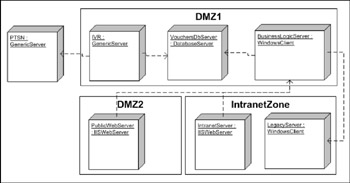
Figure 3-3
An important distinction is that whereas the UML deployment diagram is biased toward modeling physical deployment nodes, the logical datacenter diagram is strictly logical. Therefore, an LDD may show three logical servers of different kinds, all of which map to a single physical machine, or across two physical machines; it makes no difference as long as the required communication pathways (discussed later) are all in place.
In practice, UML deployment diagrams are limited in two important respects: Much of the information they show (such as IP addresses) is of no real use to developers intending to deploy on that infrastructure, and the lack of tight integration between the UML deployment view and the other UML views means that information about the datacenter's requirements and capabilities cannot be communicated effectively. That's not the case with the Visual Studio 2005 Distributed System Designers, which use a common meta-model (SDM) as the vital link between the logical infrastructure and the application architecture.
In UML, the deployment diagram actually serves two purposes: to model the infrastructure—therefore equivalent to Logical Datacenter Designer—and to allow the mapping of application components onto deployment nodes. The latter purpose is equated in the Team System with the System Designer/Deployment Designer combination described in the next chapter. Thus, the Visual Studio 2005 Team Edition for Software Architects decouples the logical infrastructure design from the deployment design such that it is possible to map a single application design onto various logical datacenters representing alternative deployment scenarios—or, indeed, map various application systems onto a single logical datacenter.

EAN: 2147483647
Pages: 220