Communicating Between Java and CC
Communicating Between Java and C/C++
When deciding on how to approach the problem, Sun engineers considered existing solutions, such as their Native Method Interface shipped with JDK 1.0, Netscape Java Runtime Interface, Microsoft Raw Native Interface, and even Microsoft COM interface. JNI was designed with several goals in mind, of which binary compatibility was one of the most important ones. That is, programmers should not have to recompile their native libraries when using different versions of virtual machines. To ensure binary compatibility, certain restrictions are imposed. Because the Java language specifications do not define a specific internal representation of Java objects that has to be used by a VM, JNI grants the developer no knowledge of a VM’s internal representation of objects. This approach is substantially different from the Native Method Interface. Even though the old approach was more efficient, it meant that changes to the VM could result in binary incompatibilities. In addition, direct access to Java objects imposed serious restrictions on the garbage collector and its performance. It is true to say that JNI costs us some efficiency. The resulting code is also less readable, but this is all for good reason. Even though none of the existing solutions to the problem met all the goals, the result is in some ways similar to Netscape Raw Native Interface and Microsoft COM.
The communication between Java and native code can be bidirectional, that is, you can access native code from the Java side and access Java code and objects from the native side. More specifically, from the Java side you can call native functions and even access memory outside the Java heap. The latter capability is a new feature introduced in JDK 1.4. We will go over examples that demonstrate both functionalities. When Java code invokes a native function, you can do anything that you can do in C/C++. For example, you can allocate memory, manipulate files, or talk to the video card through OpenGL. However, if you want to talk back to the Java side from the native side, you must choose from a set of functionality provided by the JNI. The interface lets you do many different things. For example, from the native side you can instantiate a Java object, access its member variables, or pass it to a Java method. Even though you cannot directly manipulate objects in the Java heap, you can do so through the JNI interface pointer. Before getting into details of JNI, let’s first look at a basic sample.
Sample Native Library
From the Java side you can call native functions and access memory in the C heap outside the Java heap. From a Java developer’s perspective, calling a native function is no different from calling a Java method. The idea is that a dummy Java method is declared so that other Java code can call it as if it were a typical method. When you declare a dummy method, it must be preceded by the keyword native and must not have a body. The keyword native flags the method so that the VM knows it has to do some special work when the method is called. When a native method is invoked by some Java code, the VM does some extra work and then calls a C/C++ function that has been mapped to the dummy method. Before a dummy can be called, its corresponding native function has to be loaded and linked. The following example declares MyNativeMethod as a native or dummy method and loads the native library that contains the native function that should be called when the dummy method is called.
class Sample{ Sample(){ System.loadLibrary("MyNativeLibrary"); } // dummy method private static native void MyNativeMethod(); public static void main(String args[]) { Sample sample = new Sample(); sample.MyNativeFunction(); } } Notice that when the argument is passed to loadLibrary, it does not specify a platform-dependent extension such as a dynamic link library (DLL) or Unix shared object (SO). Also, note that the library is loaded from the constructor of the class. What do you think would happen if we invoke the static native method before making an instance of the class? Because the native library is not loaded until the constructor is called, there would be an UnsatisfiedLinkError exception because the VM would not be able to link the method to a corresponding native function. It is generally a better practice to place the load call in a static block, which would cause the library to get loaded when the class is loaded. Note that there are times when you may not want to load a library until you really need it.
class Sample{ static{ System.loadLibrary("MyNativeLibrary"); } private static native void MyNativeMethod(); public static void main(String args[]) { Sample sample = new Sample(); sample.MyNativeFunction(); } } Preparing the native function and library is a little more work. First, we must write a function prototype that matches the arguments and the return type of the dummy method. Furthermore, we must inform the VM which dummy method should be mapped to the native function. The mapping between a dummy method and a native function can be done from some C code, as we will see later. Fortunately, if the native function follows a specific naming convention, the VM will automatically map the dummy Java method to the corresponding native function. The naming convention is to name a function so that its name shows exactly to which Java package, class, and method the native function corresponds.
JDK ships with a tool that autogenerates a header file, which contains the prototypes of the native (or dummy) methods in a given Java class. The tool is Javah.exe. Running it on the Sample class shown earlier generates a header file named  Sample.h that has the prototype for the MyNativeMethod method.
/* DO NOT EDIT THIS FILE - it is machine generated */ #include <jni.h: #ifdef __cplusplus extern "C" { #endif /* * Class: Sample * Method: MyNativeFunction * Signature: ()V */ NIEXPORT void JNICALL Java_Sample_MyNativeMethod(JNIEnv *,jclass); #ifdef __cplusplus } #endif Let’s go through some of the details of Sample.h. The included jni.h contains the necessary JNI declarations. jni.h includes the only additional external header file, jni_md.h, which declares some machine-dependent definitions. The machine-generated comment above the function prototype shows the class name that was inputted to Javah.exe as well as the method name. In addition, it comments that the method signature is “()V”, which means that the method takes no parameters and returns void. We will discuss method signatures later. JNIEXPORT is a simple macro that indicates that this function should get added to the function table of the library. The two parameters of the function are the JNIEnv (JNI environment) pointer and a reference to the class to which this function is linked. We will later talk about how to use the environment pointer to communicate with the Java side. We can now make a C or C++ file that looks like the following:
#include "Sample.h" #include <stdio.h> JNIEXPORT void JNICALL Java_Sample_MyNativeMethod(JNIEnv *env, jclass clazz){ printf("Java_Sample_MyNativeMethod was called\n"); } We next must compile the file to a dynamically linkable library. The library will have one entry in its function table. If we then launch Sample.class, Java_Sample_MyNativeMethod will be written to the console window. Even though a class file that has a few native methods can do many useful tasks, there is often the need to talk back to the Java side from a native function. Therefore, JNI functions must be called. Before looking at the available functions, let’s look at how Java types map to native types.
Mapping of Java Types to C/C++ Types
To interface two languages, a mapping of different types must be established. If you want to pass some data from language A to language B, you have to make sure that the data is preserved properly. Table 11.1 shows the mapping of Java primitive types to their C/C++ equivalents. Note that some C/C++ types such as short, int, and long are compiler dependent, and the table uses int16, int32, and int64 correspondingly.
| Java | C/C++ | JNI | Bytes |
|---|---|---|---|
| boolean | unsigned char | jboolean | 1 |
| byte | signed char | jbyte | 1 |
| char | unsigned short | jchar | 2 |
| double | double | jdouble | 8 |
| float | float | jfloat | 4 |
| int | int32 | jint | 4 |
| long | int64 | jlong | 8 |
| short | int16 | jshort | 2 |
For nonprimitive types, the solution is not as simple. Passing objects by value is not a viable option and can result in many issues. Take, for example, the scenario in which you need to pass a structure that has a reference to another. What should be done then? Even if it were possible and the data were copied byte by byte, how would the other language know which bytes correspond to which members of the structure? A practical solution is to pass an object by reference and use accessor functions to manipulate the object.
The JNI Interface Pointer
JNIEnv is the JNI environment that is basically a table of function pointers. It is passed to every native function as its first parameter. If a native function chooses to communicate to the Java side, it has to use this interface. JNIEnv contains more than 230 function pointers, and as newer versions of JDK become available, more functions may be added to the end of the table. The structure looks like the following:
Struct { void *functionName1(JNIEnv *env) jint *functionName2(JNIEnv *env, ... ) jobject *functionName3(JNIEnv *env, ... ) ... } In C, env is a pointer to another pointer that points to the function table. The reason for an extra level of indirection is that the JNIEnv not only points to a function table but also stores additional data local to the thread that is managed internally. You can simply dereference the double pointer and call one of its functions. The syntax is a bit more convenient when using a C++ compiler as opposed to a C compiler.
// When using C compiler you call the functions as: (*env)->FunctionName(env, ...) // But when using C++ compiler you write: env->FunctionName(...)
The functions in the table can be broken down to different categories. Some deal with Java references, which are used to point to Java objects. Class functions are those that deal with instances of Java.lang.Class. Object functions are those that can be used for typical Java objects. Field and method functions are those that allow you to access the fields of an object or invoke its methods. Array functions deal with arrays, and string functions deal with instances of java.lang.String. Exception functions allow you to deal with Java exceptions from the native side. Direct ByteBuffer functions allow you to make arbitrary regions of the system memory accessible from the Java side. The last category covers other miscellaneous functions.
Reference Functions
In Java, objects are referred to by references, not direct pointers. Even though newer VMs use direct pointers internally, the pointers are nondirect from the developer’s view. A reference contains a direct pointer to an object in the Java heap. The following Java segment shows three references, two of which are of type ClassA, but the reference3 is of type java.lang.Object:
Object ReferenceTest(){ ClassA reference1 = new ClassA(); ClassA reference2 = reference1; Object reference3 = reference1; return reference1; } Note that when this method returns, reference1, reference2, and reference3 are destroyed, and if the code that invoked this method does not save a reference to the object that was created in this method, the object will be considered a candidate for garbage collection.
When manipulating Java objects from native code, we cannot use direct pointers. That is, you cannot simply use the memory address to manipulate a Java object. Instead, you must have some sort of Java reference to the object. This is in part because the garbage collector may move objects when performing housekeeping. As expected, when objects are moved, the pointer contained within a reference is updated accordingly. In Java, references are typed, and you cannot use a reference of type ClassA to set a reference of an arbitrary type. For example, the following code results in an incompatible types error:
class ClassA{ int x, y, z; } class ClassB{ String name; } Object ReferenceTest(){ ClassA referenceA = new ClassA(); ClassB referenceB = referenceA; return referenceB; } When dealing with Java objects on the native side, however, all references are of type java.lang.Object, so you do not have as much compile-time type checking as you do in Java. When using a C compiler, all references to Java objects are simply of type jobject, which is the equivalent for java.lang.Object. However, some extra dummy types are defined when a C++ compiler is used so that some compile-time type checking can be performed for common types. Figure 11.1 shows the types defined when using a C++ compiler.
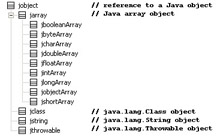
Figure 11.1: JNI reference types.
Because the garbage collector collects objects that do not have a reachable reference to them, an important issue has to be dealt with when manipulating Java objects from the native side. What if there is only one reference to an object from the native side? Should the object get collected? JNI provides special reference objects that must be used to manipulate Java objects from the native side. They have different scopes that allow us to have limited control over when an object is garbage-collected. References can have either local or global scope. JNI also provides a special type of global reference called weak global reference.
Local references are used most commonly. Local references live only during the execution of a native function, just as typical Java references are destroyed when they go out of scope. In other words, when a native function returns, any local references created during its invocation are automatically released. This is convenient and more than often frees you from having to explicitly destroy (or release) a reference object that points to an object in the Java heap. For example, if an object is created and passed to a native method, a local reference is created to point to the object being passed in. This action ensures that the object does not get collected, even if there are no references to the object on the Java side. The local reference in this example is automatically created and, as mentioned, automatically released when the function returns. If the local reference was the only reference to the passed-in object, the object will then be ready for garbage collection. When a function is called by JNI, some local references have been created already. Consider the following:
JNIEXPORT void JNICALL Java_Sample_MyNativeFunction(JNIEnv *env, jclass clazz){ jobject reference2 = env->NewLocalRef(clazz); } The local reference clazz, which is of type jclass, has already been created when the following function is called. In the function, another local reference of type jobject is created to refer to the object referred to by the clazz reference. Both references will automatically be deleted when this function returns.
Even though this behavior is appropriate for most cases, there are times when a reference should persist, even when the native function returns. For example, what if you want to store a reference in native code for use across calls? Alternatively, what if the object is created from the native side and only relevant to the native code?
Unlike local references, global references are not released when a native function returns. The only way to release them is to explicitly call the DeleteGlobalRef function. To create a global reference you must do so explicitly using the NewGlobalRef function. Unless explicitly released, global references can result in objects not getting collected during the lifetime of the VM. If you use a global reference you must make sure to call a corresponding delete at the appropriate time. Weak global references relax this idea a bit.
If you want to have a global reference but want the reference not to prevent the garbage collector from reclaiming the object, you can use a weak global reference. This type of reference is similar to the java.lang.ref.WeakReference object. This brings up another question: what if you go to use a weak reference but its corresponding object has been reclaimed? If you check to make sure that the weak global reference has not been reclaimed, is there any guarantee that it will be there immediately after you check it? The trick is that you cannot use a weak reference directly. First you must use it to create, say, a local reference. If you want to use a weak global reference, you should not simply check the weak reference to see if it has been collected and then use it. The object may happen to get collected immediately after you check its validity.
Frames are used to manage the scope of local references. When a native function is called, a new frame is created and then destroyed when the function returns. If you want to manage local references yourself, you can explicitly push and pop frames. Explicit management is useful when you have native functions that create many local references that are needed only in a specific block. In such cases, instead of waiting for the function to return, you can cause the references to be freed when you complete a block. PushLocalFrame and PopLocalFrame do exactly what their names imply.
Class Functions
In Java, instances of java.lang.Class are used to represent classes and interfaces in a running Java application. The java.lang.Class class has no public constructor and is instantiated by a class loader when class files are loaded. It is extremely important to understand the difference between an instance of java.lang.Class that a class loader creates from, say, ClassA.class file and an object of type ClassA that is created when executing:
ClassA ref = new ClassA
Only one instance of java.lang.Class is created to represent ClassA during the life of the VM. On the other hand, many objects of type ClassA can be created using the new operator. When using JNI with a C compiler (as opposed to C++), you should be careful not to confuse them with typical Java objects because you will not have compile-time type checking. When using a C compiler, an instance of java.lang.Class is referred to by jobject. If using a C++ compiler, they are referred to be jclass.
To load a class file through JNI you can call the FindClass function. FindClass takes a descriptor that identifies the class you want to load. The descriptor is simply a string that represents the class name and its package.
jclass classMyClass = env->FindClass("MyClass"); Because arrays are special objects, to describe an array object the type of the array is preceded by “[”. Table 11.2 shows the descriptors for different types, and Table 11.3 shows how to describe primitive types.
| java.lang.Object | “java/lang/Object” |
| Array of java.lang.Object | “[java/lang/Object” |
| Array of bytes | “[B” |
| 2D array of Integers | “[[I” |
| boolean | Z |
| byte | B |
| char | C |
| double | D |
| float | F |
| int | I |
| long | J |
| short | S |
You can also load a class by passing its raw bytes to DefineClass. The GetSuperClass function returns a java.lang.class reference to the super class of a class, and IsAssignableFrom determines if an object can be safely cast from one type to another. Two of the rarely needed but interesting calls are RegisterNatives and UnregisterNatives. They can be used to manually link a Java native method to a native function. This is the alternative to calling System.loadLibrary() and allowing the VM to link the functions to native methods based on the names of the functions. The following segment registers the functions function1 and function2 with the class referred to by clazz so that they correspond to methods createUnit and destroyUnit:
JNINativeMethod methods[2] = {0}; methods[0].name = "createUnit"; methods[0].signature = "(I)LUnit;"; methods[0].fnPtr = function1; methods[1].name = "destroyUnit"; methods[1].signature = "(LUnit;)V"; methods[1].fnPtr = function2; g_env->RegisterNatives(clazz, methods, nMethods); These calls are especially useful when you want to link a method to a function in a static library. They are also the only option for linking native methods when a platform does not support dynamically linkable libraries. In addition, they are useful when you want to embed the VM in a C/C++ game. By using these functions, the function that a native method has been linked to can be dynamically changed.
Object Functions
If you look through jni.h you will see that jobject is defined as _jobject pointer. jobject is really a pointer that points to a reference. Comparing two jobjects using the == operator can return false, even if they both refer to the same object. Doing so results in the references, as opposed to the objects referred to by the references, being compared. To compare two Java objects referred to from the native side, you should use the IsSameObject function. You can also use IsSameObject to test whether the object referred to by a weak global reference has been garbage collected. To do so, you can pass in NULL or 0 as one of its parameters.
jobject reference1 = env->NewLocalRef(myObject); jobject reference2 = env->NewLocalRef(myObject); jobject reference3 = reference1; // this will evaluate to **false** if (reference1 == reference2){...} // this will evaluate to true if (env->IsSameObject(reference1, reference2)){...} // obviously this evaluates to true if (reference1 == reference3){...} if (env->IsSameObject(reference1, reference3)){...} // this will evaluate to true if the object referred // to by myWeakGlobalReferece is not live if (env->IsSameObject(myWeakGlobalReferece, NULL)){...} There are two different ways to create objects from native code. The NewObject function creates an object in much the same way that the new operator does in Java. It can be used to allocate an object and call a constructor. If you want to create array objects, you should use New<type>Array instead. Unlike NewObject, AllocObject allocates memory for an object but does not call any of its constructors. If necessary, you can call the constructor explicitly later. Other functions such as GetObjectClass and IsInstanceOf are very intuitive. GetObjectClass returns a jclass (instance of java.lang.Class) and IsInstanceOf, a jboolean that can be either JNI_TRUE or JNI_FALSE.
Field Functions
To access the fields of an object, we must first obtain a field identifier or jfieldID. The GetFieldID and GetStaticFieldID functions take a reference to a class, the field’s name, and a field descriptor and returns the field ID. The descriptor is simply the signature of the field, as previously presented in Table 11.3. References are described by L + class descriptor + ;. As with class descriptors, array fields are preceded with “[”. Table 11.4 provides several examples.
| float | “F” |
| int[] | “[I” |
| Integer | “Ljava/lang/Integer;” |
| Object array | “[Ljava/lang/Object;” |
Once you have a field ID, it is a good idea to cache it so you do not have to look it up every time you need to use it. After resolving the field IDs, you can use the set/get functions to access the fields of an object. Note that there are separate accessor functions for static fields. The functions are of the following form where <type> can be “Object,” “Boolean,” “Byte,” “Char,” “Short,” “Int,” “Long,” “Float,” or “Double.”
GetFieldID GetStaticFieldID Get<type>Field Set<type>Field SetStatic<type>Field GetStatic<type>Field
The following line looks up the ID of the field named health, which is of type integer and is a member of a java.lang.Class instance referred to by clazz.
jfieldID field = env->GetFieldID(clazz, "health", "I");
There are also two functions that allow you to convert field IDs into instances of java.lang.reflect.Field and vice versa. These functions are useful if you want to take advantage of reflection from the native side. The functions are FromReflectedField and ToReflectedField.
Method Functions
Calling functions through JNI is similar to accessing fields. To call methods we first must obtain a method identifier (jmethodID), and then invoke the method using one of the following:
Call<type>Method CallStatic<type>Method CallNonvirtual<type>Method
A method ID can be retrieved by using GetMethodID or GetStaticMethodID. These functions take a class reference, method name, and the method descriptor as parameter. A method descriptor or signature is composed of the return type and the parameter types of the method. You can also look up the ID of the constructor as if it were a typical method that returns void. When doing so, you have to use <init> as the method name.
jmethodID method1 = env->GetMethodID(clazz, "run", "()V"); jmethodID method2 = env->GetMethodID(clazz, "<init>", "()V");
The previous segment retrieves the ID of the run method and the default constructor of the class referred to by clazz. Table 11.5 contains several examples of method descriptors.
| void method(int a) | “(I)V” |
| boolean method(int a, byte b) | “(IB)Z” |
| char method(String s, int a) | “(Ljava/lang/String;I)C” |
| Object[] method() | “()[Ljava/lang/Object;” |
Unlike C++, Java methods are virtual by default. That is, if class B extends class A and class B overwrites the foo method, if we call the foo method on an instance of class B that has been cast to A, the foo method in class B will be called. If you want to call the foo method in A through JNI, you should use the CallNonvirtual<type>Method family of functions.
Array Functions
Java arrays are unlike arrays in C. Java arrays are special objects. You can use the New<primitiveType>Array functions to create an array and GetArrayLength to get its length. Three sets of functions can be used to retrieve elements of primitive arrays, and it is crucial to understand their differences.
Get<primitiveType>ArrayRegion Get<primitiveType>ArrayElements GetPrimitiveArrayCritical
Get<primitiveType>ArrayRegion simply copies a region of the array into a provided buffer. On the other hand, Get<primitiveType>ArrayElements attempts to retrieve a direct pointer to the first element of the array, and if the attempt fails, it will return a pointer to a copy of the array. The attempt will fail if the array cannot be pinned or if the VM implementation does not store arrays as would typically be expected. For example, a VM implementation may not represent arrays as contiguous memory. A VM implementation may represent, for example, boolean arrays as a collection of bits. Because pinning an object so that the garbage collector does not move it may not be supported due to implementation complications, the VM may return a copy. In addition, even if pinning is supported by a VM, it may just happen that the call will result in too much fragmentation of the heap. The isCopy parameter informs you whether the returned pointer is a pointer to a copy of the array. Either way, you must call Release<primitiveType>ArrayElements when you no longer need the elements.
Unlike Get<type>ArrayElements, GetPrimitiveArrayCritical makes every effort to return a pointer to the body of the array. If possible, it will even temporarily disable the garbage collector. Every call to GetPrimitiveArrayCritical needs to be paired with ReleasePrimitiveArrayCritical. Be careful not to perform blocking operations or even call arbitrary JNI functions because such operations can result in a deadlock. In addition, disabling and enabling the garbage collector has some overhead that may undo the benefit of obtaining a direct pointer. Retrieving a direct pointer may sometimes be preferred because some CPU cycles do not have to be wasted to copy the content of the array. The larger an array, the more beneficial obtaining a direct pointer can be. In addition to CPU consumption, creating a copy can also become a concern if an array is extremely large. As with Get<type>ArrayElements, if the VM uses special internal representation for arrays, even GetPrimitiveArrayCritical can result in a creation of a copy. Setting the data in a primitive array is always done by value because the data must end up in the Java heap and not remain in the C heap or stack.
Accessing arrays of objects are done using GetObjectArrayElement and SetObjectArrayElement. You can obtain a reference to the objects referred to by the array elements only one at a time.
String Functions
JNI provides a set of functions specific for string manipulation. This may seem odd because java.lang.String objects are like any other Java objects, and it should not be necessary to have functions specific to a type. Strings have been treated differently because they are common to many applications. It is much more convenient and faster to call these functions instead of the equivalent calls that treat strings like typical objects. In Java, strings are Unicode strings, but in C they are ASCII, so you have to be more careful when dealing with strings. JNI provides functions that deal with UTF-8 and not specifically ASCII. Even though UTF-8 strings can contain multibyte characters, a UTF-8 string that uses only single-byte characters is identical to an ASCII string. An ASCII string and its equivalent UTF-8 string have the same length, and, unlike Unicode strings, they are both null-terminated. The NewStringUTF takes a pointer to a char buffer and returns an instance of java.lang.String, which is always represented as Unicode. On the other hand, NewString takes a pointer to a jchar (Unicode character) buffer and, like NewStringUTF, returns a jstring (reference to an instance of java.lang.String). Because Unicode strings are not null-terminated, you must pass the length of the buffer when calling NewString. Given a jstring, both GetStringLength and GetStringUTFLength can return the same length. In fact, the only time they return different values is when a jstring contains characters that are non-ASCII (or multibyte when converted to UTF-8). GetStringRegion and GetStringUTFRegion work like Get<primitiveType>ArrayRegion. They copy the data into a preallocated buffer.
Java_Sample_MyNativeFunction(JNIEnv *env, jclass clazz, jstring string){ jsize stringLength = env->GetStringLength(string); char *buffer = (char *)calloc(stringLength+1, 1); env->GetStringUTFRegion(string, 0, stringLength, buffer); printf("buffer: %s", buffer); free(buffer); } GetStringChars and GetStringUTFChars work similar to Get<primitiveType>ArrayElements. Finally, GetStringCritical is similar to GetPrimitiveArrayCritical. The isCopy parameter of these functions lets you know if the call results in the creation of a copy. Regardless, be sure to call the corresponding Release functions.
In Java, instances of the java.lang.String class are constant. In other words, once created, they cannot be changed (unlike java.lang.StringBuffer). By being immutable, the VM can share string objects. This means that you should not be surprised to find out that they return constant pointers and that there are no SetStringChars functions.
Exception Functions
The Java programming language specifies that an exception will be thrown when semantic constraints are violated, in which case it causes a nonlocal transfer of control from the point where the exception occurred to a point that can be specified by the programmer. An exception is said to be thrown from the point where it occurred and is said to be caught at the point to which control is transferred. When using native code, you can throw and catch Java exceptions, but unlike in Java, the transfer of control must be done explicitly. For example, if a method invoked by some native code throws an exception that is not caught on the Java side, control is transferred back to the native code. The native code should explicitly check for any pending exceptions and then transfer control appropriately so that the exception can be dealt with gracefully. When an exception is detected in native code, you can choose to return from the native code and let the caller of the native function handle the exception. Alternatively, you can choose to deal with the exception in native code and continue with the execution of the native code. The following sample shows how to check for an exception and handle it in native code:
class Sample{ Sample(){ System.loadLibrary("MyNativeLibrary"); } private native void myNativeFunction(); public void myMethod() throws NullPointerException{ throw new NullPointerException("Sample.myMethod..."); } public static void main(String args[]) { Sample sample = new Sample(); sample.myNativeFunction(); } } #include "Sample.h" #include <stdio.h: JNIEXPORT void JNICALL Java_Sample_myNativeFunction(JNIEnv *env, jobject obj){ jclass clazz = env->GetObjectClass(obj); jmethodID mid = env->GetMethodID(clazz, "myMethod", "()V"); env->CallVoidMethod(obj, mid); if (env->ExceptionCheck()){ printf("An Exception has occurred\n"); env->ExceptionDescribe(); printf("clearing Exception\n"); env->ExceptionClear(); } } The sample code demonstrates a native function that calls the myMethod method, which throws an exception. The native code checks for any pending exceptions, and after printing out some message, it clears the exception.
To check for pending exceptions you can use ExceptionCheck or ExceptionOccurred. The former is more efficient and useful when you simply want to know if an exception has been thrown. ExceptionOccurred returns a reference to the exception. Once you handle an exception in native code you should clear it by calling ExceptionClear. Because native code has to check for exception to transfer control, failing to clear a handled exception can result in unexpected behavior. This holds true for JNI functions themselves, meaning you should not call arbitrary JNI functions when there is a pending exception.
Native code can also throw an exception by calling Throw or ThrowNew. You can declare a native method with the throws keyword so that catching of the exceptions thrown from the native code is enforced at compile time. JNI function may throw exceptions themselves. Some JNI function returns success or failure that can be used as a more efficient way of error checking.
Direct Buffer Functions
Direct buffers were introduced in JDK 1.4 as part of java.nio. They provide the means to make data visible to both native and Java code by directly exposing the data to both sides. Before going any further, it is important to know the difference between the Java heap and the system memory. As shown in Figure 11.2, we will define the Java heap as the memory maintained by the garbage collector, and the system memory as all the memory of the host machine minus the Java heap.
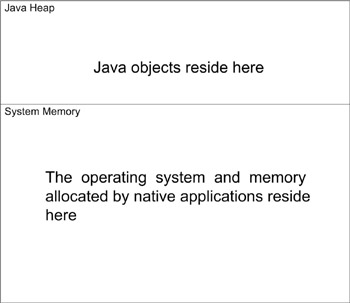
Figure 11.2: Java heap and system memory.
Because the garbage collector moves the data in the Java heap when performing housekeeping, direct access to the data cannot be possible unless either the VM supports pinning of objects or the garbage collector can be disabled temporarily. As discussed earlier, JNI functions such as GetStringChars and GetPrimitiveArrayCritical attempt to pin objects or disable the garbage collector to avoid having to copy the data. However, even if a VM implementation supports these techniques, they can impose serious overhead and limitation.
If native code cannot manipulate data in the Java heap, the data must be copied from the Java heap to system memory, manipulated, and then copied back. Copying data back and forth can result in substantial performance loss for sizeable amounts of data. Passing primitive types or even accessing object data through JNI means that data is copied. Direct buffers, on the other hand, allow both Java and native code to access a buffer of data without causing the data to get copied, relying on the VM implementation to support object pinning, or disabling the garbage collector. A direct buffer is essentially a Java object that contains a pointer to an array (or buffer) that is not maintained by the garbage collector and is typically in the system memory. This means that both native and Java code can access the content of the buffer. In addition, an implementation of the Java platform may support the creation of direct-byte buffers from native code. This means that the native code can allocate a chunk of memory and assign it as the buffer of a java.nio.ByteBuffer object. Figure 11.3 shows this concept.
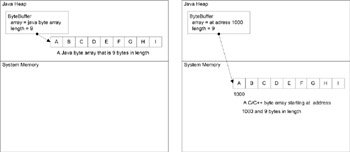
Figure 11.3: Java ByteBuffer object that contains a pointer to a native buffer.
Let’s consider a scenario where we need to load an image, modify it dynamically, and then draw it in a window. From the native side, we can load the image into the system memory and then use a direct ByteBuffer to wrap the loaded image. Once we have a direct buffer reference that points to the image data as its buffer, we can pass it to the Java side so that the image can be manipulated from the Java side. Because the image resides in the system memory, if the direct ByteBuffer is passed to a native draw function, the address of the image can be obtained from the ByteBuffer and used to draw the image. Without the use of a direct buffer, we would run into a few problems. First, we would have to decide where to store the loaded image. If stored on the Java side, after modifying the image, it would have to be copied to system memory before being passed to a draw function. Again, this is because the garbage collector can move an object when performing housekeeping. If the image is stored in system memory, it would not be possible to directly modify the image data from the Java side unless a direct ByteBuffer object wraps the content of the image. In fact, this is the reason why it is necessary to use an instance of java.awt.bufferedImage to access the data of an AWT image. A buffered image is essentially an object that is used to indirectly manipulate the image data stored by default in the system memory. If direct buffers were available when AWT was designed, the solution would probably be different. The following segment shows how to create a direct buffer that wraps an arbitrary region of the system memory:
jobject jDirectByteBuffer = env->NewDirectByteBuffer(startAddress, length);
Note that from the Java side you cannot set a direct ByteBuffer’s buffer address. If this were not the case, Java would lose its inherently safe nature. It is, however, possible to write a quick native method that takes the startAddress and length as parameters and returns a newly created buffer.
Other buffer-related JNI functions are GetDirectBufferAddress and GetDirectBufferCapacity.
Miscellaneous Functions
The two handlers, JNI_OnLoad and JNI_OnUnload, allow you to perform some initialization and finalization in the native library. When a library is loaded by the System.loadLibrary method, the JNI_OnLoad function is called. You can allocate any memory that should live during the life of the library through this function. The function is also a good place to compute and cache method and field IDs. The value returned by the function allows the loader to determine if the library is compatible with the version of JDK. For example, if you have a native library that uses newer functions in the JNI function table, the library should not be used in an older VM. It is important to note that the JNI_OnUnLoad handler is not called until the class loader of the class that caused the library to load is garbage-collected. Therefore, it would be a good idea not to wait for the JNI_OnUnLoad handler to free a large amount of system resources.
The Invocation Interface
JNI also includes an invocation interface that can be used to launch the VM from a native program. By using the functions provided by this interface, you could create and destroy a VM. In fact, this is how Java.exe launches the VM. The invocation interface is used to launch the VM from C/C++ code, which is also known as embedding the VM. If you want to use Java as a scripting language for a C/C++ game, you must use this interface. Note that Java is not exactly a scripting language. For more information please read Chapter 10, “Java as a Scripting Language.”
The AttachCurrentThread function can be used to let the VM know that you want to allow the current native thread to communicate with the VM. This step is important because the VM must give each thread a pointer to a different JNI environment instance.
As the following segment shows, launching a VM is pretty straightforward. The only requirements are that the project links to jvm.lib and the directory of jvm.dll be visible. Note that you cannot copy the jvm.dll to your directory because it uses its relative location to find other files.
JavaVM* g_jvm = 0; JNIEnv* g_env = 0; int StartVM(){ JavaVMInitArgs jvmArgs; jvmArgs.version = JNI_VERSION_1_4; jvmArgs.ignoreUnrecognized = JNI_TRUE; result = JNI_CreateJavaVM(&g_jvm, (void**)&g_env, &jvmArgs ); if (result){ printf("Error: JNI_CreateJavaVM failed"); return -1; } } The following code segment destroys the VM, but note that because the jvm.dll uses internal global variables, after destroying the VM, a VM cannot be created in the same process again. This was not the original intention, and in the past, destroying the VM would return an error. Even though the destroy function no longer returns an error, the VM cannot be restarted.
void StopVM(){ if (g_env){ if (g_env->ExceptionOccurred()) { g_env->ExceptionDescribe(); } } if (g_jvm) { jint result = g_jvm->DestroyJavaVM(); if(result){ printf("Error: g_jvm->DestroyJavaVM() FAILED\n"); } } } If you want to find out if a VM exists, you can call the following:
JavaVM* createdVms[1] = {0}; jsize numberOfVMs; JNI_GetCreatedJavaVMs(createdVms, 1, &numberOfVMs); if (numberOfVMs > 0) { g_jvm = createdVms[0]; g_jvm->GetEnv((void**)&g_env, JNI_VERSION_1_4); } 
EAN: 2147483647
Pages: 171