CURSOR TOO SMALL? MAKE IT BIGGER
| < Day Day Up > |
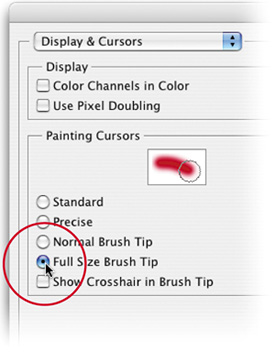
| At long last, bigger brush cursors are here. Just go to Preferences under the Photoshop menu (or under the Edit menu in Windows), under Display & Cursors, and choose Full Size Brush Tip. You also have the option of adding a crosshair to the center of your brush cursor by turning on that option (which appears just below Full Size Brush Tip).
|
| < Day Day Up > |

Photoshop CS2 Killer Tips
ISBN: 0321330633
EAN: 2147483647
EAN: 2147483647
Year: 2006
Pages: 448
Pages: 448
Authors: Scott Kelby, Felix Nelson
- Using SQL Data Definition Language (DDL) to Create Data Tables and Other Database Objects
- Using Keys and Constraints to Maintain Database Integrity
- Performing Multiple-table Queries and Creating SQL Data Views
- Writing External Applications to Query and Manipulate Database Data
- Retrieving and Manipulating Data Through Cursors