Web Services Definition Language (WSDL)
| The Web Services Definition Language (WSDL) is a proposed standard to describe the technical invocation syntax of a Web service. WSDL was submitted to the W3C for standardization by IBM, Microsoft, and others in September 2000. The current version of the specification, WSDL 1.1, is available at http://www.w3.org/TR/wsdl. A WSDL service description is an XML document conformant to the WSDL schema definition. As we asserted earlier, a WSDL document is not a complete service description, but rather it covers the lower levels of the service description stackthe raw technical description of the service's interface. WSDL is the IDL for Web services. Essentially , a WSDL description describes three fundamental properties of a Web service:
WSDL Information ModelThe WSDL information model takes full advantage of the separation between abstract specifications and concrete implementations of these specifications. This reflects the split between service interface definition (abstract interface) and service implementation definition (concrete endpoint) discussed previously in the context of the service description stack. The description of the endpoint's capabilities is the abstract interface specification represented in WSDL by a portType An abstract interface can support any number of operations For the abstract concepts of message and operation, concrete counterparts are specified in the binding element. Like all good applications of XML, the WSDL schema defines several high level or major elements in the language. Let's take a look at Web service description in terms of the major elements in WSDL:
So the portType (with details from the message and type elements) describes the what of the Web service. The binding element describes the how, and the port and service elements describe the where of the Web service. Figure 6.3 shows the relationship between these elements in WSDL. Figure 6.3. The WSDL information model. The figure shows one possible view of the organization of the WSDL information model. You can see a clear relationship between the abstract and concrete notions of message and operation as contained in the portType and binding elements. The words in bold on the diagram signify the terms from the WSDL specification. The element names used in WSDL are somewhat confusing because no consistent naming convention allows you to distinguish between abstract and concrete concepts. You simply have to memorize which elements represent abstract concepts and which elements represent concrete concepts. At first glance, WSDL seems to be quite complicated. Part of this appearance is due to the factoring chosen by the WSDL authors. This complexity feels a lot like the complexity observed with a highly normalized relational data model. Although the same information can be more succinctly expressed , the flexibility that results from the factoring in WSDL is occasionally quite necessary. So, just as you might have learned to cope with understanding highly normalized relational models, practice with reading WSDL documents will help you to focus on the important aspects of a Web service description.
Elements of the WSDL LanguageLet's take a closer look at the elements of a WSDL description. Although we examine these elements in detail, the good news is that you don't have to become an expert in WSDL. The software industry continues to churn out tools to generate WSDL from existing IT assets like COM objects and Enterprise Java Beans (EJBs) and to generate client-side stubs or proxies (access mechanism helper classes) from WSDL on the service requestor side to ease the burden of invoking Web services. Later in this chapter, we will take a closer look at the WSDL tooling available in Axis. However, by reviewing WSDL, you will get a good background in case the tools don't generate exactly the WSDL or Java to fit your particular circumstances. None of the tools to date support the entire breadth of WSDL features. For some time to come, WSDL descriptions will need to be hand crafted, and client and Web service implementation code will have to be manually developed. The best way to learn WSDL is to examine a collection of WSDL documents. An excellent registry of WSDL documents can be found at the salcentral Web services brokerage (http://www.salcentral.com) or the xmethods Web site (www.xmethods.net). Go to either of these sites and browse the collection of WSDL documents found there. After a little practice, reading a WSDL document will become as familiar as reading Java code. So, what does a WSDL description look like? Let's discuss the WSDL language in the context of two WSDL examples. In the following sections, we will discuss how the various elements of the WSDL language are used to describe two of SkatesTown's Web services. Example WSDL DocumentsWe will examine the WSDL description for the (relatively simple) priceCheck service provided by SkatesTown. The priceCheck service was added by Al Rosen in response to growing demand from customers to extend the inventoryCheck Web service to include price information as well as availability. You will see in Chapter 7 how this service prepares SkatesTown to participate in dynamic e- marketplaces . The priceCheck Web service is an extension of the inventoryCheck Web service, allowing a requestor to determine the price of one of SkatesTown's products. The response is a price and the number of units of that item currently available from inventory. The entire priceCheck WSDL document is shown in Listing 6.1. Listing 6.1 The priceCheck WSDL Document<?xml version="1.0"?> <definitions name="PriceCheck" targetNamespace="http://www.skatestown.com/services/PriceCheck" xmlns:pc="http://www.skatestown.com/services/PriceCheck" xmlns:avail="http://www.skatestown.com/ns/availability" xmlns:xsd="http://www.w3.org/2001/XMLSchema" xmlns:soap="http://schemas.xmlsoap.org/wsdl/soap/" xmlns="http://schemas.xmlsoap.org/wsdl/"> <!-- Type definitions --> <types> <xsd:schema targetNamespace="http://www.skatestown.com/ns/availability" xmlns:xsd="http://www.w3.org/2001/XMLSchema"> <xsd:complexType name="availabilityType"> <xsd:sequence> <xsd:element name="sku" type="xsd:string"/> <xsd:element name="price" type="xsd:double"/> <xsd:element name="quantityAvailable" type="xsd:integer"/> </xsd:sequence> </xsd:complexType> </xsd:schema> </types> <!-- Message definitions --> <!-- A PriceCheckRequest is simply an item code (sku) --> <message name="PriceCheckRequest"> <part name="sku" type="xsd:string"/> </message> <!-- A PriceCheckResponse consists of an availability structure, --> <!-- defined above. --> <message name="PriceCheckResponse"> <part name="result" type="avail:availabilityType"/> </message> <!-- Port type definitions --> <portType name="PriceCheckPortType"> <operation name="checkPrice"> <input message="pc:PriceCheckRequest"/> <output message="pc:PriceCheckResponse"/> </operation> </portType> <!-- Binding definitions --> <binding name="PriceCheckSOAPBinding" type="pc:PriceCheckPortType"> <soap:binding style="rpc" transport="http://schemas.xmlsoap.org/soap/http"/> <operation name="checkPrice"> <soap:operation soapAction=""/> <input> <soap:body use="encoded" namespace= "http://www.skatestown.com/services/PriceCheck" encodingStyle= "http://schemas.xmlsoap.org/soap/encoding/"/> </input> <output> <soap:body use="encoded" namespace= "http://www.skatestown.com/services/PriceCheck" encodingStyle= "http://schemas.xmlsoap.org/soap/encoding/"/> </output> </operation> </binding> <!-- Service definition --> <service name="PriceCheckService"> <port name="PriceCheck" binding="pc:PriceCheckSOAPBinding"> <soap:address location= "http://localhost:8080/axis/services/PriceCheck"/> </port> </service> </definitions> This WSDL document will come up again in Chapter 7 when we discuss how WSDL documents are published and found in a UDDI registry. The second example woven into the next sections illustrates more sophisticated uses of WSDL (but by no means is it the most complicated use). We have included the entire WSDL file in Listing 6.2, but don't panic; we explain the business purpose of this Web service and each part of the WSDL in subsequent paragraphs. For now, just take a quick glance at it, and let the explanations clarify any questions. Refer back to this listing frequently. Listing 6.2 The StockAvailableNotification WSDL Document<?xml version="1.0" ?> <definitions name="StockAvailableNotification" targetNamespace= "http://www.skatestown.com/services/StockAvailableNotification" xmlns:xsd="http://www.w3.org/2000/10/XMLSchema" xmlns:reg="http://www.skatestown.com/ns/registrationRequest" xmlns:soap="http://schemas.xmlsoap.org/wsdl/soap/" xmlns:soapenc="http://schemas.xmlsoap.org/soap/encoding/" xmlns="http://schemas.xmlsoap.org/wsdl/"> <!-- Type definitions from the registration schema--> <types> <xsd:schema targetNamespace= "http://www.skatestown.com/ns/registrationRequest" xmlns:xsd="http://www.w3.org/2000/10/XMLSchema" xmlns="http://www.skatestown.com/schemas/ns/registrationRequest"> <xsd:complexType name="registrationRequest"> <xsd:sequence> <xsd:element name="items"> <xsd:complexType name="ArrayOfItem"> <complexContent> <restriction base="soapenc:Array"> <attribute ref="soapenc:arrayType" wsdl:arrayType="xsd:string[]"/> </restriction> </complexContent> </complexType> </xsd:element> <xsd:element name="address" type="xsd:uriReference"/> <xsd:element name="transport" default="http://schemas.xmlsoap.org/soap/smtp" minOccurs="0"> <xsd:simpleType> <xsd:restriction base="xsd:uriReference"> <xsd:enumeration value="http://schemas.xmlsoap.org/soap/http"/> <xsd:enumeration value="http://schemas.xmlsoap.org/soap/smtp"/> </xsd:restriction> </xsd:simpleType> </xsd:element> <xsd:element name="clientArg" type="xsd:string" minOccurs="0"/> </xsd:sequence> </xsd:complexType> <xsd:simpleType name="correlationID"> <xsd:restriction base="xsd:string"> <!-- some appropriate restriction --> </xsd:restriction> </xsd:simpleType> </xsd:schema> </types> <!-- Message definitions --> <message name="StockAvailableRegistrationRequest"> <part name="registration" element="reg:registrationRequest"/> <part name="expiration" type="xsd:timeInstant"/> </message> <message name="StockAvailableRegistrationResponse"> <part name="correlationID" type="reg:correlationID"/> </message> <message name="StockAvailableRegistrationError"> <part name="errorString" type="xsd:string"/> </message> <message name="StockAvailableExpirationError"> <part name="errorString" type="xsd:string"/> </message> <message name="StockAvailableNotification"> <part name="timeStamp" type="xsd:timeInstant"/> <part name="correlationID" type="reg:correlationID"/> <part name="items" type="reg:items"/> <part name="clientArg" type="xsd:string"/> </message> <message name="StockAvailableExpirationNotification"> <part name="timeStamp" type="xsd:timeInstant"/> <part name="correlationID" type="reg:correlationID"/> <part name="items" type="reg:ArrayOfItem"/> <part name="clientArg" type="xsd:string"/> </message> <message name="StockAvailableCancellation"> <part name="correlationID" type="reg:correlationID"/> </message> <!-- Port type definitions --> <portType name="StockAvailableNotificationPortType"> <!--Registration Operation --> <operation name="registration"> <input message="StockAvailableRegistrationRequest"/> <output message="StockAvailableRegistrationResponse"/> <fault message="StockAvailableRegistrationError" name="StockAvailableNotificationErrorMessage"/> <fault message="StockAvailableExpirationError" name="StockAvailableExpirationError"/> </operation> <!--Notification Operation --> <operation name="notification"> <output message="StockAvailableNotification"/> </operation> <!--Expiration Notification Operation --> <operation name="expirationNotification"> <output message="StockAvailableExpirationNotification"/> </operation> <!--Cancellation Operation --> <operation name="cancellation"> <input message=" StockAvailableCancellation"/> </operation> </portType> <!-- Binding definitions --> <binding name="StockAvailableNotificationSOAPBinding" type="StockAvailableNotificationPortType"> <soap:binding style="rpc" transport="http://schemas.xmlsoap.org/soap/http"/> <documentation> Note: the requestor must invoke the registration operation first. </documentation> <operation name="registration"> <soap:operation soapAction= "http://www.skatestown.com/StockAvailableNotification/registration"> <input> <soap:header message="StockAvailableRegistrationRequest" part="expiration" use="encoded" namespace="http://www.skatestown.com/ns/registrationRequest" encodingStyle="http://schemas.xmlsoap.org/soap/encoding/"/> <soap:headerfault message="StockAvailableExpirationError" part="errorString" use="encoded" namespace="http://www.skatestown.com/ns/registrationRequest" encodingStyle="http://schemas.xmlsoap.org/soap/encoding/"/> </soap:header> <soap:body parts="registration" use="literal" style="document"/> </input> <output> <soap:body use="encoded" namespace="http://www.skatestown.com/ns/registrationRequest" encodingStyle="http://schemas.xmlsoap.org/soap/encoding/"/> </output> <fault name="StockAvailableNotificationErrorMessage"> <soap:fault name="StockAvailableNotificationErrorMessage" namespace="http://www.skatestown.com/ns/registrationRequest" encodingStyle="http://schemas.xmlsoap.org/soap/encoding/"/> </fault> </operation> <operation name="notification"> <output> <soap:body use="encoded" namespace="http://www.skatestown.com/ns/registrationRequest" encodingStyle="http://schemas.xmlsoap.org/soap/encoding/"/> </output> </operation> <operation name="cancellation"> <soap:operation soapAction= "http://www.skatestown.com/StockAvailableNotification/cancellation"> <input> <soap:body use="encoded" namespace="http://www.skatestown.com/ns/registrationRequest" encodingStyle="http://schemas.xmlsoap.org/soap/encoding/"/> </input> </operation> </binding> <!-- Service definition --> <service name="StockAvailableNotificationService"> <port name="StockAvailableNotificationPort" binding=" StockAvailableNotificationSOAPBinding"> <soap:address location= "http://www.skatestown.com/axis/services/StockNotification"/> </port> </service> </definitions> The StockAvailableNotification Web service is provided by SkatesTown to support product ordering. The RegistrationRequest schema defines the data types. In particular, this Web service is used when a customer places an order with SkatesTown, but one or more of the items is not currently available from SkatesTown's inventory. The purpose of this service is to allow customers of SkatesTown to register to be notified when all the products in their order are once again available for sale from inventory. This Web service has four operations. The first operation allows the customer to register for a notification. This is a request/response operation. The customer invokes this service, passing in a collection of item numbers (for out of stock product numbers ), network address, (default is an e-mail address) an optional transport type (valid values are " http://schemas.xmlsoap.org/soap/http " and " http://schemas.xmlsoap.org/soap/smtp " ), and a client argument token of type string . The client argument token is opaque to the service; it is a requestor-specific correlation identifier. The client argument is returned by the notification operation. This operation also includes an expiration time to be included in the message (as a soap:header , as we will discover). The normal response of this operation is a provider-side correlation id The possible fault messages include:
The second operation, notification , uses the notification transmission primitive The third operation, expirationNotification , also uses the notification transmission primitive in WSDL. This message is sent from SkatesTown to the requestor's address when the expiration period indicated on the original registration operation expires . This message indicates a timestamp, the provider-side correlation ID established in the registration message, the item numbers from the registration message, and the requestor-specific correlation ID. The fourth operation is a one-way operation for cancellation of the notification. It allows the requestor to abandon its interest in the notification. The cancellation message is simply the provider-side correlation ID. Now, let's examine the WSDL language element by element, using the priceCheck WSDL to show the simple, typical use and the StockAvailableNotification example to show more sophisticated WSDL use. PortTypeThe best starting point to understanding a Web service using a WSDL document is the portType element. The portType element describes the interface to a Web service. This is the most succinct description of what the service does; understand the portType , and you understand what the Web service does. The rest of the elements in the WSDL definition are essentially details that the portType depends upon; we will examine them in later sections. The portType in the priceCheck service description looks like this: <!-- Port type definitions --> <portType name="PriceCheckPortType"> <operation name="checkPrice"> <input message="PriceCheckRequest"/> <output message="PriceCheckResponse"/> </operation> </portType> A WSDL document can contain zero or more portType definitions. Typically, most WSDL documents contain a single portType . This convention separates out different Web service interface definitions into different documents. This granularity of separation is good for reasons of reuse, and when we discuss how UDDI can be used to register WSDL documents, this best practice will become apparent. A portType element has a single name attribute. In our case, the priceCheck Web service contains a portType of name PriceCheckPortType . Often, you will see the name of the portType follow this pattern: nameOfWebService PortType . If there are multiple portType s in a WSDL file, each portType must have a different name. Pretty simple so far, but simple, well- factored Web services often result in a simple looking portType . Much of the detail is in the rest of the elements in the WSDL definition, and as far as the portType element is concerned , the detail is in the collection of operation child elements. Just as a Java interface definition is comprised mainly of method signatures, the interesting part of a portType definition is the collection of operation elements it contains. OperationAn operation element in WSDL is the equivalent of a method signature in Java. An operation defines a method on a Web service, including the name of the method and the input parameters and the output or return type of the method. The PriceCheck portType describes one operation, named (cleverly) checkPrice . The portType for the StockAvailableNotification service defines four operations: registration , notification , expirationNotification , and cancellation . The checkPrice operation defines an input message and output message. If we invoke the checkPrice operation with a priceCheckRequestMessage (we'll see what exactly these messages look like in the next section), the Web service will return a priceCheckResponseMessage . That is all there is to an operation element. The operation elements define a combination of input, output, and fault messages. The WSDL specification defines four different combinations of input, output, and fault messages. WSDL uses the term transmission primitive to describe these combinations. Chapter 3 introduced these concepts as interaction patterns. We now revisit these concepts in the context of how to use WSDL to describe these patterns. Request-Response Style of OperationThis is the most common form of operation. The request-response operation defines an input message, output message, and an optional collection of fault messages. Because many Web services are deployed using SOAP over HTTP, request-response is the most common form of operation type found in WSDL documents. The checkPrice operation is a request-response operation as is the registration operation from the StockAvailableNotification service. Request-response messages can be informational, retrieving information about some object represented by a Web service; or a request-response operation can be behavioral, where the message changes the state of the service provider and information about the new state is included in the response. The checkPrice operation is an informational style message. The registration operation is a behavior service, because it updates the provider's server with new information about a requestor waiting on a stockAvailable event to fire. Although checkPrice does not use it, the request-response transmission primitive allows the service provider to list the possible fault messages that can appear in response to a Web service invocation. The fault message element is used within the StockAvailableNotificationPortType as part of the registration operation's definition: <portType name="StockAvailableNotificationPortType"> <!--Registration Operation --> <operation name="registration"> <input message="StockAvailableRegistrationRequest"/> <output message="StockAvailableRegistrationResponse"/> <fault message="StockAvailableRegistrationError" name="StockAvailableNotificationErrorMessage"/> <fault message="StockAvailableExpirationError" name="StockAvailableExpirationError"/> </operation> Fault elements must be named, and the name must be unique among all the fault elements defined for the operation. Like the input and output elements, the fault element uses a message element to describe the data contents of the fault. One-way Style of OperationA one-way operation does not have an output element (or a fault element for that matter). A one-way operation is like a data sink. A one-way message would be used to change state of the service provider. Clearly a one-way message is useless for informational purposes (no response is sent back to the requestor). The cancellation operation from the StockAvailableNotification service is a one-way operation: <!--Cancellation Operation --> <operation name="cancellation"> <input message=" StockAvailableCancellation"/> </operation> Because many Web services are accessed through SOAP over HTTP, many one-way messages end up being request-response messages, with the response being a simple HTTP-level acknowledgement of the message. The operation does not model the acknowledgement or transport-level message flow for a couple of reasons. First, the details of the transport protocol is a detail of the binding element, not the operation element. Second, no application-level semantic is transmitted in response to the Web service invocation. Notification Style of OperationA notification operation is like a one-way push from the service provider. Output messages are pushed to the service requestor as the result of some event on the service provider side, such as a time-out or operation completion. The notification operation in the StockAvailableNotification Web service is a notification type of operation; SkatesTown pushes a message to the requestor when a particular item is once again in stock. The notification style of interaction is commonly used in systems built around asynchronous messaging. Although systems with asynchronous messaging might be a little harder to conceptualize and implement, they are much more loosely coupled , and, therefore, are easier to maintain; often this flexibility adds robustness to the system. Given the notification operation is a one-way push message, how does SkatesTown know where to push the output messages to? Nothing in the WSDL specification describes this directly. This correlation semantic must be described by other means. One mechanism used to address this problem is to have a network address (a URL or e-mail address) as a parameter in another message. In the case of the StockAvailableNotification Web service, SkatesTown has created the registration operation shown in Listing 6.2 for just the purpose of determining where to send a notification message. The service requestor must invoke the registration operation first, and then the notification operation will be able to send a message to the requestor. The ordering requirement of these operationsthat is, the fact that the registration operation must be invoked in order to receive notification messagescannot be described in WSDL. Potentially , this ordering semantic might be represented in the WSEL language (described briefly later in this chapter). At this point, SkatesTown must describe this semantic using prose . The following documentation element appears with this portType : <documentation> Note: the requestor must invoke the registration operation first. </documentation> Solicit-Response Style of OperationA solicit-response operation models a push operation similar to a notification operation. However, unlike the notification style of operation, the solicit-response operation expects an input (response) from the service requestor in response to the solicit-response output flow. A solicit-response operation could look like this: <portType name="someName"> <operation name="exampleSolicitResponse"> <output message="pushThis"/> <input message="responseToPush"/> <fault name="someFaultName" message="faultPushedToRequestor"/> </operation> </portType> Output and fault flows are pushed to the service requestor as the result of some event on the service provider side, such as a time out or operation completion. The solicit-response style of operation has the same problem as the notification style of operation: where to push the output/fault messages. Again, the solution is the same as we discussed with the notification style of operation. The only way to tell the difference between a request-response operation and a solicit-response operation is the ordering of the input and output elements. In request-response, the input child element comes first. In solicit-response, the output child element comes first. Rounding Out the Operation ElementThe current state of the WSDL tooling really emphasizes request-response and one-way messages. Because solicit-response messages require some sort of correlation or registration to associate the message with something meaningful to the requestor, they require a level of association that is beyond the simple semantics represented by WSDL. The operation-ordering semantic could not be enforced in generated code. Similarly, a notification message requires a preceding registration message from the service requestor. Again, this correlation semantic cannot be directly represented in WSDL. Most tools do not support solicit-response or notification. For that matter, most tools support only request-response. Let's consider a couple of final details related to the operation element. The WSDL specification allows the input, output, and fault messages to have a name attribute. Typically, this name attribute is not specified by the designer on input and output elements. This detail is often too much clutter in the WSDL document (as if a WSDL document is not already too cluttered!). And besides, WSDL provides default values for these names based on the operation name. For example, we repeat our priceCheck example, this time filling in the default values that WSDL would have supplied: <!-- Port type definitions --> <portType name="PriceCheckPortType"> <operation name="checkPrice"> <input name="checkPriceRequest" message="PriceCheckRequest"/> <output name="checkPriceResponse" message="PriceCheckResponse"/> </operation> </portType> Typically, the name attribute of the input and output element doesn't add much. Further, you will find that many WSDL designers already encode this information into the names of the message elements they define. If you do add a name to an input or output element, this name must be unique among all the input and output elements within the portType . Table 6.2 describes the default names for input and output elements, for an operation named XXX . Table 6.2. Defaults for Input and Output Elements for Operation XXX
Fault elements, of course, require a name, because several fault elements can be associated with any operation and the fault name is used to distinguish between the collection of possible faults. This is particularly important in the binding element, which describes the mapping between the fault element and the way the fault is presented in a protocol-specific fashion. WSDL also lets you specify a parameterOrder attribute on an operation. The parameterOrder operation is used only for RPC-style operations. This is a bit of a layering violation in the specification, because the portType is abstract, and its nature as an RPC or document-centric message is revealed in the binding element. Further, this element is informational only, and is completely optional, even for operations that are described as RPC within the binding element. The only purpose of this attribute is to provide a mechanism to describe the original parameter ordering of the RPC function as a list of part names (we will see part names discussed in the following "Message" section) separated by spaces. So far, we have not defined what we mean by a priceCheckRequest message, or any of the messages for that matter. These are simply abstract messages. The composition of an abstract message is detailed in a message element, described next. MessageA message is a very simple concept. A message is a collection of parts. A WSDL document can contain zero or more message elements. Each message element can be used as an input message, output message, or fault message within an operation. What is a message? Let's take a look at the messages defined in the priceCheck WSDL: <!-- Message definitions --> <!-- A PriceCheckRequest is simply an item code (sku) --> <message name="PriceCheckRequest"> <part name="sku" type="xsd:string"/> </message> <!-- A PriceCheckResponse consists of an availability structure, --> <!-- defined above. --> <message name="PriceCheckResponse"> <part name="result" type="avail:availabilityType"/> </message> The first message, PriceCheckRequest , is a simple message element. Recall that PriceCheckRequest is used as the input message to the checkPrice operation. All message elements must have a name, and that name must be unique among all the message elements defined in the WSDL document. The PriceCheckRequest message defines one part element named item . A part element is made up of two properties: the name of the part and the type of the part. The name attribute must be unique among all the part child elements of the message element. The type property of the part is defined as either a type attribute (a simpleType , complexType from the XSD schema type system) or an element attribute (also defined using the XSD schema type system). We will examine types in more detail in the next section. Often, the name of the part says it all, and you need not dive into the details of how the types associated with the part are modeled . As we will see later, the item part will turn into a method parameter in the service invocation. In the PriceCheckRequest example, the type of the part named item is a simple string. The XML comment above the element definition (we could have used a WSDL documentation element) indicates that the string is to be interpreted as an item code. Of course, a better model might have been to define a complex type giving a pattern or range that an item code should be constrained to. However, we didn't make that choice here. The only other message element defined in the priceCheck WSDL is PriceCheckResponse . The PriceCheckResponse message describes the format of the output message of the checkPrice operation. Like its companion message, PriceCheckResponse defines a single part. The result part is slightly more interesting because its type is a complex type defined in the namespace corresponding to the avail : prefix. That's it for simple messages. You can see that the separation of messages from the operation is extremely well factored, but somewhat overkill for this kind of simple example. Many WSDL documents do not require the full power achieved by factoring messages from operations and decomposing messages into parts. The parts mechanism in WSDL is used to allow a message to be decomposed into smaller units or parts. Each part can be manifested in different ways in the various network protocols. This mapping between parts and protocol-specific components is described in the binding element. Some parts of the messages can appear as SOAP header elements. Some parts can be mapped to HTTP headers. Some parts can be used as individual parameters in an RPC message. You really cannot understand the true use of a part until you look at how the abstract notion of the part is mapped into a concrete data representation. This mapping is the responsibility of the binding element. StockAvailableNotification is an example of a complex, multipart message: <message name="StockAvailableNotification"> <part name="timeStamp" type="xsd:timeInstant"/> <part name="correlationID" type="reg:correlationID"/> <part name="items" type="reg:items"/> <part name="clientArg" type="xsd:string"/> </message> We will examine how different parts are modeled as different components of a message in the "SOAP Header Formatting" section. TypeWe have seen the message element in WSDL, and the part elements that are contained within it. However, some of the types used in these example WSDL documents need further discussion. The default type system in WSDL is XML Schema (XSD). This approach is useful to describe most of the type used in the messages to invoke a Web service. The types element in the priceCheck WSDL is pretty typical of the use of this element: <!-- Type definitions --> <types> <xsd:schema targetNamespace="http://www.skatestown.com/ns/availability" xmlns:xsd="http://www.w3.org/2001/XMLSchema"> <xsd:complexType name="availabilityType"> <xsd:sequence> <xsd:element name="sku" type="xsd:string"/> <xsd:element name="price" type="xsd:double"/> <xsd:element name="quantityAvailable" type="xsd:integer"/> </xsd:sequence> </xsd:complexType> </xsd:schema> </types> The contents of the types element look very much like a schema definition using XSD. Many organizations already have XML schemas defined. Because the types element in WSDL is defined to contain one or more schema definition elements, WSDL repurposes work already done in XML. Business objects already modeled in XML can be used as parts of the message elements and, therefore, used to define the input and output elements for the Web services' operations. For the priceCheck WSDL, the availability type is defined using a types element from WSDL. Recall that the availability type was used as part of the PriceCheckResponse message. This is all standard XML schema work that we covered in Chapter 2, "XML Primer." WSDL is quite flexible in the type system used. Although XML Schema is the predominant type system used, the types element allows you the flexibility to describe a completely different type system. The types element has an extensibility element that lets you describe another type system, say the Java type system, and define all the messages in terms of this type system. Consider, however, that deviating from the XML Schema type system increases the chances that more service requestors will be unable to invoke your Web service. There are several variants of XML Schema; schema has been under development by the W3C for several years . The XML Schema version referenced in the listings is http://www.w3.org/2001/XMLSchema. You might also encounter other versions of schema used in types elements (and as we will see later in the definitions element, too): http://www.w3.org/2000/10/XMLSchema and often http://www.w3.org/1999/XMLSchema. These declarations have subtle implications on some sophisticated use of the XML Schema language. Consult advanced resources on XML schema for more detail. The types element is essentially a place for the WSDL document to define some user -defined XML types for later use in the message elements. A WSDL document can have at most one types element in a document. When a types element appears in a WSDL document, it typically contains a single schema definition element, although it is legal to have more than one schema definition element. You will typically see multiple schema definition elements if the Web service is using datatypes defined elsewhere in multiple schemas. Let's take a closer look at the way the items type is defined within SkatesTown's registrationRequest schema. Normally, to define a type that contains a repeating group of elements, you would use the following style of XML schema: <xsd:complexType name="registrationRequest"> <xsd:sequence> <xsd:element name="items" type="xsd:string" maxOccurs="unbounded" /> However, in WSDL, repeating groups such as this must be modeled using the array data type from the SOAP encoding namespace ( xmlns:soapenc="http://schemas.xmlsoap.org/soap/encoding/" ). This is another jarring example where an aspect of the message encoding (really the domain of the binding element, as we will see in the next section) imposes itself on the base datatyping mechanism in WSDL. This is an artifact of the common use of WSDL to model SOAP messages. So, regardless of whether your Web service uses SOAP, you need to use the array datatype from the SOAP encoding namespace to model repeating groups. The following snippet shows the registrationRequest type: <xsd:complexType name="registrationRequest"> <xsd:sequence> <xsd:element name="items"> <xsd:complexType name="ArrayOfItem"> <complexContent> <restriction base="soapenc:Array"> <attribute ref="soapenc:arrayType" wsdl:arrayType="xsd:string[]"/> </restriction> </complexContent> </complexType> </xsd:element> By convention, the name of the type is ArrayOfXXX , where XXX is the base type of the elements that are to appear in the repeating group. The type itself is an extension of the base Array type in the SOAP encoding namespace. WSDL adds an arrayType attribute to let you formally declare the exact base type of the repeating group (in this case, it is simply the string base type from XML schema). Note that the [] characters also specify the array has a single dimension. That's it for types. Essentially, the complexity is in modeling XML, not in modeling WSDL. BindingWe have seen that the PriceCheck and StockAvailableNotification services define several operations, and we have some idea about the sorts of XML elements that these operations need as input and produce for output. However, to this point, we still do not know how to format the message to invoke these operations. We haven't seen anything in the WSDL description that relates to SOAP headers, SOAP bodies, SOAP encoding, and so on. The portType , message , and type elements define the abstract or reusable portion of the WSDL definition. Is this service invoked by a SOAP message, or a simple HTTP POST of an XML payload? Is this an RPC invocation or a document-centric message invocation? These details are given by one or more binding elements associated with the portType . The binding element in WSDL tells the service requestor how to format the message in a protocol- specific manner. Each portType can have one or more binding elements associated with it. For a given portType , a binding element can describe how to invoke operations using a single messaging/transport protocol, like SOAP over HTTP, SOAP over SMTP, a simple HTTP POST operation, or any other valid combination of networking and messaging protocol standards. Let's take a look at the binding element in the priceCheck WSDL: <!-- Binding definitions --> <binding name="PriceCheckSOAPBinding" type="pc:PriceCheckPortType"> < soap:binding style="rpc" transport= "http://schemas.xmlsoap.org/soap/http"/> <operation name="checkPrice"> < soap:operation soapAction=""/> <input> < soap:body use="encoded" namespace="http://www.skatestown.com/services/PriceCheck" encodingStyle="http://schemas.xmlsoap.org/soap/encoding/"/> </input> <output> < soap:body use="encoded" namespace="http://www.skatestown.com/services/PriceCheck" encodingStyle="http://schemas.xmlsoap.org/soap/encoding/"/> </output> </operation> The name of this binding element is PriceCheckSOAPBinding . The name must be unique among all the binding elements defined in the WSDL document. Conventionally, the name of the binding combines the portType name with the name(s) of the protocol(s) to which the binding maps. The type attribute identifies which portType this binding describes. Because WSDL uses name referencing to link the binding element to a portType , you can now see why portType name uniqueness is so important. We will see the same is true for binding name uniqueness when we discuss how the port element references a binding element. Typically, most WSDL documents contain only a single binding. The reason is similar to why conventional WSDL documents contain a single portType element: convenience of reuse. Now, which protocol is this binding element mapping the priceCheck portType to? We need to look for clues inside the binding element (besides the naming convention, of course). The first clue is the prefix of the first child element, soap:binding . This is a pretty strong hint that this binding is related to the SOAP messaging protocol. So, the PriceCheckSOAPBinding element describes how the priceCheck portType (remember, priceCheck is an abstract service interface definition) is expressed using SOAP. How are the SOAP aspects of the priceCheck service invocation described in this binding element? WSDL defines a very clever extensibility convention that allows the binding element to be extended, with elements from different XML namespaces, to describe bindings to any number of messaging and transport protocols. Pick a messaging/transport protocol set, find the WSDL convention that corresponds to that pair, and fill in the details. The WSDL spec defines three standard binding extensions for SOAP/HTTP, HTTP GET/POST, and SOAP with MIME attachments. All sorts of activities are underway to define additional binding conventions. The PriceCheckSOAPBinding element shown earlier decorates the elements from the priceCheck portType in four ways (invocation style, SOAPAction, input message appearance, and output message appearance), as explained in the following sections. This is a pretty straightforward use of the SOAP binding extension convention described in the WSDL specification. The SOAP binding style also specifies the way SOAP headers, SOAP faults, and SOAP headerfaults should be formatted. These additional aspects of the SOAP binding convention are illustrated in the StockAvailableNotificationSOAPBinding . Invocation StyleThe first use of the SOAP binding extension indicates the style of invocation: < soap:binding style="rpc" transport="http://schemas.xmlsoap.org/soap/http"/> This declaration applies to the entire binding. It indicates that all operations for the priceCheck portType are defined in this binding as SOAP messages. Further, the style attribute indicates that operations will follow the remote procedure call (RPC) conventions on the SOAP body as defined in the SOAP specification. This default can be explicitly overridden by a style declaration in a child operation element. The other alternative value for the style attribute is document , meaning the body of the SOAP message is to be interpreted as straight XML, more of a document-centric message send than a remote procedure call. The default value of this attribute is document . The registration operation from the StockAvailableNotification service uses a document style for the input flow. The transport attribute tells you that the requestor must send the SOAP message using HTTP. Other possible values for this attribute could include http://schemas.xmlsoap.org/soap/SMTP/, http://schemas.xmlsoap.org/soap/ftp/, and so on. SOAPActionThe second use of the SOAP binding extension is: <operation name="checkPrice"> < soap:operation SOAPAction=""/> This declaration indicates the value that should be placed in the SOAPAction HTTP header as part of the HTTP message carrying the priceCheck service invocation message. As we discussed in Chapter 3, the purpose of the SOAPAction header is to describe the intent of the message. In the case of the checkPrice operation, the WSDL tells the service requestor to put an empty string as the value for the SOAPAction header. Although an empty string is a valid value for SOAPAction , it is not terribly helpful for the SOAP router. Note that a SOAPAction header with value of empty string indicates that the URI of the request is the place where the intent of the message is to be found. If the SOAPAction value is completely empty, no intent of the message is to be found. Better conventions with SOAP would require the requestor to put an interesting value as the SOAPAction to help some SOAP routers dispatch the message to the appropriate Web service. The operations in the StockAvailableNotification service use this convention: <operation name="registration"> <soap:operation soapAction= "http://www.skatestown.com/StockAvailableNotification/registration"> and <operation name="cancellation"> <soap:operation soapAction= "http://www.skatestown.com/StockAvailableNotification/cancellation"> This shows that different operations in the same portType can be assigned different SOAPAction headers by the binding element. Note that the notification and expirationNotification operation elements do not have soap:operation child elements. These operations are not invoked using SOAP over HTTP by the requestor. Note, however, that the semantics of the SOAPAction header are quite controversial . As of this writing, the XML Protocol Working Group of the W3C is considering removing the SOAPAction HTTP header concept from the XML Protocol (the follow-up to SOAP). This is another reason why the URL dispatch is very popular, especially with things like Axis JWS files. This technique is demonstrated in all the examples in Chapter 3. We recommend using the URL of the message to express the intent of the message. This soap:operation element can also be used to override the default style specified in the soap:binding element's style attribute. In the case of the StockAvailableNotificationSOAPBinding , the default style is rpc . However, the registration operation overrides this default to use the document style for its input message: <operation name="registration"> <soap:operation soapAction= "http://www.skatestown.com/StockAvailableNotification/registration"> . . . <soap:body parts="registration" use="literal" style="document"/> Input Message AppearanceThe third use of the SOAP binding extension in the priceCheck WSDL document describes exactly how the input message to the checkPrice appears in the parts of the SOAP message: <input> < soap:body use="encoded" namespace="http://www.skatestown.com/services/PriceCheck" encodingStyle="http://schemas.xmlsoap.org/soap/encoding/"/> </input> In this case, it is a pretty simple mapping. The entire input message, PriceCheckRequest (remember, from the portType declaration for the checkPrice operation) is declared to be abstract in this case ( use="encoded" ). This means that the XML defining the input message and its parts are in fact abstract, and the real, concrete representation of the data is to be derived by applying the encoding scheme indicated in the encodingStyle attribute. This is a long-winded way to say that the message should appear as part of the SOAP body element and that the SOAP engine on the service provider's network will deserialize the information from XML to another format (such as Java types) using the encoding style defined in the SOAP specification. The soap:body declaration also interacts with the style of the operation. Because the checkPrice operation was declared as RPC style, the parts of the checkPrice input message will appear as child elements of the SOAP:body element in the SOAP message. Further, these parts will appear as parameters in the style of the RPC convention defined by the SOAP specification. Here is an example SOAP message that conforms to the pattern this binding element describes for the input of the checkPrice operation: <?xml version="1.0" encoding="UTF-8"?> <SOAP-ENV:Envelope xmlns:SOAP-ENV="http://schemas.xmlsoap.org/soap/envelope/" xmlns:xsd="http://www.w3.org/2001/XMLSchema" xmlns:xsi="http://www.w3.org/2001/XMLSchema-instance"> <SOAP-ENV:Body> <ns3:checkPrice xmlns:ns3="http://www.skatestown.com/services/PriceCheck"> <sku xsi:type="xsd:string">947-TI </sku> </ns3:checkPrice> </SOAP-ENV:Body> </SOAP-ENV:Envelope> Output Message AppearanceThe fourth use of the SOAP binding extension in our example describes exactly how the output message of checkPrice should appear. Nothing new is introduced with this example. For completeness, here is an example response that corresponds to the pattern described in the binding element for the output of the checkPrice operation: <?xml version="1.0" encoding="UTF-8"?> <SOAP-ENV:Envelope SOAP-ENV:encodingStyle="http://schemas.xmlsoap.org/soap/encoding/" xmlns:SOAP-ENV="http://schemas.xmlsoap.org/soap/envelope/" xmlns:xsd="http://www.w3.org/2001/XMLSchema" xmlns:xsi="http://www.w3.org/2001/XMLSchema-instance"> <SOAP-ENV:Body> <ns3:checkPriceResponse xmlns:ns3="http://www.skatestown.com/services/PriceCheck"> <checkPriceResult href="#id0"/> </ns3:checkPriceResponse> <multiRef id="id0" xsi:type="ns5:AvailabilityType" xmlns:ns5="http://www.skatestown.com/ns/availability"> <quantityAvailable xsi:type="xsd:int">36 </quantityAvailable> <price xsi:type="xsd:double">129.0 </price> <sku xsi:type="xsd:string">947-TI </sku> </multiRef> </SOAP-ENV:Body> </SOAP-ENV:Envelope> SOAP Header FormattingThe SOAP extension also defines the way SOAP headers are described in WSDL. The notification operation within the StockAvailableNotification Web service allows an expiration to be carried in the input message as a SOAP header. This is described in terms of SOAP within the b inding element's operation child element: <operation name="registration"> <soap:operation soapAction= "http://www.skatestown.com/StockAvailableNotification/registration"> <input> <soap:header message="StockAvailableRegistrationRequest" part="expiration" use="encoded" namespace="http://www.skatestown.com/ns/registrationRequest" encodingStyle="http://schemas.xmlsoap.org/soap/encoding/"/> The soap:header element indicates that the expiration part of the StockAvailableRegistrationRequest message appears as a SOAP header. The attributes of the soap:header element are similar to the soap:body element. Note that only the "expiration" part of the message appears in the header. The rest of the message appears in the body of the SOAP message. SOAP Fault and HeaderFault FormattingThe soap:fault extension is an additional facility described by the SOAP binding extension that does not appear in the priceCheck WSDL, but does appear in the StockAvailableNotification WSDL. The soap:fault extension describes how a fault element (like the one described in the registration operation in the StockAvailableNotificationPortType ) is mapped into SOAP. A use of this extension is shown here: <operation name="registration"> . . . <fault name="StockAvailableNotificationErrorMessage"> < soap:fault name="StockAvailableNotificationErrorMessage" namespace="http://www.skatestown.com/ns/registrationRequest" encodingStyle="http://schemas.xmlsoap.org/soap/encoding/"/> </fault> The soap:fault extension has the same attributes as the soap:body extension. The fault message must have a single part. SOAP requires that any errors generated by the SOAP engine when processing a SOAP header must be communicated back to the requestor in the form of a header, not in the body of a fault message. MustUnderstand faults are communicated this way, for example. The SOAP extension in WSDL defines the soap:headerfault element for just this purpose. A soap:headerfault element is used to describe how the StockAvailableExpirationError is expressed in SOAP, as a fault header that could potentially flow to communicate errors related to how the requestor formats the expiration header. The following example shows how WSDL models this situation: <operation name="registration"> <soap:operation soapAction= "http://www.skatestown.com/StockAvailableNotification/registration"> <input> <soap:header message="StockAvailableRegistrationRequest" . . . < soap:headerfault message="StockAvailableExpirationError" part="errorString" use="encoded" namespace="http://www.skatestown.com/ns/registrationRequest" encodingStyle="http://schemas.xmlsoap.org/soap/encoding/"/> . . . The soap:headerfault element is associated with the soap:header definition that might be in error, not as part of a fault or output message part of the operation. Example SMTPBindingAs a slight variant on the SOAP binding theme, consider the possibility of sending a priceCheck request using e-mail. SkatesTown could provide an additional SMTP binding to the priceCheck portType , allowing a customer to e-mail a priceCheck request and receive as a reply e-mail the priceCheck response message. Not much changes with this new binding. Of course, the priceCheck portType and the messages and types it references do not change. What does change is additional binding , port , and service elements (we will discuss port and service elements in separate sections later). The biggest changes include use of a different URI for the transport attribute of the soap:binding element to indicate SMTP is the transport mechanism. Also, the format of the location attribute in the soap:address child element of the port is different, reflecting an e-mail address format of the location. Another change is the use of literal form for the input and output message. It is a natural exchange to have an XML document itself as the e-mail message and response going between SkatesTown and its customer. Nothing precludes using RPC over SMTP; this is a matter of your choice: <!-- Binding definitions --> <binding name="PriceCheckSMTPBinding" type="pc:PriceCheckPortType"> <soap:binding style="document" transport="http://schemas.xmlsoap.org/soap/smtp" /> <operation name="checkPrice"> <input> <soap:body use="literal"/> </input> <output> <soap:body use="literal"/> </output> </operation> </binding> <!-- Service definition --> <service name="PriceCheckSMTPService"> <port name="PriceCheckSMTP" binding="PriceCheckSMTPBinding"> < soap:address location="mailto:priceCheck@skatestown.com"/> </port> </service> And that is pretty much it for the WSDL binding element and the SOAP extensions to the WSDL binding element. So, we now know that the only format supported for the priceCheck and StockAvailableNotification services is SOAP, and we know how the abstract types should be mapped into concrete objects. We now have (almost) all the details needed to invoke these Web services. At this point, we know we must use a SOAP message something like the following to invoke the checkPrice operation: HTTP/1.0 200 OK Content-Type: text/xml; charset=utf-8 Content-Length: 719 Set-Cookie2: JSESSIONID=6321fmkki1;Version=1;Discard;Path="/axis" Set-Cookie: JSESSIONID=6321fmkki1;Path=/axis Servlet-Engine: Tomcat Web Server/3.2.3 (JSP 1.1; Servlet 2.2; Java 1.3.0; Windows 2000 5.0 x86; java.vendor=IBM Corporation) <?xml version="1.0" encoding="UTF-8"?> <SOAP-ENV:Envelope SOAP-ENV:encodingStyle="http://schemas.xmlsoap.org/soap/encoding/" xmlns:SOAP-ENV="http://schemas.xmlsoap.org/soap/envelope/" xmlns:xsd="http://www.w3.org/2001/XMLSchema" xmlns:xsi="http://www.w3.org/2001/XMLSchema-instance"> <SOAP-ENV:Body> <ns3:checkPriceResponse xmlns:ns3="http://www.skatestown.com/services/PriceCheck"> <checkPriceResult href="#id0"/> </ns3:checkPriceResponse> <multiRef id="id0" xsi:type="ns5:AvailabilityType" xmlns:ns5="http://www.skatestown.com/ns/availability"> <quantityAvailable xsi:type="xsd:int">36 </quantityAvailable> <price xsi:type="xsd:double">129.0 </price> <sku xsi:type="xsd:string">947-TI </sku> </multiRef> </SOAP-ENV:Body> </SOAP-ENV:Envelope> The only missing piece is the network address; what URL do we send the message to? These details are given in the port and service elements. PortThe port element in WSDL is very simple. Its only purpose is to specify the network address of the endpoint hosting the Web service. More precisely, the port element associates a single protocol-specific address to an individual binding element. Port elements are named, and the name must be unique among all the ports within a WSDL document. The port element for the priceCheckSOAPBinding is: <port name="PriceCheck" binding="pc:PriceCheckSOAPBinding"> < soap:address location= "http://localhost:8080/axis/servlet/AxisServlet/PriceCheck"/> </port> This binding indicates the URL to which SOAP messages should be sent in order to invoke the priceCheck operations over SOAP. Note the soap:address element; this is another aspect of the SOAP extension to WSDL. Most of the extension is in the binding element, and this is the only part of the extension outside the binding element. That's it for the port element. We would be all done with our examination of the WSDL elements except that the port element does not stand alone. Port elements are children of the service element. ServiceThe purpose of the service element is to contain a set of related port elements. Nothing more. Although a WSDL document can contain a collection of service elements, conventionally a WSDL document contains a single service element. Each service element is named, and each name must be unique among all the services in the WSDL document. The following shows the entire service element for the priceCheck Web service: <!-- Service definition --> <service name="PriceCheckService"> <port name="PriceCheck" binding="PriceCheckSOAPBinding"> <soap:address location= "http://www.skatestown.com/axis/services/PriceCheck "/> </port> </service> That's it. It seems like quite a lot of bother to waste all these elements to express a group of ports. Why would a designer group several ports together into a service element? One reason is to group the ports related to the same service interface ( portType ) but expressed by different protocols (bindings). For example, if the priceCheck portType was implemented in two ways, one using SOAP over HTTP and another using SOAP over SMTP, a single service element could contain the port describing the URL for the SOAP/HTTP network endpoint and the port describing the e-mail address for the SOAP/SMTP network endpoint. Another reason might be to group related but different portType s together. For example, if the designer of the StockAvailabilityNotification Web service had chosen to split out the notification operation into a separate portType ( certainly justifiable), then it would be advantageous to relate the port for the registration service together with the port describing the network endpoint for the binding for the notification operation. That is the bulk of the important elements in a WSDL definition. We now examine a few other miscellaneous elements that appear in a WSDL document. DefinitionsThe root element of a WSDL document is a definitions element. A definitions element contains all of the other WSDL elements. A definitions element can contain:
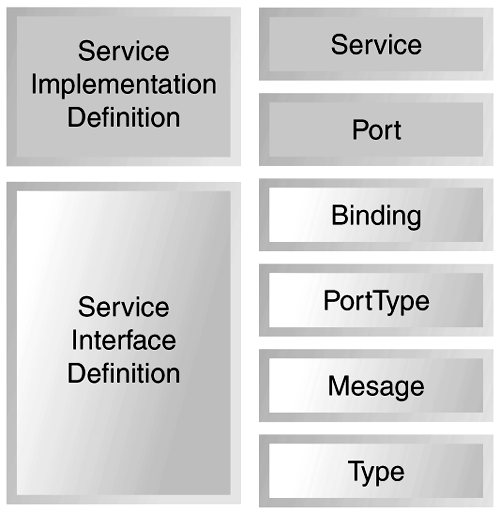
The definitions element might also contain a documentation element (we'll talk about this in the next section) and zero or more import elements (we'll talk about the import element after the documentation element). The definitions element itself contains a name attribute (the name usually corresponds to the name of the Web service itself) and the usual XML namespace declarations. The following is the definitions element from the priceCheck WSDL: <?xml version="1.0"?> <definitions name="PriceCheck" targetNamespace="http://www.skatestown.com/services/PriceCheck" xmlns:pc="http://www.skatestown.com/services/PriceCheck" xmlns:avail="http://www.skatestown.com/ns/availability" xmlns:xsd="http://www.w3.org/2001/XMLSchema" xmlns:soap="http://schemas.xmlsoap.org/wsdl/soap/" xmlns="http://schemas.xmlsoap.org/wsdl/"> . . . </definitions> Except for the value of the name attribute and the xmlns:pc and xmlns:avail declarations, you will see this pattern at the beginning of every WSDL document. For WSDL documents that declare types with repeating groups (arrays), you will also see the SOAP encoding namespace declaration here. DocumentationYou have seen the documentation element before. It was used to communicate the relationship between the registration operation and the notification operation in the StockAvailabilityNotification Web service. The documentation element can contain any combination of text or other child elements. Any other WSDL element can contain a documentation element, usually as the first child element. Conventional Use of the Import ElementWSDL defines an additional import element that allows WSDL documents to be linked together. The import element lets you reuse WSDL documents. Really, an import element binds a network location to an XML namespace. The following line shows the definition of an import element in WSDL: <import namespace="uri" location="uri"/> As described previously, many developers split their WSDL designs into two parts, each placed in a separate document. The service interface definition, containing the types , message , portType , and binding elements, appears in one file. The service interface definition encapsulates the reusable components of a service description. You can then place this file, for example, on a well-known Web site (on an e- marketplace , for example) for everyone to view. Each organization that wants to implement a Web service conformant to that well-known service interface definition would describe a service implementation definition, containing the port and service elements, describing how that common, reusable, service interface definition was, in fact, implemented at the network endpoint hosted by that organization. (You will see in Chapter 7 that this split is very important for registering WSDL Web service definitions in UDDI.) Figure 6.4 outlines how the major elements in WSDL are divided between the service interface definition and the service implementation definition. Figure 6.4. Service implementation definition, service interface definition, and WSDL elements. The designers at SkatesTown used this technique for the poSubmission WSDL. The poSubmission WSDL is a service description for the poSubmission SOAP service you saw in Chapter 3. It uses schema definitions from Chapter 2. The service interface definition for the poSubmission service interface definition file appears as follows : <?xml version="1.0" ?> <definitions name="poSubmission" targetNamespace= "http://www.skatestown.com/services/interfaces/poSubmission.wsdl" xmlns:xsd="http://www.w3.org/2001/XMLSchema" xmlns:po="http://www.skatestown.com/ns/po" xmlns:inv="http://www.skatestown.com/ns/invoice" xmlns:soap="http://schemas.xmlsoap.org/wsdl/soap/" xmlns="http://schemas.xmlsoap.org/wsdl/"> <!-- Type definitions --> <types> <xsd:schema targetNamespace="http://www.skatestown.com/ns/invoice" ...> <!-- rest of invoice schema definition from chapter 2 --> <include schemaLocation="http://www.skatestown.com/ns/invoice.xsd"/> </xsd:schema> <xsd:schema targetNamespace="http://www.skatestown.com/ns/po" ...> <!-- rest of purchaseOrder schema definition from chapter 2 --> <include schemaLocation="http://www.skatestown.com/ns/po.xsd"/> </xsd:schema> </types> <!-- Message definitions --> <message name="poSubmissionRequest"> <part name="purchaseOrder" element="po:po"/> </message> <message name="poSubmissionResponse"> <part name="invoice" element="inv:invoice"/> </message> <!-- Port type definitions --> <portType name="poSubmissionPortType"> <operation name="doSubmission"> <input message="poSubmissionRequest"/> <output message="poSubmissionResponse"/> </operation> </portType> <!-- Binding definitions --> <binding name="poSubmissionSOAPBinding" type="poSubmissionPortType"> <soap:binding style="document" transport="http://schemas.xmlsoap.org/soap/http"/> <operation name="placePO"> <soap:operation soapAction= "http://www.skatestown.com/services/poSubmission/submitPO"/> <input> <soap:body parts="purchaseOrder" use="literal"/> </input> <output> <soap:body parts="invoice" use="literal"/> </output> </operation> </binding> </definitions> Note the use of the XML Schema include tag, importing the elements defined in the po and invoice schema definitions. This WSDL file is a typical pattern for a simple document-centric SOAP service. The messages are simple document instances; the SOAP binding indicates the use of literal encodingno deserialization of the XML message into programming languagespecific objects will occur. This service interface definition can be reused by many organizations. This is especially true if the data formats (the purchase order and invoice schemas) are industry standard. The information specific to how SkatesTown implements the poSubmission service interface is contained in the poSubmissionService service implementation definition file: <?xml version="1.0" ?> <definitions name="poSubmissionService" targetNamespace= "http://www.skatestown.com/services/POSubmissionService.wsdl" xmlns:xsd="http://www.w3.org/2001/XMLSchema" xmlns:pop= "http://www.skatestown.com/services/interfaces/poSubmission.wsdl" xmlns:soap="http://schemas.xmlsoap.org/wsdl/soap/" xmlns="http://schemas.xmlsoap.org/wsdl/"> <import namespace= "http://www.skatestown.com/services/interfaces/poSubmission.wsdl" location= "http://www.skatestown.com/services/interfaces/poSubmission.wsdl"/> <!-- Service definition --> <service name="poSubmissionService"> <port name="poSubmissionSOAPPort" binding="pop:poSubmissionSOAPBinding"> <soap:address location= "http://www.skatestown.com/axis/services/submitPO"/> </port> </service> </definitions> This technique is a nice separation of concerns. The service implementation document is quite succinct and contains information that is truly specific to the implementation of this type of service by SkatesTown. Another convention, sometimes followed by WSDL designers, is to separate the binding from the service interface definition. It remains quite controversial that the service interface definition includes, by convention, the binding element. After all, the binding element, when used with the SOAP extensions to WSDL, includes the SOAPAction attribute in the operation element. This really has more to do with implementation than reusable description. As you will see in Chapter 7, part of the argument to keep the binding element in with the other reusable elements was due to the convention of registering WSDL documents within UDDI. WSDL Extension MechanismThe WSDL language allows each of the WSDL elements to be extended with elements from other namespaces. The language specification further defines standard extensions for SOAP, HTTP GET/POST operations, and MIME attachments. You have seen the use of the SOAP extension extensively in the previous sections of this chapter. We will briefly describe the other two extension frameworks here. WSDL Descriptions of HTTP GET/POST Web ServicesImagine a variant on the priceCheck Web service that was tuned to support Web browsers. This variant on the priceCheck Web service would use URL encoding to include the item number as part of the service request using HTTP GET . An invocation of this service could look like an HTTP GET message sent to the following URL: http://www.skatestown.com/checkPrice?item=xxx1234 . The priceCheck WSDL definition would be extended to include a new binding element: <!-- Binding definitions --> . . . <binding name="PriceCheckHTTPGetBinding" type="PriceCheckPortType"> <http:binding verb="GET"/> <operation name="checkPrice"> <http:operation location="checkPrice"/> <input> <http:urlEncoded/> </input> <output> <mime:content type="text/xml"/> </output> </operation> </binding> The first HTTP extension is shown as the first child of the binding element. This element indicates that the GET verb is used (the other option was the POST verb). The second HTTP extension is shown as the first child of the operation element. This element indicates that the service is to be invoked at the relative URI location. This is to be combined with the absolute URI location indicated in the port element (we'll review that shortly). The third HTTP extension is shown as the first child of the input element. This element indicates that the parts of the input message are encoded in the request URI as name/value pairs, where the HTTP GET parameter names correspond to the WSDL message part names. Recall that the input message to the checkPrice operation is the PriceCheckRequest message, and it has only one part: a string named item . This means that the value of the input will appear in the URI, following the string ?item= . The fourth HTTP extension is shown as the first child of the output element. This element indicates that the priceCheckResponse message will appear as XML text. The last thing required is to update the service element of the priceCheck WSDL to include a port describing the http:address of the priceCheckHTTPGetBinding . This update is shown in the following listing: <!-- Service definition --> <service name="PriceCheckService"> . . . <port name="PriceCheckBrowserPort" binding="PriceCheckHTTPGetBinding"> <http:address location="http://www.skatestown.com/"/> </port> . . . Here the URL of the priceCheck service is given using the http:address WSDL extension. Just like the SOAP extension, most of the HTTP extension is in the binding element (where you would expect it), and the only remaining piece is an extension to the port element expressing the endpoint network address in a protocol-specific manner. The HTTP extension also specifies how to express the input message as HTTP POST using FORM-POST and how to express the input using urlReplacement . Refer to the WSDL specification for more detail. WSDL Descriptions of Web Services Incorporating MIMEWSDL also supports a standard extension to describe message parts as MIME. We covered SOAP with MIME attachments in Chapter 3. This extension would be used if the designers at SkatesTown decided to include (in addition to the normal SOAP response) a GIF or JPEG image of the part queried in a priceCheck service invocation. To support this addition, the following changes would be necessary in the priceCheck WSDL. First, the response message would be updated to include the new part: <message name="PriceCheckResponse"> <part name="result" type="avail:availability"/> <part name="picture" type="xsd:binary"/> </message> This change does not exercise the MIME extension standard, because the MIME extensions are only within the binding element. However, the only change necessary in the binding element is to indicate that the output is modeled as multipart MIME, with the result part appearing as one MIME part, the SOAP body; the picture appears in another MIME part as GIF or JPEG. The following listing shows the binding element with these changes: <!-- Binding definitions --> <binding name="PriceCheckSOAPBinding" type="PriceCheckPortType"> <soap:binding style="rpc" transport="http://schemas.xmlsoap.org/soap/http"/> <operation name="checkPrice"> <soap:operation SOAPAction=""/> <input> <soap:body use="encoded" namespace="http://www.skatestown.com/ns/availability" encodingStyle="http://schemas.xmlsoap.org/soap/encoding/"/> </input> <output> <mime:multipartRelated> <mime:part> <soap:body use="encoded" namespace="http://www.skatestown.com/services/PriceCheck" encodingStyle="http://schemas.xmlsoap.org/soap/encoding/"/> </mime:part> <mime:part> <mime:content part="picture" type="image/gif"/> <mime:content part="picture" type="image/jpeg"/> </mime:part> </mime:multipartRelated> </output> </operation> </binding> Really, the only thing that has changed is within the output element (added definitions are in bold). Note the duplicate mime:content elements with the part named picture . When you see them, you are to interpret them as alternative formats, one of which might appear. We have examined the WSDL standard for service description, but how does it address automating the invocation of Web services by the service requestor? The next section examines one approach: using WSDL to create Java interfaces or proxies to invoke Web services. We will also talk about how to generate WSDL from existing Java code. |
 . A
. A 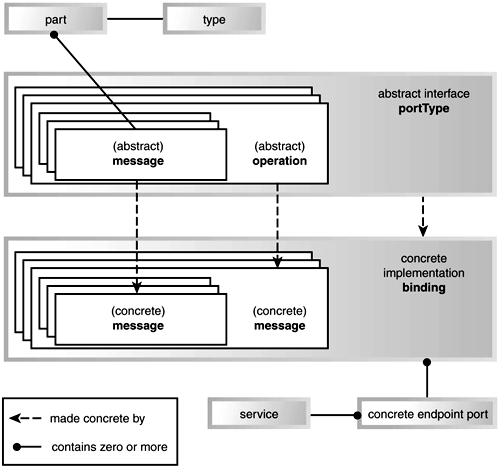

EAN: N/A
Pages: 130