Flylib.com

Books Software


Subscribing to a Newsgroup

Subscribing to a Newsgroup

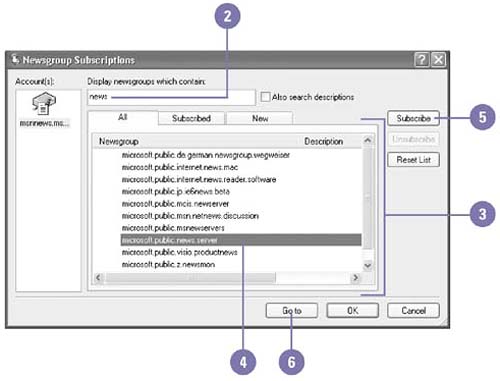
When you add a news server account, Outlook Express retrieves a list of newsgroups available on that server. Once you select a newsgroup, you can merely view its contents, or, if you expect to return to the newsgroup often, you can subscribe to it. Subscribing to a newsgroup places a link to the group in the Folders list, providing easy access to the newsgroup. If you find that you are no longer interested in a newsgroup, you can unsubscribe from it. You can also view a newsgroup without subscribing to see if you might want to add it to your Folders list.

Subscribe to a Newsgroup

graphics/one_icon.jpg

Click the Tools menu, and then click Newsgroups.

graphics/two_icon.jpg

Type the word or phrase for which you want to search. As you type, the results appear in the Newsgroup list.

graphics/three_icon.jpg

Scroll through the list of available newsgroups.

graphics/four_icon.jpg

Click the newsgroup you want to subscribe to.

graphics/five_icon.jpg

Click Subscribe.

graphics/six_icon.jpg

Click Go To to see the posted messages.

graphics/06inf42.jpg

Did You Know?

You can unsubscribe from a newsgroup . If you no longer want to see a newsgroup in your Folders list, right-click the newsgroup name , click Unsubscribe on the shortcut menu, and then click OK.


Reading the News

Once you have subscribed to a newsgroup, you will want to view its messages. Click the newsgroup to display messages, and then click the message you want to read. Newsgroup messages appear in the Preview pane, just as e-mail messages do. If a plus sign (+) appears to the left of a newsgroup message, then the message contains a conversation thread. A conversation thread consists of the original message on a particular topic along with any responses that include the original message. Icons appear next to the news messages to indicate whether a conversation thread is expanded or collapsed , and whether or not it has been read.

Open and Read News Messages

graphics/one_icon.jpg

Click the newsgroup in the Folders list whose message you want to read.

graphics/two_icon.jpg

Scroll through the list to see the posted messages.

graphics/three_icon.jpg

Find the message you want to read using the following methods :

  • To display all the responses to a conversation thread, click the plus sign (+) to the left of a message.

  • To hide all the responses to a conversation thread, click the minus sign (-) to the left of a message.

  • To view only unread messages, click the View menu, point to Current View, and then click Hide Read Or Ignored Messages.

  • To sort the messages based on type, click the column button you want to sort by. The column button toggles between sorting the column in ascending and descending order.

graphics/four_icon.jpg

To read a message, click its header in the message list.

graphics/five_icon.jpg

Read the message in the Preview pane.

graphics/06inf43.jpg

Filtering the News

After you become familiar with a newsgroup, you might decide that you don't want to retrieve messages from a particular person, about a specific subject, of a certain length, or older than a certain number of days. This is called filtering newsgroup messages.

Filter Unwanted Messages

graphics/one_icon.jpg

Click the Tools menu, point to Message Rules, and then click News.

graphics/two_icon.jpg

If necessary, click New.

graphics/three_icon.jpg

Select the conditions for your rule.

graphics/four_icon.jpg

Select the actions for your rule.

graphics/five_icon.jpg

Click any undefined value, such as the e-mail address you want to divert and the folder where you want to store the unwanted messages, and then provide information.

graphics/six_icon.jpg

Type a name .

graphics/seven_icon.jpg

Click OK.

graphics/eight_icon.jpg

Click OK.

graphics/06inf44.jpg

graphics/06inf45.jpg

Did You Know?

You can ignore or watch a conversation . Select the conversation you want to ignore or watch, click the Message menu, and then click Ignore Conversation or Watch Conversation.